

For more information, visit my site: New AspDotNet Concepts.
Hi friends, I have created a simple registration page using Three-Tier Architecture concepts in ASP.NET. We use Three-Tier Architecture concepts in higher-level companies where there are three separate layers formed. There are three layers in 3-Tier Architecture as given below:
- Presentation Layer (UI Layer)
- Business Access Layer (BAL)
- Data Access Layer (DAL)
Where each layer is uniquely important in the role of the project.
1. Presentation Layer (UI)
The Presentation Layer is nothing but a user interface that every user sees on your computer, mobile and Windows screen. You can say that a design part of any application is known as Presentation Layer. The user can post input and get output on your Presentation Layer only. The ASP.NET .axpx file is known as a the Presentation Layer.
2. Business Access Layer (BAL)
The Business Access Layer acts as a mediator layer between the Presentation layer and the Data Access layer. This layer is used to transfer the data between the Presentation Layer and Data Access Layer. This layer is mainly used for Validations and calculations purposes. Every validation and calculation of data is held on that layer only. I have also implemented Property layer or Entity Layer concepts in Business Access Layer. It is an optional layer if you are working on small project. But if you are working on large projects then you need to include this layer in your 3-Tier Architecture Applications. It is used to enhance the security and prevent to brokering the application.
3. Data Access Layer (DAL)
This layer only communicates with the Business Access Layer. The Data Access Layer contains the methods that helps a Business Access Layer. The Business Layer class's methods call the Data Access Layer Class methods to do some required actions with database such as insertion, deletion, updates and so on. All database related connection codes are written in this layer only such as SQL query, stored procedure and so on.
You can easily understand the exact concepts of 3-Tier Applications as shown below:
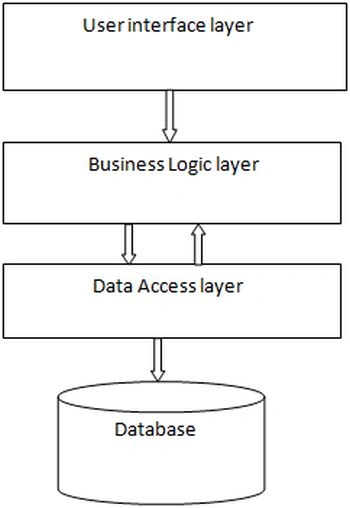
What are the working process of 3 Layers
When any user post data from your presentation layer (user Interface layer) --> then this data first goes to the Business Access Layer then the validation and calculation is done on this layer then this data passes data to the Data Access Layer then the Data Access Layer fetches the required data or inserts the data into the database. Then the Data Access Layer passes the required data to the business Access Layer. Then the Business Access Layer sends the required data to the Presentation Layer. Then the Presentation Layer is responsible for displaying the required data to the user's computers or mobiles or Windows.
Why we use 3-Tier Architecture
There are the following reasons to use 3-Tier Architecture in our ASP.NET applications:
- To increase the security in application.
- To easily maintain the application.
- To easily modify or change in application.
- To reduce the server over load.
- To reduce the loading time of the application.
Examples
- All companies working in a software environment always use 3-Tier Architecture concepts in their applications, whether they are working on small projects or large projects. if you are using 3-Tier concepts then it will be more complex but more understandable to the users.
- Suppose you are working on a project in a team of 1000 members. There are many members shifted day by day due to some problems. When any new member is assigned for this project, then he can easily understand the concept of 3-Tier Architecture and be involved in the project. If the companies are working on a 1-Tier Architecture then the shifting of an employee from one project to another project is not possible.
- In 3-Tier, you can easily update any tier of code. But in 1-Tier, it is not possible.
Advantages of 3-Tier Architecture
- Each layer always uses your separate code, so it is easy to modify the code.
- It is helpful to easily maintain and understand the large projects.
- You can easily change your graphical environment.
- It is more secure because users can't access the database directly.
- You can easily change any layer of code without affecting the other two layers.
- It is a more consistent application.
Disadvantages of 3-Tier Architecture
- Its takes more time to build.
- Many people encounter problems because they lack good knowledge of OOP concepts and other C# programming such as class, object, property and so on.
- 3-Tier Architecture is more complex to build.
There are some steps to implement the 3-Tier Architecture concepts in ASP.NET applications. In this application, I will explain how to build a 3-Tier registration and login page in ASP.NET as given below:
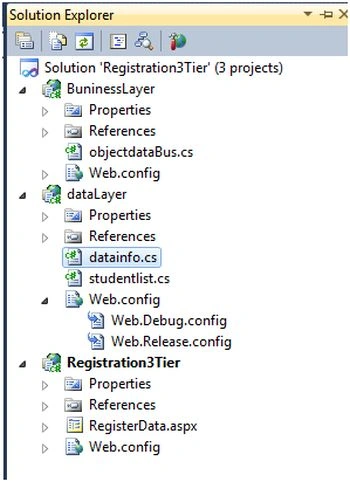
- I have created this login page using a 3-Tier architecture.
- Inside the BuninessLayer class library, I have created a class named BuninessLayer.cs.
- Inside the DAL class library I created a class named dataLayer.cs.
- Inside the Registration3Tier application I created the web form RegisterData.aspx.
In the following, I rovided code for all the classes and web forms.
Step 1
- create database skyworld
- use skyworld
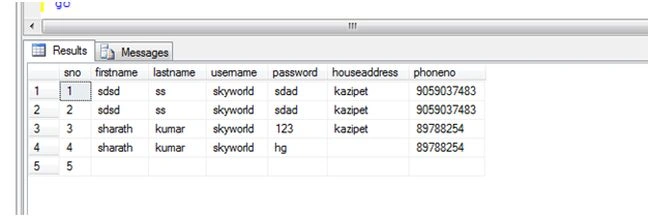
- create table myregisterdata(sno int identity(1,1) primary key,firstname varchar(30),lastname varchar(30),username varchar(30),password varchar(30),houseaddress varchar(30),phoneno varchar(30))
- select * from myregisterdata
- create procedure userdata
- (@spfirstname varchar(30),@splastname varchar(30),@spusername varchar(30),@sppassword varchar(30),@sphouse varchar(30),@spphone varchar(30))
- as
- begin
- insert into myregisterdata values (@spfirstname,@splastname,@spusername,@sppassword,@sphouse,@spphone)
- end
- go
Step 2
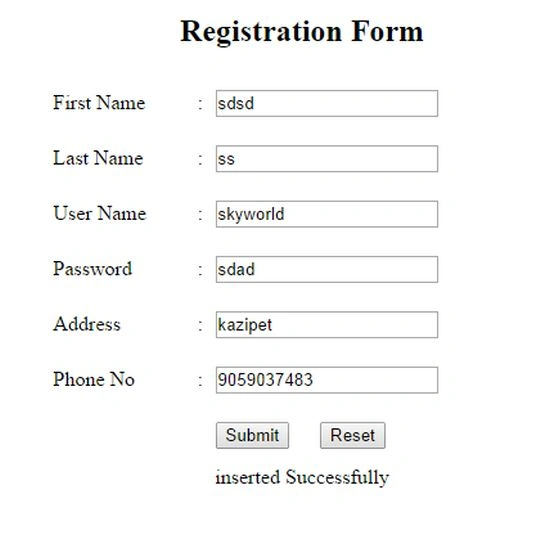
RegisterData.aspx Code
- <table style="height: 304px; width: 393px">
- <tr>
- <td>First Name</td>
- <td>:</td>
- <td><asp:TextBox ID="txtfirst" runat="server" ></asp:TextBox></td>
- </tr>
- <tr>
- <td>Last Name</td>
- <td>:</td>
- <td><asp:TextBox ID="txtlast" runat="server" ></asp:TextBox></td>
- </tr>
- <tr>
- <td>User Name</td>
- <td>:</td>
- <td><asp:TextBox ID="txtuser" runat="server" ></asp:TextBox></td>
- </tr>
- <tr>
- <td>Password</td>
- <td>:</td>
- <td><asp:TextBox ID="txtpassword" runat="server" ></asp:TextBox></td>
- </tr>
- <tr>
- <td>Address</td>
- <td>:</td>
- <td><asp:TextBox ID="txtaddress" runat="server" ></asp:TextBox></td>
- </tr>
- <tr>
- <td>Phone No</td>
- <td>:</td>
- <td><asp:TextBox ID="txtphoneno" runat="server" ></asp:TextBox></td>
- </tr>
- <tr>
- <td></td><td></td>
- <td><asp:Button ID="btnsubmit" runat="server" Text="Submit"
- onclick="btnsubmit_Click" /> <asp:Button ID="btnreset"
- runat="server" Text="Reset" onclick="btnreset_Click" /></td>
- </tr>
- </table>
Dennis ThomasPosted Jan 3, 2018, 4:31 AM
Good one Sharath, explained in a simple and easy to understand language!
gilang anugrahPosted Nov 19, 2014, 10:07 PM
So sir vithal wadje, what is exactly the different of 3 tier and 3 layer? I was confused. can you show me the good way to understand about the different? Im beginner. Thanks
Vithal WadjePosted Oct 12, 2014, 3:34 AM
is this is 3 Tier Example ? this is not 3 tier refer wikki and books to know the difference between 3 layered and 3 tier Architecture ,many people gets false information because this type of confusing explanation,please care about beginners .
Saineshwar BageriPosted Oct 12, 2014, 2:59 AM
this is already exist Sharath sir write on new concepts
Sam HobbsPosted Oct 12, 2014, 12:42 AM
Oh, Sharath, thank you for explaining this. I am sure this will help many. I do however want to say about the part where you compare 1-tier and 3-tier, I think it is possible to shift an employee from one project to another project whether it is 1-tier or 3-tier but if it is not possible then perhaps it would help to explain that. I also think the ease with which a system is modified is dependent on the programmers as well as how many tiers (tears?) are used. I agree that three tiers are better but I think the issues are not as simple as we would like it it to be.
Vithal WadjePosted Oct 11, 2014, 3:22 PM
this is not a 3 tier Architecture ,this is 3 layered Architecture ,please change you title ,many beginners will get false information before it change your title and explanation