Introduction
This article demonstrates you a different way of using bootstrap warning, success, info, and error alert message in your projects. Bootstrap 4 provides an easy way to create predefined alert messages. It provides contextual feedback messages for typical user actions with the handful of available and flexible alert messages. Alerts are available for any length of text, as well as an optional dismiss button.
Bootstrap 4 Alert CSS Classes
| .alert | Creates an alert message box |
| .alert-dismissible |
Indicates a closable alert box. Together with the .close class, this class is used to close the alert (adds extra padding)
|
| .alert-heading |
Adds color:inherit to the specified element
|
| .alert-link | Used on links inside alerts to provide matching colored links |
| .close | Styles the close button for the alert message (floats right with a specified font-size, color, etc.) |
Bootstrap 4 alert contextual classes
| .alert-primary | Blue alert. Indicates an important action |
| .alert-secondary | Grey alert. Indicates a "less" important action |
| .alert-danger | Red alert. Indicates a dangerous or potentially negative action |
| .alert-success | Green alert. Indicates a successful or positive action |
| .alert-info | Light-blue alert. Indicates a neutral informative change or action |
| .alert-light | Light alert. Light grey alert box |
| .alert-dark | Dark alert. Dark grey alert box |
| .alert-warning | Yellow alert. Indicates caution should be taken with this action |
Add
data-dismiss="alert" to a link or a button, element to close the alert message.To use Bootstrap 4 alert in your project, you need have the following downloaded or cdn link scripts.
- link rel="stylesheet" href="https://maxcdn.bootstrapcdn.com/bootstrap/4.1.3/css/bootstrap.min.css">
- <script src="https://ajax.googleapis.com/ajax/libs/jquery/3.3.1/jquery.min.js"></script>
- <script src="https://maxcdn.bootstrapcdn.com/bootstrap/4.1.3/js/bootstrap.min.js"></script>
- <script type="text/javascript">
- $(document).ready(function () {
- $(".close").click(function () {
- $("#myAlert").alert("close");
- });
- });
- </script>
Alert Methods
| .alert("close") | Closes the alert message |
| .alert("dispose") | Destroys an element's alert. |
Alert Events
| close.bs.alert | Occurs when the alert message is about to be closed |
| closed.bs.alert | Occurs when the alert message has been closed (will wait for CSS transitions to complete) |
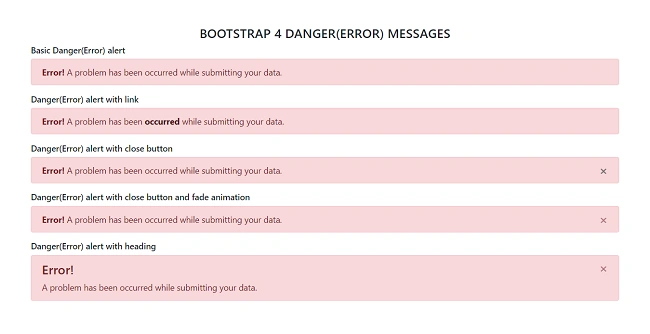
Example of warning alert message in Bootstrap 4
- <!DOCTYPE html>
- <html>
- <head>
- <title>Warning Alerts</title>
- <meta charset="utf-8" />
- <link rel="stylesheet" href="https://maxcdn.bootstrapcdn.com/bootstrap/4.1.3/css/bootstrap.min.css">
- <script src="https://ajax.googleapis.com/ajax/libs/jquery/3.3.1/jquery.min.js"></script>
- <script src="https://maxcdn.bootstrapcdn.com/bootstrap/4.1.3/js/bootstrap.min.js"></script>
- </head>
- <body>
- <div class="container py-5">
- <h4 class="text-center text-uppercase">Bootstrap 4 warning messages</h4>
- <h6>Basic Warning alert</h6>
- <div class="alert alert-warning">
- <strong>Warning!</strong> There was a problem with connection.
- </div>
- <h6>Warning alert with link</h6>
- <div class="alert alert-warning">
- <strong>Warning!</strong> There was a problem with internet connection<a href="#" class="alert-link"> Contact us</a>.
- </div>
- <h6>Warning alert with close button</h6>
- <div class="alert alert-warning">
- <button type="button" class="close" data-dismiss="alert">×</button>
- <strong>Warning!</strong> There was a problem with connection.
- </div>
- <h6>Warning alert with close button and fade animation</h6>
- <div class="alert alert-warning alert-dismissible fade show">
- <button type="button" class="close" data-dismiss="alert">×</button>
- <strong>Warning!</strong> There was a problem with connection.
- </div>
- <h6>Warning alert with heading</h6>
- <div class="alert alert-warning alert-dismissible fade show">
- <button type="button" class="close" data-dismiss="alert">×</button>
- <h5 class="alert-heading">Warning!</h5> There was a problem with connection.
- </div>
- </div>
- </body>
- </html>
Output

- <!DOCTYPE html>
- <html>
- <head>
- <title>Succuss Alerts</title>
- <meta charset="utf-8" />
- <link rel="stylesheet" href="https://maxcdn.bootstrapcdn.com/bootstrap/4.1.3/css/bootstrap.min.css">
- <script src="https://ajax.googleapis.com/ajax/libs/jquery/3.3.1/jquery.min.js"></script>
- <script src="https://maxcdn.bootstrapcdn.com/bootstrap/4.1.3/js/bootstrap.min.js"></script>
- </head>
- <body>
- <div class="container py-5">
- <h4 class="text-center text-uppercase">Bootstrap 4 Succuss messages</h4>
- <h6>Basic Succuss alert</h6>
- <div class="alert alert-success">
- <strong>Succuss!</strong> Your message has been sent successfully..
- </div>
- <h6>Succuss alert with link</h6>
- <div class="alert alert-success">
- <strong>Succuss!</strong> Your message has been sent successfully. <a href="#" class="alert-link">View our service page</a>
- </div>
- <h6>Succuss alert with close button</h6>
- <div class="alert alert-success">
- <button type="button" class="close" data-dismiss="alert">×</button>
- <strong>Succuss!</strong> Your message has been sent successfully..
- </div>
- <h6>Succuss alert with close button and fade animation</h6>
- <div class="alert alert-success alert-dismissible fade show">
- <button type="button" class="close" data-dismiss="alert">×</button>
- <strong>Succuss!</strong> Your message has been sent successfully..
- </div>
- <h6>Succuss alert with heading</h6>
- <div class="alert alert-success alert-dismissible fade show">
- <button type="button" class="close" data-dismiss="alert">×</button>
- <h4 class="alert-heading">Succuss!</h4> Your message has been sent successfully..
- </div>
- </div>
- </body>
- </html>
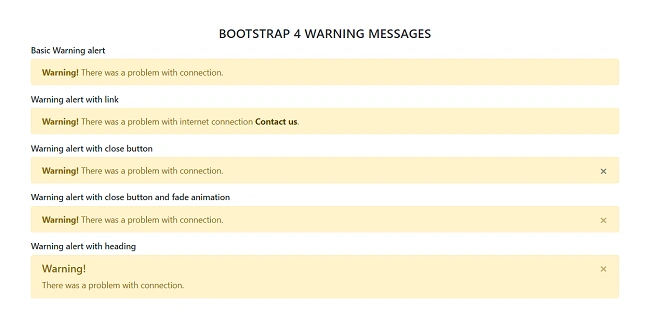
Output

Example of info alert message in Bootstrap 4
- <!DOCTYPE html>
- <html>
- <head>
- <title>Info Alerts</title>
- <meta charset="utf-8" />
- <link rel="stylesheet" href="https://maxcdn.bootstrapcdn.com/bootstrap/4.1.3/css/bootstrap.min.css">
- <script src="https://ajax.googleapis.com/ajax/libs/jquery/3.3.1/jquery.min.js"></script>
- <script src="https://maxcdn.bootstrapcdn.com/bootstrap/4.1.3/js/bootstrap.min.js"></script>
- </head>
- <body>
- <div class="container py-5">
- <h4 class="text-center text-uppercase">Bootstrap 4 Info messages</h4>
- <h6>Basic Info alert</h6>
- <div class="alert alert-info">
- <strong>Note!</strong> Please read the comments carefully.
- </div>
- <h6>Info alert with link</h6>
- <div class="alert alert-info">
- <strong>Note!</strong> Please read the <a href="#" class="alert-link">comments</a> carefully.
- </div>
- <h6>Info alert with close button</h6>
- <div class="alert alert-info">
- <button type="button" class="close" data-dismiss="alert">×</button>
- <strong>Note!</strong> Please read the comments carefully.
- </div>
- <h6>Info alert with close button and fade animation</h6>
- <div class="alert alert-info alert-dismissible fade show">
- <button type="button" class="close" data-dismiss="alert">×</button>
- <strong>Note!</strong> Please read the comments carefully.
- </div>
- <h6>Info alert with heading</h6>
- <div class="alert alert-info alert-dismissible fade show">
- <button type="button" class="close" data-dismiss="alert">×</button>
- <h4 class="alert-heading">Note!</h4> Please read the comments carefully.
- </div></div>
- </body>
- </html>
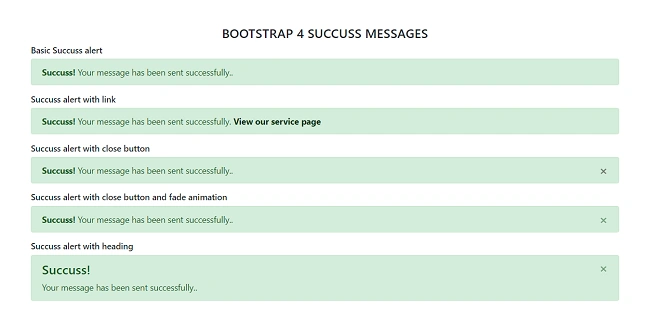
Output

Example of danger alert message in Bootstrap 4
- <!DOCTYPE html>
- <html>
- <head>
- <title>Danger Alerts</title>
- <meta charset="utf-8" />
- <link rel="stylesheet" href="https://maxcdn.bootstrapcdn.com/bootstrap/4.1.3/css/bootstrap.min.css">
- <script src="https://ajax.googleapis.com/ajax/libs/jquery/3.3.1/jquery.min.js"></script>
- <script src="https://maxcdn.bootstrapcdn.com/bootstrap/4.1.3/js/bootstrap.min.js"></script>
- </head>
- <body>
- <div class="container py-5">
- <h4 class="text-center text-uppercase">Bootstrap 4 Danger(Error) messages</h4>
- <h6>Basic Danger(Error) alert</h6>
- <div class="alert alert-danger">
- <strong>Error!</strong> A problem has been occurred while submitting your data.
- </div>
- <h6>Danger(Error) alert with link</h6>
- <div class="alert alert-danger">
- <strong>Error!</strong> A problem has been <a href="#" class="alert-link">occurred</a> while submitting your data.
- </div>
- <h6>Danger(Error) alert with close button</h6>
- <div class="alert alert-danger">
- <button type="button" class="close" data-dismiss="alert">×</button>
- <strong>Error!</strong> A problem has been occurred while submitting your data.
- </div>
- <h6>Danger(Error) alert with close button and fade animation</h6>
- <div class="alert alert-danger alert-dismissible fade show">
- <button type="button" class="close" data-dismiss="alert">×</button>
- <strong>Error!</strong> A problem has been occurred while submitting your data.
- </div>
- <h6>Danger(Error) alert with heading</h6>
- <div class="alert alert-danger alert-dismissible fade show">
- <button type="button" class="close" data-dismiss="alert">×</button>
- <h4 class="alert-heading">Error!</h4> A problem has been occurred while submitting your data.
- </div>
- </div>
- </body>
- </html>
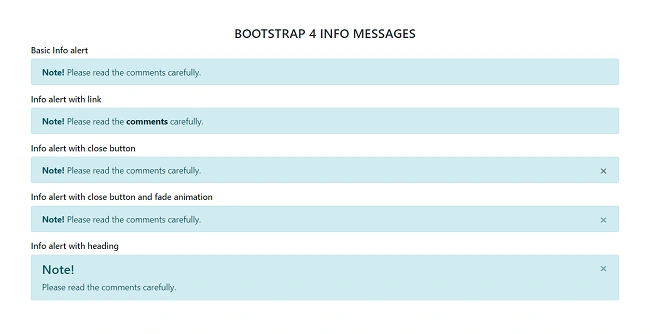
Output


Prabu ElavarasanPosted Sep 20, 2018, 12:12 PM
Hi Farhan, It seems your publishing a series of articles in Bootstrap. Possible could you please just have a link to your previous Bootstrap articles so that it would be easy to refer if needed.
Rajesh KumarPosted Sep 20, 2018, 6:17 AM
Nice article, Thanks for sharing...............
Prabu ElavarasanPosted Sep 15, 2018, 1:35 PM
Another good article.. :-) Thanks much..