

Recently I saw a thread in the C# Corner Forums. Many people like to do doing insert, update and delete in a single View, in other words similar to ASP.NET. So I decided to write an article on this topic.
By default ASP.NET MVC does not support this approach. We need to implement some tricks to do this.
Step 1
Create the blank application like this: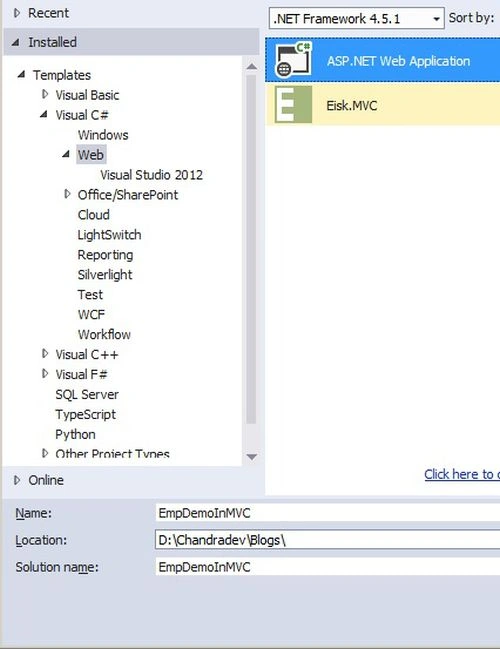
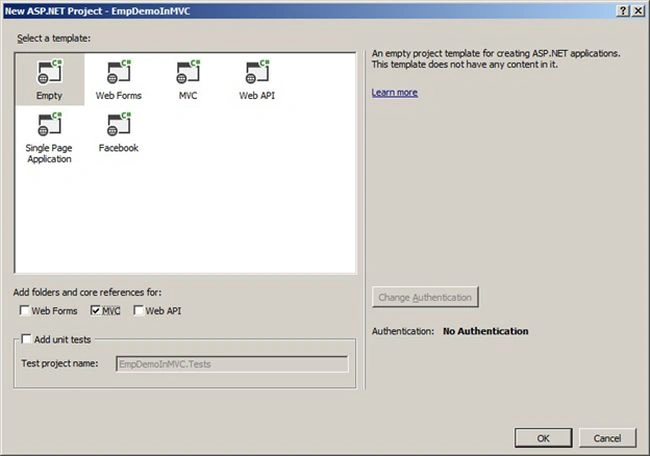
Step 2
Create the database table like this: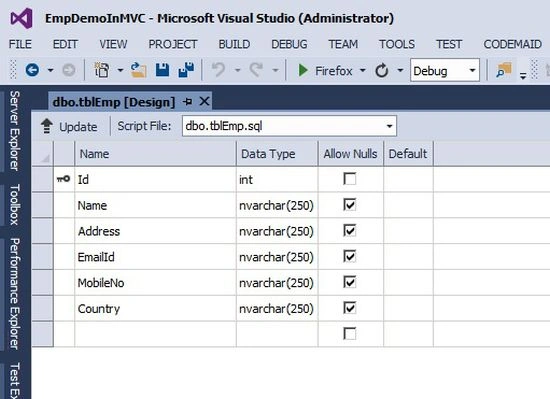
Step 3
In the Model layer, create the model using an EF database first approach like this: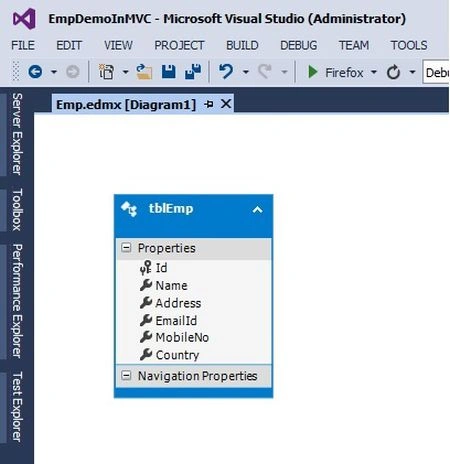
Step 4
Now create a blank Emp controller like this: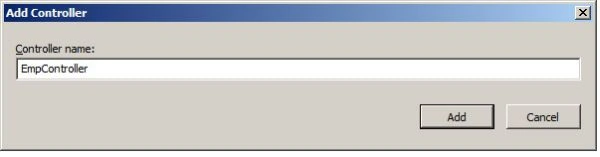
Step 5
Add a class, HttpParamActionAttribute, in the solution like this:
- using System;
- using System.Collections.Generic;
- using System.Linq;
- using System.Reflection;
- using System.Web;
- using System.Web.Mvc;
- namespace EmpDemoInMVC
- {
- public class HttpParamActionAttribute : ActionNameSelectorAttribute
- {
- public override bool IsValidName(ControllerContext controllerContext, string actionName, MethodInfo methodInfo)
- {
- if (actionName.Equals(methodInfo.Name, StringComparison.InvariantCultureIgnoreCase))
- return true;
- var request = controllerContext.RequestContext.HttpContext.Request;
- return request[methodInfo.Name] != null;
- }
- }
- }
Step 6
Write the Action Method in the Controller for the insert/update/delete and fetch functionalities like this:
- using System;
- using System.Collections.Generic;
- using System.Linq;
- using System.Web;
- using System.Web.Mvc;
- using EmpDemoInMVC.Models;
- using System.Data.Entity;
- namespace EmpDemoInMVC.Controllers
- {
- public class EmpController : Controller
- {
- EmpEntities db = new EmpEntities();
- //
- // GET: /Emp/
- public ActionResult Index(int? id)
- {
- ViewBag.Operation = id;
- ViewBag.Name = db.tblEmps.ToList();
- tblEmp objEmp = db.tblEmps.Find(id);
- return View(objEmp);
- }
- [HttpPost]
- [HttpParamAction]
- [ValidateAntiForgeryToken]
- public ActionResult Create(tblEmp objEmp)
- {
- if (ModelState.IsValid)
- {
- db.tblEmps.Add(objEmp);
- db.SaveChanges();
- }
- return RedirectToAction("Index");
- }
- [HttpPost]
- [HttpParamAction]
- [ValidateAntiForgeryToken]
- public ActionResult Update(tblEmp objEmp)
- {
- if (ModelState.IsValid)
- {
- db.Entry(objEmp).State = EntityState.Modified;
- db.SaveChanges();
- }
- return RedirectToAction("Index", new { id = 0 });
- }
- public ActionResult Delete(int id)
- {
- tblEmp objEmp = db.tblEmps.Find(id);
- db.tblEmps.Remove(objEmp);
- db.SaveChanges();
- return RedirectToAction("Index", new { id = 0 });
- }
- }
- }
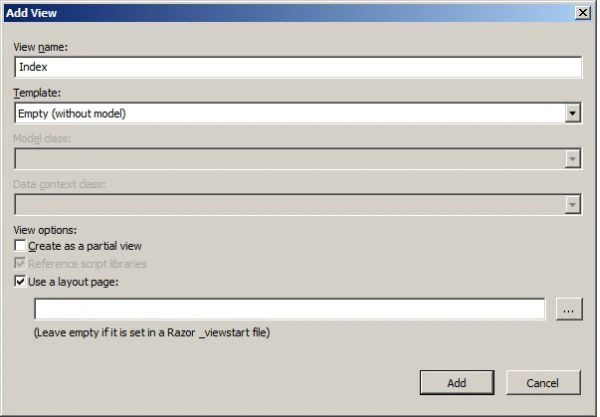
Create the Empty View from the controller like this:
Step 8
Now write the HTML code as per as our requirements like this:
- @model EmpDemoInMVC.Models.tblEmp
- @{
- ViewBag.Title = "Index";
- }
- <h2>Index</h2>
- @using (Html.BeginForm())
- {
- // This is For EmpDetail in Grid
- <fieldset>
- <legend><b>Emp Details</b></legend>
- <table border="1" cellpadding="10">
- <tr>
- <th>
- @Html.DisplayNameFor(model => model.Name)
- </th>
- <th>
- @Html.DisplayNameFor(model => model.Address)
- </th>
- <th>
- @Html.DisplayNameFor(model => model.EmailId)
- </th>
- <th>
- @Html.DisplayNameFor(model => model.MobileNo)
- </th>
- <th>
- @Html.DisplayNameFor(model => model.Country)
- </th>
- <th>
- Action
- </th>
- </tr>
- @foreach (var item in (IEnumerable<EmpDemoInMVC.Models.tblEmp>)ViewBag.Name)
- {
- <tr>
- <td>
- @Html.DisplayFor(modelItem => item.Name)
- </td>
- <td>
- @Html.DisplayFor(modelItem => item.Address)
- </td>
- <td>
- @Html.DisplayFor(modelItem => item.EmailId)
- </td>
- <td>
- @Html.DisplayFor(modelItem => item.MobileNo)
- </td>
- <td>
- @Html.DisplayFor(modelItem => item.Country)
- </td>
- <td>
- @Html.ActionLink("Edit", "Index", new { id = item.Id }) |
- @Html.ActionLink("Delete", "Delete", new { id = item.Id })
- </td>
- </tr>
- }
- </table>
- </fieldset>
- // This is for the Emp Entry Screen
- @Html.AntiForgeryToken()
- <div class="form-horizontal">
- @Html.ValidationSummary(true)
- <fieldset>
- <legend> <b>Entry Screen</b></legend>
- <div class="form-group">
- @Html.LabelFor(model => model.Name, new { @class = "control-label col-md-2" })
- <div class="col-md-10">
- @Html.EditorFor(model => model.Name)
- @Html.ValidationMessageFor(model => model.Name)
- </div>
- </div>
- <div class="form-group">
- @Html.LabelFor(model => model.Address, new { @class = "control-label col-md-2" })
- <div class="col-md-10">
- @Html.EditorFor(model => model.Address)
- @Html.ValidationMessageFor(model => model.Address)
- </div>
- </div>
- <div class="form-group">
- @Html.LabelFor(model => model.EmailId, new { @class = "control-label col-md-2" })
- <div class="col-md-10">
- @Html.EditorFor(model => model.EmailId)
- @Html.ValidationMessageFor(model => model.EmailId)
- </div>
- </div>
- <div class="form-group">
- @Html.LabelFor(model => model.MobileNo, new { @class = "control-label col-md-2" })
- <div class="col-md-10">
- @Html.EditorFor(model => model.MobileNo)
- @Html.ValidationMessageFor(model => model.MobileNo)
- </div>
- </div>
- <div class="form-group">
- @Html.LabelFor(model => model.Country, new { @class = "control-label col-md-2" })
- <div class="col-md-10">
- @Html.EditorFor(model => model.Country)
- @Html.ValidationMessageFor(model => model.Country)
- </div>
- </div>
- <div class="form-group">
- <p>
- <input type="submit" value="Create" name="Create"
- style=@((ViewBag.Operation != null && Convert.ToInt32(ViewBag.Operation) > 0) ? "display:none" : "display:block") />
- <input type="submit" value="Update" name="Update"
- style=@((ViewBag.Operation != null && Convert.ToInt32(ViewBag.Operation) > 0) ? "display:block" : "display:none") />
- </p>
- </div>
- </fieldset>
- </div>
- }
In this article we showed that we are using only one view for doing doing insert, update, delete and fetch functionality. If you like to implement an entry screen similar to the ASP.NET style then you can use this approach.
Ravi ChandranPosted May 3, 2022, 3:44 PM
Sir, will this work in Dot net Framework 4.0...?
Ashish SharmaPosted Jun 10, 2018, 4:52 AM
Can u please provide the correct code ?
Ashish SharmaPosted Jun 10, 2018, 4:51 AM
Bro Edit, Update and Delete is not working in your code
karthik rajaPosted Jul 20, 2017, 7:33 AM
Update is not working in your code. getting Error as Store update, insert, or delete statement affected an unexpected number of rows (0). Entities may have been modified or deleted since entities were loaded. Refresh ObjectStateManager entries
ratnakar DayalPosted Jul 7, 2017, 11:44 AM
HI, Can I download code? I am unable to create using ADO
Mahmoud AhmedPosted Feb 6, 2017, 7:53 PM
Adds possible dropdownlist
Chandradev PrasadPosted Mar 2, 2016, 12:57 AM
what type of error are you getting ?
Zeeshan AzimPosted Mar 2, 2016, 12:03 AM
your example is not working properly.
Rucha PandyaPosted Feb 24, 2016, 4:26 AM
thank you sir
Chandradev PrasadPosted Feb 22, 2016, 9:03 AM
If you will used EF database first, It is not required. But in my demo code, i have given the application name as "EmpDemoInMvc" but you have given EmpApp. So make ensure that every where if should be "EmpApp".
Rucha PandyaPosted Feb 22, 2016, 7:02 AM
because @modle EmpApp.Models.tblEmp is throwing error
Rucha PandyaPosted Feb 22, 2016, 7:00 AM
ViewModel is required to create or not?
developerPosted Feb 9, 2016, 9:30 PM
Very Useful, but when I use Data Annotations for validations like Required then the validation messages are not displayed and the application breaks as View Bag is null.
Chandradev PrasadPosted May 13, 2015, 6:18 AM
If you will use Entity Framework then you will get it.
Jackie CoolPosted May 9, 2015, 7:18 PM
Hi, Can you please verify where this line is coming from : EmpEntities db = new EmpEntities(); from Step 6
Chandradev PrasadPosted Oct 30, 2014, 2:05 AM
Thanks Saravana.
Saravanakumar SekaranPosted Oct 29, 2014, 10:50 PM
really superb
Manju lata YadavPosted Oct 29, 2014, 9:12 AM
nice trick, you can also use one controller method for Create and Update and SQL Merge will take care of rest. bcz tblEmp is sended in both.