

Introduction
In this article I will create a Single View application. Here in the first view I use an image view, one label and one button from outlet. In this app I will implement a Security alert view. To do that, the very first thing to do is to add a Security framework. In the second view I use a Customize table view and add it on the image or label, at last in the third view I use an image view and text view.
To understand it we use the following.
Step 1
Here first we add a Security framework which is required to implement the Secure alert view.
To import this framework we use the following.
Step 2
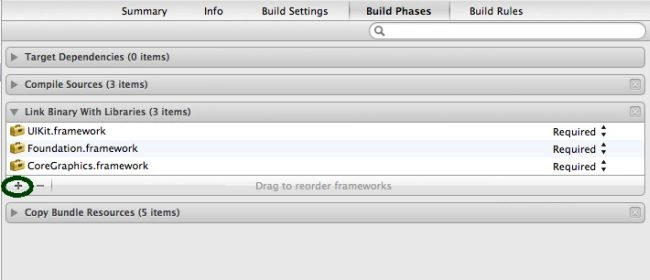
Click on the project and select Build Phase.
Step 3
Click on the "+" icon to add the framework.
Step 4
Now select the Security framework and click on the add button.
Step 5
Now we write the code for each class.
AppDelegate.h
//
// AppDelegate.h
// Happy Christmas
//
// Created by Sachin Bhardwaj on 21/12/12.
// Copyright (c) 2012 Sachin Bhardwaj. All rights reserved.
//
#import <UIKit/UIKit.h>
@class ViewController;
@interface AppDelegate : UIResponder <UIApplicationDelegate>
@property (strong, nonatomic) UIWindow *window;
@property (strong, nonatomic) ViewController *viewController;
@property (strong,nonatomic) UINavigationController *nav;
@end
AppDelegate.m
//
// AppDelegate.m
// Happy Christmas
//
// Created by Sachin Bhardwaj on 21/12/12.
// Copyright (c) 2012 Sachin Bhardwaj. All rights reserved.
//
#import "AppDelegate.h"
#import "ViewController.h"
@implementation AppDelegate
- (void)dealloc
{
[_window release];
[_viewController release];
[super dealloc];
}
- (BOOL)application:(UIApplication *)application didFinishLaunchingWithOptions:(NSDictionary *)launchOptions
{
self.window = [[[UIWindow alloc] initWithFrame:[[UIScreen mainScreen] bounds]] autorelease];
// Override point for customization after application launch.
self.viewController = [[[ViewController alloc] initWithNibName:@"ViewController" bundle:nil] autorelease];
self.nav=[[UINavigationController alloc]initWithRootViewController:self.viewController];
self.window.rootViewController = self.nav;
[self.window makeKeyAndVisible];
return YES;
}
- (void)applicationWillResignActive:(UIApplication *)application
{
// Sent when the application is about to move from active to inactive state. This can occur for certain types of temporary interruptions (such as an incoming phone call or SMS message) or when the user quits the application and it begins the transition to the background state.
// Use this method to pause ongoing tasks, disable timers, and throttle down OpenGL ES frame rates. Games should use this method to pause the game.
}
- (void)applicationDidEnterBackground:(UIApplication *)application
{
// Use this method to release shared resources, save user data, invalidate timers, and store enough application state information to restore your application to its current state in case it is terminated later.
// If your application supports background execution, this method is called instead of applicationWillTerminate: when the user quits.
}
- (void)applicationWillEnterForeground:(UIApplication *)application
{
// Called as part of the transition from the background to the inactive state; here you can undo many of the changes made on entering the background.
}
- (void)applicationDidBecomeActive:(UIApplication *)application
{
// Restart any tasks that were paused (or not yet started) while the application was inactive. If the application was previously in the background, optionally refresh the user interface.
}
- (void)applicationWillTerminate:(UIApplication *)application
{
// Called when the application is about to terminate. Save data if appropriate. See also applicationDidEnterBackground:.
}
@end
ViewController.h
//
// ViewController.h
// Happy Christmas
//
// Created by Sachin Bhardwaj on 21/12/12.
// Copyright (c) 2012 Sachin Bhardwaj. All rights reserved.
//
#import <UIKit/UIKit.h>
@interface ViewController : UIViewController<UITextFieldDelegate>
{
IBOutlet UIButton *btn;
IBOutlet UILabel *lbl;
IBOutlet UIImage *img;
}
@property(nonatomic,strong)IBOutlet UIButton *btn;
@property(nonatomic,strong)IBOutlet UILabel *lbl;
@property(nonatomic,strong)IBOutlet UIImage *img;
@property (nonatomic) BOOL pinValidated;
-(IBAction)click;
@end
ViewController.m
//
// ViewController.m
// Happy Christmas
//
// Created by Sachin Bhardwaj on 21/12/12.
// Copyright (c) 2012 Sachin Bhardwaj. All rights reserved.
//
#import "ViewController.h"
#import "KeychainWrapper.h"
#import "ChristmasConstants.h"
#import "GiftsViewController.h"
@interface ViewController ()
@end
@implementation ViewController
@synthesize pinValidated;
@synthesize lbl,btn,img;
- (id)initWithNibName:(NSString *)nibNameOrNil bundle:(NSBundle *)nibBundleOrNil
{
self = [super initWithNibName:nibNameOrNil bundle:nibBundleOrNil];
if (self) {
// Custom initialization
}
return self;
}
-(IBAction)click
{
NSLog(@"click");
GiftsViewController *bk = [[GiftsViewController alloc ]init];
[self.navigationController pushViewController:bk animated:YES];
}
- (void)didReceiveMemoryWarning
{
// Releases the view if it doesn't have a superview.
[super didReceiveMemoryWarning];
// Release any cached data, images, etc that aren't in use.
}
// Helper method to congregate the Name and PIN fields for validation.
- (BOOL)credentialsValidated
{
NSString *name = [[NSUserDefaults standardUserDefaults] stringForKey:USERNAME];
BOOL pin = [[NSUserDefaults standardUserDefaults] boolForKey:PIN_SAVED];
if (name && pin) {
return YES;
} else {
return NO;
}
}
- (void)presentAlertViewForPassword
{
// 1
BOOL hasPin = [[NSUserDefaults standardUserDefaults] boolForKey:PIN_SAVED];
// 2
if (hasPin) {
// 3
NSString *user = [[NSUserDefaults standardUserDefaults] stringForKey:USERNAME];
NSString *message = [NSString stringWithFormat:@"What is %@'s password?", user];
UIAlertView *alert = [[UIAlertView alloc] initWithTitle:@"Enter Password"
message:message
delegate:self
cancelButtonTitle:@"Cancel"
otherButtonTitles:@"Done", nil];
// 4
[alert setAlertViewStyle:UIAlertViewStyleSecureTextInput]; // Gives us the password field
alert.tag = kAlertTypePIN;
// 5
UITextField *pinField = [alert textFieldAtIndex:0];
pinField.delegate = self;
pinField.autocapitalizationType = UITextAutocapitalizationTypeWords;
pinField.tag = kTextFieldPIN;
[alert show];
} else {
UIAlertView *alert = [[UIAlertView alloc] initWithTitle:@"Setup Credentials"
message:@"Secure your Christmas list!"
delegate:self
cancelButtonTitle:@"Cancel"
otherButtonTitles:@"Done", nil];
// 6
[alert setAlertViewStyle:UIAlertViewStyleLoginAndPasswordInput];
alert.tag = kAlertTypeSetup;
UITextField *nameField = [alert textFieldAtIndex:0];
nameField.autocapitalizationType = UITextAutocapitalizationTypeWords;
nameField.placeholder = @"Name"; // Replace the standard placeholder text with something more applicable
nameField.delegate = self;
nameField.tag = kTextFieldName;
UITextField *passwordField = [alert textFieldAtIndex:1]; // Capture the Password text field since there are 2 fields
passwordField.delegate = self;
passwordField.tag = kTextFieldPassword;
[alert show];
}
}
//- (void)alertView:(UIAlertView *)alertView didDismissWithButtonIndex:(NSInteger)buttonIndex
//{
// if (alertView.tag == kAlertTypePIN) {
// if (buttonIndex == 1 && self.pinValidated) { // User selected "Done"
// [self performSegueWithIdentifier:@"GiftsViewController" sender:self];
// self.pinValidated = NO;
// } else { // User selected "Cancel"
// [self presentAlertViewForPassword];
// }
// } else if (alertView.tag == kAlertTypeSetup) {
// if (buttonIndex == 1 && [self credentialsValidated]) { // User selected "Done"
// [self performSegueWithIdentifier:@"GiftsViewController" sender:self];
// } else { // User selected "Cancel"
// [self presentAlertViewForPassword];
// }
// }
//}
#pragma mark - Text Field + Alert View Methods
- (void)textFieldDidEndEditing:(UITextField *)textField
{
// 1
switch (textField.tag) {
case kTextFieldPIN: // We go here if this is the 2nd+ time used (we've already set a PIN at Setup).
NSLog(@"User entered PIN to validate");
if ([textField.text length] > 0) {
// 2
NSUInteger fieldHash = [textField.text hash]; // Get the hash of the entered PIN, minimize contact with the real password
// 3
if ([KeychainWrapper compareKeychainValueForMatchingPIN:fieldHash]) { // Compare them
NSLog(@"** User Authenticated!!");
self.pinValidated = YES;
} else {
NSLog(@"** Wrong Password :(");
self.pinValidated = NO;
}
}
break;
case kTextFieldName: // 1st part of the Setup flow.
NSLog(@"User entered name");
if ([textField.text length] > 0) {
[[NSUserDefaults standardUserDefaults] setValue:textField.text forKey:USERNAME];
[[NSUserDefaults standardUserDefaults] synchronize];
}
break;
case kTextFieldPassword: // 2nd half of the Setup flow.
NSLog(@"User entered PIN");
if ([textField.text length] > 0) {
NSUInteger fieldHash = [textField.text hash];
// 4
NSString *fieldString = [KeychainWrapper securedSHA256DigestHashForPIN:fieldHash];
NSLog(@"** Password Hash - %@", fieldString);
// Save PIN hash to the keychain (NEVER store the direct PIN)
if ([KeychainWrapper createKeychainValue:fieldString forIdentifier:PIN_SAVED]) {
[[NSUserDefaults standardUserDefaults] setBool:YES forKey:PIN_SAVED];
[[NSUserDefaults standardUserDefaults] synchronize];
NSLog(@"** Key saved successfully to Keychain!!");
}
}
break;
default:
break;
}
}
#pragma mark - View lifecycle
- (void)viewDidLoad
{
[super viewDidLoad];
self.pinValidated = NO;
self.title=@"Happy Christmas";
self.navigationController.navigationBar.barStyle = UIBarStyleBlackOpaque;
}
- (void)viewDidAppear:(BOOL)animated
{
[super viewDidAppear:animated];
[self presentAlertViewForPassword];
}
- (void)viewDidUnload
{
[super viewDidUnload];
// Release any retained subviews of the main view.
// e.g. self.myOutlet = nil;
}
- (BOOL)shouldAutorotateToInterfaceOrientation:(UIInterfaceOrientation)interfaceOrientation
{
// Return YES for supported orientations
return (interfaceOrientation == UIInterfaceOrientationPortrait);
}
@end
KeychainWrapper.h
#import <Foundation/Foundation.h>
#import <Security/Security.h>
#import <CommonCrypto/CommonHMAC.h>
@interface KeychainWrapper : NSObject
// Generic exposed method to search the keychain for a given value. Limit one result per search.
+ (NSData *)searchKeychainCopyMatchingIdentifier:(NSString *)identifier;
// Calls searchKeychainCopyMatchingIdentifier: and converts to a string value.
+ (NSString *)keychainStringFromMatchingIdentifier:(NSString *)identifier;
// Simple method to compare a passed in hash value with what is stored in the keychain.
// Optionally, we could adjust this method to take in the keychain key to look up the value.
+ (BOOL)compareKeychainValueForMatchingPIN:(NSUInteger)pinHash;
// Default initializer to store a value in the keychain.
// Associated properties are handled for you - setting Data Protection Access, Company Identifer (to uniquely identify string, etc).
+ (BOOL)createKeychainValue:(NSString *)value forIdentifier:(NSString *)identifier;
// Updates a value in the keychain. If you try to set the value with createKeychainValue: and it already exists,
// this method is called instead to update the value in place.
+ (BOOL)updateKeychainValue:(NSString *)value forIdentifier:(NSString *)identifier;
// Delete a value in the keychain.
+ (void)deleteItemFromKeychainWithIdentifier:(NSString *)identifier;
// Generates an SHA256 (much more secure than MD5) hash.
+ (NSString *)securedSHA256DigestHashForPIN:(NSUInteger)pinHash;
+ (NSString*)computeSHA256DigestForString:(NSString*)input;
@end
KeychainWrapper.m
#import "KeychainWrapper.h"
#import "ChristmasConstants.h"
@implementation KeychainWrapper
// *** NOTE *** This class is ARC compliant - any references to CF classes must be paired with a "__bridge" statement to
// cast between Objective-C and Core Foundation Classes. WWDC 2011 Video "Introduction to Automatic Reference Counting" explains this.
// *** END NOTE ***
+ (NSMutableDictionary *)setupSearchDirectoryForIdentifier:(NSString *)identifier {
// Setup dictionary to access keychain.
NSMutableDictionary *searchDictionary = [[NSMutableDictionary alloc] init];
// Specify we are using a password (rather than a certificate, internet password, etc).
[searchDictionary setObject:(__bridge id)kSecClassGenericPassword forKey:(__bridge id)kSecClass];
// Uniquely identify this keychain accessor.
[searchDictionary setObject:APP_NAME forKey:(__bridge id)kSecAttrService];
// Uniquely identify the account who will be accessing the keychain.
NSData *encodedIdentifier = [identifier dataUsingEncoding:NSUTF8StringEncoding];
[searchDictionary setObject:encodedIdentifier forKey:(__bridge id)kSecAttrGeneric];
[searchDictionary setObject:encodedIdentifier forKey:(__bridge id)kSecAttrAccount];
return searchDictionary;
}
+ (NSData *)searchKeychainCopyMatchingIdentifier:(NSString *)identifier
{
NSMutableDictionary *searchDictionary = [self setupSearchDirectoryForIdentifier:identifier];
// Limit search results to one.
[searchDictionary setObject:(__bridge id)kSecMatchLimitOne forKey:(__bridge id)kSecMatchLimit];
// Specify we want NSData/CFData returned.
[searchDictionary setObject:(__bridge id)kCFBooleanTrue forKey:(__bridge id)kSecReturnData];
// Search.
NSData *result = nil;
CFTypeRef foundDict = NULL;
OSStatus status = SecItemCopyMatching((__bridge CFDictionaryRef)searchDictionary, &foundDict);
if (status == noErr) {
result = (__bridge_transfer NSData *)foundDict;
} else {
result = nil;
}
return result;
}
+ (NSString *)keychainStringFromMatchingIdentifier:(NSString *)identifier
{
NSData *valueData = [self searchKeychainCopyMatchingIdentifier:identifier];
if (valueData) {
NSString *value = [[NSString alloc] initWithData:valueData
encoding:NSUTF8StringEncoding];
return value;
} else {
return nil;
}
}
+ (BOOL)createKeychainValue:(NSString *)value forIdentifier:(NSString *)identifier
{
NSMutableDictionary *dictionary = [self setupSearchDirectoryForIdentifier:identifier];
NSData *valueData = [value dataUsingEncoding:NSUTF8StringEncoding];
[dictionary setObject:valueData forKey:(__bridge id)kSecValueData];
// Protect the keychain entry so it's only valid when the device is unlocked.
[dictionary setObject:(__bridge id)kSecAttrAccessibleWhenUnlocked forKey:(__bridge id)kSecAttrAccessible];
// Add.
OSStatus status = SecItemAdd((__bridge CFDictionaryRef)dictionary, NULL);
// If the addition was successful, return. Otherwise, attempt to update existing key or quit (return NO).
if (status == errSecSuccess) {
return YES;
} else if (status == errSecDuplicateItem){
return [self updateKeychainValue:value forIdentifier:identifier];
} else {
return NO;
}
}
+ (BOOL)updateKeychainValue:(NSString *)value forIdentifier:(NSString *)identifier
{
NSMutableDictionary *searchDictionary = [self setupSearchDirectoryForIdentifier:identifier];
NSMutableDictionary *updateDictionary = [[NSMutableDictionary alloc] init];
NSData *valueData = [value dataUsingEncoding:NSUTF8StringEncoding];
[updateDictionary setObject:valueData forKey:(__bridge id)kSecValueData];
// Update.
OSStatus status = SecItemUpdate((__bridge CFDictionaryRef)searchDictionary,
(__bridge CFDictionaryRef)updateDictionary);
if (status == errSecSuccess) {
return YES;
} else {
return NO;
}
}
+ (void)deleteItemFromKeychainWithIdentifier:(NSString *)identifier
{
NSMutableDictionary *searchDictionary = [self setupSearchDirectoryForIdentifier:identifier];
CFDictionaryRef dictionary = (__bridge CFDictionaryRef)searchDictionary;
//Delete.
SecItemDelete(dictionary);
}
+ (BOOL)compareKeychainValueForMatchingPIN:(NSUInteger)pinHash
{
if ([[self keychainStringFromMatchingIdentifier:PIN_SAVED] isEqualToString:[self securedSHA256DigestHashForPIN:pinHash]]) {
return YES;
} else {
return NO;
}
}
// This is where most of the magic happens (the rest of it happens in computeSHA256DigestForString: method below).
// Here we are passing in the hash of the PIN that the user entered so that we can avoid manually handling the PIN itself.
// Then we are extracting the username that the user supplied during setup, so that we can add another unique element to the hash.
// From there, we mash the user name, the passed-in PIN hash, and the secret key (from ChristmasConstants.h) together to create
// one long, unique string.
// Then we send that entire hash mashup into the SHA256 method below to create a "Digital Digest," which is considered
// a one-way encryption algorithm. "One-way" means that it can never be reverse-engineered, only brute-force attacked.
// The algorthim we are using is Hash = SHA256(Name + Salt + (Hash(PIN))). This is called "Digest Authentication."
+ (NSString *)securedSHA256DigestHashForPIN:(NSUInteger)pinHash
{
// 1
NSString *name = [[NSUserDefaults standardUserDefaults] stringForKey:USERNAME];
name = [name stringByAddingPercentEscapesUsingEncoding:NSUTF8StringEncoding];
// 2
NSString *computedHashString = [NSString stringWithFormat:@"%@%i%@", name, pinHash, SALT_HASH];
// 3
NSString *finalHash = [self computeSHA256DigestForString:computedHashString];
NSLog(@"** Computed hash: %@ for SHA256 Digest: %@", computedHashString, finalHash);
return finalHash;
}
// This is where the rest of the magic happens.
// Here we are taking in our string hash, placing that inside of a C Char Array, then parsing it through the SHA256 encryption method.
+ (NSString*)computeSHA256DigestForString:(NSString*)input
{
const char *cstr = [input cStringUsingEncoding:NSUTF8StringEncoding];
NSData *data = [NSData dataWithBytes:cstr length:input.length];
uint8_t digest[CC_SHA256_DIGEST_LENGTH];
// This is an iOS5-specific method.
// It takes in the data, how much data, and then output format, which in this case is an int array.
CC_SHA256(data.bytes, data.length, digest);
// Setup our Objective-C output.
NSMutableString* output = [NSMutableString stringWithCapacity:CC_SHA256_DIGEST_LENGTH * 2];
// Parse through the CC_SHA256 results (stored inside of digest[]).
for(int i = 0; i < CC_SHA256_DIGEST_LENGTH; i++) {
[output appendFormat:@"%02x", digest[i]];
}
return output;
}
@end
GiftsViewController.h
// Happy Christmas
//
// Created by Sachin Bhardwaj on 21/12/12.
// Copyright (c) 2012 Sachin Bhardwaj. All rights reserved.
//
#import <UIKit/UIKit.h>
@interface GiftsViewController : UITableViewController
{
NSMutableArray *arr1,*arr2,*arr3;
}
@property(nonatomic,strong)NSMutableArray *arr1,*arr2,*arr3;
@end
GiftsViewController.m
// Happy Christmas
//
// Created by Sachin Bhardwaj on 21/12/12.
// Copyright (c) 2012 Sachin Bhardwaj. All rights reserved.
//
#import "GiftsViewController.h"
#import "CustomTableCell.h"
#import "CategoryTable.h"
@interface GiftsViewController ()
@end
@implementation GiftsViewController
@synthesize arr1,arr2,arr3;
- (id)initWithStyle:(UITableViewStyle)style
{
self = [super initWithStyle:style];
if (self) {
// Custom initialization
}
return self;
}
- (void)viewDidLoad
{
[super viewDidLoad];
arr2 = [[NSMutableArray alloc]init];
UIImage *img1 = [UIImage imageNamed:@"images (1).jpeg"];
UIImage *img2 = [UIImage imageNamed:@"images(2).jpeg"];
UIImage *img3 = [UIImage imageNamed:@"images(3).jpeg"];
UIImage *img4 = [UIImage imageNamed:@"images(4).jpeg"];
UIImage *img5 = [UIImage imageNamed:@"images(5).jpeg"];
UIImage *img6 = [UIImage imageNamed:@"images(6).jpeg"];
arr1 = [[NSMutableArray alloc] initWithObjects:@"HONDA CBR",@"SUZUKI",@"BMW",@"DUCATI",@"ROYAL ENFIELD",@"YAMAHA R15",nil];
[arr2 addObject:img1];
[arr2 addObject:img2];
[arr2 addObject:img3];
[arr2 addObject:img4];
[arr2 addObject:img5];
[arr2 addObject:img6];
arr3 = [[NSMutableArray alloc]init];
[arr3 addObject:@"HONDA CBR,VEHICLE SUMMARY Model:Version 1.0, Type: sports, Gears:6, Fuel Consumption:32, Stroke:58, Clutch:Wet Multiplate "];
[arr3 addObject:@"SUZUKI VEHICLE SUMMARY Model:Version 2.0, Type: sports, Gears:5, Fuel Consumption:34, Stroke:57, Clutch:Wet Multiplate"];
[arr3 addObject:@"BMW VEHICLE SUMMARY Model:Version 3.0, Type: sports, Gears:4, Fuel Consumption:50, Stroke:56, Clutch:Wet Multiplate"];
[arr3 addObject:@"DUCATI VEHICLE SUMMARY Model:Version 4.0, Type: sports, Gears:6, Fuel Consumption:30, Stroke:52, Clutch:Wet Multiplate"];
[arr3 addObject:@"ROYAL ENFIELD VEHICLE SUMMARY Model:Version 2.0, Type: sports, Gears:6, Fuel Consumption:20, Stroke:58, Clutch:Wet Multiplate"];
[arr3 addObject:@"YAMAHA R15 VEHICLE SUMMARY Model:Version 2.0, Type: sports, Gears:6, Fuel Consumption:32, Stroke:58, Clutch:Wet Multiplate"];
// Uncomment the following line to preserve selection between presentations.
// self.clearsSelectionOnViewWillAppear = NO;
// Uncomment the following line to display an Edit button in the navigation bar for this view controller.
// self.navigationItem.rightBarButtonItem = self.editButtonItem;
}
-(CGFloat) tableView:(UITableView *)tableView heightForRowAtIndexPath:(NSIndexPath *)indexPath
{
return 100;
}
- (void)viewDidUnload
{
[super viewDidUnload];
// Release any retained subviews of the main view.
// e.g. self.myOutlet = nil;
}
- (BOOL)shouldAutorotateToInterfaceOrientation:(UIInterfaceOrientation)interfaceOrientation
{
return (interfaceOrientation == UIInterfaceOrientationPortrait);
}
#pragma mark - Table view data source
- (NSInteger)numberOfSectionsInTableView:(UITableView *)tableView
{
//#warning Potentially incomplete method implementation.
// Return the number of sections.
return 1;
}
- (NSInteger)tableView:(UITableView *)tableView numberOfRowsInSection:(NSInteger)section
{
//#warning Incomplete method implementation.
// Return the number of rows in the section.
return [arr1 count];
//return [arr2 count];
}
- (UITableViewCell *)tableView:(UITableView *)tableView cellForRowAtIndexPath:(NSIndexPath *)indexPath
{
static NSString *CellIdentifier = @"CustomTableCell";
CustomTableCell *cell = (CustomTableCell *)[tableView dequeueReusableCellWithIdentifier:CellIdentifier];
if (cell == nil) {
// NSArray *topLevelObjects = [[NSBundle mainBundle] loadNibNamed:@"CustomTableCell" owner:self options:nil];
//
// for (id currentObject in topLevelObjects)
// {
// if ([currentObject isKindOfClass:[UITableViewCell class]])
// {
// cell = (CustomTableCell *) currentObject;
// break;
// }
// }
if (cell==nil) {
cell=[[CustomTableCell alloc]initWithStyle:UITableViewCellStyleSubtitle reuseIdentifier:CellIdentifier];
}
[cell setSelectionStyle:UITableViewCellSelectionStyleNone];
}
cell.img1.image = [arr2 objectAtIndex:indexPath.row];
cell.lbl1.text = [arr1 objectAtIndex:indexPath.row];
return cell;
}
#pragma mark - Table view delegate
- (void)tableView:(UITableView *)tableView didSelectRowAtIndexPath:(NSIndexPath *)indexPath
{
// Navigation logic may go here. Create and push another view controller.
CategoryTable *third = [[CategoryTable alloc]init];
// ...
// Pass the selected object to the new view controller.
[self.navigationController pushViewController:third animated:YES];
third.image.image = [arr2 objectAtIndex:indexPath.row];
third.lbl1.text = [arr1 objectAtIndex:indexPath.row];
third.txt.text = [arr3 objectAtIndex:indexPath.row];
[third release];
}
@end
CustomTableCell.h
#import <UIKit/UIKit.h>
@interface CustomTableCell : UITableViewCell
{
UILabel *lbl1;
UIImageView *img1;
}
@property(nonatomic,strong)UILabel *lbl1;
@property(nonatomic,strong)UIImageView *img1;
@end
CustomTableCell.m
#import "CustomTableCell.h"
@implementation CustomTableCell
@synthesize lbl1,img1;
- (id)initWithStyle:(UITableViewCellStyle)style reuseIdentifier:(NSString *)reuseIdentifier
{
self = [super initWithStyle:style reuseIdentifier:reuseIdentifier];
if (self) {
lbl1=[[UILabel alloc]initWithFrame:CGRectMake(10,5,150,40) ];
img1=[[UIImageView alloc]initWithFrame:CGRectMake(160,5,90,70)];
[self.contentView addSubview:lbl1];
[self.contentView addSubview:img1];
}
return self;
}
- (void)setSelected:(BOOL)selected animated:(BOOL)animated
{
[super setSelected:selected animated:animated];
// Configure the view for the selected state
}
@end
Step 6
Finally we click on the run button to show the output.
Step 7
Splash in iPhone:

Output 1 in iPhone:
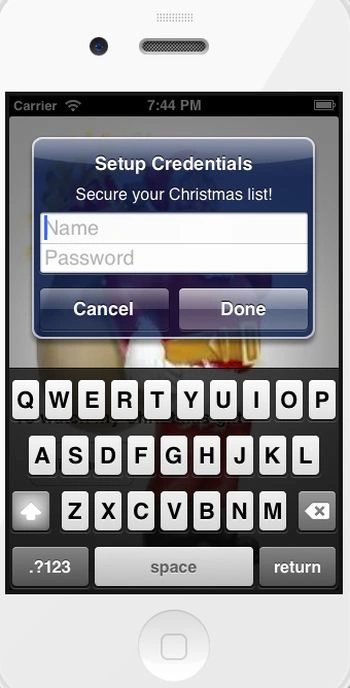
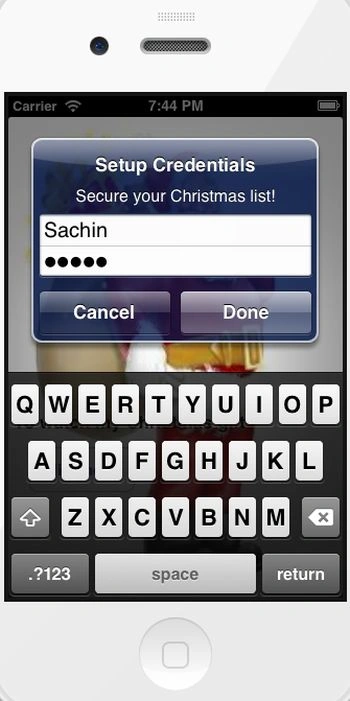
Here we provide the user name and password.
Output 2 in iPhone:
Output 3 in iPhone: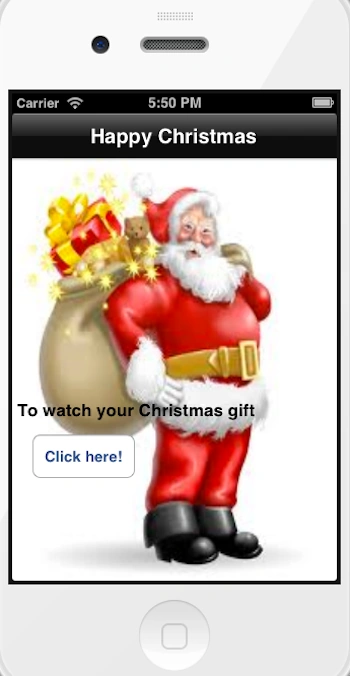
When we click on the button we move to the table view controller class.
Output 4 in iPhone:
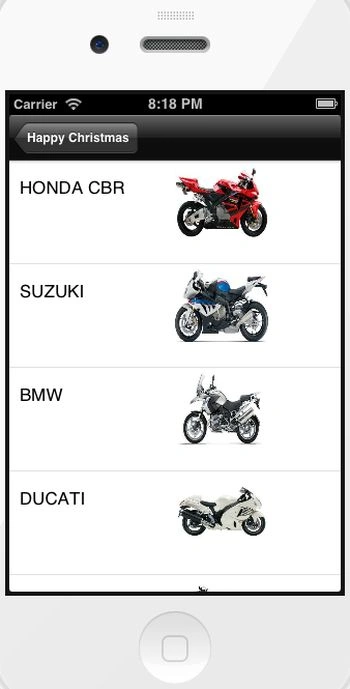
Now when we click on the navigation button "Happy Christmas" it is again asking for a user password to authenticate the user.
Output 5 in iPhone:
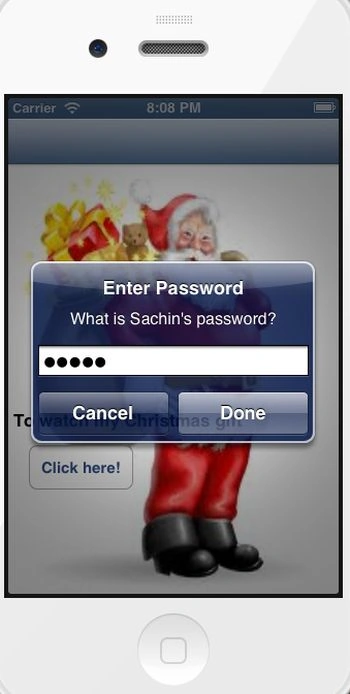
Here we type again the same password.
Output 6 in iPhone:
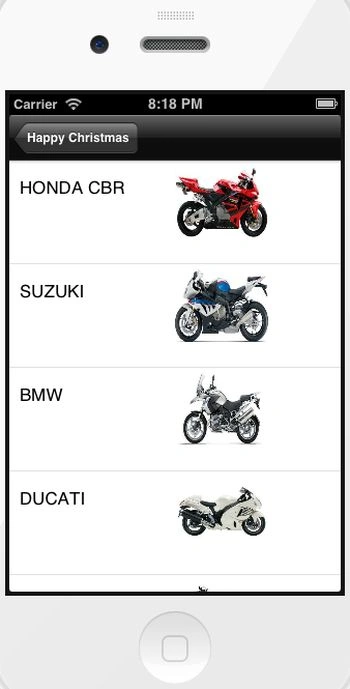
Now when we select any row it moves to another view.
Output 7 in iPhone:
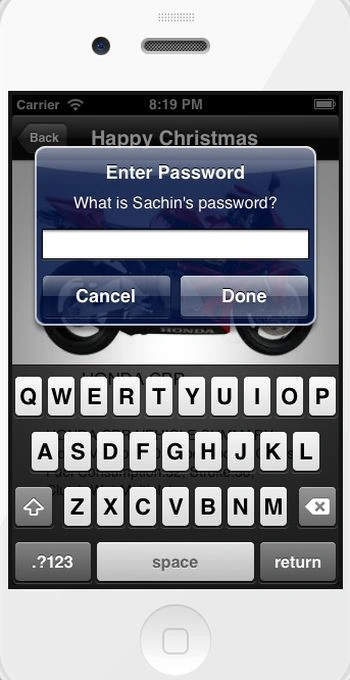
For security purposes it again asks for the user's Password to authenticate the user.
Output 8 in iPhone:
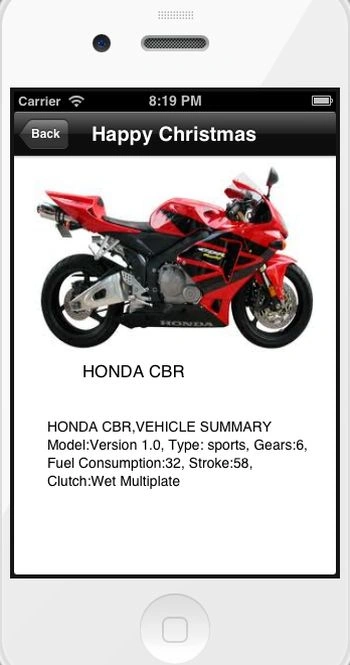
Now again run your app and enjoy your Christmas Gift.
Happy Christmas!!
Join the conversation! Your thoughts help the community grow.