

Introduction
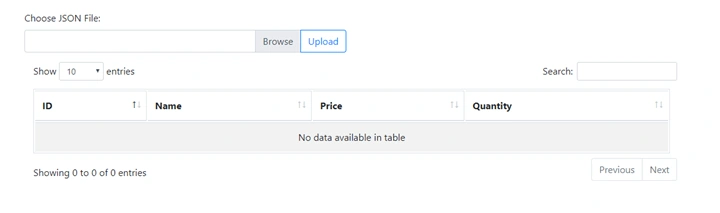
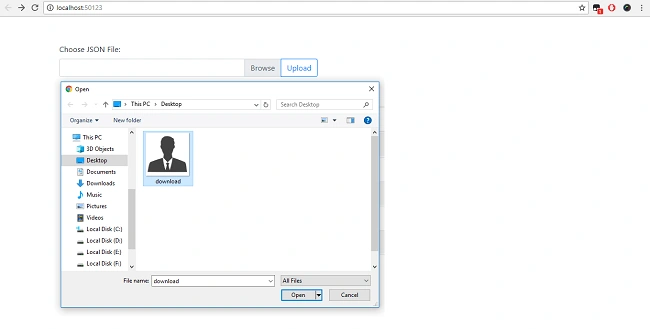
In this article. I will demonstrate how to import JSON data into SQL server using MVC 5 and entity framework. I will create a json file and upload it into FileUpload in project. I will also use jQuery datatable for searching, shorting and paging.
Step 1
Open SQL Server 2014 and create a database table.- CREATE TABLE [dbo].[Product](
- [Id] [int] IDENTITY(1,1) NOT NULL,
- [Name] [nvarchar](50) NULL,
- [Price] [money] NULL,
- [Quantity] [int] NULL,
- CONSTRAINT [PK_Product] PRIMARY KEY CLUSTERED
- (
- [Id] ASC
- )WITH (PAD_INDEX = OFF, STATISTICS_NORECOMPUTE = OFF, IGNORE_DUP_KEY = OFF, ALLOW_ROW_LOCKS = ON, ALLOW_PAGE_LOCKS = ON) ON [PRIMARY]
- ) ON [PRIMARY]
- GO
Step 2
Open Visual Studio 2015, click on New Project, and create an empty web application project.
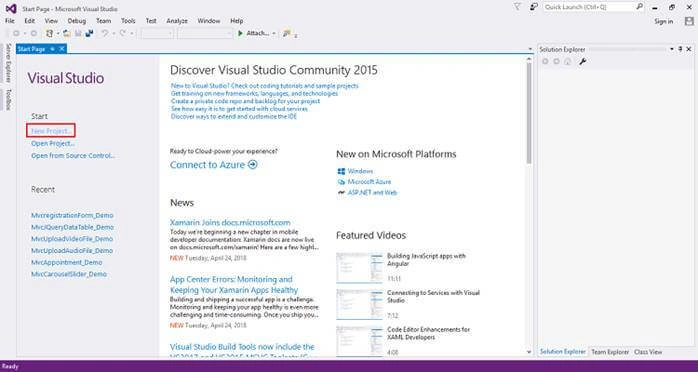
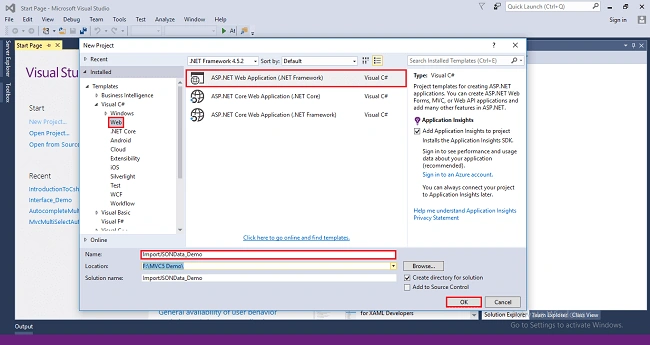
After clicking on New Project, one window will appear. Select Web from the left panel, choose ASP.NET Web Application, give a meaningful name to your project, and then click on OK, as shown in the below screenshot.
After clicking on OK one more window will appear; choose empty, check on MVC checkbox and click on OK, as shown below screenshot.
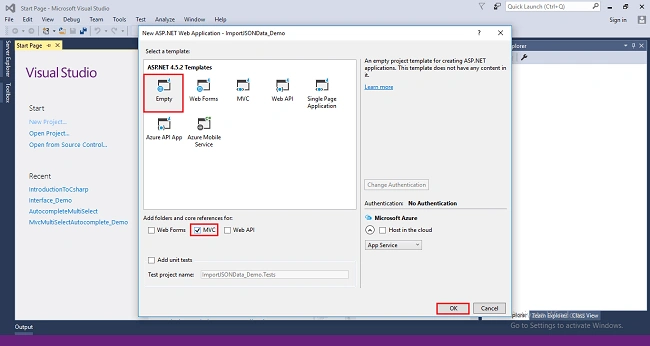
After clicking OK, the project will be created with the name of ImportJSONData_Demo.
Step 3
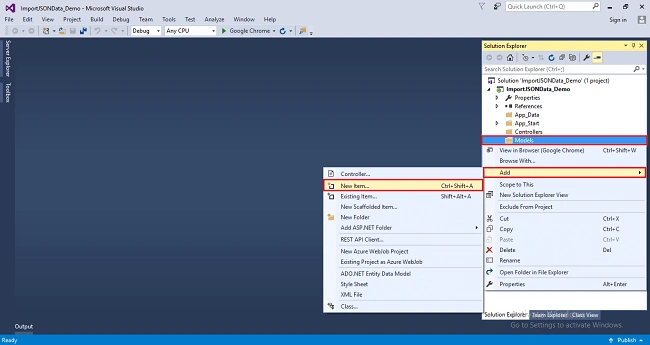
Add Entity Framework now. For that, right click on Models folder, select Add, then select New Item, then click on it.
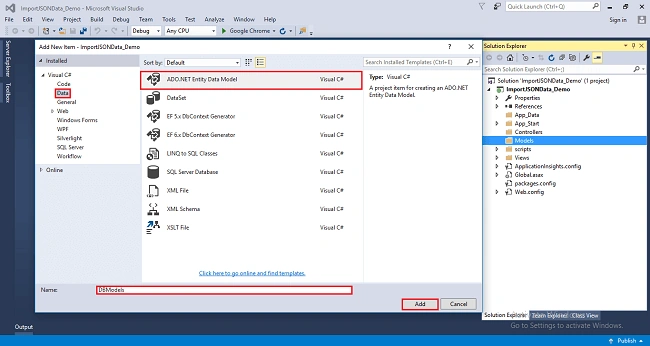
After clicking on New item, you will get a window; from there, select Data from the left panel and choose ADO.NET Entity Data Model, give it the name DBModels (this name is not mandatory you can give any name) and click on Add.
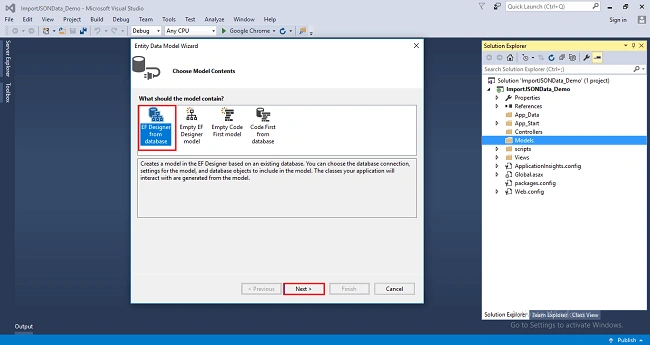
After you click on "Add a window", the wizard will open, choose EF Designer from the database and click Next.
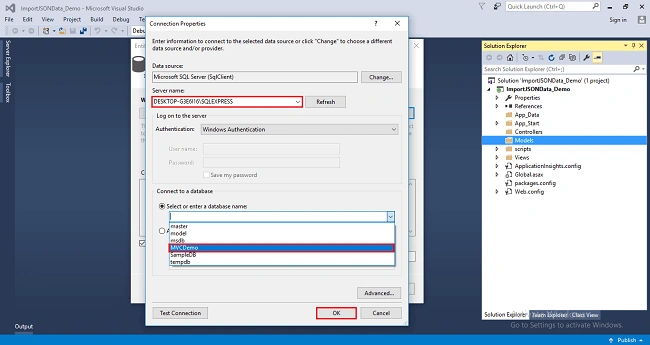
After clicking on Next a window will appear. Choose New Connection. Another window will appear, add your server name if it is local, then enter dot (.). Choose your database and click on OK.
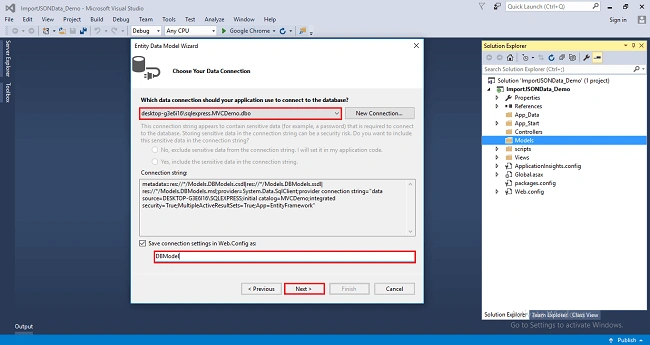
The connection will be added. If you wish to save connect as you want. You can change the name of your connection below. It will save connection in web config then click on Next.
After clicking on NEXT another window will appear. Choose database table name as shown in the below screenshot, then click on Finish.
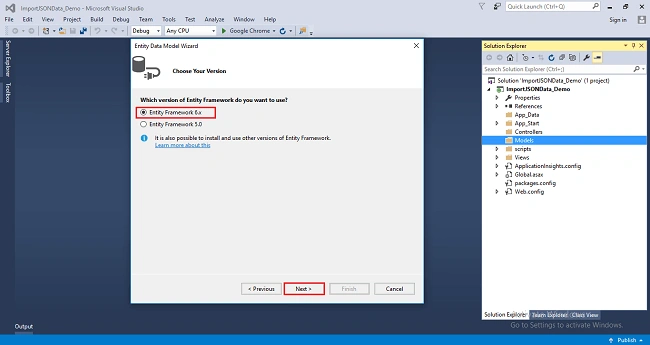
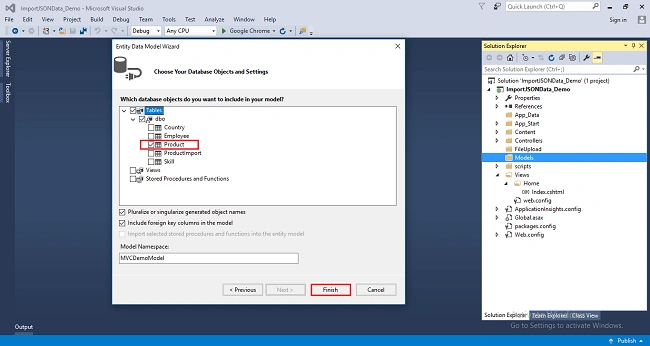
The Entity Framework will be added and the respective class gets generated under Models folder.
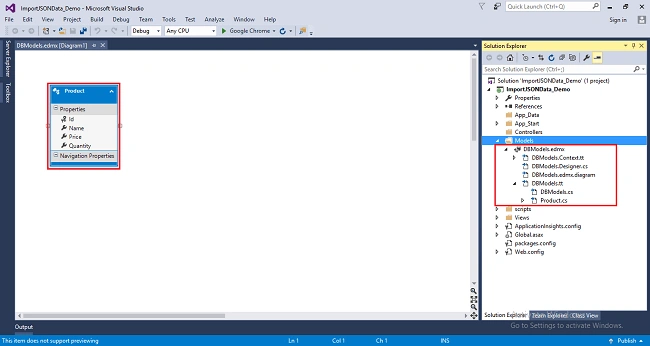
The following class will be added.
- namespace ImportJSONData_Demo.Models
- {
- using System;
- using System.Collections.Generic;
- public partial class Product
- {
- public int Id { get; set; }
- public string Name { get; set; }
- public Nullable<decimal> Price { get; set; }
- public Nullable<int> Quantity { get; set; }
- }
- }
Step 4
Right-click on Controllers folder, select Add, then choose Controller as shown in below screenshot.
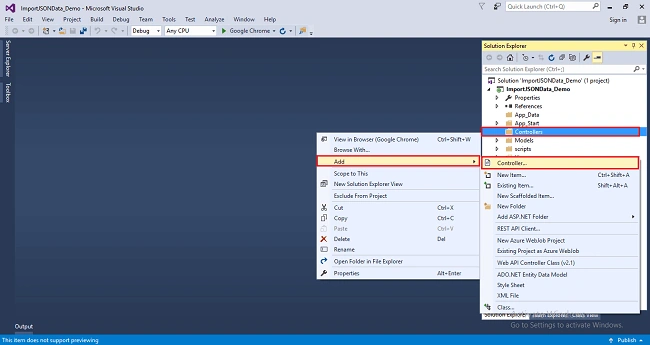
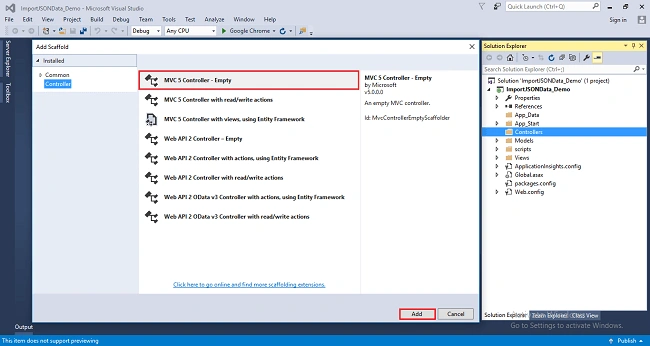
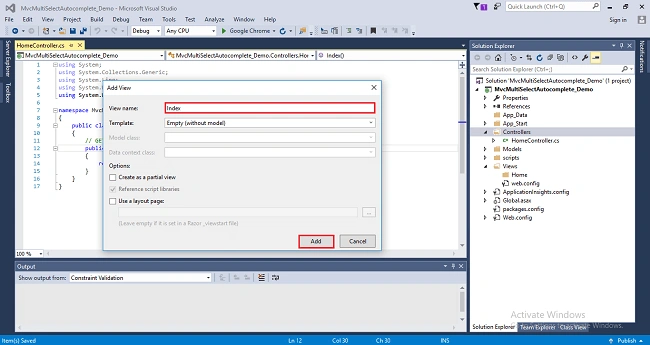
After clicking on the controller, a window will appear. Choose MVC5 Controller-Empty click on Add.
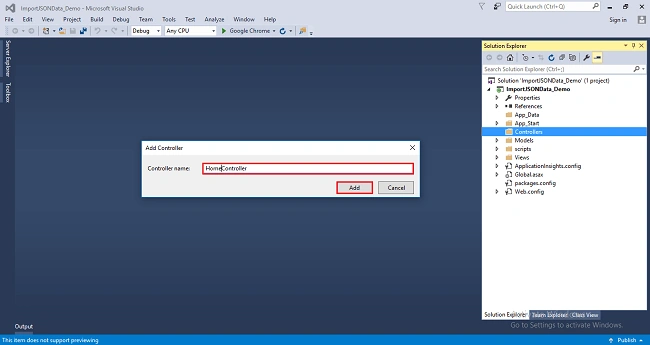
After clicking on Add, another window will appear with DefaultController. Change the name to HomeController; then click on Add. HomeController will be added under Controllers folder. Remember don’t change the Controller suffix for all controllers, change only highlight, and instead of default just change Home, as shown in the below screenshot.
Complete code for Controller
- using MvcImportJSONData_Demo.Models;
- using System;
- using System.Collections.Generic;
- using System.IO;
- using System.Linq;
- using System.Web;
- using System.Web.Mvc;
- using Newtonsoft.Json;
- namespace MvcImportJSONData_Demo.Controllers
- {
- public class HomeController : Controller
- {
- [HttpGet]
- public ActionResult Index()
- {
- return View();
- }
- public ActionResult GetData()
- {
- using (DBModel db = new DBModel())
- {
- List<Product> productList= db.Products.ToList<Product>();
- return Json(new { data = productList}, JsonRequestBehavior.AllowGet);
- }
- }
- [HttpPost]
- public ActionResult Upload(HttpPostedFileBase jsonFile)
- {
- using (DBModel db = new DBModel())
- {
- if (!jsonFile.FileName.EndsWith(".json"))
- {
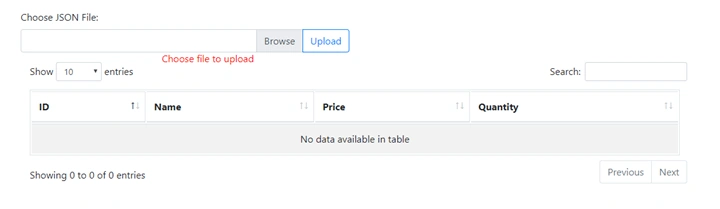
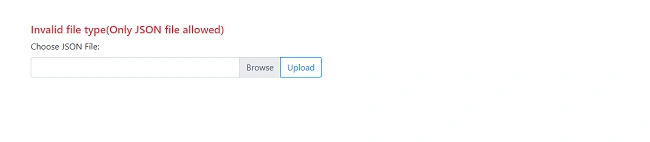
- ViewBag.Error = "Invalid file type(Only JSON file allowed)";
- }
- else
- {
- jsonFile.SaveAs(Server.MapPath("~/FileUpload/" + Path.GetFileName(jsonFile.FileName)));
- StreamReader streamReader = new StreamReader(Server.MapPath("~/FileUpload/" + Path.GetFileName(jsonFile.FileName)));
- string data = streamReader.ReadToEnd();
- List<Product> products = JsonConvert.DeserializeObject<List<Product>>(data);
- products.ForEach(p =>
- {
- Product product = new Product()
- {
- Name = p.Name,
- Price = p.Price,
- Quantity = p.Quantity
- };
- db.Products.Add(product);
- db.SaveChanges();
- });
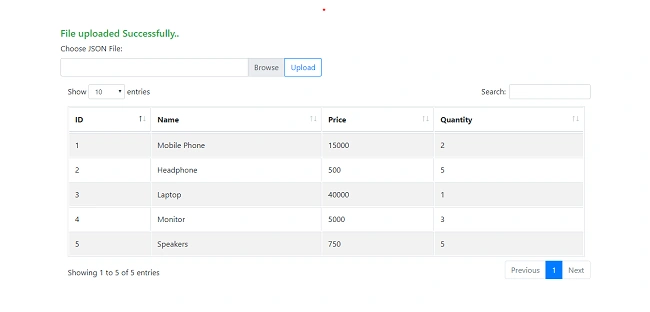
- ViewBag.Success = "File uploaded Successfully..";
- }
- }
- return View("Index");
- }
- }
- }
Wen ChangPosted Jan 5, 2021, 8:22 AM
I has some problem. Step 6 Create a folder to upload the file with the name FileUpload then Sept 7 FileUpload file disappear . Please tell me What steps did I do wrong? Thank you
araujo milanPosted Nov 12, 2019, 4:44 PM
Can you share me the code?
Chinmoy JenaPosted Aug 5, 2019, 12:21 AM
<script src="~/scripts/dataTables.bootstrap4.min.js"></script><link href="~/Content/dataTables.bootstrap4.min.css" rel="stylesheet" />
Chinmoy JenaPosted Aug 5, 2019, 12:20 AM
Please provide below script file -
Eya DimessiPosted Aug 15, 2018, 8:35 AM
How to get just the ID
Rameshkumar AngaPosted Aug 13, 2018, 1:00 PM
Public ActionResult GetData() { using(DBModel db=new DBModel()) { List<Product> productList = db.Products.ToList<Product>(); return Json(new { data = productList }, JsonRequestBehavior.AllowGet); } } [the type of namespace 'DBModel' could not be found(are you missing a using directive or an assembly reference?)]
Rameshkumar AngaPosted Aug 13, 2018, 12:10 PM
Using(DBModel db=new DBModel()) "Here im getting an error ,why that problem came"
Manav PandyaPosted Aug 7, 2018, 1:28 AM
Step 9 repeated two times
SUDHA RPosted Aug 3, 2018, 12:40 AM
Pls share the code for this.Very useful.thank u so much
maha lakshmiPosted Jul 19, 2018, 9:17 AM
Nice article
Hadshana KamalanathanPosted Jul 18, 2018, 4:55 PM
Thanks for sharing
First LastPosted Jul 18, 2018, 4:34 PM
I click the browse button and select the products.json file from the FileUpload folder defined in the application. I click the UpLoad button and get an error: An exception of type 'System.NullReferenceException' occurred in App_Web_jhv31rd3.dll but was not handled in user code. Additional information: Object reference not set to an instance of an object. I then close the app and rerun and I see that files JSON data was loaded to the database. It seems to be failing on the foreach. It's as though the controller method has not yet completed before the foreach looping of the model starts in the view.
First LastPosted Jul 18, 2018, 4:30 PM
How do I get the name of the file selected to appear in the box after clicking the Browse button?
First LastPosted Jul 18, 2018, 4:29 PM
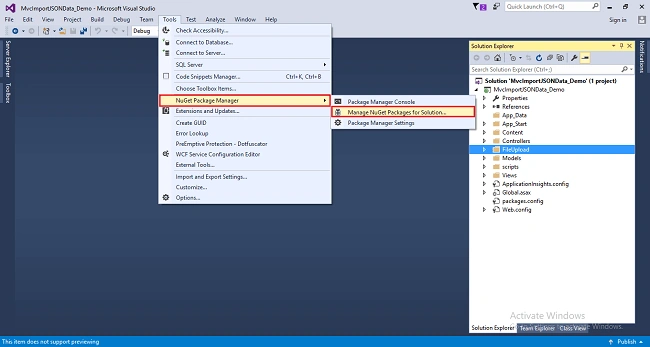
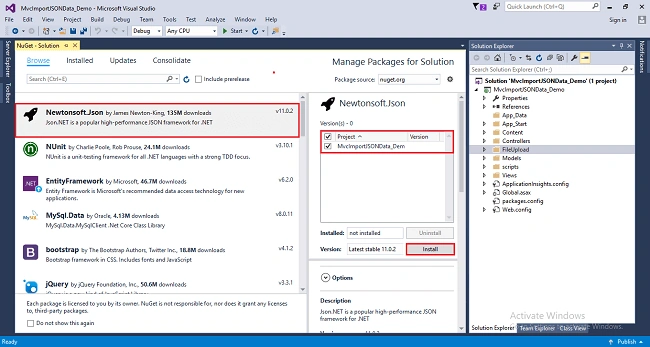
I had to use NuGet to load in Newtonsoft.Json. I had to use NuGet to load in Bootstrap and jQuery.
Viknaraj ManogararajahPosted Jul 18, 2018, 11:36 AM
nice article, thank you for sharing