

Introduction
Adjusting the laptop's keyboard light settings to remain on constantly can significantly improve your typing experience, especially in low-light conditions. This article will guide you through the necessary steps to ensure that your keyboard's backlighting is optimized for constant use without compromising your laptop’s performance or battery life.
Accessing the Boot Menu
- Restart Your Laptop: Begin by restarting your laptop. As it starts up, you’ll need to enter the boot menu. This is typically achieved by pressing a specific key such as F2, F10, Del, or Esc immediately after turning the laptop on. The exact key varies by manufacturer and will usually be displayed briefly on the screen during startup or follow the below-given list:-
- Here is a list of common laptop brands and the typical keys used to access the BIOS or UEFI settings:
- Acer: Press F2 or DEL as the laptop starts up.
- Asus: Press F2 or DEL, sometimes F10. For older models, it might be ESC.
- Dell: Press F2 when the Dell logo appears. For older models, it might be F12.
- HP: Press F10 as the HP logo appears. For the Pavilion series, it might be ESC or F1.
- Lenovo: Press F1 or F2. For the ThinkPad series, it's often Enter, then F1.
- MSI: Press DEL when the MSI logo shows up.
- Samsung: Press F2 as the laptop boots up.
- Sony: Press F1, F2, or F3 as the Sony logo appears. Some Vaio models use the ASSIST button.
- Toshiba: Press F2 during startup. For older models, it could be F12.
- Here is a list of common laptop brands and the typical keys used to access the BIOS or UEFI settings:
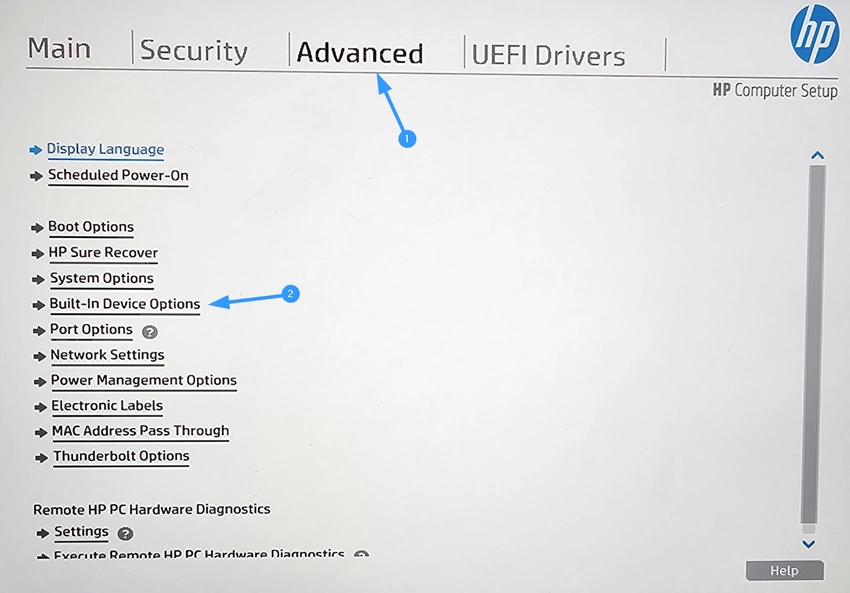
- Navigate to the BIOS Settings: Once you enter the boot menu, look for the BIOS settings or setup utility. Use the arrow keys to navigate, as your mouse will not function on this screen. See the below snapshot for HP Laptops.
Adjusting the Keyboard Backlight Settings
- Find the Keyboard Backlight Options: Within the BIOS, search for the tab or menu related to hardware functionality. This could be named ‘System Configuration’, ‘Advanced’, or something similar. Under this menu, you’ll find the keyboard backlight settings. See the below snapshot for HP Laptops.
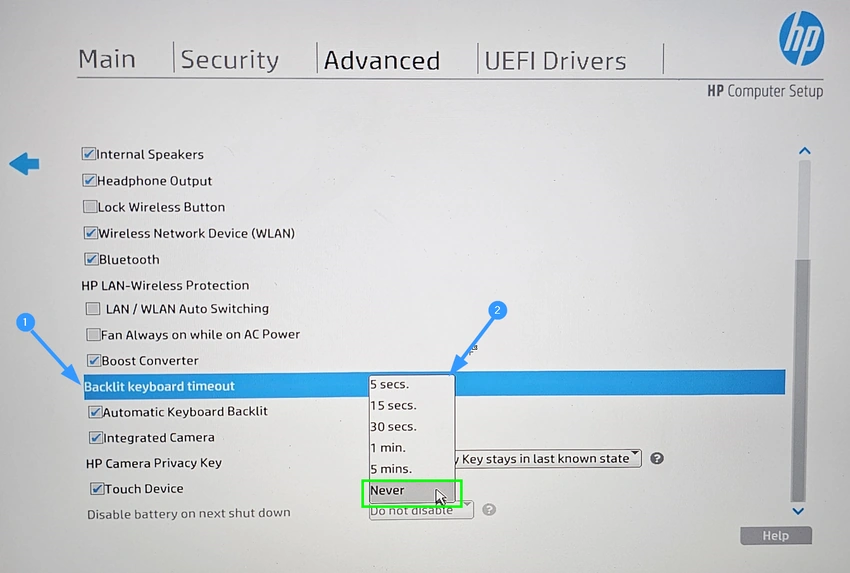
- Set the Backlight Keyboard timeout to Never: Select the option named "Backlit Keyboard timeout" that allows you to modify from dropdown to never. This will ensure that your keyboard light remains on whenever the laptop is powered.
Saving and Exiting
- Save Changes: After setting the backlight to always on, make sure to save your changes. Look for a key marked 'Save and Exit' or simply press F10 to save and exit. Confirm any prompts to save the settings.
- Reboot Your Laptop: Your laptop will reboot with the new settings in effect. The keyboard light should now remain on continuously.
Ensuring Smooth Operation
- Check for Software Controls: Some laptops also offer software applications that manage keyboard backlight settings. These can override BIOS settings, so ensure they are configured to match your preference for keeping the backlight always on.
- Monitor Battery Usage: Be aware that keeping the keyboard light on can slightly increase battery consumption. If you’re using your laptop unplugged, keep an eye on the battery level.
By following these steps, you can easily configure your laptop to keep the keyboard backlight on at all times, enhancing usability and ensuring optimal visibility in all lighting conditions.
Join the conversation! Your thoughts help the community grow.