

Let’s first establish what the purpose of the code is, in the first place.
For this article, the purpose of the code is how to Sign in / Login with Google Plus in MVC application.
,
Step 1
In the first step, you need to create an empty MVC application.
- On the File menu, click New Project.
- In the New Project dialog box, under Project types, expand Visual C#, and then click Web. In the Name box, type "DemoGPlusAPI", then click on OK.
- Now, in the dialog box, click on "MVC" under ASP.NET 4.5.2 Templates, Then, click on "Change Authentication" which stays on the center-right side. Then, select "No Authentication".
Step 2
For Sign in / Login with Google Plus, first of all, we need to create an app in our Google account & then we need client_id and secret_key of that app. So, here we go for creating an app in Google account.
- Log in Google Developer Console for creating an app.
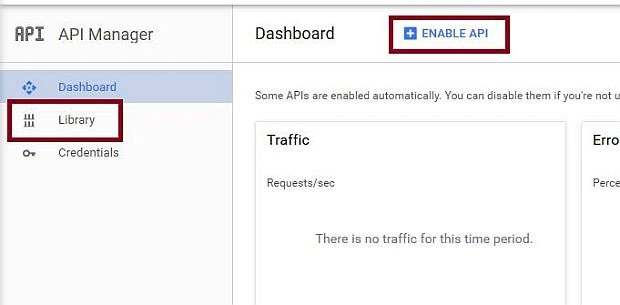
- Click on "Library" which lies in left side navigation or click on "Enable API" which stays at the top navigation.
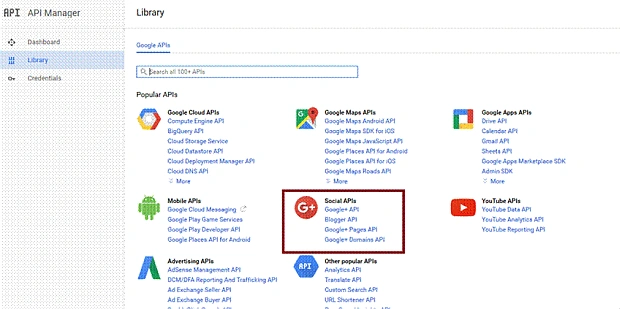
- Select "Google+ API" under Social APIs.
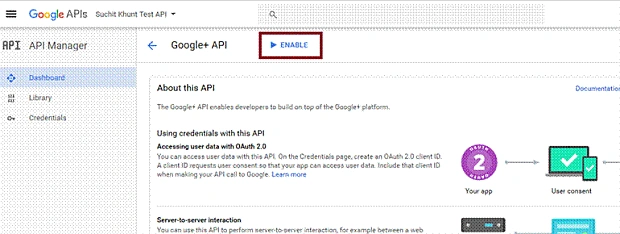
- Click on "Enable" on top navigation.
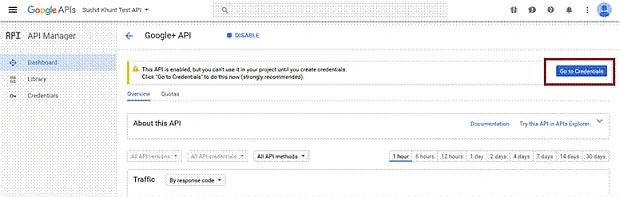
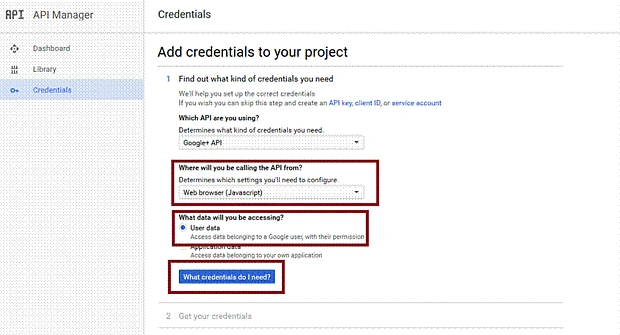
- Select "Go To Credentials" on right side.
- Select "Web browser (JavaScript)" for "Determines" which settings you'll need to configure. Select "User Data" for the data that you would be accessing. Then, click on "What credentials do I need?"
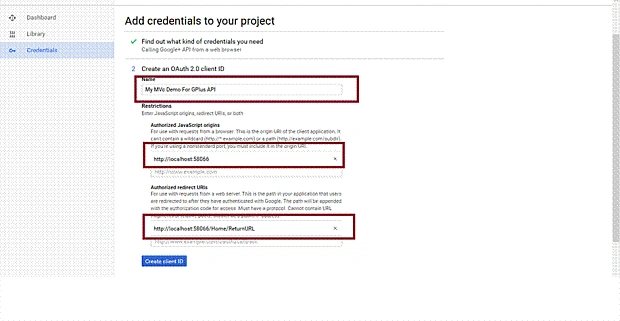
- Finally, it's time to create an app for OAuth 2.0 client ID. Give your preferred app name. Provide your Origin URL & Redirect URL, then click on "Create client ID".
Redirect URL
It means that after executing the request, trigger will redirect to this URL.
Origin URL
The URL which contains the request. For Origin URL, right click on your project "DemoGPlusAPI" and select "Web". Then, copy your Project URL.
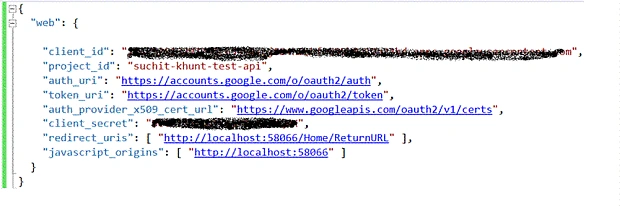
- Now, click on "Download" so that you can get your Client ID and Client Secret.
Step 3
Now, its time for implementation.
Ankit KanojiaPosted Mar 12, 2020, 2:16 AM
Thank you so much Gaurang Mistry
Ankit KanojiaPosted Mar 12, 2020, 2:15 AM
Thank you so much Rushabh Patel
Ankit KanojiaPosted Mar 12, 2020, 2:15 AM
Thank you so much ahmed khattab
Ankit KanojiaPosted Mar 12, 2020, 2:15 AM
Thank you so much Amodu Bashir
Ankit KanojiaPosted Mar 12, 2020, 2:15 AM
Thank you so much eslam akrm
Ankit KanojiaPosted Mar 12, 2020, 2:14 AM
Thank you so much manav pandya
eslam akrmPosted Mar 2, 2019, 11:05 PM
Nice work sir, but I want to get the name of login user and I want to know that the user is login or not ?
Amodu BashirPosted May 27, 2018, 12:21 AM
Nice work sir...... please have you done anything on facebook login?
Amodu BashirPosted May 27, 2018, 12:20 AM
Nice work .....please have you actually done anything on facebook login
ahmed khattabPosted Jun 29, 2017, 2:07 PM
I got this errorThe following sections have been defined but have not been rendered for the layout page "~/Views/Shared/_Layout.cshtml": "Scripts".Description: An unhandled exception occurred during the execution of the current web request. Please review the stack trace for more information about the error and where it originated in the code.
Gaurang MistryPosted Nov 29, 2016, 1:43 AM
Good Demo bro. Really very helpful.
Rushabh PatelPosted Nov 29, 2016, 1:43 AM
Good work Suchit Khunt I need same thing for microsoft login. Please share if you can
Ankit KanojiaPosted Nov 29, 2016, 1:37 AM
Hii Manav Pandya.. Currently i am working on that.. in short time you get that all..
Manav PandyaPosted Nov 26, 2016, 1:05 AM
If possible i need Login demo with Linkedin and Facebook posting sir
Manav PandyaPosted Nov 26, 2016, 1:02 AM
I will try and lets se what happened
Manav PandyaPosted Nov 26, 2016, 1:02 AM
Thanks for sharing sir @Suchit Khunt