

In this article, you will learn how to make login, register, and logout screens with real-world functionality using Razor and Entity Framework data models.
What is Entity Framework
Entity Framework (EF) is an object-relational mapper that enables .NET developers to work with relational data using domain-specific objects. It eliminates the need for most of the data-access code that developers usually need to write. For more see: http://msdn.microsoft.com/en-us/data/ef.aspx
What is MVC?
The Model-View-Controller (MVC) pattern separates the modeling of the domain, the presentation, and the actions based on user input into three separate classes [Burbeck92].
Model
The model manages the behavior and data of the application domain, responds to requests for information about its state (usually from the view), and responds to instructions to change state (usually from the controller).
View
The view manages the display of information.
Controller
The controller interprets the mouse and keyboard inputs from the user, informing the model and/or the view to change as appropriate.
Getting Started
- Create a new project; first open Visual Studio 2012
- Then go to "File" => "New" => "Project..."
- Select Web in installed templates
- Select "ASP.NET MVC 4 Web Application"
- Enter the name and choose the location
- Click "OK"
Now add a new ADO.NET Entity data Model.
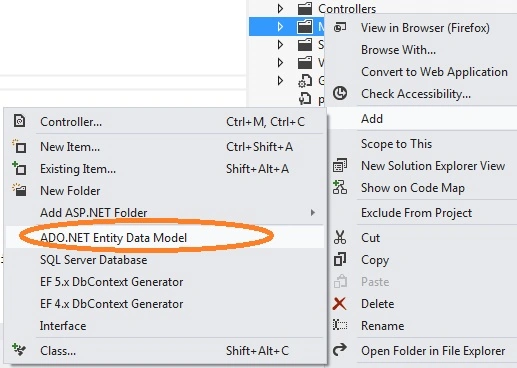
Image 1.
To learn how to configure an ADO.NET Entity Data Model please read this article-
So let's proceed without wasting time, here is my data model scenario:
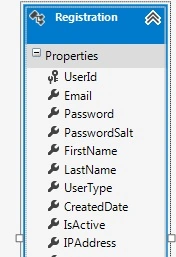
Image 2.
This is my model class that is generated when we configure the data model, I just made slight changes.
//--------------------------------------
// <auto-generated>
//    This code was generated from a template.
//
//    Manual changes to this file may cause unexpected behavior in your application.
//    Manual changes to this file will be overwritten if the code is regenerated.
// </auto-generated>
//--------------------------------------

namespace LoginInMVC4WithEF.Models
{
    using System;
    using System.Collections.Generic;
    using System.ComponentModel.DataAnnotations;

    public partial class Registration
    {
        public int UserId { get; set; }
        [Required]
        [EmailAddress]
        [StringLength(150)]
        [Display(Name = "Email Address: ")]
        public string Email { get; set; }

        [Required]
        [DataType(DataType.Password)]
        [StringLength(150, MinimumLength = 6)]
        [Display(Name = "Password: ")]
        public string Password { get; set; }

        public string PasswordSalt { get; set; }

        [Required]
        [Display(Name = "First Name: ")]
        public string FirstName { get; set; }

        [Required]
        [Display(Name = "Last Name: ")]
        public string LastName { get; set; }
        public string UserType { get; set; }
        public System.DateTime CreatedDate { get; set; }
        public bool IsActive { get; set; }
        public string IPAddress { get; set; }
   }
}
This is my context class, again this is also generated by data model.
public partial class UserEntities2 : DbContext
{
    public UserEntities2()
        : base("name=UserEntities2")
    {
    }

    protected override void OnModelCreating(DbModelBuilder modelBuilder)
    {
        throw new UnintentionalCodeFirstException();
    }

    public DbSet<Registration> Registrations { get; set; }
}
Now to add a controller.
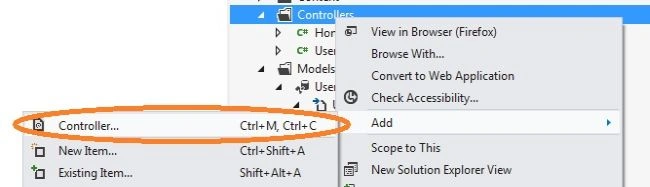
Image 3.
Add namespaces in the controller class:
using System.Web.Security;
using LoginInMVC4WithEF.Models;

Now add the following functions and methods.

//
// GET: /User/
public ActionResult Index()
{
    return View();
}

[HttpGet]
public ActionResult LogIn()
{
    return View();
}

[HttpPost]
public ActionResult LogIn(Models.Registration userr)
{
//if (ModelState.IsValid)
//{
    if (IsValid(userr.Email, userr.Password))
    {
        FormsAuthentication.SetAuthCookie(userr.Email, false);
        return RedirectToAction("Index", "Home");
    }
    else
    {
        ModelState.AddModelError("", "Login details are wrong.");
    }
    return View(userr);
}

[HttpGet]
public ActionResult Register()
{
    return View();
}

[HttpPost]
public ActionResult Register(Models.Registration user)
{
    try
    {
        if (ModelState.IsValid)
        {
            using (var db = new LoginInMVC4WithEF.Models.UserEntities2())
            {
                var crypto = new SimpleCrypto.PBKDF2();
                var encrypPass = crypto.Compute(user.Password);
                var newUser = db.Registrations.Create();
                newUser.Email = user.Email;
                newUser.Password = encrypPass;
                newUser.PasswordSalt = crypto.Salt;
                newUser.FirstName = user.FirstName;
                newUser.LastName = user.LastName;
                newUser.UserType = "User";
                newUser.CreatedDate = DateTime.Now;
                newUser.IsActive = true;
                newUser.IPAddress = "642 White Hague Avenue";
                db.Registrations.Add(newUser);
                db.SaveChanges();
                return RedirectToAction("Index", "Home");
            }
        }
        else
        {
            ModelState.AddModelError("", "Data is not correct");
        }
    }
    catch (DbEntityValidationException e)
    {
        foreach (var eve in e.EntityValidationErrors)
        {
            Console.WriteLine("Entity of type \"{0}\" in state \"{1}\" has the following validation errors:",
                eve.Entry.Entity.GetType().Name, eve.Entry.State);
            foreach (var ve in eve.ValidationErrors)
            {
                Console.WriteLine("- Property: \"{0}\", Error: \"{1}\"",
                    ve.PropertyName, ve.ErrorMessage);
            }
        }
        throw;
    }
    return View();
}

public ActionResult LogOut()
{
    FormsAuthentication.SignOut();
    return RedirectToAction("Index", "Home");
}

private bool IsValid(string email, string password)
{
    var crypto = new SimpleCrypto.PBKDF2();
    bool IsValid = false;

    using (var db = new LoginInMVC4WithEF.Models.UserEntities2())
    {
        var user = db.Registrations.FirstOrDefault(u => u.Email == email);
        if (user != null)
        {
            if (user.Password == crypto.Compute(password, user.PasswordSalt))
            {
                IsValid = true;
            }
        }
    }
    return IsValid;
}
There I have functions and methods for index page and login, logout, register and isvalid, now let's make some change in "_Layout.vshtml". Add the following div:
<div style="width:auto; background-color:aqua">
    @if (Request.IsAuthenticated)
    {
        <strong>@Html.Encode(User.Identity.Name)</strong>
        @Html.ActionLink("Log Out", "Logout", "User")
    }
    else
    {
        @Html.ActionLink("Register", "Register", "User")
        <span> | </span>
        @Html.ActionLink("Log In", "Login", "User")
    }
</div>
Now let's add views for presentation.
The best way to add a view is to right-click on the controller's method name and then right-click and "Add View" and select the view engine type and select strongly-typed view and use the layout master page and click "Add".
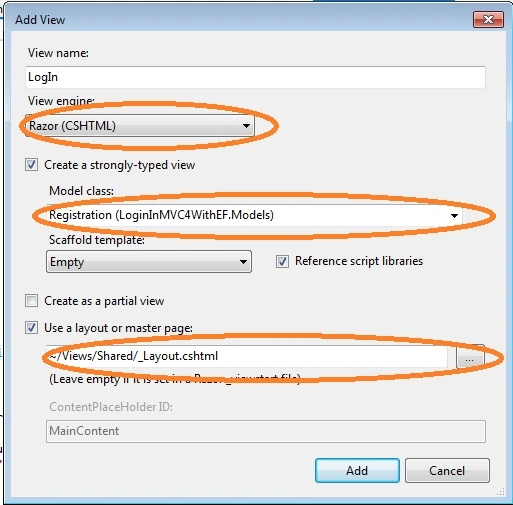
Image 4.
LogIn.cshtml
@model LoginInMVC4WithEF.Models.Registration

@{
    ViewBag.Title = "LogIn";
    Layout = "~/Views/Shared/_Layout.cshtml";
}

<h2>LogIn</h2>
@using (Html.BeginForm())
{
    @Html.ValidationSummary(true, "Login Failed, check details");
    <div>
        <fieldset>
            <legend>Login Form</legend>
            <div class="editor-label">@Html.LabelFor(u=> u.Email)</div>
            <div class="editor-field">@Html.TextBoxFor(u=> u.Email)
                @Html.ValidationMessageFor(u=> u.Email)
            </div>
            <div class="editor-label">@Html.LabelFor(u=> u.Password)</div>
            <div  class="editor-field">@Html.PasswordFor(u=> u.Password)
                @Html.ValidationMessageFor(u=> u.Password)
            </div>
            <input type="submit" value="Log In" />
        </fieldset>
    </div>
}
Register.cshtml
@model LoginInMVC4WithEF.Models.Registration
@{
    ViewBag.Title = "Register";
    Layout = "~/Views/Shared/_Layout.cshtml";
}

<h2>Register</h2>
@using (Html.BeginForm())
{
    @Html.ValidationSummary(true, "Registeration Failed, fields.");
    <div>
        <fieldset>
            <legend>Register Form</legend>
            <div class="editor-label">@Html.LabelFor(u => u.Email)</div>
            <div class="editor-field">@Html.TextBoxFor(u => u.Email)
                @Html.ValidationMessageFor(u => u.Email)
            </div>
            <div class="editor-label">@Html.LabelFor(u => u.Password)</div>
            <div class="editor-field">@Html.PasswordFor(u => u.Password)
                @Html.ValidationMessageFor(u => u.Password)
            </div>
            <div class="editor-label">@Html.LabelFor(u => u.FirstName)</div>
            <div class="editor-field">@Html.TextBoxFor(u => u.FirstName)
                @Html.ValidationMessageFor(u => u.FirstName)
            </div>
             <div class="editor-label">@Html.LabelFor(u => u.LastName)</div>
            <div class="editor-field">@Html.TextBoxFor(u => u.LastName)
                @Html.ValidationMessageFor(u => u.LastName)
            </div>

            <input type="submit" value="Register" />
        </fieldset>
    </div>
}
LogOut.cshtml
@{
    ViewBag.Title = "LogOut";
    Layout = "~/Views/Shared/_Layout.cshtml";
}

<h2>LogOut</h2>

public ActionResult LogOut()
{
    FormsAuthentication.SignOut();
    return RedirectToAction("Index", "Home");
}
Now hit F5 to run the application and click on the "Register" button and don't put anything in the TextBoxes and click the "Register" button.
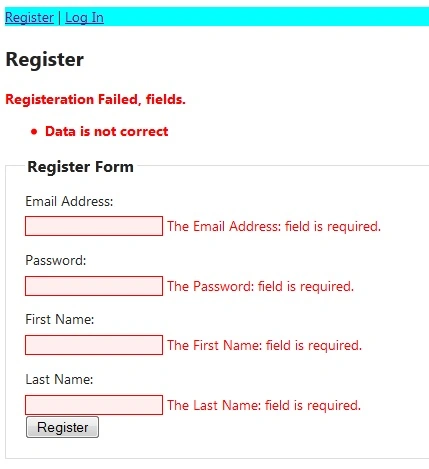
Image 5.
As you can see in the model class, all fields are required so these messages are displayed.
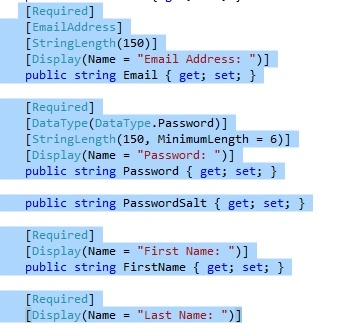
Image 6.
Now if I put a password value less than 6 characters or more than 150 characters then this message will display:
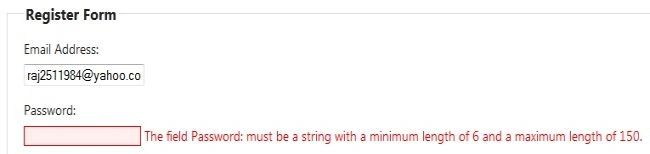
Image 7.
Now insert all values properly, then you will see it will register and data should inserted into the database, now you can login.
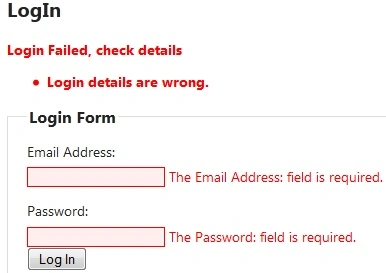
Image 8.
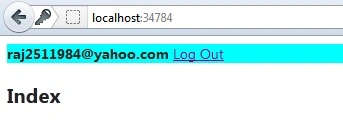
Image 9.
Conclusion
In this article, we have learned the basic concepts of login using Entity Framework with Razor.
ankesh gamitPosted Mar 31, 2019, 2:37 PM
It is working but after click on logout if I click back button it opens dashboard. It should redirect to login page.What is solution for it?
Ramzanali MominPosted Sep 21, 2018, 11:43 PM
Thanks for share article
rahul trisaptPosted Apr 16, 2018, 4:12 AM
I'm badly stuck on it can anyone tell me to fix it
rahul trisaptPosted Apr 16, 2018, 2:25 AM
Login page keeps going loading , not seeems to be any happening
rahul trisaptPosted Apr 16, 2018, 2:23 AM
When i enter the values in login page it shows same page with filled field so please suggest me
rahul trisaptPosted Apr 15, 2018, 5:50 AM
Login action not perform what to do for it?
ROHIT SINGHPosted Mar 14, 2018, 4:47 AM
We need to show user full name and image of the user login. like string userId = UserManager.FindByEmail(model.Email)?.Id
rabi pandaPosted Oct 21, 2017, 9:01 AM
Entity validation error will show,properties are not match means isvalid ,passwordsalt are not exist,so many error
Guest UserPosted Jul 13, 2017, 12:18 AM
I have two different registration for different type of user how make one login page or how to make two login pages
Digna SalcedoPosted Jun 14, 2017, 10:18 AM
Hello, why after login i can?t see messages validator in any pages?
Amin SaffarnejadPosted Feb 1, 2017, 4:14 AM
Can you tell me why Request.IsAuthenticated is always false?
sudipto sarkarPosted Jan 19, 2017, 2:27 AM
Where is ur webConfig setting dude for form authentication ??
Manav PandyaPosted Dec 15, 2016, 5:02 AM
Hello sir why you have taken PasswordSalt Raj Kumar
Nathan SiafaPosted Sep 28, 2016, 2:03 AM
@if (Request.IsAuthenticated) { <strong>@Html.Encode(User.Identity.Name)</strong> @Html.ActionLink("Log Out", "Logout", "User") } Seems like this if statement in my shared layout isn't evaluating for me. Do you think I miss something? Nice post by the way.
Manav PandyaPosted Sep 13, 2016, 1:07 PM
Ambesh Jha brother for Logout , always there is home page i mean for this project we have Index view which shows Login screen
Manav PandyaPosted Sep 13, 2016, 1:05 PM
divya shasha , I understand your error , its because of you are trying to run code directly , i suggest you to create new project and make unique name of each files , i hope it will help you , if dont than ask me
Manav PandyaPosted Sep 13, 2016, 1:03 PM
Satnam Singh , You have faced this problem because entities are not compiled , i mean not able to load , reason is that we dont have Database with project .
Ramesh PalaniappanPosted Aug 26, 2016, 10:08 AM
Nice
Satnam SinghPosted Jul 2, 2016, 10:39 PM
Hi i try this code but this code give error in UserController.cs (Register )file in db.SaveChanges(); it doses not save any field in the database anyone have any idea to solve this problem?????????????
Thiruppathi RPosted Jun 16, 2016, 6:53 AM
Nice..
divya shashaPosted Mar 24, 2016, 5:23 AM
I got an error,how to solve this?please see above
divya shashaPosted Mar 24, 2016, 5:23 AM
The type or namespace name 'Registration' does not exist in the namespace 'LoginInMVC4WithEF.Models' (are you missing an assembly reference?) E:\divya\RenuMvc task\LoginInMVC4WithEF\LoginInMVC4WithEF\Controllers\UserRegistrationController.cs 51 45 LoginInMVC4WithEF
Riteish SinghPosted Jan 20, 2016, 7:59 AM
var crypto = new SimpleCrypto.PBKDF2(); This line SimpleCrypto.PBKDF2 is no Understand please Details write.
Mahavirsinh PadhiyarPosted Sep 30, 2015, 3:39 AM
ali pishkari I have done as you say in comments that remove crypto line but in IsValid function crypto also used how to update that method please answer as soon as possible.
Ambesh JhaPosted Aug 23, 2015, 4:56 AM
What should be the View for Log out Action method.
ali pishkariPosted Dec 4, 2014, 5:38 AM
Thanks , I want to add rolls in my application . can you help me?
ali pishkariPosted Dec 4, 2014, 5:37 AM
or download the source and copy the dll file from bin folder
ali pishkariPosted Dec 4, 2014, 5:36 AM
comment "crypto" lines and save password without encryption . in login and register.
sskumar guruPosted Aug 6, 2014, 10:19 AM
i got a error in this line: var crypto = new SimpleCrypto.PBKDF2(); pls help me
Satish BPosted Dec 20, 2013, 1:54 AM
i want after login display user profile like as name,gender,dateofbirth,email