After ensuring the high-available of the database tier it is important to consider how to help ensure that both Web Front End (WFE) services and service applications within a SharePoint farm can be made highly available. In SharePoint 2013, there is a new Request Management feature that can help to direct certain types of requests to specific sets of servers. The choice of server is made in part by determining server health scores to determine which server can best service the request. You should also consider components such as Central Administration, SQL Server access and server placement for impact on farm availability.
Implementing Network Load Balancing
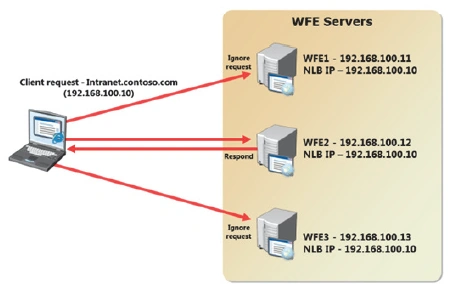
Network Load Balancing (NLB) provides high availability and scalability for TCP/IP-based services, including web servers, File Transfer Protocol (FTP) servers, as well as other mission critical servers and services. In an NLB configuration, multiple servers run independently and do not share any resources. This group of servers is referred to as an NLB cluster. Client requests are serviced by one of the servers in the cluster, depending on the cluster configuration. In the event of a server failure, client requests are handled by another server in the cluster. In this way, NLB allows you to increase network service performance and availability. In terms of a SharePoint implementation, NLB is effective for client requests to Web Front End (WFE) servers. By using multiple WFE servers in the farm and configuring NLB, you can increase the availability of the WFE tier.
You can implement NLB in one of the following two ways:
- Configuring Windows Network Load Balancing on each WFE server.
- Using a third-party load balancing solution, such as a dedicated hardware load balancer.
Conceptually, both approaches share some common configuration requirements. Consider a SharePoint farm with three WFE servers. Each WFE server has a single network adapter with a unique IP address. You create a web application called intranet.contoso.com in Central Administration and use a host header. This automatically creates the IIS website and virtual directories on all three WFE servers.
To point to the NLB address, when a client navigates to intranet.contoso.com in a web browser, the TCP/IP packets first reach the NLB component before NLB decides which server should handle the request. If a WFE server fails, NLB stops passing requests to that host and all requests are spread between the two remaining hosts until the failed server is brought online.
Request Management
In a SharePoint farm with multiple WFE servers, you may want to perform more tasks than simple load balancing. In particular, Windows NLB does not provide any “smart” traffic management, so that request routing is always evenly divided across the farm. You can implement host weighting to adjust the way requests are split, but this is a fairly static mechanism. Many organizations may want to prioritize certain types of request, or to reroute web requests when individual servers become overloaded. In SharePoint 2013, you can use Request Management to perform dynamic, rule-based request routing to various WFE servers in your farm. The following behavior can be configured with Request Management:
- Route requests to web servers with a better health score, thus avoiding overloading servers.
- Prioritize important requests, such as end user requests over low priority requests, such as crawl requests.
- Route requests to specific servers based on host name, client IP address, or browser type. This could be a permanent configuration or to assist troubleshooting.
- Route traffic to servers based on request type, such as search or client applications.
- Identify and block harmful requests.
Request Management can operate in one of the following two modes:
- Integrated mode. This mode runs the Request Management service on every server configured with the WFE server role, that is every server running the Microsoft SharePoint Foundation Web Application service. In integrated mode, requests arrive at a WFE server in the farm, but they may be redirected to another WFE server depending on rule configuration.
- Dedicated mode. This mode runs the Request Management service on a set of dedicated servers, separate from the WFE servers in the farm. Requests arrive at the Request Management servers before being directed to a WFE server. Dedicated mode is typically used only for very large server farms.
Request Management has the following components:
- Routing rules. Routing rules route requests to an associated machine pool based on matching criteria.
- Machine pools. Machine pools are collections of one or more servers, typically dedicated to handling certain types of requests, such as end user requests, crawler requests and mobile device requests.
- Server weights. Server weights are used by routing rules to determine which servers will provide the best response for a request. Weights can be static or health based. Static weights can be assigned by an administrator by using Windows PowerShell, whereas health weights are controlled by the system, based on information such as current load.
- Execution group. An Execution group holds one or more routing rules. There are three possible execution groups, numbered 0, 1 and 2, that are processed in sequence. Once a rule is matched in an execution group, no other execution groups are processed for that request. For example, if a request matches a rule in execution group 0, no rules in execution groups 1 or 2 are processed for that request.
- Throttling rules. Throttling rules are used to refuse requests based on matching criteria. Throttling rules are not associated with a machine pool or execution group, they can have an expiry time and they are always evaluated first. Request Management is configured on a per-web application basis by using PowerShell. There is no GUI for managing Request Management components or settings. You must also start the Request Management service instance on each WFE server in the farm.


Rishi SharmaPosted Jun 30, 2020, 9:53 AM
Hello Destin Sir,Need your guide on this: 2 WFE, 2 APP and 1 DB. I am not using this AutoSPInstaller but will be installing all the things (SharePoint Prerequisites install and configuration and subsequent web application deployment) manually. Also, willing to know how we need to setup https:// links of WFE server in LB for high availability. On which WFE server (WFE1 or WFE2) i need to install SSL and bind the SharePoint (https) Web Application in IIS Could u please assist me to get the proper understanding of this High Availability architecture. I know, we would also require a 2 or 3 separate DB servers for HA/DR purpose. 2 DB servers : For Log-Shipping 3 DB servers: For mirroring or witness server Also, how this architecture would work as an HA. I mean how to configure it using LB in the way: - If WFE1 server goes down then WFE2 will keep serving the end users. - If APP1 server goes down then APP2 server will keep on serving. - And, in case a single layer (WFE1 and the joined APP1 server farm goes down then would the hosted application will be working at end user. Kindly help to understand. Thanking you in anticipation! Regards, Rishi Sharma