

Introduction
This article demonstrates how to mask phone number field like XXX-XXX-XXXX using the Xamarin Forms Behaviors concept.
Prerequisites
- Windows or Mac machine
- Visual Studio has to be installed in it
- A virtual device or real device for both Android and iOS platforms to run and observe the application
The flow of the article
- How to create a Xamarin Forms Project
- What is Behavior?
- How to create Behavior?
- How to mask phone number using Behavior?
How to create a Xamarin Forms Project?
- On the Start screen, launch Visual Studio. This opens the start page.
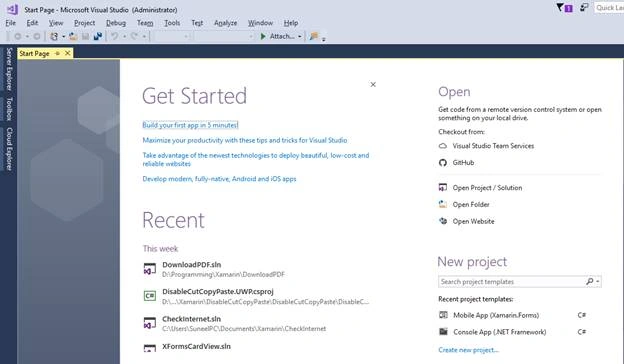
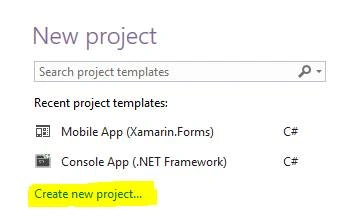
- In Visual Studio, click "Create new project..." to create a new project.
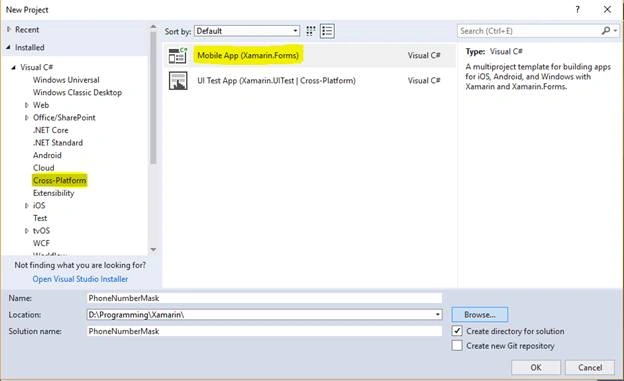
- In the New project window, click Cross-Platform from the left pane, select the Mobile App (Xamarin.Forms) template, set the Name and Solution name to PhoneNumberMask, choose a suitable location for the project, and click the OK button.
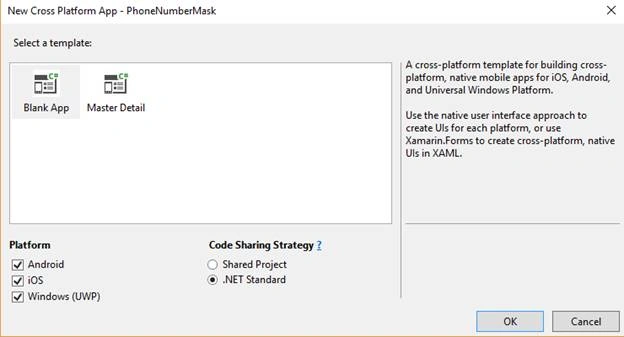
- In the New Cross-Platform App dialog, click Blank App, select .NET Standard as the Code Sharing Strategy, and click the OK button.
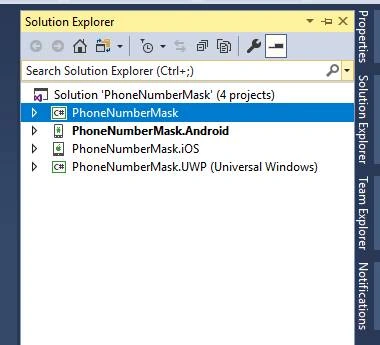
- In Solution Explorer, the PhoneNumberMask project will be displayed like below.
What is Behavior?
- Behaviors allow us to add functionality to User Interface controls without creating the subclass for it. Instead, the functionality is implemented in behavior class and attached to the control.
- Behaviors are written in the code and added to controls in XAML or code in the code behind page.
How to create Behavior?
The process of creating a Xamarin.Forms Behavior is as follows.
- Create a class that inherits from the Behavior or Behavior<T> class, where T is the type of the control to which the behavior should apply.
- Override the OnAttachedTo method to perform any required setup.
- Override the OnDetachingFrom method to perform any required cleanup.
- Implement the core functionality of the behavior.
Now, we will start creating a behavior for phone number masking.
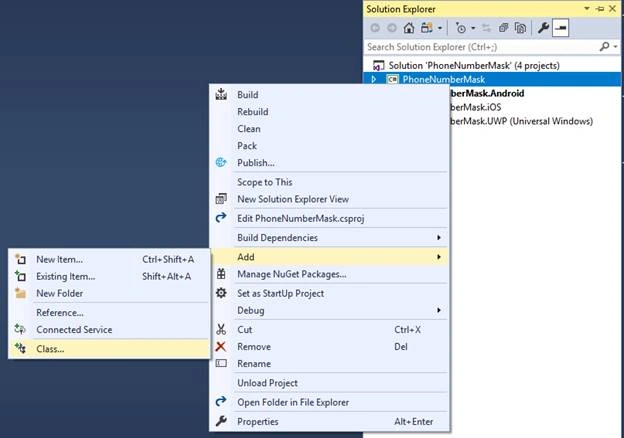
- Right-click on PCL/NET Standard (PhoneNumberMask) project and select Add and then click on Class, as shown in the below diagram.
- Then, the "Add New Item" window will open like below.
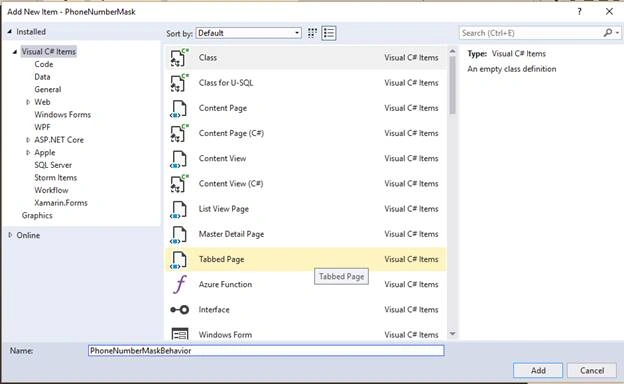
In the above window, I have named a class “PhoneNumberMaskBehavior” and then clicked on Add button.
- The class will be created as shown below.
- using System;
- using System.Collections.Generic;
- using System.Text;
- namespace PhoneNumberMask
- {
- class PhoneNumberMaskBehavior
- {
- }
- }
Replace the above class with the following code.
- using System;
- using System.Collections.Generic;
- using System.Text;
- using Xamarin.Forms;
- namespace PhoneNumberMask
- {
- public class PhoneNumberMaskBehavior : Behavior<Entry>
- {
- public static PhoneNumberMaskBehavior Instance = new PhoneNumberMaskBehavior();
- ///
- /// Attaches when the page is first created.
- ///
- protected override void OnAttachedTo(Entry entry)
- {
- entry.TextChanged += OnEntryTextChanged;
- base.OnAttachedTo(entry);
- }
- ///
- /// Detaches when the page is destroyed.
- ///
- protected override void OnDetachingFrom(Entry entry)
- {
- entry.TextChanged -= OnEntryTextChanged;
- base.OnDetachingFrom(entry);
- }
- private void OnEntryTextChanged(object sender, TextChangedEventArgs args)
- {
- if (!string.IsNullOrWhiteSpace(args.NewTextValue))
- {
- // If the new value is longer than the old value, the user is
- if (args.OldTextValue != null && args.NewTextValue.Length < args.OldTextValue.Length)
- return;
- var value = args.NewTextValue;
- if (value.Length == 3)
- {
- ((Entry)sender).Text += "-";
- return;
- }
- if (value.Length == 7)
- {
- ((Entry)sender).Text += "-";
- return;
- }
- ((Entry)sender).Text = args.NewTextValue;
- }
- }
- }
- }
- Similarly, create one more behavior to set Maximum length for phone number as below.
- using Xamarin.Forms;
- namespace PhoneNumberMask
- {
- public class EntryLengthValidator : Behavior<Entry>
- {
- public int MaxLength { get; set; }
- public int MinLength { get; set; } = 0;
- protected override void OnAttachedTo(Entry bindable)
- {
- base.OnAttachedTo(bindable);
- bindable.TextChanged += OnEntryTextChanged;
- }
- protected override void OnDetachingFrom(Entry bindable)
- {
- base.OnDetachingFrom(bindable);
- bindable.TextChanged -= OnEntryTextChanged;
- }
- void OnEntryTextChanged(object sender, TextChangedEventArgs e)
- {
- var entry = (Entry)sender;
- // if Entry text is longer than valid length
- if (entry.Text.Length > this.MaxLength)
- {
- string entryText = entry.Text;
- entryText = entryText.Remove(entryText.Length - 1); // remove last char
- entry.Text = entryText;
- }
- if (MinLength > 0)
- if (entry.Text.Length < this.MinLength)
- {
- ((Entry)sender).TextColor = Color.Red;
- }
- else
- ((Entry)sender).TextColor = Color.Black;
- }
- }
- }
- Open mainPage.xaml and paste the following code in it.
- <?xml version="1.0" encoding="utf-8" ?>
- <ContentPage xmlns="http://xamarin.com/schemas/2014/forms"
- xmlns:x="http://schemas.microsoft.com/winfx/2009/xaml"
- xmlns:behavior="clr-namespace:PhoneNumberMask"
- x:Class="PhoneNumberMask.MainPage">
- <StackLayout HorizontalOptions="Fill"
- VerticalOptions="Fill"
- Padding="5,20,5,5">
- <Label Text="Phone Number Formatting"
- FontAttributes="Bold"
- FontSize="Medium"></Label>
- <Entry Text="{Binding Phone}" Keyboard="Telephone">
- <Entry.Behaviors>
- <behavior:PhoneNumberMaskBehavior x:Name="PhoneMask" />
- <behavior:EntryLengthValidator MaxLength="12"/>
- </Entry.Behaviors>
- </Entry>
- </StackLayout>
- </ContentPage>
- Now, set either Android or iOS project as start-up project and run the application. You will see the output like below.
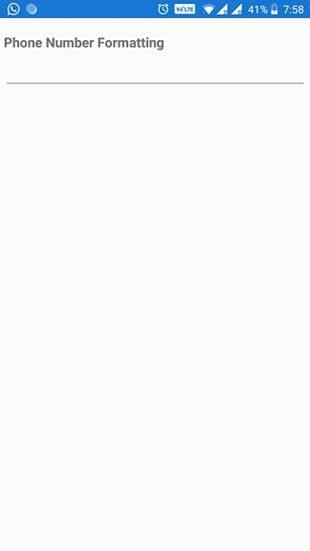
When I try to enter the phone number in Entry box shown in above screen, it has displayed like below.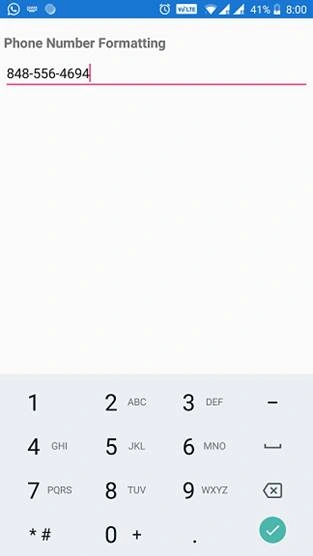
To view the full source code, please click here.
Summary
To display the phone number in XXX-XXX-XXXX format, I have used two behaviors for the Entry control defined in MainPage.xaml.
They are,
- EntryLengthValidator
To allow a maximum number of characters. - PhoneNumberMaskBehavior
To mask the phone number in XXX-XXX-XXXX format
yogesh cmPosted Mar 25, 2019, 2:31 AM
Hi @Suneel Kumar Biyyapu, How will you manage the keyboard phone number erase
Mahesh ChandPosted Jun 2, 2018, 8:59 PM
Updated title. Keep it clean and short. Cheers!