

Introduction
.Net 6 is an LTS (Long Tern Support) Version. It will be supported for three years. It is the latest long-term support release. The previous version, .Net Core 3.1 support will be finalized in December 2022, and support for .Net 5 will be ended May 2022. This article describes how to upgrade the solution from .Net Core 3.1 to .NET 6.0 with an example of Console application and .Net Core 3.1 class library project. Upgrading console applications and class library project is almost similar. However, there is some difference between Upgrading ASP.NET Core Web app.
Prerequisites
- Visual Studio 2022
Step 1 - Upgrade the Target Framework
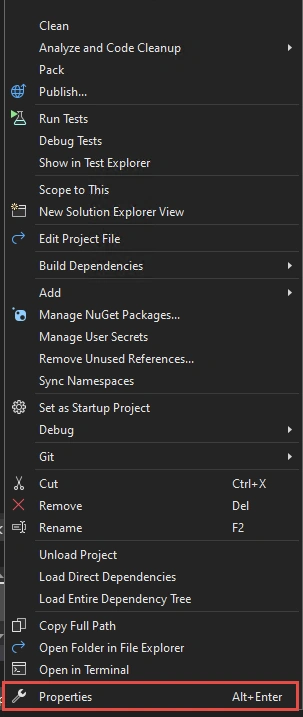
Right-click on the project then go to properties and change the target.
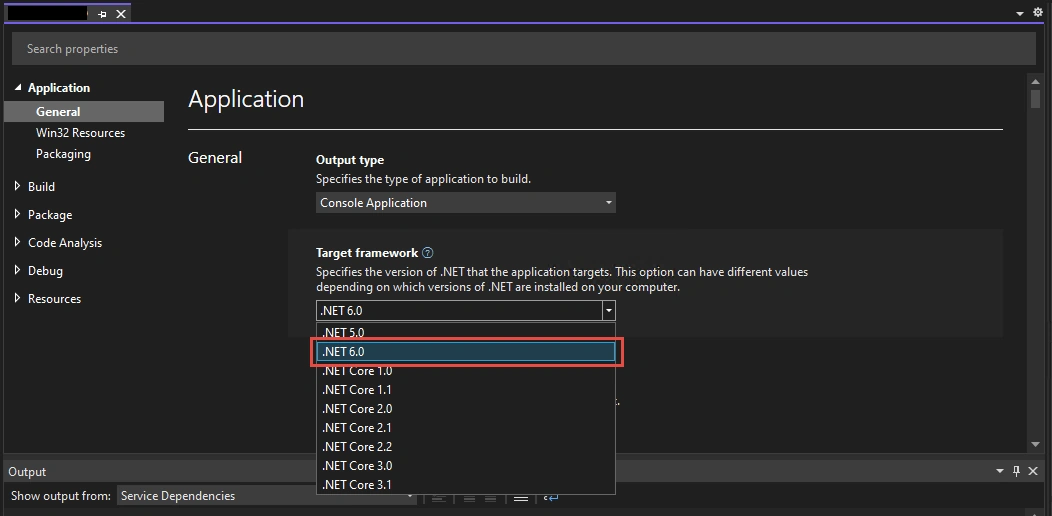
Then select the target framework to .NET 6.0 as depicted below and save it.
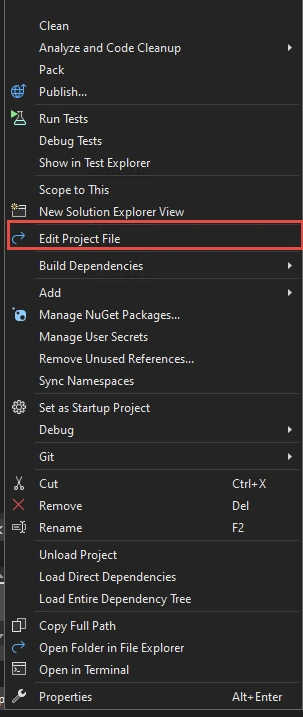
Alternatively from project.csproj file you can change the target Framework from netcore3.1 to net 6.0 as shown below.
<PropertyGroup>
    <OutputType>Exe</OutputType>
    <TargetFramework>net6.0</TargetFramework>
  </PropertyGroup>
Step 2 - Updating Package references
Update Package references if there are any. Go to Project.csproj file and upgrade packages as shown below.
For an instance upgrade the package Microsoft.AspNetCore.JsonPatch and Microsoft.EntityFrameworkCore.Tools and so on from version 3.1.6 to 6.0.0 as illustrated below.
<ItemGroup>
-    <PackageReference Include="Microsoft.AspNetCore.JsonPatch" Version="3.1.6" />
-    <PackageReference Include="Microsoft.EntityFrameworkCore.Tools" Version="3.1.6" />
-    <PackageReference Include="Microsoft.Extensions.Caching.Abstractions" Version="3.1.6" />
-    <PackageReference Include="System.Net.Http.Json" Version="3.2.1" />
+    <PackageReference Include="Microsoft.AspNetCore.JsonPatch" Version="6.0.0" />
+    <PackageReference Include="Microsoft.EntityFrameworkCore.Tools" Version="6.0.0" />
+    <PackageReference Include="Microsoft.Extensions.Caching.Abstractions" Version="6.0.0" />
+    <PackageReference Include="System.Net.Http.Json" Version="6.0.0" />
</ItemGroup>
Step 3 - Delete obj and bin folder
You may need to delete the existing bin and obj folder. Go to the respective project directory and delete those folders. Additionally, you can delete the NuGet cache by running the below command.
dotnet nuget locals --clear all
Step 4 - Build the solution
Then build the solution and see whether there are errors or your app is built successfully. If there are errors based on an error message correct the code and rebuild the solution. On successful build of the application, your app is upgraded to the .NET 6.0.
The above three steps are required to follow to upgrade the class library and console application to migrate from .NET Core 3.1 to .NET 6.0.
On the other hand, to update the Asp.NET Core 3.1 and Blazor application you need to follow more steps in addition to the above three.
Following are some changes you need to consider for upgrading ASP.NET Core 3.1 web application to .NET6
- Minimal hosting and statup.cs file changes
Note that minimal hosting unifies the Startup.cs and Program.cs to a single Program.cs file. Moreover, the ConfigureServices and Configure are no longer used in .NET6.0. - Model Binding
Datetime values are model bound as UTC timezone. For applications build on ASP .NET Core 5 and later, model binding binds the DateTime as UTC timezone whereas, in applications built using ASP.NET Core 3.1 and earlier, Datetime values were model bound as local time and the timezone was determined by the server. - Docker Image
If your app uses docker then you need to pull a Docker image that consists of ASP.NET Core 6.0 runtime as well. The below command can be used for that.
docker pull mcr.microsoft.com/dotnet/aspnet:6.0
You can check the details on the below document.
Summary
In this article, we have learned how to upgrade the project from .NET Core 3.1 to .NET 6.0 with an example of a console application. This article will be useful while migrating your application from .NET Core 3.1 to .NET 6.0 without encountering any issues. Best of luck to migrate your application before the end of support.
References
Hemanth KumarPosted May 25, 2022, 4:34 PM
Thank you for the detailed writeup.