Introduction
The Interoperability services make it very easy to work with COM Capable Applications such as Word and Excel. You can also refer to my previous article on the topic: Real-time Stock Quotes in Excel using .NET for more information on accessing Excel via .NET. This article was written in response to a question asking How do I open an excel file and read it using .NET?
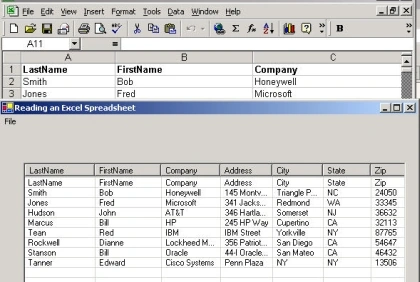
Figure 1 - Excel Spreadsheet read into a ListView
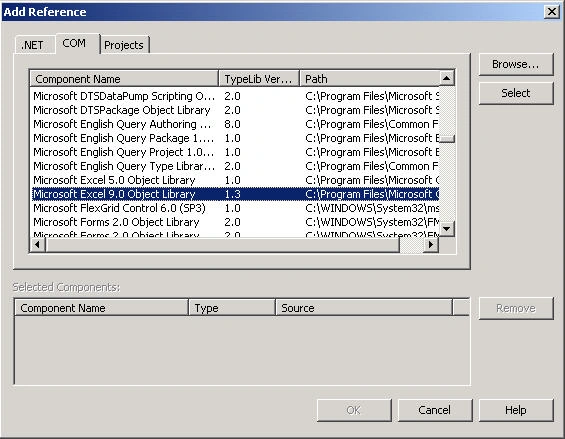
The first step is to create a reference in your project to Excel 9.0 Objects Library. This is done by right mouse clicking on the References folder in the Solution Explorer and choose Add Reference. This brings up the Tab Dialog below. Choose the COM Tab and pick Microsoft Excel 9.0 Objects Library.
Figure 2 - Adding an Excel Reference
This action puts an Interop.Excel.dll and Interop.Office.dll into your bin directory so you can manipulate excel.
Now we can declare our Excel Application Object and the compiler will recognize it:
- private Excel.Application ExcelObj = null;
Excel is launched and an Application reference is obtained in the constructor of our form. First an Excel Application object is constructed. Then we check to make sure Excel was actually started. If it was, we have a valid application object and we can now use it to open a file:
- public Form1()
- {
-
- InitializeComponent();
- ExcelObj = new Excel.Application();
-
- if (ExcelObj == null)
- {
- MessageBox.Show("ERROR: EXCEL couldn't be started!");
- System.Windows.Forms.Application.Exit();
- }
-
- ExcelObj.Visible = true;
- }
The code for opening the Excel file is shown below. The code uses the OpenFileDialog component to get the path name for the Excel file. The Excel file is opened using the WorkBooks collections' Open method. This method takes 15 parameters with the following definition.
Function Open(Filename As String, [UpdateLinks], [ReadOnly], [Format], [Password], [WriteResPassword], [IgnoreReadOnlyRecommended], [Origin], [Delimiter], [Editable], [Notify], [Converter], [AddToMenuRecentlyUsed]) As Workbook
We really are only interested in the FileName, but have added the other default parameters for your reference. There is also an OpenText method in Workbooks for opening tab or comma delimited text files.
- private void menuItem2_Click(object sender, System.EventArgs e)
- {
-
- this.openFileDialog1.FileName = "*.xls"; if (this.openFileDialog1.ShowDialog() == DialogResult.OK)
- {
-
-
- Excel.Workbook theWorkbook = ExcelObj.Workbooks.Open(openFileDialog1.FileName, 0, true, 5,
- "", "", true, Excel.XlPlatform.xlWindows, "\t", false, false, 0, true);
-
- Excel.Sheets sheets = theWorkbook.Worksheets;
-
- Excel.Worksheet worksheet = (Excel.Worksheet)sheets.get_Item(1);
-
- for (int i = 1; i <= 10; i++)
- {
- Excel.Range range = worksheet.get_Range("A" + i.ToString(), "J" + i.ToString());
- System.Array myvalues = (System.Array)range.Cells.Value;
- string[] strArray = ConvertToStringArray(myvalues);
- listView1.Items.Add(new ListViewItem(strArray));
- }
- }
- }
You also may want to note the ConvertToStringArray method which is used to convert a System.Array into a string array. If someone knows an easier way to do this, please let me know and I'll alter the article. The problem is that an Excel Array comes back as two dimensional even if you are selecting a range of a single row, so you need to change the 2-d array into something the listview can accept. Also the listview array is 0 based and the Excel range array is 1 based.
- string[] ConvertToStringArray(System.Array values)
- {
-
- string[] theArray = new string[values.Length];
-
- for (int i = 1; i <= values.Length; i++)
- {
- if (values.GetValue(1, i) == null)
- theArray[i - 1] = "";
- else
- theArray[i - 1] = (string)values.GetValue(1, i).ToString();
- }
- return theArray;
- }
That's all there is to it! Now you can read in all your old Excel Databases. Perhaps you can even use ADO.NET to place them into a database! (Could be the topic for the next article).
VBA Resources for Excel:
Excel VBA Made Easy
Affiliation Links:
Learn MS Office the Easy Way Passing Microsoft Certification Basic Programming 

Mohamed ElqassasPosted Apr 18, 2017, 8:45 PM
Good work..............
kalu singh raoPosted Jul 7, 2016, 1:47 AM
Nice...
SharadPosted Jul 17, 2015, 3:43 AM
good one...
Anton BithinkPosted May 2, 2013, 11:33 PM
thanks mike
srilekhaPosted Jan 31, 2011, 12:40 AM
hi all, I want to upload a excel file and i want to read the excel file details using c#.net can any one say me that i how should i write the code for this.
reena kapoorPosted Jun 4, 2010, 1:04 AM
how could we do the same thing in vb.net
tee peePosted Feb 1, 2010, 7:13 PM
Thanks Mike
sachu ssPosted May 25, 2009, 1:02 PM
Can anyone here please suggest how to implement the same using asp .net application? Thanks in advance....
Anitha JosephPosted Jan 20, 2009, 11:36 PM
I tried your code .I'm getting an exception :"Retrieving the COM class factory for component with CLSID {00024500-0000-0000-C000-000000000046} failed due to the following error: 80040154. " Can i do this without installing excel on my system?..Is there any way of doing this without installing excel ??
steven staleyeditedPosted Nov 15, 2008, 12:31 AMEdited Nov 15, 2008, 12:36 AM
I am trying to use the code above to read a xls file. I had to modify the code a bit to get it to work on my computer, like putting Microsoft.Office.Interop before every Excell reference. I also had to use Microsoft.Excell.12 as the reference instead of 9. I dont know if that makes any kind of difference. My problem is that for some reason, the file is not being recognized. I did not use the OpenFileDialog class, as I know the single file I want to open, so instead I just put the file name I wanted to open as the 1st parameter in the OPEN function. Those are the only major differences between what I have and what was posted above. What comes up is a prompt asking me to check the spelling of the file and then asking if I want to quit or continue, quit being closing the program out, and continue being continue on from where I was. The data never shows up or it never finds the file for some reason. I made sure that the file was named correctly and even tried placing it in different places on my computer. I am not dealing with a database at all, just need to read a single excell file. Can someone please help. Thanks.
SeedPosted Sep 15, 2008, 10:35 AM
Doesn't this solution require that MS Office be installed on the server? thx, seed
ravi naikPosted Aug 27, 2008, 6:54 AM
hi, i have read from excel cell by cell as the excell file is not formatted . then i want to insert the values into sql server2005. please do f\provide some code i am struck with it.. Thanks SAKEE
ravi naikPosted Aug 27, 2008, 6:53 AM
hi, i have read from excel cell by cell as the excell file is not formatted . then i want to insert the values into sql server2005. please do f\provide some code i am struck with it.. Thanks SAKEE
Filo WalaskyPosted Mar 18, 2008, 11:19 AM
Hi, Nice article, very helpful. Now: How can I take the data in the datagrid and display it in a new spreadsheet. Please help!
harsh kapoorPosted Mar 8, 2008, 3:48 AM
plz write the code for transfer the data of one excel sheet into the another excel sheet. plz write the runnable code and way to run the code.
Hemant BaisPosted Mar 6, 2008, 5:52 AM
i opend the exel file by following code. Dim xlTmp As Excel.Application xlTmp = New Excel.Application Dim wb As Excel.Workbook wb = xlTmp.Workbooks.Open("C:\UnitTest files for import\MapTest.xls") xlTmp.Visible = True 'xlTmp.ActiveWorkbook.ReadOnly wb.Activate() But it not let me save the file by same name
ScottPosted Mar 5, 2008, 9:39 AM
This is wonderful, but, I need to insert data into cells. How is this done?
Filo WalaskyPosted Mar 2, 2008, 12:12 PM
How would I make the listView to not only show the first column but the whole document's data. It currently shows only the first column and it lists the data vertically. I want the listview to show the data exactly the same way you did it in this example.
Filo WalaskyPosted Mar 2, 2008, 12:09 PM
How would I make the listView to not only show the first column but the whole document's data. It currently shows only the first column and it lists the data vertically. I want the listview to show the data exactly the same way you did it in this example.
Mukesh WadhwaPosted Dec 27, 2007, 3:23 AM
Hi, Can any body help me for writing the code for merging cells. Thanks Mukesh
Mukesh WadhwaPosted Dec 19, 2007, 6:31 AM
Hello sir, This is mukesh here. i tried ur example.its working fine.Thanks,but i have a question in this,if i use the same file name in Save as, it shows a dialog "File already exist...overwrite". I need not to show such dialog box when SaveAs metod of workbook invoked.it should overwrite the file. plz help me and reply on [email protected] Thanks & Regards Mukesh
Kamrul AhsanPosted Sep 17, 2007, 7:44 AM
suppose that i have list view. I want to get the datas in an exel file. how can i do.
Raja NagarajanPosted Aug 18, 2007, 3:38 AM
I want to create one more worksheet in Excel from .Net... CAn Anyone help me how to do that?
MIni PillaieditedPosted Aug 10, 2007, 2:53 AMEdited Aug 10, 2007, 2:57 AM
WhenI use this code I am getting an error from my remote client server. IN local server creates no peroblem. then errror I am getting is "Retrieving the COM class factory for component with CLSID {00024500-0000-0000-C000-000000000046} failed due to the following error: 80070005. " Can you please help me to solve this problem? My email Id is [email protected]
Florian PatzleditedPosted Jul 18, 2007, 8:40 AMEdited Jul 18, 2007, 9:53 AM
Hi, good article. But i'd need to get the comments to the extracted cells, too. Any ideas how to include this in this example? I found other articles about deleting & adding comments, but how to get the comment text into my C# programme? Thanks in advance! [edit] Comment.Shape.AlternativeText returns a string with the comment text.
Indrasis AcharyaeditedPosted May 31, 2007, 8:07 PMEdited May 31, 2007, 8:10 PM
I am trying to open a form from a customised menu bar I have created by C#.net. The form is opning but stops responding and the controls over it are not visible. private void MenuItem_Click(Office.CommandBarButton Ctrl, ref Boolean cancelDeafult ) { try { Form2 frm2 = new Form2(); frm2.Show(); } catch (Exception e) { MessageBox.Show(e.Message, e.Source); } Searching for solution.
manu sharmaPosted May 22, 2007, 2:10 AM
Excel.Application is not detected . i am getting error Error 1 The type or namespace name 'Excel' could not be found . i have installed excel 2003 , i have selected MS excel 11.0 in the COM tab
JacobsPosted Apr 19, 2007, 3:33 AM
The Interop.Office.dll is not stored in my bin directory. And my code to generate an Excel is also not working. What did i forgot to do/install? Can anaybody help me please?? Thx!
Amita SainiPosted Feb 27, 2007, 3:06 AM
This artical is very helpful to me to develope an web- application .net which is related to upload a excel file but now i want to store it's contents in SQL server2000 database which create tables dynamically , thanks for ur help
vivek pawarPosted Jan 30, 2007, 6:47 AM
hi, i opened excel file in my c# application in readonly mode with open(.......) method and visible = false; and after that if open same excel file seperately in window my application throws exception
Prabhu BNPosted Aug 4, 2006, 11:37 AM
How to delete first Row from an Excel sheet using C#.net. For my project its very important. I am New for DotNet. So i don't know what to do. Please Help. Please mail me: [email protected]