
Introduction
In this simple article I'd like to show two different ways how you can pass control values (i.e. TextBox) from one Windows Form to a second Windows Form.
Actually I never worried about this issue until I also had to struggle to find a solution myself in a C#-project.
Although from time to time I am still reading on .NET Forums that people are always asking always the same question: i.e.:
please help, how can I pass a TextBox value or a variable from a Form to a second Form etc..
Of course, there were some interesting ways to do it.
Anyway, in terms of this issue I have also 2 different ways/solutions which I would like to share with you and which I think might be the interesting solutions to those questions on the .NET forums.
As you know, Visual Studio.NET automatically generates a solution when you create a new project. There is as you will see for this project one solution "PassingValuesFromFormToForm" containing 2 different projects.
Project "ProjectPassValuesFromFormToForm_1Way" is for the first way, project "ProjectPassValuesFromFormToForm_2Way" is for the second way.
First Way, how to pass TextBox values from one Form to Another?
For this reason I use 2 TextBoxes as input on the Form1.
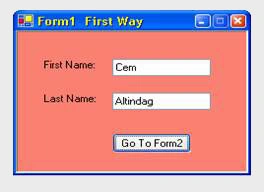
If you click the "GoToForm2" button the values of these 2 TextBoxes will appear on Form2.
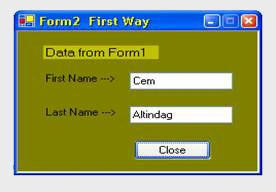
Form1.cs in project "PassingValuesFromFormToForm_1"
If you use Visual Studio.NET and drag/drop the 2 TextBoxes on the Form, access modifier of these 2 TextBoxes in Form1.cs will be private by default. It is therefore very important here you change the modifier private to public because otherwise these 2 TextBoxes would be inaccessible in Form2.cs.
Form1.cs
public class clsForm1 : System.Windows.Forms.Form
{
public System.Windows.Forms.TextBox textBox1InForm1;
public System.Windows.Forms.TextBox textBox2InForm1;
...
...
}
As a reminder I'd like to make mention of access modifiers briefly used to specify the declared accessibility of a member or a type in OO-Programming.
- private - Private members are accessible only within the body of the class or the struct in which they are declared. Access is limited to the containing type.
- public - Public access is the most permissive access level. You have no restrictions on accessing public members.
- protected - A protected member of a base class can be accessed in a derived class only if the access takes place through the derived class type.
- internal - Internal members are accessible only within files in the same assembly.
- protected internal - Protected internal access is limited to the current assembly or types derived from the containing class.
More on: MSDN
Now, after entering some text in 2 TextBoxes you click the "Go to Form2" button. The code within the event handler for the btGoToForm2_Click which is necessary to open/show the Form2 is as follows:
private void btGoToForm2_Click(object sender, System.EventArgs e)
{
//instantiate frm2 as local
clsForm2 frm2 = new clsForm2();
//frm1inForm2 is the instance of the class clsForm1 in Form2.cs declared as public
frm2.frm1inForm2 = this;
//Display the Form2 as a modal dialog box.
frm2.ShowDialog();
}
I think the code is self-explanatory. The only additional thing to say here is not to forget to change the modifier private to public of the instance of the class clsForm1 "frm1inForm2" in Form2.cs. Otherwise you get the compile-error like this:
'PassingDataFromForm1ToForm2.clsForm2.frm1inForm2' is inaccessible due to its protection level
Now we look at Form2.cs
Form2 looks like Form1 containing 2 TextBoxes because we want to display the values of 2 TextBoxes from Form1 on Form2 in 2 new TextBoxes. Here in Form2.cs we keep the access modifier private for 2 TextBoxes and declare the instance of the class clsForm1 "frm1inForm2" in Form2.cs as public because we want to access to the TextBoxes on Form1 .
public class clsForm2 : System.Windows.Forms.Form
{
private System.Windows.Forms.TextBox textBox1_InForm2;
private System.Windows.Forms.TextBox textBox2_InForm2;
...
...
public clsForm1 frm1inForm2;
...
...
}
If the Form2 is loading the following code will be executed which is I think the most important part in this application.
private void Form2_Load(object sender, System.EventArgs e)
{
this.textBox1_InForm2.Text = ((clsForm1)this.frm1inForm2).textBox1InForm1.Text;
this.textBox2_InForm2.Text = ((clsForm1)this.frm1inForm2).textBox2InForm1.Text;
}
clsForm1 : Class name in Form1.cs
frm1inForm2 : public object instaniation of clsForm1 in Form2.cs
It assigns the 2 TextBoxes "textBox1Form1" and "textBox2InForm1" of the Form1 to the 2 TextBoxes(textBox1_InForm2, textBox2_InForm2) on Form2 combined with "(clsForm1)this.frm1inForm2)" you can now have access to the control values on Form1 from the Form2.
Second Way, how to pass TextBox values to a Second Form?
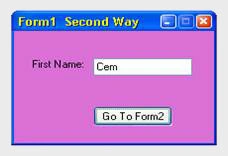
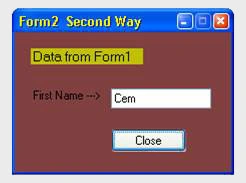
For the second way I make use of passing parameter to constructor.
A constructor can generalize for example the initialization, assigning start values of an object. It is like using a method. As you know all classes must have at least one constructor, which initializes new instances of the class. An instance of a class is an object. You access an object's functionality by calling its methods and accessing its properties, events, and fields.
A default constructor is automatically provided by Visual Studio.NET like the following:
anil mPosted Jun 20, 2012, 7:16 AM
gfhfghg
gaurav shindePosted Dec 19, 2010, 1:48 AM
thanks.................. this is very easy to understand. i wan't to know same situation how solve using component.
Dave ChikaPosted Oct 31, 2010, 11:00 PM
hi, i have a multiple window forms (8 windows forms) application in C# language, but am having problem of passing data between the forms in realtime,i used Delegates for all the child forms which allows me to pass data from parent form but i have to open all the 8 window forms else i get a compiler error. i.e upon start of my application i have to open all the 8 windows in other for the application to pass data effectively. Brief Description of my Project my application accepts realtime data (8 time chaging data from a hardware interfaced to the serialport) and sends it to my c# application which displays the 8 variables in 8 different textboxes on the main form also each variable has its own window form acessed via a button click, i have used delegates to pass data from the parent form(Main) to all the eight child forms but the problem is that all the forms has to be open before my application will pass data to it otherwise it throws an exception(compiler error) when i try to debug.how can i solve this problem. thanks
Dave ChikaPosted Oct 3, 2010, 12:59 PM
i want to pass data from form 1 to form 2 in real time i.e the data on the textbox on form 1 changes with time,continuously updated (real-time data acquisition measuring the temperatures of a room which is coming from a hardware device attached to the Pc) how can i do that in c#
praveen khadePosted Sep 2, 2010, 7:10 AM
thanks alot
Karthikeyan SundaramPosted Jul 19, 2010, 8:27 AM
Its really helpful for me.
akhmad firdausiPosted Dec 30, 2009, 9:47 PM
thanks for tutorial, it really useful. And I'll wait next your writing..
Umaid SaleemPosted Dec 19, 2009, 7:21 AM
Form6 frm4 = new Form6(this.listbox1); for (int i=0;i<frm4.listBox1.Items.Count;i++) { // <P> xmlWriter.WriteStartElement("P"); xmlWriter.WriteAttributeString("","DISP","",frm4.listBox1.Items[i].ToString()); xmlWriter.WriteString(frm4.listBox2.Items[i].ToString()); // </P> xmlWriter.WriteEndElement(); }
Sarla SankarPosted Feb 6, 2008, 11:49 PM
fine,It's working. But i have small query? How can i close the first form before opening the form2 ? When i click on btn_Goto, the from1 will be closed and Only form2 will be Displayed? How can i?
kunal sehgalPosted Nov 8, 2007, 1:44 AM
Hi, i found this article very very usful . actually i wanted to know something about biztalk server . how is the market for biztalk in comin times. i want to shift into something related to tool based works and thats why biztak i heard about somewhere and asking you pplzz. can u please suggest me something about that. mail id: [email protected]
RobertPosted Aug 12, 2007, 1:35 PM
You posted an article on the above listed subject some time ago and i am having the following problem. 1. I tried to pass values from Form1 to Form2, setting form2's textbox to public and in form1 i do the following: Form2 f2 = new Form2(); f2.label1.Text = this.TextBox1.Text; i get NO compiler errors, however when i click Submit on Form1 i get a NulReferenceException was unhandled error! Can you please help. 2. I also tried to access the value of Form1.TextBox1 from Form2, NO compiler errors, however, after making Form1's TextBox public i got the same error! Please help! Thanks, Robert Green
shahaan khanPosted Jul 11, 2007, 7:44 PM
Nice wrok
Joy ChakeditedPosted Apr 15, 2006, 12:43 PMEdited Jun 13, 2006, 8:40 PM
Hi, Thank you for your very good example on passing control values from form1 to form2 text box. I would like to know from you, how best I can do the following: When I click a button1 in form1, the click event should read the value from txtBox1 of form1 and store it in a variable strParam1 (string or int type) and go to the child form form2. After I insert a value in textBox2 of form2 and click a button2 of form2 the click event of button2 should compare the value of txtBox2 of form2 with the value of txtBox1 of form1, that was stored in the variable strParam1read a value from form1. My point of asking is that I would not like to create a text box in form2 and transfer the value from txtBox1 of form1 to that text box and then compare. I would like to keep form2 as simple as possible. Thanks Joy
Joy ChakeditedPosted Apr 14, 2006, 3:45 AMEdited Aug 24, 2006, 7:25 AM
My problem is-- I have used a btn_click event to generate a new windows form from a parent form. Say my parent form is form1 and child is form2. I have a specific value in one of the textboxes, say txtbox1 of form1. when I click a button button1 of form1, the btn_click event of button1 of form 1 takes me to form2 which has a text box, say txtbox2, where I need to input a value. When I click a button, say button 2 of form 2, the btn_click event of button 2 should access both the values of form1.txtbox1 and form2.txtbox2 and produce a difference to be shown on a message box. Can you please let me know the simple ways to do that.
rrPosted Mar 8, 2006, 8:27 AM
Why not just make the textboxes on form2 public. Then you can access them directly from form1 e.g. clsForm2 frm2 = new clsForm2(); <?xml:namespace prefix = o /><o:p> frm2.textbox1.Text = this.textbox1.Text;</o:p> <o:p>Better yet, leave the textboxes of form2 as private and provide some public properties to set them.</o:p>