

Here you can have your farm back up for various purposes, for example to save a copy or to restore it to another server. All admins should be able to perform farm backup as this is one of the most used functions on central administration.
How to perform it?
Let’s open Central Admin of SharePoint on your machine. On your Windows desktop screen, click Start >> Administrative Tools >> SharePoint 2013 Central Administration.
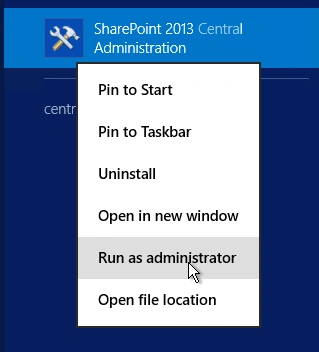
- Run it as an administrator to have elevated privileges.
- You will see the screenshot given below.
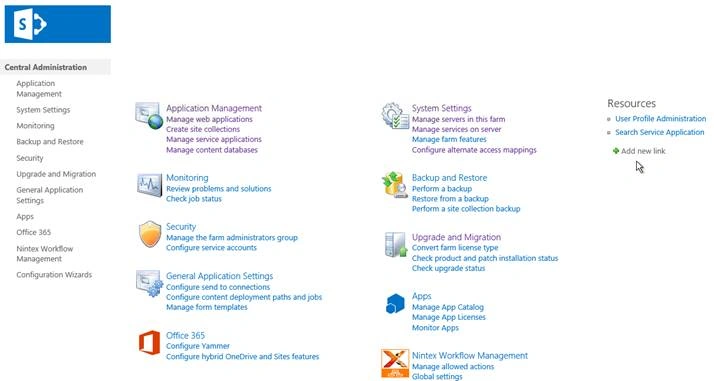
- Central Admin is configured under the categories given above.
- Click on "Monitoring".
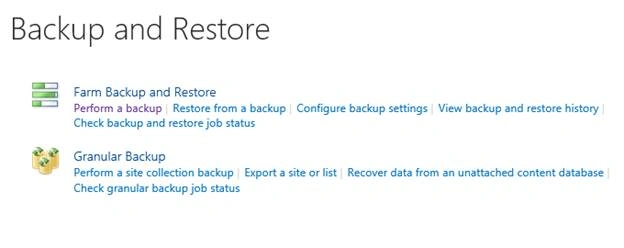
- Go to "Backup and Restore".

- Click on “Perform a backup“.
- You will see the screen below. Click on it.
Configure
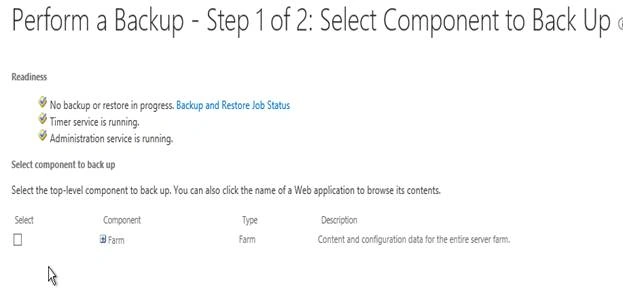
It’s a two level configuration.
You can either back up the whole farm or you can choose some components or solutions within your farm.
Once done click on “Next”.
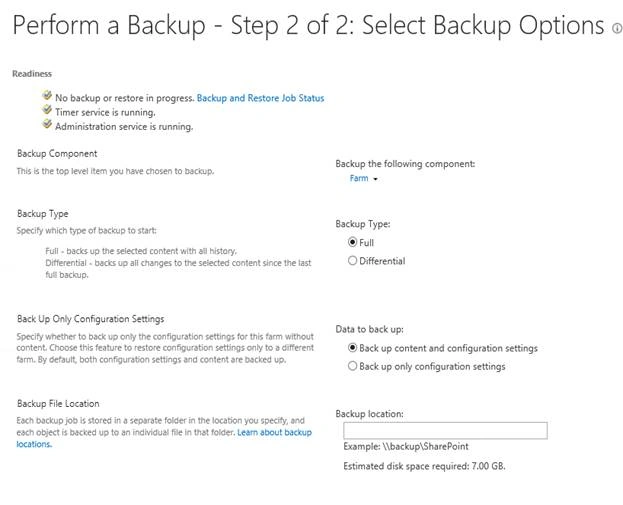
- Readiness
As we can see from the status, there is no back up in progress, and timer service and admin service are running. - Backup Component
It provides you the list of components you have selected for backup. - Backup Type
Choose a backup among the following, - Full
To have a complete back up with history. - Differential
To have a backup with changes from the last backup. - Back Up Only Configuration Settings
Here you can choose if you want to back up the content or just the configuration or both. - Backup File Locations
Provide a path to store the backup.
Once the configuration is done, click on Start Backup.
The backup will be saved on the location provided with all the components you want to back up on the central administration.
In this article, we saw how to perform farm backup in SharePoint 2013 Central. There are more articles to come on Central Administration. Until then, keep reading and keep learning!
Join the conversation! Your thoughts help the community grow.