

Introduction
This article describes how to play a love calculator in JavaScript. A love calculator is an application that allows you to know how compatible you and your partner are and how strong shall be the depth of love between you and your dear one.
Coding
Love_Calculator.html
- <!DOCTYPE html PUBLIC "-//W3C//DTD XHTML 1.0 Transitional//EN" "http://www.w3.org/TR/xhtml1/DTD/xhtml1-transitional.dtd">
- <html xmlns="http://www.w3.org/1999/xhtml">
- <head>
- <title></title>
- <script type="text/javascript">
- </script>
- <style type="text/css">
- #Text1
- {
- z-index: 1;
- left: 451px;
- top: 169px;
- position: absolute;
- width: 28px;
- height: 21px;
- }
- #Text2
- {
- z-index: 1;
- left: 437px;
- top: 88px;
- position: absolute;
- }
- .style12
- {
- width: 138px;
- }
- .style13
- {
- width: 178px;
- }
- #Button1
- {
- width: 163px;
- }
- .style14
- {
- width: 184px;
- }
- #result
- {
- width: 27px;
- z-index: 1;
- left: 511px;
- top: 155px;
- position: absolute;
- height: 22px;
- }
- </style>
- </head>
- <body>
- <script type="text/javascript">
- function calculateLove()
- {
- Fname = document.getElementById('firstname').value.toUpperCase();
- FnameLength = Fname.length;
- Sname = document.getElementById('secondname').value.toUpperCase();
- SnameLength = Sname.length;
- var lovecount=0;
- for(var i=0;i<FnameLength;i++)
- {
- var L1=Fname.substring(i,i+1);
- if(L1=='A') lovecount +=3;
- if(L1=='E') lovecount +=3;
- if(L1=='I') lovecount +=3;
- if(L1=='O') lovecount +=3;
- if(L1=='U') lovecount +=4;
- if(L1=='L') lovecount +=1;
- if(L1=='V') lovecount +=4;
- }
- for (var count = 0; count < SnameLength; count++)
- {
- var L2 = Sname.substring(count, count + 1);
- if(L2=='A') lovecount +=3;
- if(L2=='E') lovecount +=3;
- if(L2=='I') lovecount +=3;
- if(L2=='L') lovecount +=3;
- if(L2=='O') lovecount +=4;
- if(L2=='V') lovecount +=1;
- if(L2=='E') lovecount +=4;
- }
- var Total = 0;
- if (lovecount > 0) Total = 5 - ((FnameLength + SnameLength) / 2)
- if (lovecount > 2) Total = 10 - ((FnameLength + SnameLength) / 2)
- if (lovecount > 4) Total = 20 - ((FnameLength + SnameLength) / 2)
- if (lovecount > 6) Total = 30 - ((FnameLength + SnameLength) / 2)
- if (lovecount > 8) Total = 40 - ((FnameLength + SnameLength) / 2)
- if (lovecount > 10) Total = 50 - ((FnameLength + SnameLength) / 2)
- if (lovecount > 12) Total = 60 - ((FnameLength + SnameLength) / 2)
- if (lovecount > 14) Total = 70 - ((FnameLength + SnameLength) / 2)
- if (lovecount > 16) Total = 80 - ((FnameLength + SnameLength) / 2)
- if (lovecount > 18) Total = 90 - ((FnameLength + SnameLength) / 2)
- if (lovecount > 20) Total = 100 - ((FnameLength + SnameLength) / 2)
- if (lovecount > 22) Total = 110 - ((FnameLength + SnameLength) / 2)
- if (FnameLength == 0 || SnameLength == 0)
- Total = "Error";
- if (Total < 0) Total = 0;
- if (Total > 99) Total = 99;
- var txtresult = document.getElementById("result");
- txtresult.value = Math.floor(Total).toString();
- //alert("Toatal" + Math.floor(Total));
- }
- </script>
- <div style="height: 220px">
- <table style="border-style: ridge; border-color: #FF99FF; width: 33%; height: 187px;">
- <tr>
- <td class="style13">
- </td>
- <td class="style12" style="color: #FF66FF; font-weight: bold">
- Love Calculator</td>
- <td class="style14">
- </td>
- </tr>
- <tr>
- <td class="style13">
- <input id="firstname" type="text" /></td>
- <td class="style12">
- <img alt="" src="l1.gif" style="height: 98px" /></td>
- <td class="style14">
- <input id="secondname" type="text" /></td>
- </tr>
- <tr>
- <td class="style13">
- </td>
- <td class="style12">
- <input id="Button1" style="color: #FF66FF; font-weight: bold;" type="button"
- value="Calculate" onclick="calculateLove()" /></td>
- <td class="style14">
- <img id="img" alt="" src="love2.jpg" style="height: 60px; width: 112px" /><input id="result"
- readonly="readonly" type="text" style="border-style: hidden" /> </td>
- </tr>
- </table>
- </div>
- </body>
- </html>
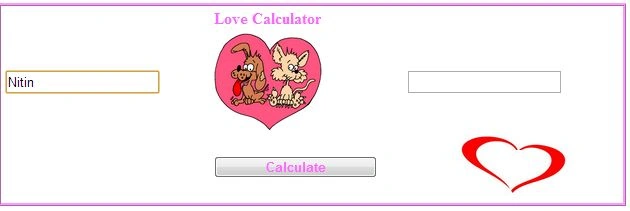
Output 1
Enter a name in the first TextBox, as in:
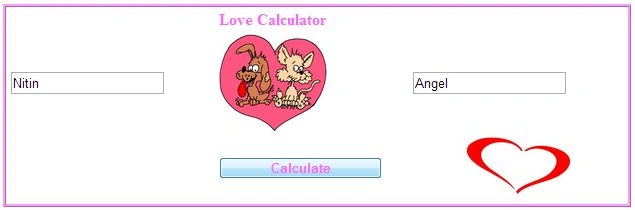
Output 2
Enter a name in the second TextBox, as in:
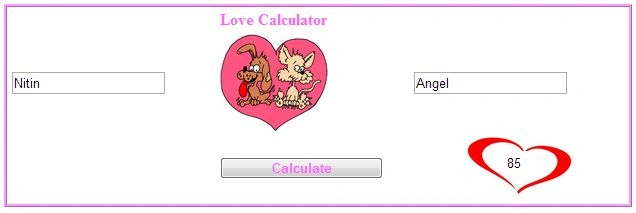
Output 3
Click on the calculate button, then see the results as in the following:
For more information, download the attached sample application.
Nitin BhardwajPosted Apr 30, 2013, 6:04 AM
Thank you
Prabhakar MauryaPosted Apr 27, 2013, 4:26 AM
Nice Article Nitin....