
- Open Visual Studio 2010.
- Go to File => New => Project.
- Select Event Receiver under installed template category SharePoint and name it as EventReceiver.
- Target the .Net Framework 3.5.
- Click OK.
- In the SharePoint Customization Wizard, enter the URL of the local site where you want to use (http://demo2010a:5000/) and select Deploy as a farm solution.
- Click Next. SharePoint Customization Wizard will pop up as shown below.
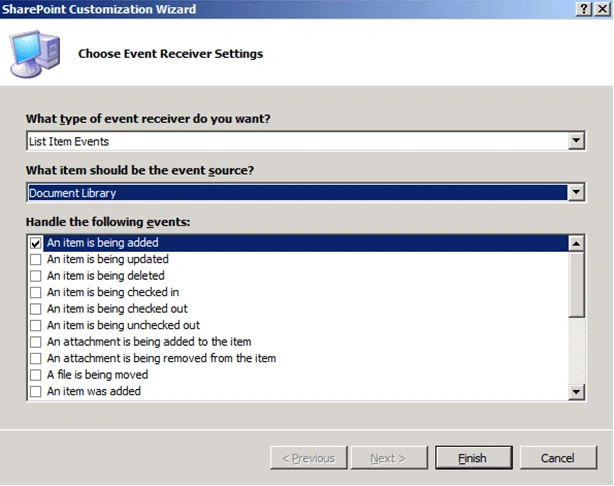
- Click Finish.
- Right click the Solution Explorer, click Add and select SharePoint "Layouts" Mapped Folder.

- Right Click on EventReceiver folder, click Add and select New Item.
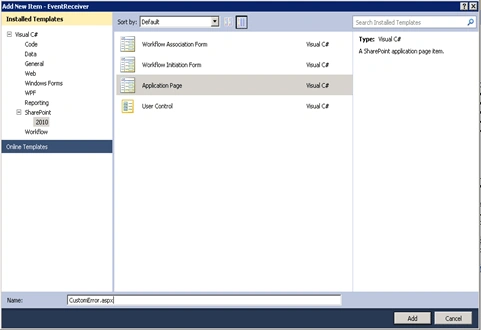
- Select Application Page under installed template category SharePoint and name it As CustomError.aspx.
- In the EventReciever1.cs replace the method ItemAdding with the below one.
public override void ItemAdding(SPItemEventProperties properties)
{
if (DateTime.Now.Hour > 9 || DateTime.Now.Hour < 17)
{
properties.Status = SPEventReceiverStatus.CancelWithRedirectUrl;
properties.RedirectUrl = "/_layouts/EventReceiver/CustomError.aspx";
}
}
- CustomError.aspx
<%@ Assembly Name="$SharePoint.Project.AssemblyFullName$" %>
<%@ Import Namespace="Microsoft.SharePoint.ApplicationPages" %>
<%@ Register Tagprefix="SharePoint" Namespace="Microsoft.SharePoint.WebControls" Assembly="Microsoft.SharePoint, Version=14.0.0.0, Culture=neutral, PublicKeyToken=71e9bce111e9429c" %>
<%@ Register Tagprefix="Utilities" Namespace="Microsoft.SharePoint.Utilities" Assembly="Microsoft.SharePoint, Version=14.0.0.0, Culture=neutral, PublicKeyToken=71e9bce111e9429c" %>
<%@ Register Tagprefix="asp" Namespace="System.Web.UI" Assembly="System.Web.Extensions, Version=3.5.0.0, Culture=neutral, PublicKeyToken=31bf3856ad364e35" %>
<%@ Import Namespace="Microsoft.SharePoint" %>
<%@ Assembly Name="Microsoft.Web.CommandUI, Version=14.0.0.0, Culture=neutral, PublicKeyToken=71e9bce111e9429c" %>
<%@ Page Language="C#" AutoEventWireup="true" CodeBehind="CustomError.aspx.cs" Inherits="EventReceiver.Layouts.EventReceiver.CustomError" DynamicMasterPageFile="~masterurl/default.master" %>
<asp:Content ID="PageHead" ContentPlaceHolderID="PlaceHolderAdditionalPageHead" runat="server">
</asp:Content>
<asp:Content ID="Main" ContentPlaceHolderID="PlaceHolderMain" runat="server">
<label id="lblErrorMessage" runat="server"><b>You can upload documents only between 9am to 5pm </b></label>
</asp:Content>
<asp:Content ID="PageTitle" ContentPlaceHolderID="PlaceHolderPageTitle" runat="server">
Error Message:
</asp:Content>
<asp:Content ID="PageTitleInTitleArea" ContentPlaceHolderID="PlaceHolderPageTitleInTitleArea" runat="server" >
My Application Page
</asp:Content> - Build the solution and deploy it.
- Try to Add the Document in the SharePoint Document Library after 5 p.m. or before 9 a.m. you will be redirected to the custom page as shown below.


How to redirect to a Custom Page for Event Receiver in SharePoint 2010
Join the conversation! Your thoughts help the community grow.
Sign in to leave a comment
It is the same account you read, post and publish with — and you will come straight back to this page.
digambar kashidPosted Nov 29, 2017, 8:45 AM
I have created **ItemAdded event** receiver, how I can redirect to another page from ItemAdded Event?I tried below code but it was not working. properties.Status = SPEventReceiverStatus.CancelWithRedirectUrl; properties.RedirectUrl = "/_layouts/RiskLog_ItemSubmission/SubmittedPage.aspx"; Thanks, Digambar.
R MiconePosted Oct 31, 2012, 4:51 PM
this is very similar to http://msdn.microsoft.com/en-us/sp2010devtrainingcourse_listsandschemalab_topic4.aspxin any case, if you click the "X" button on the custom error page, it goes ahead and adds the item to the list in partial form (for Picture Libraries), is this a bug in the custom asp .net page?
Mahesh BabueditedPosted Sep 11, 2012, 3:36 AMEdited Sep 11, 2012, 3:38 AM
I learned something about Event Receivers now...Thanks. Can you provide more examples?
srinivas thallapelliPosted Nov 18, 2010, 8:05 AM
good post for event receiver item adding event