

Question
I have a System.Web.DataVisualization.dll present in my bin folder. Now I have added the registration tag to my page as below:
- <%@ Register Assembly="System.Web.DataVisualization, Version=3.5.0.0, Culture=neutral, PublicKeyToken=31bf3856ad364e35" Namespace="System.Web.UI.DataVisualization.Charting" TagPrefix="asp" %>
Answer
- using System;
- using System.Collections.Generic;
- using System.Linq;
- using System.Web;
- using System.Web.UI;
- using System.Web.UI.WebControls;
- using System.Reflection;
- using System.Threading;
- public partial class _Default : System.Web.UI.Page
- {
- protected void Page_Load(object sender, EventArgs e)
- {
- Assembly[] myAssemblies = Thread.GetDomain().GetAssemblies();
- Assembly myAssembly = null;
- for (int i = 0; i < myAssemblies.Length; i++)
- {
- if (String.Compare(myAssemblies[i].GetName().Name,
- "System.Web.DataVisualization") == 0)
- {
- myAssembly = myAssemblies[i];
- break;
- }
- }
- if (myAssembly != null)
- {
- //This will give the Version Information.
- var myVersion = myAssembly.GetName().Version;
- //This will give the Namespace Infromation.
- var namespaces = myAssembly.GetTypes()
- .Select(t => t.Namespace)
- .Distinct();
- }
- }
- }
1. You can find the Version Information from the following code statement.
- var myVersion = myAssembly.GetName().Version;

2. You can also find the Namespace Information from the following code statement:
- var namespaces = myAssembly.GetTypes()
- .Select(t => t.Namespace)
- .Distinct();
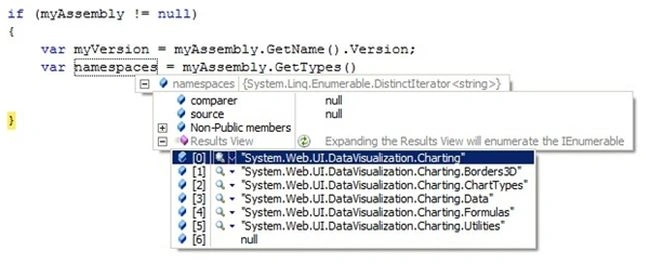
3. So I can generate the register tag as follows:
- <%@ Register Assembly="System.Web.DataVisualization, Version=3.5.0.0, Culture=neutral, PublicKeyToken=31bf3856ad364e35" Namespace="System.Web.UI.DataVisualization.Charting" TagPrefix="asp" %>
D DonthuPosted Feb 13, 2017, 7:13 AM
Thank you Alle . this article is lot help for me
KkPosted Aug 1, 2016, 3:58 AM
Hi i am using framework 3.5 in my project and how can i add and found "System.Web.DataVisualization.dll" to my bin folder can you tell me it's very need to me