

This article describes how to remove " " from the cells in a Grid in C#. There is a common problem that we come across when we create an empty field in a grid. It is filled with " " since the value for that field that we get from the grid is " ". The procedure to remove this from the grid is provided below.
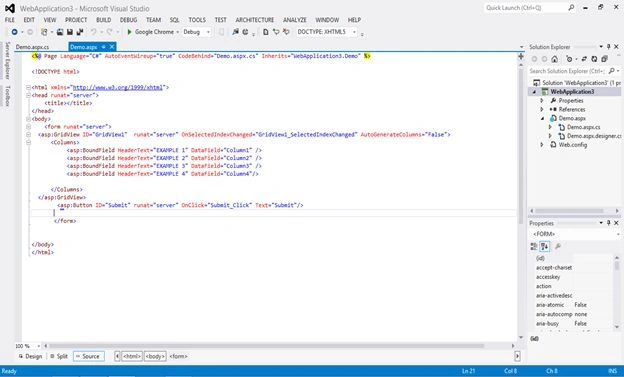
- First create a Web based project in Visual Studio and make a simple Grid. I have attached a screenshot that show the code of the Grid. I made a simple Grid that has one row and four columns in it.
- In the screenshot below I have bound the data to the grid and left the last column of the grid empty.
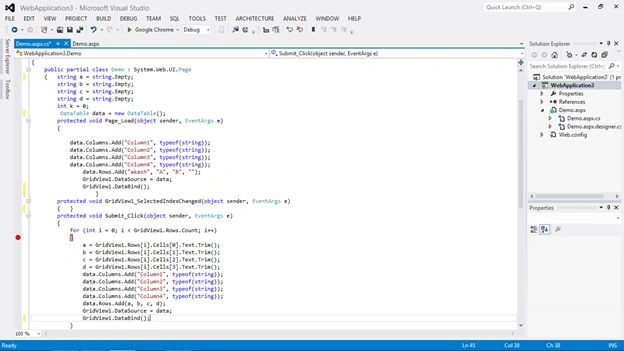
- When you run the preceding code the output of the code is as shown in the screenshot below.

- When you click on the submit button you will see the " " in the empty cell of the grid. On the submit I took the values from the preceding Grid and then bound it into a new data table. The ouput is shown in the screenshot below:

- The solution for this problem is to add Server.HtmlDecode() at the beginning of the field when we are obtaining its value in a string. The screenshot below shows the code where Server.HtmlDecode() is written before the grid cell.
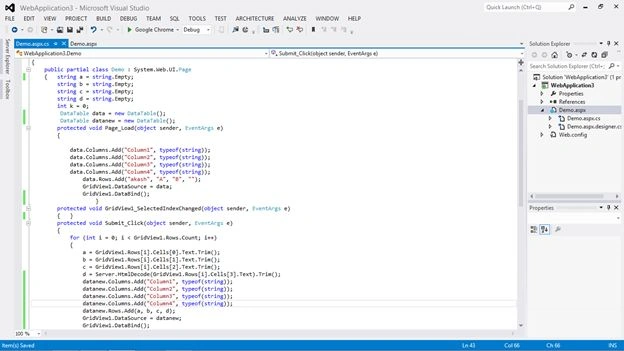
- Now run the code again and when we click on the submit button; there will be no " " in the cell. Please see the screenshot below.

I hope this article was useful to you.
Join the conversation! Your thoughts help the community grow.