

Description
When building APIs, sometimes you need to apply restrictions before executing your business logic. For example, you may want to block underage customers from accessing certain resources or prevent blacklisted customers from calling any API at all. ASP.NET Core provides two powerful approaches to handle these scenarios: Action Filters and Middleware.
In this article, we’ll explore both techniques with real-world examples (age-based restrictions and blacklist checks) and see how they compare.
Approach 1. Restricting Calls with an Action Filter (Age Filter)
Action Filters let you run custom logic before or after a controller action executes. They’re ideal when the restriction applies to specific APIs only.
Example. Age-based Access Restriction
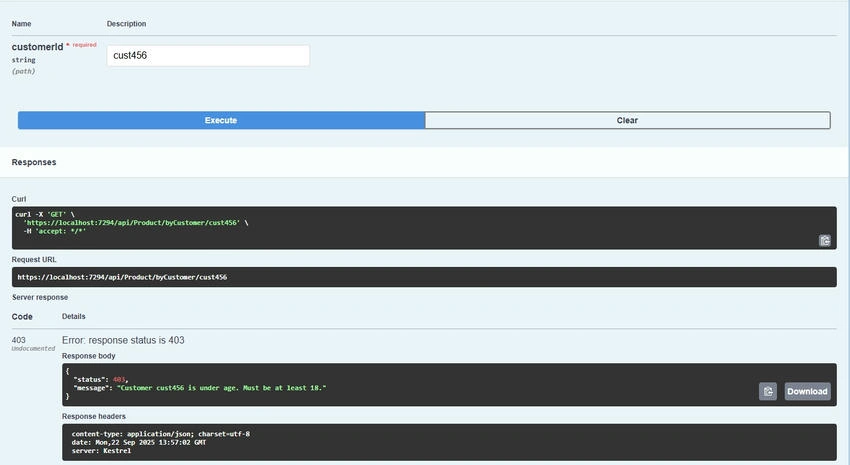
Imagine we have an API endpoint that fetches products for a customer:
GET /api/product/byCustomer/{customerId}
We want to ensure only customers 18 years or older can access this endpoint.
AgeFilter Attribute
    using Microsoft.AspNetCore.Mvc;
using Microsoft.AspNetCore.Mvc.Filters;

namespace ProductFilteringExample.Api.Filters
{
    public class AgeFilterAttribute : Attribute, IAsyncActionFilter
    {
        private readonly int _minAge;

        public AgeFilterAttribute(int minAge)
        {
            _minAge = minAge;
        }

        // Mock data: customer ages
        private readonly Dictionary<string, int> _customerAges = new()
        {
            { "cust123", 25 },
            { "cust456", 16 },
            { "cust789", 40 }
        };

        public async Task OnActionExecutionAsync(ActionExecutingContext context, ActionExecutionDelegate next)
        {
            if (context.ActionArguments.TryGetValue("customerId", out var custIdObj))
            {
                var customerId = custIdObj?.ToString();
                if (!string.IsNullOrEmpty(customerId) && _customerAges.TryGetValue(customerId, out var age))
                {
                    if (age < _minAge)
                    {
                        context.Result = new ObjectResult(new
                        {
                            Status = 403,
                            Message = $"Customer {customerId} is under age. Must be at least {_minAge}."
                        })
                        {
                            StatusCode = StatusCodes.Status403Forbidden
                        };
                        return; // stop pipeline
                    }
                }
                else
                {
                    context.Result = new NotFoundObjectResult(new
                    {
                        Status = 404,
                        Message = $"Customer {customerId} not found."
                    });
                    return;
                }
            }

            await next();
        }
    }
}
Controller Usage
    [ApiController]
[Route("api/[controller]")]
public class ProductController : ControllerBase
{
    private readonly IProductService _service;

    public ProductController(IProductService service)
    {
        _service = service;
    }

    [HttpGet("byCustomer/{customerId}")]
    [AgeFilter(18)] // Restrict access for under-18 customers
    public async Task<IActionResult> GetProductsByCustomer(string customerId)
    {
        var products = await _service.GetAllProductsAsync();
        return Ok(products);
    }
}
Result
Approach 2. Restricting Calls with Middleware (Blacklist Customer)
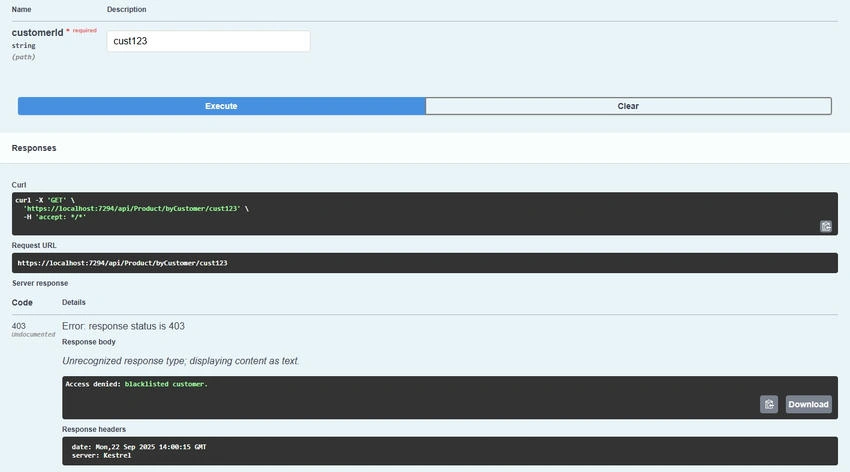
Middleware runs before controllers and can be used for application-wide restrictions.
Join the conversation! Your thoughts help the community grow.