


Environment Variables are widely used in Microsoft Dataverse and Power Platform solutions to store configuration values that can differ across environments.
When troubleshooting a solution or validating a deployment, we may need to quickly identify the Environment Variable Schema Name, Description, Type, Default Value, and Current Value configured in a Dataverse environment.
Instead of opening each Environment Variable individually, we can retrieve the information using the SQL 4 CDS tool in XrmToolBox.
SQL 4 CDS allows us to use standard SQL syntax to query Dataverse data and metadata.
Follow the below steps to get the Environmental Variable configuration values in SQL 4 CDS tool.
Step 1: Open XrmToolBox.
Launch XrmToolBox.
If SQL 4 CDS isn't already installed, open:
Configuration → Tool Library
Search for:
SQL 4 CDS
and install it.

Step 2: Connect to the Dataverse Environment
Connect XrmToolBox to the Dataverse environment from which you want to retrieve the Environment Variables.
For example:
Development
SIT
UAT
Production
When SQL 4 CDS opens, the connected Dataverse instance is shown in the Object Explorer.
Step 3: Open SQL 4 CDS
From the XrmToolBox Tools tab, search for:
SQL 4 CDS
Open the tool.
SQL 4 CDS provides a SQL query interface for querying data stored in Microsoft Dataverse.

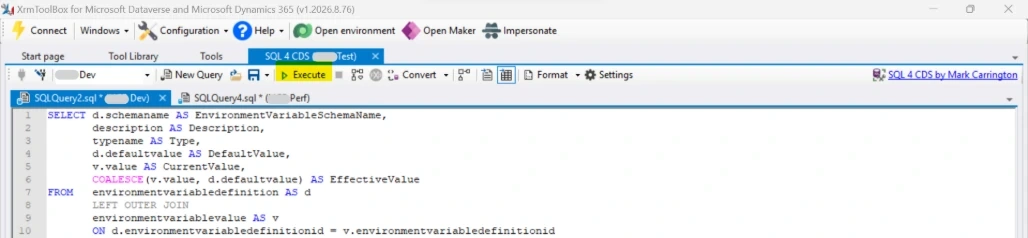
Step 4: Execute the SQL Query
Copy the following query into the SQL 4 CDS query editor:
SELECT d.schemaname AS EnvironmentVariableSchemaName,
description AS Description,
typename AS Type,
d.defaultvalue AS DefaultValue,
v.value AS CurrentValue,
COALESCE(v.value, d.defaultvalue) AS EffectiveValue
FROM environmentvariabledefinition AS d
LEFT OUTER JOIN
environmentvariablevalue AS v
ON d.environmentvariabledefinitionid = v.environmentvariabledefinitionid
Click Execute.
Step 5: Review the Results
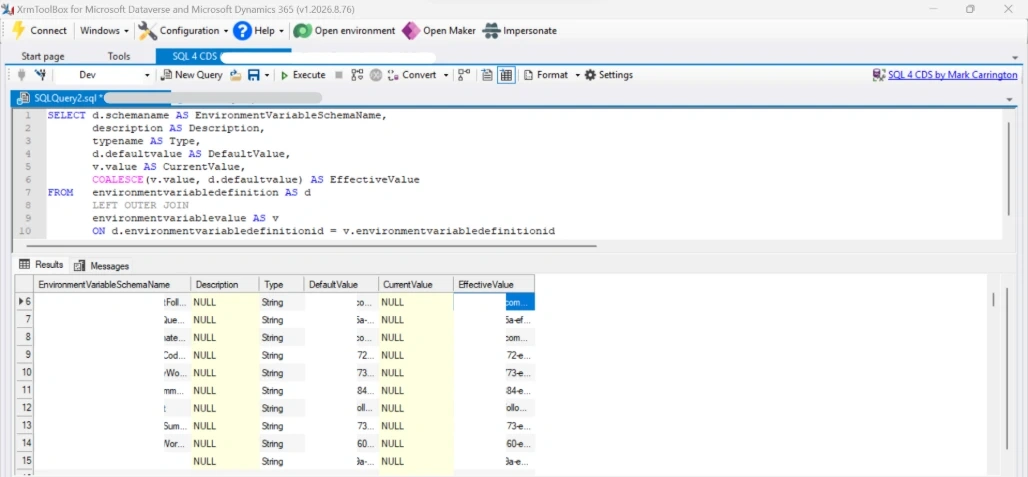
The query provides a consolidated view of all the Environment Variable configurations:
EnvironmentVariableSchemaName: Schema name of the Environment Variable
Description: Description of the Environment Variable
Type: Environment Variable type
DefaultValue: Default value defined for the Environment Variable
CurrentValue: Value stored for the Environment Variable in the connected Dataverse environment
EffectiveValue: Final value which is used in real time.
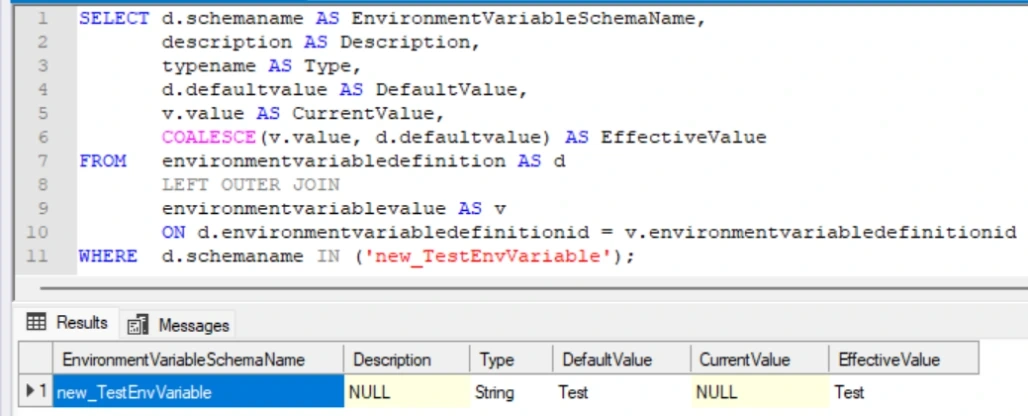
Use the below query to get the required Environment Variables values.
SELECT d.schemaname AS EnvironmentVariableSchemaName,
description AS Description,
typename AS Type,
d.defaultvalue AS DefaultValue,
v.value AS CurrentValue,
COALESCE(v.value, d.defaultvalue) AS EffectiveValue
FROM environmentvariabledefinition AS d
LEFT OUTER JOIN
environmentvariablevalue AS v
ON d.environmentvariabledefinitionid = v.environmentvariabledefinitionid
WHERE d.schemaname IN ('new_TestEnvVariable');
Practical scenarios:
You can use this query when:
Validating Environment Variables after a solution deployment
Troubleshooting configuration differences between DEV, SIT, UAT and Production
Checking whether an Environment Variable has a current value
Identifying variables that are relying on default values
Reviewing Environment Variable configuration from one place
Comparing configuration between Dataverse environments
Troubleshooting Power Apps or Power Automate solutions that depend on Environment Variables
Conclusion
Using SQL 4 CDS in XrmToolBox provides a convenient way to retrieve Dataverse Environment Variable configurations using familiar SQL syntax.
Join the conversation! Your thoughts help the community grow.