
Introduction
This article shows how to get a Macro Name using VSTO in C#. This articles starts with an introduction of the display macro in a drop down using Excel VSTO. We know that it is not a regular requirement in our project and it is quite difficult to find the solution on the internet.
What a Macro is
A Macro is a set of instructions in a Visual Basic module that will make Excel perform commands and actions for you by running them. Excel can repeat a task at any time using the macro. They allow you to do repetitive and complex tasks that you perform regularly. The easiest way to create a macro is to record a macro, Excel stores information about each step you take as you perform a series of commands.
How to create a Macro in Excel
If you are unfamiliar with Macros then please refer to the following link to create a Macro.
Quick start: Create a macro
Create a macro
Create a C# application to list the macros in the workbook :
I have created a sample to get a macro name using VSTO C#.
1. Create VSTO project in C#
Create a new VSTO project in C# as shown in following screen shot.
How to create Add-Ins using VSTO
Read my following article about creating Add-ins using VSTO :
How to Create Add-Ins Using VSTO in MS-Word
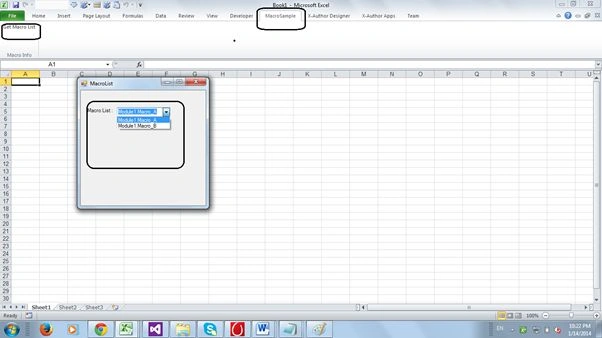
I have created Excel add-ins. I have added a ribbon button in the Ribbon tab. I open a Windows Forms form from the Ribbon button.
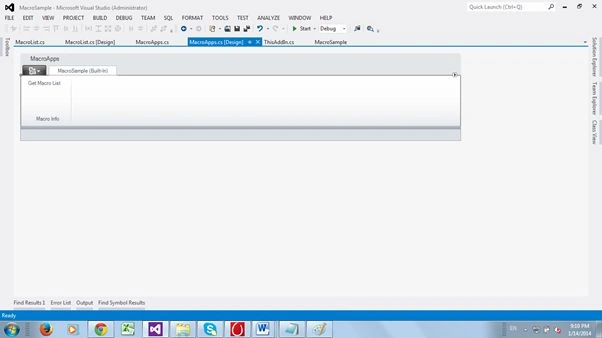
2. Add Windows Forms form to display the Macro in a DropDown list
After creating the VSTO project, you can add a Windows Forms form as shown in the following screen shot. I have added a drop down control to this form. I have filled in a Macro name in the drop down control.
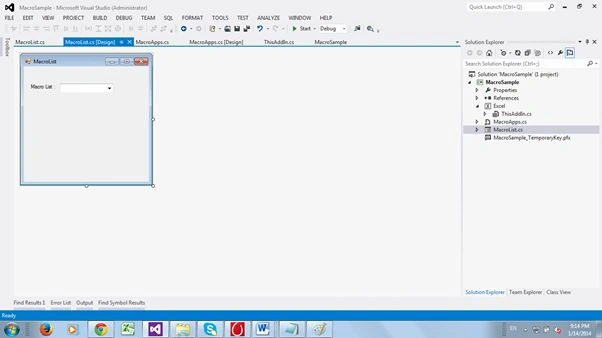
3. Get Macro Name from Excel using C#
I have created a method to get a Macro name from an Excel file.
On the Project menu, click "References". In the References dialog box, select the following references “Microsoft.Vbe.Interop”.
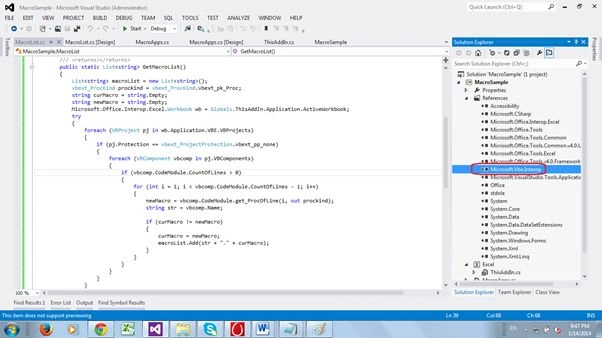
Create a method to get a Macro name from Excel as shown in the following code.
/// <summary>
/// Get Macro list
/// </summary>
/// <returns></returns>
public static List<string> GetMacroList()
{
List<string> macroList = new List<string>();
vbext_ProcKind prockind = vbext_ProcKind.vbext_pk_Proc;
string curMacro = string.Empty;
string newMacro = string.Empty;
Microsoft.Office.Interop.Excel.Workbook wb = Globals.ThisAddIn.Application.ActiveWorkbook;
try
{
foreach (VBProject pj in wb.Application.VBE.VBProjects)
SubashPosted Sep 19, 2016, 12:25 AM
Good