

Content
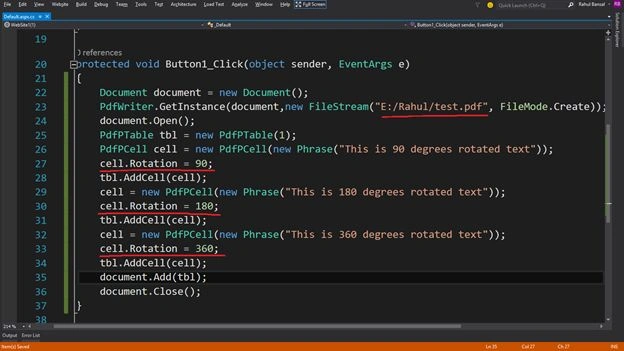
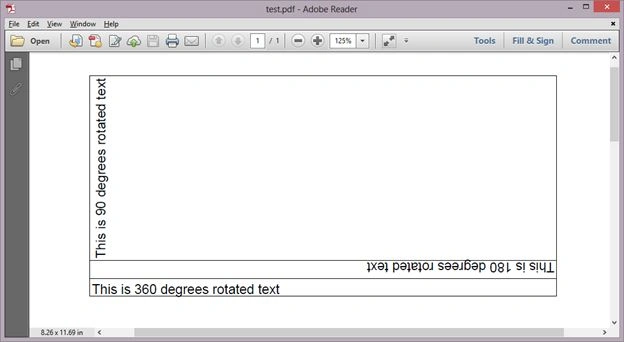
I will explain how to rotate a table's cell into a runtime generated PDF using Visual Studio Ultimate 2015 Preview.
I will briefly generate the runtime PDF using ITextSharp.
Note: I will use the "iTextSharp.dll" as a PDF generator library. You can download it from itextsharp projects and iTextSharp packages.
You can find it to the attached file in the "bin" folder of this article but the best way is to add ItextSharp in Step B.
Step A
Create a new website named "Website1".
Step B
Add the ItextSharp library from the NuGet package using the following sub-steps:
- Click on Tools
- NuGet Package Manager
- Manage NuGet Packages for Solution.
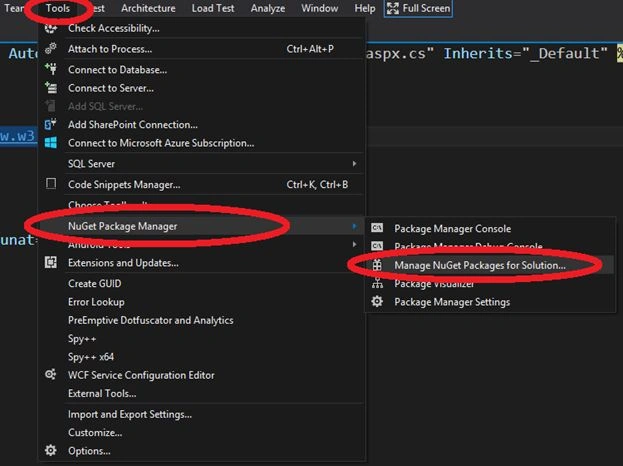
Then a popup windows will open like: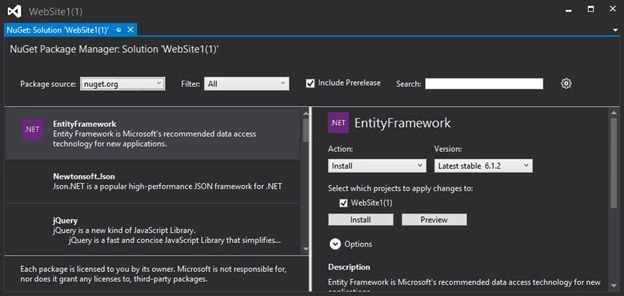
Type the "ItextSharp" into the Search TextBox. Then you will get the "ItextSharp" library in the left pane. To add it to the website just click on the Install button of the right pane.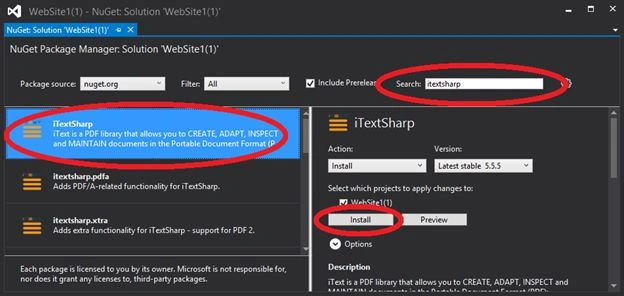
After the installation, you see the "Right" sign in the left pane that indicaters that the library has been installed.
You can also check it from the Solution Explorer.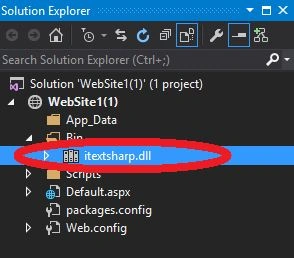
sreenivasa kPosted Feb 24, 2015, 12:32 PM
excellent