

Following example developed in Visual Studio.NET 2005. In the following code we will see that how to use crystal report viewer in .NET.
Steps to use the crystal report viewer:-
Import the following namespace for sql server configuration settings.
Imports System.Data.SqlClient
'Code to configure the database settings
'Change the server="your server name where your sql server is running"
'database="Default" database "pubs" and sql "userid" and the "password"
Dim strConnection As String = "server=dtpxp-skumari;database=pubs;uid=sa;pwd=;"
Dim Connection As New SqlConnection(strConnection)
Dim strSQL As String = "Select * From authors"
Dim DA As New SqlDataAdapter(strSQL, Connection)
Dim DS As New DataSet
'Variable to assign the report name
Dim strReportName As String
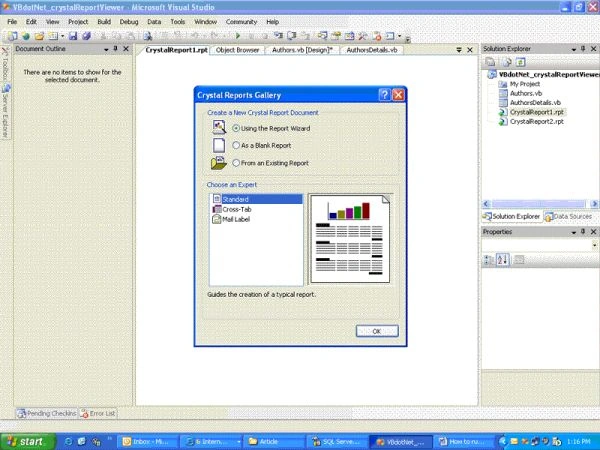
Next we are going to add the .rpt(Report)file. Right click on
The Project solution --> Add --> New Item --> .rpt File
It will
open the following window. Select the Report wizard.
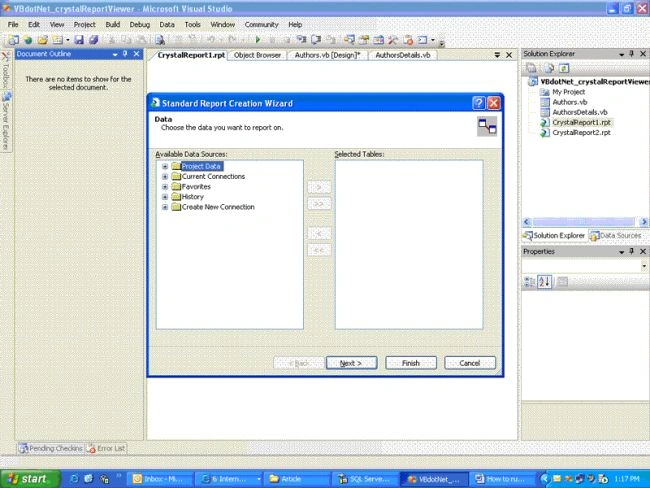
Specifying the data --> Create new connection --> OLEDB(ADO) --> specify the data provider by following screen.
Shajahan PkPosted Sep 12, 2018, 3:27 AM
Hi it is VERY useful notes , thanks a lot
srivani surampalliPosted Nov 28, 2012, 1:54 AM
I want crystalreport on vb.net in windows application,can you please help me..?