

Introduction
To insert the image in the database, first we have to create the database and after that create the table in that database. For that, we need to use the following steps. First design the table like this in your SQL Server database and give the name as images.

Now, To create a Web site, there are the following steps to be done:
Step 1: First we have to create a Web Application.
- Go to Visual Studio 2010.
- New--> And select the Web Application.
- Give whatever name you want to.
- Click OK.

Step 2: Secondly you have to add a new page to the website.
- Go to the Solution Explorer.
- Right-click on the project name.
- Select add new item.
- Add new web page and give it a name.
- Click OK.


Step 3: To add a new folder to our project:
- Add a new folder
- Give the name as images because here I have used the same name for my sample; if you want to change the folder name, you need to also change the images folder name in your code behind.
Step 4: In this step we will see the complete code of the Default2.aspx page which is given below.
<%@ Page Language="C#" AutoEventWireup="true" CodeFile="Default2.aspx.cs"
Inherits="Default2" %>
<!DOCTYPE html PUBLIC "-//W3C//DTD XHTML 1.0 Transitional//EN"
"http://www.w3.org/TR/xhtml1/DTD/xhtml1-transitional.dtd">
<html xmlns="http://www.w3.org/1999/xhtml">
<head id="Head1" runat="server">
<title>Save Images In database</title>
<style type="text/css">
.Gridview
{
font-family:Verdana;
font-size:10pt;
font-weight:normal;
color:black;
margin-top: 20px;
}
</style>
</head>
<body>
<form id="form1" runat="server">
<div>
<asp:FileUpload ID="fileuploadimages" runat="server" />
<br />
<asp:Button ID="btnSubmit" runat="server" Text="Submit" onclick="btnSubmit_Click" />
</div>
<div>
<asp:GridView runat="server" ID="gvImages" AutoGenerateColumns="False"
CssClass="Gridview"
HeaderStyle-BackColor="#61A6F8" AllowPaging="True" AllowSorting="True"
BackColor="White" BorderColor="#CCCCCC" BorderStyle="None" BorderWidth="1px"
CellPadding="3" Height="255px" Width="199px" >
<FooterStyle BackColor="White" ForeColor="#000066" />
<HeaderStyle BackColor="#006699" Font-Bold="True" ForeColor="White"></HeaderStyle>
<PagerStyle BackColor="White" ForeColor="#000066" HorizontalAlign="Left" />
<RowStyle ForeColor="#000066" />
<SelectedRowStyle BackColor="#669999" Font-Bold="True" ForeColor="White" />
<SortedAscendingCellStyle BackColor="#F1F1F1" />
<SortedAscendingHeaderStyle BackColor="#007DBB" />
<SortedDescendingCellStyle BackColor="#CAC9C9" />
<SortedDescendingHeaderStyle BackColor="#00547E" />
</asp:GridView>
</div>
</form>
</body>
</html>
Step 5: In this step we will see the design of the Default2.aspx page which is given below.

Step 6: Finally the full code of the default.aspx.cs page is:
using System.Data;
using System.Collections;
using System.Data.SqlClient;
using System.IO;
public partial class Default2 : System.Web.UI.Page
{
protected void Page_Load(object sender, EventArgs e)
{
}
protected void btnSubmit_Click(object sender, EventArgs e)
{
//Get Filename from fileupload control
string filename = Path.GetFileName(fileuploadimages.FileName); ;
//Save images into Images folder
fileuploadimages.SaveAs(Server.MapPath("~/" + filename));
//Getting dbconnection from web.config connectionstring
SqlConnection con = new SqlConnection(@"Data Source=.;Initial
Catalog=sanjoli;Persist Security Info=True;User ID=sa;Password=wintellect");
//Open the database connection
con.Open();
//Query to insert images path and name into database
SqlCommand cmd = new SqlCommand("Insert into Images(ImageName,ImagePath)
values(@ImageName,@ImagePath)", con);
//Passing parameters to query
cmd.Parameters.AddWithValue("@ImageName", filename);
cmd.Parameters.AddWithValue("@ImagePath", "images/" + filename);
cmd.ExecuteNonQuery();
//Close dbconnection
con.Close();
//Response.Redirect("~/Default.aspx");
}
}
So, when you run the program then the output will be shown as:

When we click on the browse button then it will allow you to select images for storing in the database:

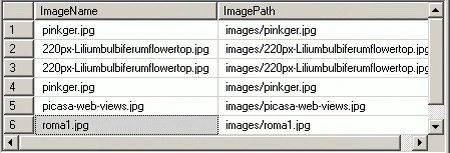
Then click on the Submit button; the images will be automatically saved in the database. To see all the saved images in the database, it will look like:
Some of the useful resources are:
Sandeep SharmaPosted Mar 27, 2015, 9:27 PM
Nice Artticle. Keep it up... Q.How to save those images under a specific directory with specific location at same time?
Nitish KumarPosted Mar 16, 2012, 8:12 AM
i was searching for this from last 2 months.....thanks u so much for posting this.