

Introduction
In this article, we will look at how the JavaScript timer functions - settimeout, setinterval, and Cleartimeout -- are used to schedule and cancel timer-based Callbacks, with a simple example of a stopwatch program.
Brief of settimeout
- In simple words, it will call any function after the specified time (milliseconds). This specified time is also called a delay.
- For example - if we specify the delay as 5000, then it will wait for 5 seconds and start to execute the function which was passed as a parameter.
Below is the syntax
- First Parameter(fn) => Any function name
- Second Parameter(delay) => specifies the no. of milliseconds to wait before it starts the execution of the given function
Note
The settimeout function returns a unique ID which can be used to cancel the timer at any time using Cleartimeout which is discussed below.
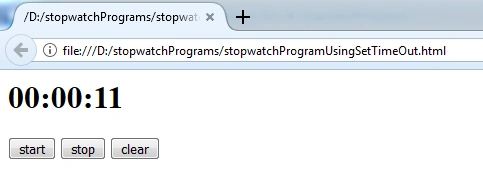
Example- Implemented stopwatch functionality using settimeout
- <html>
- <head>
- <script type="text/javascript">
- window.onload = function() {
- var startbutton = document.getElementById("btnstart");
- var stopbutton = document.getElementById("btnstop");
- var clearbutton = document.getElementById("btnclear");
- var seconds = 0,
- minutes = 0,
- hours = 0,
- currenttimervalue = 0;
- function CalculateTimerPartsAndDisplay() {
- //increment logic
- seconds++;
- if (seconds >= 60) {
- seconds = 0;
- minutes++;
- if (minutes >= 60) {
- minutes = 0;
- hours++;
- } //end of if(minutes>= 60)
- } //end of if(seconds>= 60)
- //display
- document.getElementById("res").innerHTML = (hours ? (hours > 9 ? hours : "0" + hours) : "00") + ":" + (minutes ? (minutes > 9 ? minutes : "0" + minutes) : "00") + ":" + (seconds ? (seconds > 9 ? seconds : "0" + seconds) : "00")
- //recursive
- timerlogicintiator();
- } //end of function CalculateTimerPartsAndDisplay()
- function timerlogicintiator() {
- currenttimervalue = setTimeout(CalculateTimerPartsAndDisplay, 1000);
- } //end of function timerlogicintiator()
- //intial call of timer logic
- timerlogicintiator();
- //call timer logic when startbutton clicks
- startbutton.onclick = timerlogicintiator;
- //stop the watch by using clearTimeout function
- stopbutton.onclick = function() {
- clearTimeout(currenttimervalue);
- }
- clearbutton.onclick = function() {
- document.getElementById("res").innerHTML = "00:00:00";
- seconds = 0, minutes = 0, hours = 0;
- }
- } //end of onload function
- </script>
- </head>
- <body>
- <h1 id="res">00:00:00
- </h1>
- <input type="button" value="start" id="btnstart" />
- <input type="button" value="stop" id="btnstop" />
- <input type="button" value="clear" id="btnclear" />
- </body>
- <html>
Brief of Setinterval
FYI as recap
Syntax of Setinterval
var id = setInterval(fn, delay);
- First Parameter(fn) => Any function name
- Second Parameter(delay) => specifies the no of milliseconds to wait between each execution.
Note
By using this advantage of setinterval, we can just avoid the recursive call which was implemented in the above settimeout program.
Example
This time, we implemented the same stopwatch functionality also using setinterval to differentiate and understand easily.
- <html>
- <head>
- <script type="text/javascript">
- window.onload = function() {
- var startbutton = document.getElementById("btnstart");
- var stopbutton = document.getElementById("btnstop");
- var clearbutton = document.getElementById("btnclear");
- var seconds = 0,
- minutes = 0,
- hours = 0,
- currenttimervalue = 0;
- //start of button click logics
- //call timer logic when startbutton clicks
- startbutton.onclick = timerlogicintiator;
- //stop the watch by using clearTimeout function
- stopbutton.onclick = function() {
- clearTimeout(currenttimervalue);
- }
- clearbutton.onclick = function() {
- document.getElementById("res").innerHTML = "00:00:00";
- seconds = 0, minutes = 0, hours = 0;
- }
- //end of button click logics
- function CalculateTimerPartsAndDisplay() {
- //increment logic
- seconds++;
- if (seconds >= 60) {
- seconds = 0;
- minutes++;
- if (minutes >= 60) {
- minutes = 0;
- hours++;
- } //end of if(minutes>= 60)
- } //end of if(seconds>= 60)
- //display
- document.getElementById("res").innerHTML = (hours ? (hours > 9 ? hours : "0" + hours) : "00") + ":" + (minutes ? (minutes > 9 ? minutes : "0" + minutes) : "00") + ":" + (seconds ? (seconds > 9 ? seconds : "0" + seconds) : "00")
- } //end of function CalculateTimerPartsAndDisplay()
- function timerlogicintiator() {
- currenttimervalue = setInterval(CalculateTimerPartsAndDisplay, 1000);
- } //end of function timerlogicintiator()
- //initial call of timer logic
- timerlogicintiator();
- } //end of onload function
- </script>
- </head>
- <body>
- <h1 id="res">00:00:00</h1> <input type="button" value="start" id="btnstart" /> <input type="button" value="stop" id="btnstop" /> <input type="button" value="clear" id="btnclear" /> </body>
- <html>
Brief of Cleartimeout
It is used to cancel the execution at any time using the timerid, which was returned.
Syntax of ClearTimeout
clearTimeout(id);
Conclusion
I hope the above examples were useful. Kindly let me know your feedback or thoughts.
Join the conversation! Your thoughts help the community grow.