Introduction
Most of the
Android applications use an API to send and receive data from server to client. API is very useful when applications need to send or receive data.
In this tutorial, I will show you how to create a Restful JSON based API for Android application using ASP.NET and Microsoft SQL Server database.
Overview of the tutorial
This tutorial shows you the basic implementation of the RESTful API and will let you know how to create a Restful API in Visual Studio with ASP.NET using C#.
How to connect the android application with SQL Server Database
In this tutorial, I am using Visual Studio 2015 (you can use any version) and Android 1.5.1 version with minimum SDK API 18: Android 2.2 (Froyo).
First, we create an API
Step I
Download the required resources:
Download three JSON service DLL files from the link...
Step II
Open Visual Studio and create an ASP.NET Empty Web Application project.
For this
Go to File, then New. Click Project. From the new project window select web category. Then select ASP.NET Empty Web Application and give it a name. Select the project location from Browse. Make sure Create Directory for Solution is checked. Click Ok.
Now add DLL files in the .Net web application.
- Right-click on the project in Solution Explorer
- Form the menu, click on Add Reference to open the Reference Manager
- Click on Browse from left panel
- Then click browse button at bottom of Reference Manager
- Go to the location where save the download files
- Select three .dll files(which you have is download) and click on the add button
- Click ok
Now you need to add a handler class. For this,
- Go to the Project menu then click Add New Item.
- From Add New Item, select the web category from the left panel.
- From center select Generic Handler.
- Give it a name or left it default and click on the Add button.
Now create three new classes. To add class,
- Go to the Project menu and click on Add New Item.
- From the code category select class.
- Give the class name as SAPI.cs.
- Click the Add button.
In the same way, add two more classes named ISAPI and DBConnect.
Step III
SQL Server Database Creation
Open SQL Server Management Studio and connect with the server.
Create a database
- Right-click on the Database folder in Object Explorer and select a new database.
- Give the database a name (I have given serverdb) and click OK.
Now create tables. To create a table
- Click on the created database and click on New Query.
- SQLQuery window will open.
- Now execute the following SQL Query to create a table,
SQL query to create a table- CREATE TABLE UserData (
- Name VARCHAR(50),
- userName VARCHAR(50),
- password VARCHAR(50),
- PhoneNumber VARCHAR(50),
- CNIC VARCHAR(50),
Step IV
Make API and Connect Database with this and go back to the visual studio.
Now we programmatically save information in the database. To configure a connection open web.config file in Solution Explorer. Add the following line between <configuratio> and </configuration> tag
- <connectionStrings>
- <add name="ConString" connectionString="Data Source=DESKTOP-AU9BNOB;Initial Catalog=serverProjectdb;Integrated Security=True" providerName="System.Data.SqlCliesnt" />
- </connectionStrings>
In these lines change data source value to your Server Name. In the initial catalog change the database name with yours.
Now open DBConnect.cs class. Copy the following code into it and change the namespace with your project name.
- using System.Configuration;
- using System.Data.SqlClient;
-
- namespace TestProjectAPI
- {
-
- public class DBConnect
- {
- private static SqlConnection NewCon;
- private static stringconStr = ConfigurationManager.ConnectionStrings["ConString"].ConnectionString;
- public static SqlConnection getConnection()
- {
- NewCon = new SqlConnection(conStr);
- return NewCon;
- }
- public DBConnect()
- {
-
- }
- }
- }
Configuring the API
To configure the API interface open Handler.ashx file and copy the following code into it. Use the correct namespace in your code.
- using JsonServices;
- using JsonServices.Web;
-
- namespace TestProjectAPI
- {
- public classHandler1: JsonHandler
- {
- public Handler1()
- {
- this.service.Name = " TestProjectAPI ";
- this.service.Description = "JSON API for android appliation";
- InterfaceConfiguration IConfig = new InterfaceConfiguration("RestAPI", typeof(ISAPI), typeof(SAPI));
- this.service.Interfaces.Add(IConfig);
- }
- }
- }
Now we need to change ISAPI.cs class to an interface class. To do this open ISAPI.cs and the class keyword to interface. And extend the SAPI.cs class with this Interface ISAPI.cs.
Here's the code to modify both classes.
ISAPI.cs
- namespace TestProjectAPI
- {
- public interface ISAPI
- {
-
- }
- }
SAPI.cs
- namespace TestProjectAPI
- {
- public interface SAPI: ISAPI
- {
-
- }
- }
Now open ISAPI.cs and copy the following code. You can change methods according to your requirements.
- using System. Data;
-
- namespace TestProjectAPI
- {
-
- public interface ISAPI
- {
- void CreateNewAccount(string Name, string userName, string password, string PhoneNumber, string CNIC);
- }
- }
Now open SAPI.cs and add the following code.
- using System;
- using System.Data;
- using System.Data.SqlClient;
-
- namespace TestProjectAPI
- {
- public classSAPI: ISAPI
-
- {
- SqlConnection dbConnection;
- public ServiceAPI()
- {
- dbConnection = DBConnect.getConnection();
- }
- public void CreateNewAccount(string Name, string userName, string password, string PhoneNumber, string CNIC) {
- if (dbConnection.State.ToString() == "Closed") {
- dbConnection.Open();
- }
-
- string query = "INSERT INTO UserDetails VALUES ('" + Name + "','" + userName + "','" + password + "','" + PhoneNumber + "','" + CNIC + "');";
-
- SqlCommand command = new SqlCommand(query, dbConnection);
- command.ExecuteNonQuery();
-
- dbConnection.Close();
- }
- }
Now we have a successful code API.
Step VI
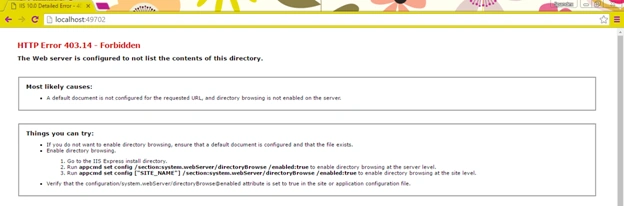
Now run the API in your browser. At first, the page gives you the error.
To solve this problem, simply add “
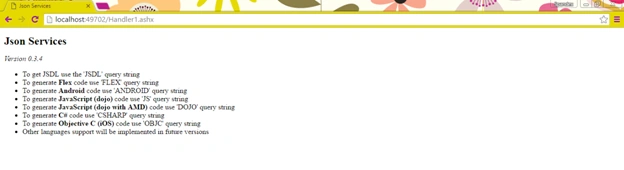
/Handler1.ashx” to the end of the URL. In my case, the complete URL is “
localhost:49702/Handler.ashx”. If you use another name of Handler class then add that name instead of Handler1.ashx.
After adding this, if you see below type of screen it means your API is working.
Now at the end of URL add “?ANDROID” and complete URL becomes “
localhost:49702/Handler.ashx?ANDROID”.
Press enter and it will prompt you to save a zipped file.
Now extract that zip file and start coding with Android Studio.
Step 1
Creating an Android project.
Name the project Navigation
Only one activity which is the Main Activity.
Step 2
Open the extracted file, then copy and paste the RestAPI.java file into your project. Change the package value with your package name.
Step 3
Add the following permission into AndroidMenifest.xml
<uses-permissionandroid:name="android.permission.INTERNET"/>
Step 4
Open the activity_main.xml file and add the following code into it.
Step 5
Add two more classes named
UserDetailsTable.java and JSONParser.java.
UserDetailsTable.java class-map database objects to java objects.
JSONParser.java class used to parse JSONObjects
Step 6
Now open UserDetailsTable.java and add the following code into it.
- package com.example.zubariaashraf.navigation;
-
- import android.content.Intent;
-
-
-
-
- public class UserDetailsTable
- {
- String Name, userName, password, PhoneNumber, CNIC;
- int id;
-
- public UserDetailsTable(String Name, String userName,
- String password, String PhoneNumber, String CNIC)
- {
- super();
- this.id = id;
- this.Name = Name;
- this.userName = userName;
- this.password = password;
- this.PhoneNumber = PhoneNumber;
- this.CNIC = CNIC;
- }
-
- public UserDetailsTable()
- {
- super();
- this.id = 0;
- this.Name = null;
- this.userName = null;
- this.password = null;
- this.PhoneNumber = null;
- this.CNIC = null;
-
-
- }
-
- public int getId()
- {
- return id;
- }
- public void setId(int id)
- {
- this.id = id;
- }
-
- public String getName()
- {
- return Name;
- }
-
- public void setName(String Name)
- {
- this.Name = Name;
- }
-
- public String getUserName()
- {
- return userName;
- }
-
- public void setUserName(String userName)
- {
- this.userName = userName;
- }
-
- public String getPassword()
- {
- return password;
- }
-
- public void setPassword(String password)
- {
- this.password = password;
- }
-
- public String getPhoneNumber()
- {
- return PhoneNumber;
- }
-
- public void setPhoneNumber(String PhoneNumber)
- {
- this.PhoneNumber = PhoneNumber;
- }
-
- public String getCNIC()
- {
- return CNIC;
- }
-
- public void setCNIC(String CNIC)
- {
- this.CNIC = CNIC;
- }
-
- }
Now open JSONParser.java and add the following code into it. You can modify this class according to your requirements.
- package com.example.zubariaashraf.navigation;
-
- import org.json.JSONArray;
- import org.json.JSONException;
- import org.json.JSONObject;
-
- import android.annotation.SuppressLint;
- import android.util.Log;
-
-
-
-
- public class JSONParser
- {
-
- public JSONParser()
- {
- super();
- }
- }
Now open Main Activity.java and add the following code into it.
- package com.example.zubariaashraf.navigation;
-
- import android.content.Context;
- import android.os.AsyncTask;
- import android.os.Bundle;
- import android.app.Activity;
- import android.util.Log;
- import android.view.Menu;
- import android.view.MenuItem;
- import android.view.View;
- import android.widget.Button;
- import android.widget.EditText;
- import android.support.v4.app.NavUtils;
- import android.annotation.TargetApi;
- import android.content.Intent;
- import android.os.Build;
- import android.widget.TextView;
- import android.widget.Toast;
-
- import org.json.JSONObject;
-
- import java.sql.SQLException;
-
- public class CreateUserActivity extends Activity
- {
-
- EditText etName, etUsername, etPassword, rPassword, pNumber, uCnic;
- Button btnCreateUser;
- Context context;
- boolean value;
- String username;
-
- @Override
- protected void onCreate(Bundle savedInstanceState)
- {
- super.onCreate(savedInstanceState);
- setContentView(R.layout.activity_create_user);
- context = this;
- Show the Up button in the action bar.
- setupActionBar();
-
- etName = (EditText) findViewById(R.id.name);
- etUsername = (EditText) findViewById(R.id.uname);
- etPassword = (EditText) findViewById(R.id.upassword);
- rPassword = (EditText) findViewById(R.id.uRepassword);
- pNumber = (EditText) findViewById(R.id.phonenum);
- uCnic = (EditText) findViewById(R.id.cnic);
-
- btnCreateUser = (Button) findViewById(R.id.btn_createuser);
-
- btnCreateUser.setOnClickListener(
- new View.OnClickListener()
- {
-
- @Override
- public void onClick(View v)
- {
-
- String firstname, password, rePassword, Pnumber, ucnic;
- firstname = etName.getText().toString();
- username = etUsername.getText().toString();
- password = etPassword.getText().toString();
- rePassword = rPassword.getText().toString();
- Pnumber = pNumber.getText().toString();
- ucnic = uCnic.getText().toString();
-
- UserDetailsTable userDetail = new UserDetailsTable(firstname, username, password, Pnumber, ucnic);
- new AsyncCreateUser().execute(userDetail);
-
- }
- });
- }
-
-
-
- protected class AsyncCreateUser extends
- AsyncTask < UserDetailsTable, Void, Void >
- {
-
- @Override
- protected Void doInBackground(UserDetailsTable...params)
- {
-
- RestAPI api = new RestAPI();
- try
- {
-
- api.CreateNewAccount(params[0].getName(),
- params[0].getUserName(),
- params[0].getPassword(),
- params[0].getPhoneNumber(),
- params[0].getCNIC());
-
- } catch (Exception e)
- {
-
- Log.d("AsyncCreateUser", e.getMessage());
-
- }
- return null;
- }
-
- @Override
- protected void onPostExecute(Void result)
- {
- store(username);
- Intent i = new Intent(CreateUserActivity.this, LoginActivity.class);
- startActivity(i);
- }
-
- }
-
- @Override
- public boolean onOptionsItemSelected(MenuItem item)
- {
- switch (item.getItemId())
- {
- case android.R.id.home:
-
- NavUtils.navigateUpFromSameTask(this);
- return true;
- }
- return super.onOptionsItemSelected(item);
- }
-
- }
Now run the application
To run this, the application should know the correct URL of the API. So to add this open the RestAPI class and here you will see an attribute called urlString with "
http://DESKTOP-AU9BNOB/Handler1.ashx" URL as in my RestAPI.
So to run this application on the emulator you need to host your API on a local server. But if you want to run an application on a real android device then you have to host API in the public hosting site.
Run the application and enjoy it.
After hosting API on local or public hosting server change the URL from the RestAPI.
Read more articles on Android:

malar palanisamyPosted Feb 27, 2023, 4:44 PM
Hi Ashraf, I am facing issue in convertStreamToUTF8String(InputStream stream). It always returning "Successful": false, "ErrorMessage": "Object reference not set to an instance of an object." Kindly how to fix this
Fysal UsmanPosted Jun 12, 2021, 6:26 PM
Dear Sir, I could not create DBConnect.cs successfully, for the following errors: Error CS1514 { expected WebSelection C:\Users\HP\Documents\SameerShabeer\WebSelection\DBConnect.cs 8 Active Error CS1519 Invalid token '=' in class, record, struct, or interface member declaration WebSelection C:\Users\HP\Documents\SameerShabeer\WebSelection\DBConnect.cs 14 Active Error CS1519 Invalid token '=' in class, record, struct, or interface member declaration WebSelection C:\Users\HP\Documents\SameerShabeer\WebSelection\DBConnect.cs 14 Active Error CS1519 Invalid token '.' in class, record, struct, or interface member declaration WebSelection C:\Users\HP\Documents\SameerShabeer\WebSelection\DBConnect.cs 14 Active Error CS1519 Invalid token '.' in class, record, struct, or interface member declaration WebSelection C:\Users\HP\Documents\SameerShabeer\WebSelection\DBConnect.cs 14 Active Error CS1519 Invalid token ';' in class, record, struct, or interface member declaration WebSelection C:\Users\HP\Documents\SameerShabeer\WebSelection\DBConnect.cs 14 Active Error CS1519 Invalid token ';' in class, record, struct, or interface member declaration WebSelection C:\Users\HP\Documents\SameerShabeer\WebSelection\DBConnect.cs 14 Active Error IDE1007 The name 'ConfigurationManager.ConnectionStrings' does not exist in the current context. WebSelection C:\Users\HP\Documents\SameerShabeer\WebSelection\DBConnect.cs 14 Active Error IDE1007 The name 'ConfigurationManager' does not exist in the current context. WebSelection C:\Users\HP\Documents\SameerShabeer\WebSelection\DBConnect.cs 14 Active Error IDE1007 The name 'ConnectionStrings' does not exist in the current context. WebSelection C:\Users\HP\Documents\SameerShabeer\WebSelection\DBConnect.cs 14 Active Error CS0103 The name 'conStr' does not exist in the current context WebSelection C:\Users\HP\Documents\SameerShabeer\WebSelection\DBConnect.cs 17 Active
Fysal UsmanPosted Jun 12, 2021, 6:23 PM
As I have queries related to error messages while creating DBClass please provide email id.
Simon SchweiklePosted Mar 27, 2021, 11:16 AM
What would a GetAllAccount Method look like in class SAPI ?
H AlseadonPosted Jan 29, 2021, 11:03 AM
My zip file is empty!
Assäm BâïgPosted Nov 26, 2020, 4:31 AM
I have completed and work on whole code but my app is keep crashing and not giving any error also
erum mirzaPosted Oct 31, 2020, 1:59 AM
Error:(87, 13) error: cannot find symbol class RestAPI
Manoj PrasannaPosted Oct 24, 2020, 8:39 AM
Thank is work
Lakshmi Narayanan baluPosted Mar 28, 2020, 3:01 PM
"error: cannot find symbol variable activity_create_user" in MainActivity.java. pls help where to define that "activity_create_user"
Hamna MallickPosted Feb 4, 2020, 4:14 AM
I'm getting an error at store where it says cannot resolve method score. And probably due to that the app is not sending data to the sql server.
Sarvesh SinghPosted Dec 12, 2019, 5:14 AM
What is "store" in android code
Sarvesh SinghPosted Dec 2, 2019, 3:10 AM
I have written store(editResult) in the code but it throwing error Cannot resolve method 'store(android.widget.EditText)
Sarvesh SinghPosted Dec 2, 2019, 3:09 AM
Cannot resolve method 'store(android.widget.EditText)
annu patelPosted May 22, 2019, 6:29 AM
Show the Up button in the action bar; setupActionBar();
annu patelPosted May 22, 2019, 6:28 AM
Show the Up button in the action bar; setupActionBar();
annu patelPosted May 22, 2019, 6:28 AM
I have error in android
annu patelPosted May 22, 2019, 6:15 AM
Thank you but i will run the application and enter the data but they are not insert in sql so plz help ,me and solve my error
ubaid rehmanPosted Oct 9, 2018, 2:30 PM
Hello, Can anyone please provide me with the full code ? It seems that there is some code missing. I am getting error in the MainActivity class: "Cannot resolve method 'store(java.lang.String)" in line 108.
Junaid JameelPosted Sep 23, 2018, 5:29 PM
One thing I have noticed here is that the table you create is called UserData but you are inserting data in UserDetails. also my code runs but now its not inserting into the table, What could be wrong?
Junaid JameelPosted Sep 18, 2018, 10:07 PM
I am using the code ANDROID but its only downloading the ashx file.
yogesh purohitPosted Aug 19, 2018, 3:42 AM
[email protected]
yogesh purohitPosted Aug 19, 2018, 3:42 AM
Please send me the android code i am also facing the errors
Hussein JPosted Aug 2, 2018, 4:13 PM
Hello, Can anyone please provide me with the full code ? It seems that there is some code missing. I am getting error in the MainActivity class: "Cannot resolve method 'store(java.lang.String)" in line 108.
Rohith PPPosted Jul 2, 2018, 11:38 AM
It shows an error { "Successful": false, "ErrorMessage": "Object reference not set to an instance of an object." }
devang PrajapatiPosted May 17, 2018, 12:38 AM
I need this demo sir plz plz send me full code and all deails sir plz ........email : [email protected]
devang PrajapatiPosted May 17, 2018, 12:37 AM
Show JsonHandler Error....
devang PrajapatiPosted May 17, 2018, 12:37 AM
Show JsonHandler Error
Muhammad FahadPosted May 14, 2018, 12:26 AM
Data not inserted into database
Pax ObiPosted Feb 13, 2018, 11:43 PM
Tried these codes. When I define, InterfaceConfiguration IConfig = new InterfaceConfiguration("RestAPI", typeof(ISAPI), typeof(SAPI)); InterfaceConfiguration getting error, missing a using directive or assembly reference. Please what directive should i be using?
viraj ambrePosted Feb 3, 2018, 2:06 AM
Hi my API is working fine as per your instruction & i host it on live server also integrate in android but it throws an error that "Object reference not set to an instance of an object." in RestAPI.java file please help
abdullah saeedPosted Dec 27, 2017, 1:39 PM
I have an issue in this.service.Name, service wants directive or reference?....please help me
Ravi NandanPosted Dec 15, 2017, 7:09 AM
Thank you for this tutorial its working perfactly :)
Yücel AydınPosted Dec 7, 2017, 11:34 AM
How can I provide security for this API ?
eddy SutantoPosted Nov 15, 2017, 5:42 AM
Hai Zubaria, i was up to run the API in the browser. I put /Handler1.Ashx?Android. It's only downloading file Handler1.Ashx, not a zip file or RestAPI.java file. Do i miss anything here.Thanks
moji mojiPosted Oct 30, 2017, 3:59 AM
Very good article. can you put example code for ios connecting via this rest Api?
Johan DantumaPosted Sep 7, 2017, 5:06 AM
Hi Zubaria. Do you perhaps have a working source code sample of the example given in this tutorial . I'm following the instruction to the letter but can't seem to get it working
Chan ZilePosted Aug 16, 2017, 12:43 AM
I got an error on android app code. Show that createuserActivity and LoginActivity class is not found. What should I do?
Ayman El KhamkhamiPosted Dec 1, 2016, 3:13 PM
The file returned when I send the query string in the url ..?ANDROID is corrupted, I cannot extract it, the same with CSHARP, the JS file seems to be working. Is anybody facing the same problem??
Ajish NairPosted Nov 18, 2016, 5:58 AM
Can you give me your mail id so that i can send the screenshot. Please let me know.
Ajish NairPosted Nov 18, 2016, 5:57 AM
Hi, There is a issue in DBConnect.cs
Jordi TesonPosted Nov 7, 2016, 5:54 AM
Where is the method store in your Activity ?
Lakshmi Narayanan baluPosted Sep 18, 2016, 5:53 AM
Hi vs throws err "Could not load file or assembly 'Newtonsoft.Json' or one of its dependencies. The located assembly's manifest definition does not match the assembly reference. (Exception from HRESULT: 0x80131040)"... pls help
Taghouri DessahPosted Aug 11, 2016, 8:34 AM
Hi where is the method store in your Activity ?
Felix DeSerresPosted Jul 26, 2016, 4:05 PM
What would be the syntax of the URL to test it?
Felix DeSerresPosted Jul 25, 2016, 10:18 PM
Is there any way I could test the api directly from the URL? I can't seem to make it work from the android app and would like to confirm that the api is not the problem. Thanks!
ahsan buttPosted Jun 2, 2016, 6:14 AM
kindly tell me as soon as possible
ahsan buttPosted Jun 2, 2016, 6:14 AM
hello guys i am downloading .ashx of handler instead of zip file .. kindly someone help me in resolving this error or what and i am using visual studio 2015
advanex 123Posted May 11, 2016, 9:49 PM
Dear Zubaria Ashraf, Please May I know where is the "LoginActivity.class" in your MainActivity.java being defined?
Humayun Kabir MamunPosted Mar 20, 2016, 12:04 AM
Nice...
Ankur MistryPosted Mar 19, 2016, 3:28 AM
Nice, thanks for sharing
Vignesh ManiPosted Mar 17, 2016, 4:57 PM
Nice
Sirisha KPosted Mar 17, 2016, 4:28 PM
Wow, good one
Sibeesh VenuPosted Mar 17, 2016, 11:14 AM
Nice Share
Mohammed IbrahimPosted Mar 17, 2016, 3:42 AM
nice
Yashwant VishwakarmaPosted Mar 17, 2016, 2:21 AM
Thanks for sharing , nice one !!
Asfend YarPosted Mar 17, 2016, 2:04 AM
nice share