
This article explains how to send GridView row values to another page and update the record values and return to the original GridView page using ASP.NET.
1. Go to Start, then All Programs and open Microsoft Visual Studio 2013.
2. Now, click "File" -> "New" -> "Project..." then click on Visual C#. Then select ASP.NET Web Application, Empty and click on OK.
1. Go to Start, then All Programs and open Microsoft Visual Studio 2013.
2. Now, click "File" -> "New" -> "Project..." then click on Visual C#. Then select ASP.NET Web Application, Empty and click on OK.
3. Provide the web application name and location as you wish. I named my web application UpdateGridviewRowValuesInSecondPage.
4. Now the project will be opened. Right-click on the web application name, add a New Item and select Web Form. Then click on Add.
5. Add the following code between the <form> tags of the WebForm1.aspx page as in the following:
- <div>
- <asp:GridView ID="GridView1" HeaderStyle-BackColor="#3AC0F2" HeaderStyle-ForeColor="White" runat="server" AutoGenerateColumns="false" OnRowCommand="GridView1_RowCommand">
- <Columns>
- <asp:BoundField DataField="EmpNo" HeaderText="EmpId" />
- <asp:BoundField DataField="EmpName" HeaderText="EmpName" />
- <asp:BoundField DataField="Job" HeaderText="Job" />
- <asp:BoundField DataField="Sal" HeaderText="EmpSalary" />
- <asp:BoundField DataField="Dept" HeaderText="Department" />
- <asp:TemplateField>
- <ItemTemplate>
- <asp:Button ID="btnEdit" runat="server" Width="60" Text="Edit" CommandName="EditButton" CommandArgument="<%# ((GridViewRow) Container).RowIndex %>" />
- </ItemTemplate>
- </asp:TemplateField>
- </Columns>
- </asp:GridView>
- </div>
6. Add the following code to the page load event of the WebForm1.aspx.cs page.
- protected void Page_Load(object sender, EventArgs e)
- {
- if (!this.IsPostBack)
- {
- BindGridView();
- }
- }
- private void BindGridView()
- {
- string constr = ConfigurationManager.ConnectionStrings["con"].ConnectionString;
- SqlConnection con = new SqlConnection(constr);
- SqlCommand cmd = new SqlCommand("select * from Emp",con);
- DataTable dt = new DataTable();
- SqlDataAdapter da = new SqlDataAdapter(cmd);
- da.Fill(dt);
- GridView1.DataSource = dt;
- GridView1.DataBind();
- }
7. The following is the GridView1_RowCommand event method of the WebForm1.aspx.cs page.
- protected void GridView1_RowCommand(object sender, GridViewCommandEventArgs e)
- {
- if (e.CommandName == "EditButton")
- {
- int index = Convert.ToInt32(e.CommandArgument);
- GridViewRow row = GridView1.Rows[index];
- Response.Redirect("~/UpdateGridView.aspx?EmpNo=" + row.Cells[0].Text);
- }
- }
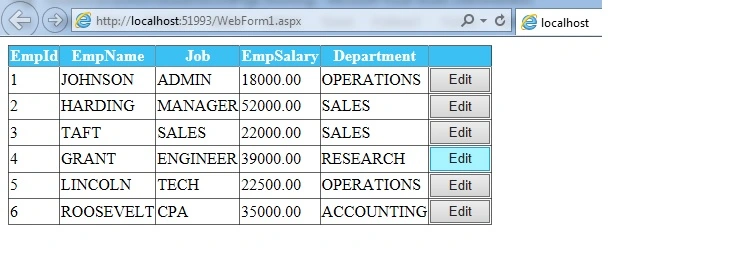
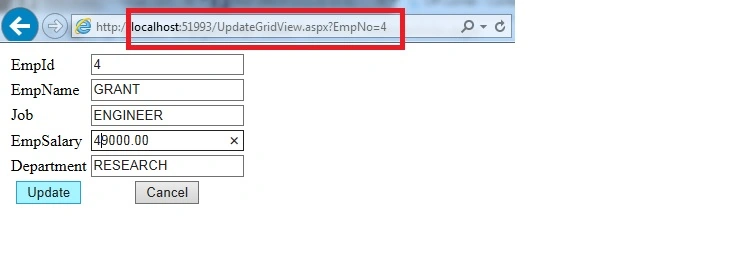
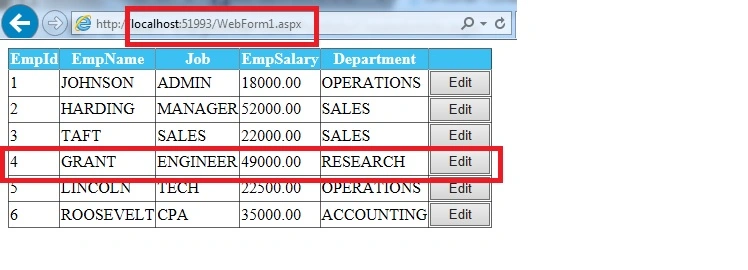
Rajaa KhalifehPosted Apr 10, 2020, 10:07 AM
Hello it works for me when i choose the first id and update, but when iam choosing another id an error occur :"Input string was not in a correct format." for this line empno = Convert.ToInt32(Request.QueryString["EmpNo"].ToString()); any help please
KYLE CHUAPosted Feb 27, 2019, 3:12 AM
Object reference not set to an instance of an object.Pretty sure the error is in "int empno = 0;"
Deepak VermaPosted Aug 26, 2018, 7:27 AM
Can you add insert and delete code in this. my email is [email protected]
aamir aliPosted Mar 30, 2018, 3:25 PM
It is a very good article it fits in my requirement. keep contributing.
Isaac HatilimaPosted Mar 1, 2018, 9:57 AM
It is saying Object reference not set to an instance of an object. I don't know what am missing but the value is showing in the URL bar. Someone help.
Annabel LimPosted Jul 23, 2017, 7:33 AM
Does Anyone know how I can use for instance "CustID" from a Gridview of page 'A' to the gridview of Page 'B'?
nirmala biradarPosted Jul 14, 2017, 3:07 AM
I got this exception "Input string was not in a correct format." for this line empno = Convert.ToInt32(Request.QueryString["EmpNo"].ToString());
ABHIJIT POOJARIPosted Apr 13, 2017, 11:26 AM
I try this but i am only getting row1 gridview values geting displayedeven when i am selecting the 2nd row.
محمد يونسPosted Apr 6, 2017, 9:28 AM
Hey bro good job hw can we do for dropdownlist
Lipun PradhanPosted Nov 23, 2016, 8:34 AM
How this will be done using checkbox in place of edit button and the edit button should be outside the gridview
Lipun PradhanPosted Nov 23, 2016, 8:33 AM
How this will be done using checkbox in place of edit button,abd the edit button should be outside the grid
AbedElHamid AlWahidyPosted Nov 16, 2015, 8:21 AM
good job
Govinda Rajulu YemineniPosted Sep 1, 2015, 3:54 AM
Thank you all
Gopi ChandPosted Aug 23, 2015, 1:33 PM
Well done
Santhakumar MunuswamyPosted Aug 23, 2015, 11:34 AM
Thanks for Nice article
Sibeesh VenuPosted Aug 23, 2015, 3:49 AM
Nice Share
Rajeesh MenothPosted Aug 23, 2015, 2:55 AM
Good One
RakeshPosted Aug 23, 2015, 12:58 AM
Good one
Saineshwar BageriPosted Aug 23, 2015, 12:52 AM
Nice Start
Gowtham KPosted Aug 22, 2015, 10:05 PM
Thanks for sharing
Karthikeyan KPosted Aug 22, 2015, 9:31 PM
Good one...