

👋 Introduction
AI is quietly transforming how we build low-code and no-code solutions. If you’re working with Microsoft Power Pages, you now have access to a game-changing feature — Copilot in Power Pages Studio.
But by default, it’s turned off in most environments. If you're a Power Platform admin or managing environments for your organization, you’ll need to manually enable and set up Copilot in Power Pages Studio before your team can start using it.
This article will help you do just that. No fluff — just practical, step-by-step instructions in a developer-friendly tone.
🧠 What is Copilot in Power Pages Studio?
Copilot in Power Pages Studio brings AI assistance to website building. Using simple natural language prompts, users can:
- 📄 Generate and design pages
- 🧱 Add forms and components
- 🎨 Customize content layouts
- ⚡ Speed up overall site authoring
This is especially helpful for citizen developers, consultants, and content authors who don’t want to start from scratch.
✅ Prerequisites Before Setup
Make sure the following is ready before enabling Copilot:
- You have Power Platform Admin or Environment Admin permissions
- Environment is hosted in a supported region (like United States)
- The environment must be enabled for Power Pages
- Feature availability is aligned with your organization’s data governance
⚙️ Steps to Set Up Copilot in Power Pages Studio
Let’s get straight to the steps.
1️⃣ Open the Power Platform Admin Center
🔗 Go to: https://admin.powerplatform.microsoft.com
Login with your admin credentials.
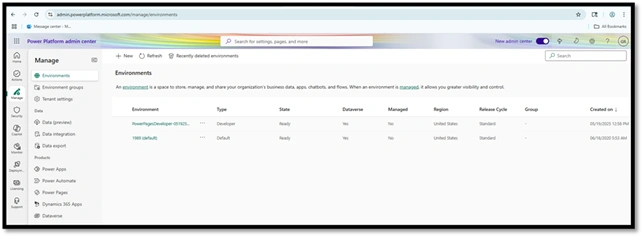
2️⃣ Choose Your Environment
- Navigate to copilot from the left-side menu
- Click on the settings and select Copilot in Power Pages Studio
3️⃣ Locate “Copilot in Power Pages Studio” Settings
Scroll down and look for the section:
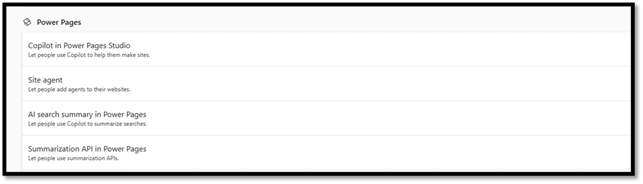
🧠 Copilot in Power Pages Studio- Click the link
You’ll also see the tooltip:
“When on, people can create and author sites with the help of Copilot.”
Click on the "Set up" button.
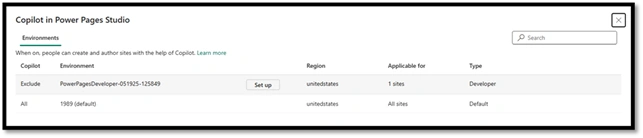
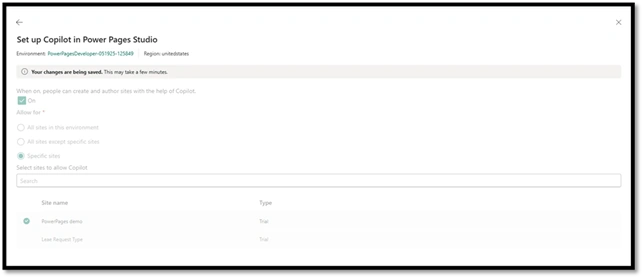
4️⃣ Choose Your Site Access Policy
Now you’ll get three radio options:
- 🔓 Allow for all sites in the environment: This will enable Copilot for every site under the selected environment.
- 🚫 Allow for all except specific sites: You can exclude certain sites if needed.
- ✅ Allow only for specific sites: Best for restricted environments or sensitive projects.
Choose what works best for your org. For quick testing, the first option is easiest.
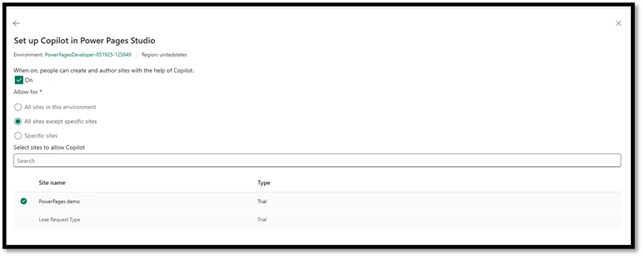
Change the combo box as needed
5️⃣ Save the Configuration
Click Save.
You’ll see a confirmation message:
“Your changes are being saved. This may take a few minutes.”
And that’s it! Copilot is now active in Power Pages Studio for the chosen sites/environment.
💡 Pro Tips for Admins
- 🔄 Changes may take a few minutes to reflect in Studio, so be patient.
- 🧪 Always test Copilot in a sandbox/dev environment before enabling in production.
- 🛡️ If you're working in a regulated industry, prefer site-specific access to control AI exposure.
🎯 Conclusion
Setting up Copilot in Power Pages Studio using the Power Platform Admin Center is quick and painless. Once enabled, your makers and content creators can build websites much faster — with AI as their assistant.
It’s a great feature to empower teams, especially in large organizations where time-to-market matters. So if you’re an admin, go ahead and turn it on. Let AI handle the heavy lifting while your team focuses on creativity and content.
Join the conversation! Your thoughts help the community grow.