

1. Alert Message Box
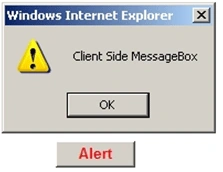
This type of Message Box is used to give alert information to the user. This can be done using the "alert" method. Use the alert method in <script> </script> tags by using a function with a method name. Call this function on client click event in a Button as follows in the following code.
e.g.: alert("write Message here")
Image of Alert Message Box:
- <head runat="server">
- <title>Untitled Page</title>
- <script type="text/Javascript" language ="javascript" >
- function alert_meth()
- {
- alert("Client Side MessageBox");
- }
- </script>
- </head>
- <body>
- <form id="form1" runat="server">
- <div>
- <asp:Button ID="Button1" runat="server" Style="z-index: 100; left: 64px; position: absolute;
- top: 88px" Text="Alert" OnClientClick ="alert_meth()" Font-Bold="True" ForeColor="Red" Width="72px"/>
2. Confirmation Message Box
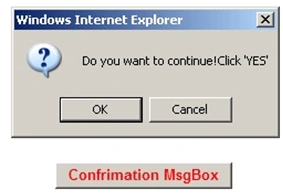
This type of Message Box is used to give a warning to the user. Suppose user is deleting records; at that time this type of message box is used to give confirmation about the action to be taken or not by showing two Buttons as "YES'" and "NO". If the user clicks on the "YES" Button it returns Boolean "True" and for "NO" button it returns Boolean "False".
This type of Message Box is used to give a warning to the user. Suppose user is deleting records; at that time this type of message box is used to give confirmation about the action to be taken or not by showing two Buttons as "YES'" and "NO". If the user clicks on the "YES" Button it returns Boolean "True" and for "NO" button it returns Boolean "False".
- <head runat="server">
- <title>Untitled Page</title>
- <script type="text/Javascript" language ="javascript" >
- function confirm_meth()
- {
- if( confirm("Do you want to continue!Click 'YES'")==true)
- {
- document.writeln ("<b>You had click on 'YES' Button</b>");
- }
- else
- {
- document.writeln ("<b>You had clic on 'NO' Button</b>");
- }
- }
- </script>
- </head>
- <body>
- <form id="form1" runat="server">
- <div>
- <asp:Button ID="btnconfirm" runat="server" Font-Bold="True" ForeColor="Red" Style="z-index: 101;
- left: 272px; position: absolute; top: 208px" Text="Confrimation MsgBox"
- OnClientClick =" return confirm_meth()" Width="160px" />
Son Nguyen DucPosted May 9, 2011, 2:27 AM
it is good
knightsPosted Feb 21, 2011, 10:18 AM
Suthish and Shakeer, what do you think, I think such instructional write ups should go in Blog section?
Suthish NairPosted Feb 21, 2011, 5:22 AM
Please correct the spell mistakes. Also alert() and confirm() are javascripts built-in functions, not methods. They are not message boxes, they are dialog boxes with informations for users. Agree we used to call it as a message box. There is no such as "Yes/No" buttons for confirm function, its "OK/Cancel" buttons.