

In this article, I will explain how the Chunk method works, highlight its advantages, and provide practical examples of how to implement it in real-world applications.
Efficiently managing large collections is a common challenge in C#. Whether you're working with extensive datasets, implementing pagination for API responses, or executing batch operations, breaking a list into smaller, more manageable chunks can significantly enhance performance, reduce memory usage, and streamline processing. By dividing data into structured segments, you can optimize computational efficiency, minimize processing delays, and improve overall system responsiveness.
With .NET 6 and later, the Chunk method in LINQ makes this task easier. Instead of writing complex logic to split a list manually, Chunk allows you to break a collection into smaller arrays with just one line of code.
Chunk Method in Linq (.Net 6, C# 8 & above version)
The Chunk method splits a collection into smaller chunks of a specified size. It was introduced in .NET 6 and is available in C# 8+. The Chunk method in C# simplifies splitting large lists into smaller groups, improving batch processing, pagination, and parallel execution. Introduced in .NET 6, it replaces manual looping, making code cleaner and more efficient.

Syntax
int chunkSize = 3;
var chunks = EmployeeColletion.Chunk(chunkSize);
- size → Number of items per chunk.
- Returns IEnumerable<T[]> → Each chunk is an array (T[]).
Example. Split a List into Chunks
int[] numbersList = Enumerable.Range(1, 15).ToArray(); // [1,2,3,4,5,6,7,8,9,10,11,12,13,14,15]

var chunks = numbersList.Chunk(3); // Split into groups of 3
Console.WriteLine(Environment.NewLine);
foreach (var chunk in chunks)
{
    Console.WriteLine($"Chunk: {string.Join(", ", chunk)}");
}
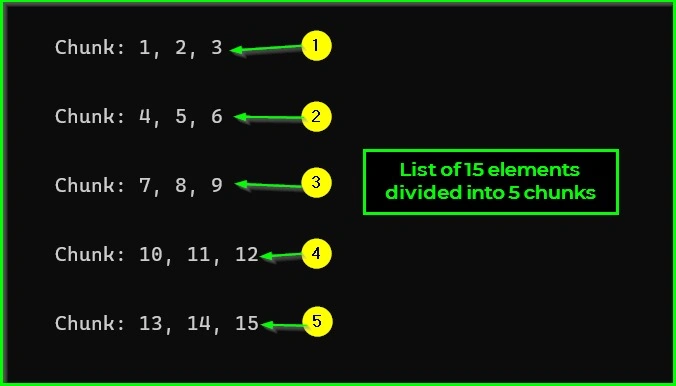
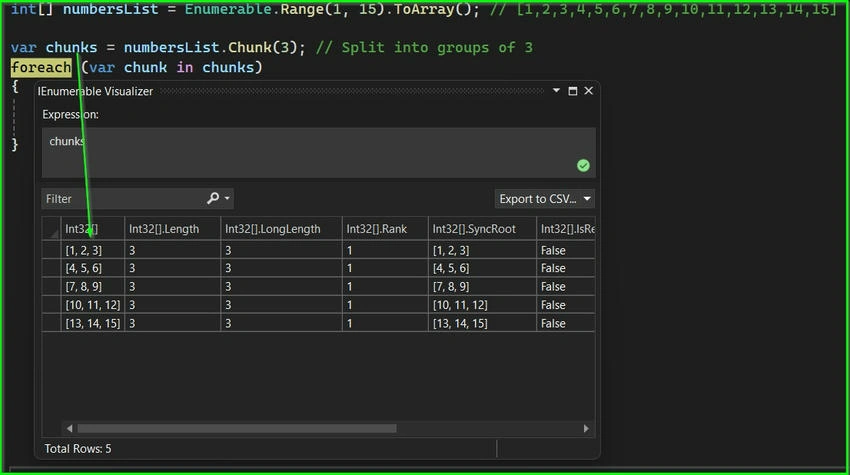
Let's use debugging to see how a list is split into smaller chunks, each containing three elements. By stepping through the code, we can watch how the Chunk method breaks the list into groups of three. This makes it easier to understand how the data is organized and processed in smaller, more manageable parts. Please refer to the snippet below in debug mode.
Join the conversation! Your thoughts help the community grow.