In this article, we are going to see how to store data in Azure tables using Rest API in ASP.NET core. ASP.NET Core is an open source web framework which can be run on Mac, Windows, and Linux. Azure Tables is a NoSQL cloud database, not a relational database. It can store just without any other kind of relations, like foreign keys. Read the previous part of the article before continuing with this one.
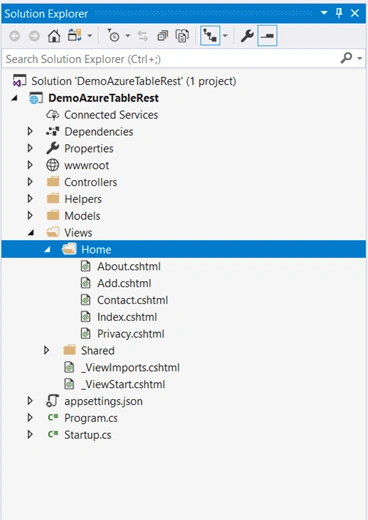
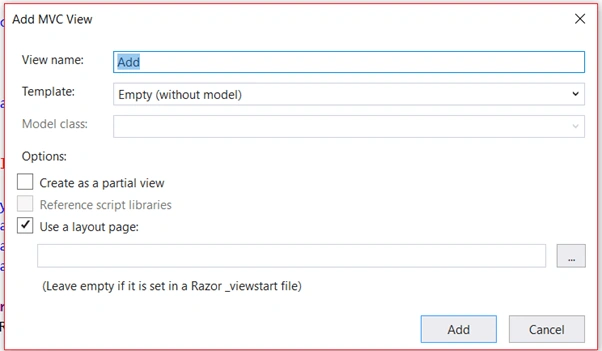
Adding a new MVC Razor View
Open the Add.cshtml file and replace the code given below. Here, we use strongly-typed synchronous forms because it is easy to maintain the forms in cshtml. HTML helpers like @Html.BeginForm(..) create the <form> tag when rendering the web page and @Html.Textbox(..) creates the <input> tag when rendering the webpage.
- @model DemoAzureTableRest.Models.MaterialUsageDetails
-
- <div class="container">
- <h2>Add New Device</h2>
-
- @using (Html.BeginForm("Add", "Home", FormMethod.Post))
- {
- <table>
- <tr>
- <th colspan="2" align="center"></th>
- </tr>
- <tr>
- <td>Device ID: </td>
- <td>
- @Html.TextBoxFor(m => m.deviceId)
- </td>
- </tr>
- <tr>
- <td>Furnace: </td>
- <td>
- @Html.TextBoxFor(m => m.furnace)
- </td>
- </tr>
-
- <tr>
- <td>Material: </td>
- <td>
- @Html.TextBoxFor(m => m.material)
- </td>
- </tr>
- <tr>
- <td>Weight: </td>
- <td>
- @Html.TextBoxFor(m => m.weight)
- </td>
- </tr>
- <tr>
- <td></td>
- <td><input type="submit" value="Submit" /></td>
- </tr>
- </table>
- }
- </div>
-
-
- @if (ViewBag.Message != null)
- {
- <script type="text/javascript">
- window.onload = function () {
- alert("@ViewBag.Message");
- };
- </script>
- }
-
-
- <style>
- table {
- border-spacing: 8px 2px;
- }
-
- td {
- padding: 6px;
- }
- </style>
Now, open the Controllers/HomeController.cs and replace the code with the one given below. Here, we will get materialUsageDetails model data and pass it to the AzureTable helper class. Azure Table InsertEntity Method requires a storage name, storage key, table name, and model data so we need to pass the following data while calling the InsertEntity method.
- public IActionResult Add(MaterialUsageDetails materialUsageDetails)
- {
- string response ="";
- if (materialUsageDetails.deviceId != null)
- {
- materialUsageDetails.PartitionKey = materialUsageDetails.deviceId;
- materialUsageDetails.RowKey = materialUsageDetails.furnace;
- response = AzureTables.InsertEntity(StorageName, StorageKey, TableName, JsonConvert.SerializeObject(materialUsageDetails));
- }
-
- if (response == null)
- {
- ViewBag.Message = "Saved Successfully";
-
- }
-
- return View(materialUsageDetails);
- }
And, open the Helpers/AzureTables.cs file and add the below code to it. Here, we will create a new entity in Azure Tables using HttpWebRequest. To create the web request, we need the URI and Headers. The required header is given in getRequestHeader() method, the required parameters are HTTP method name ("POST"), request(Http Request), Storage account(storage account name), access key(storage secret key), resource(table name), jsonData.length(model data length). To write a model JSON data into the request body, we use StreamWriter class and execute the request using request.GetRequestStream().
- public static string InsertEntity(string storageAccount, string accessKey, string tableName, string jsonData)
- {
- string jsonResponse = "";
- string host = string.Format(@"https://{0}.table.core.windows.net/", storageAccount);
-
- string resource = string.Format(@"{0}", tableName);
- string uri = host + resource;
-
-
- HttpWebRequest request = (HttpWebRequest)HttpWebRequest.Create(uri);
-
- request = getRequestHeaders("POST", request, storageAccount, accessKey, resource, jsonData.Length);
-
-
- using (var streamWriter = new StreamWriter(request.GetRequestStream()))
- {
- streamWriter.Write(jsonData);
- streamWriter.Flush();
- streamWriter.Close();
- }
-
-
- try
- {
- using (HttpWebResponse response = (HttpWebResponse)request.GetResponse())
- {
- using (System.IO.StreamReader r = new System.IO.StreamReader(response.GetResponseStream()))
- {
- jsonResponse = r.ReadToEnd();
-
- }
- }
- }
- catch (WebException ex)
- {
-
- using (System.IO.StreamReader sr = new System.IO.StreamReader(ex.Response.GetResponseStream()))
- {
- jsonResponse = sr.ReadToEnd();
-
- }
-
-
- }
-
- return jsonResponse;
- }
-
-
- public static HttpWebRequest getRequestHeaders(string requestType, HttpWebRequest Newrequest, string storageAccount, string accessKey, string resource, int Length = 0)
- {
- HttpWebRequest request = Newrequest;
-
- switch (requestType.ToUpper())
- {
- case "GET":
- request.Method = "GET";
- request.ContentType = "application/json";
- request.ContentLength = Length;
- request.Accept = "application/json;odata=nometadata";
- request.Headers.Add("x-ms-date", DateTime.UtcNow.ToString("R", System.Globalization.CultureInfo.InvariantCulture));
- request.Headers.Add("x-ms-version", "2015-12-11");
- request.Headers.Add("Accept-Charset", "UTF-8");
- request.Headers.Add("MaxDataServiceVersion", "3.0;NetFx");
- request.Headers.Add("DataServiceVersion", "1.0;NetFx");
- break;
- case "POST":
- request.Method = "POST";
- request.ContentType = "application/json";
- request.ContentLength = Length;
- request.Accept = "application/json;odata=nometadata";
- request.Headers.Add("x-ms-date", DateTime.UtcNow.ToString("R", System.Globalization.CultureInfo.InvariantCulture));
- request.Headers.Add("x-ms-version", "2015-04-05");
- request.Headers.Add("Accept-Charset", "UTF-8");
- request.Headers.Add("MaxDataServiceVersion", "3.0;NetFx");
- request.Headers.Add("DataServiceVersion", "1.0;NetFx");
- break;
- case "PUT":
- request.Method = "PUT";
- request.ContentLength = Length;
- request.ContentType = "application/json";
- request.Accept = "application/json;odata=nometadata";
- request.Headers.Add("x-ms-date", DateTime.UtcNow.ToString("R", System.Globalization.CultureInfo.InvariantCulture));
- request.Headers.Add("x-ms-version", "2015-04-05");
- request.Headers.Add("If-Match", "*");
- request.Headers.Add("Accept-Charset", "UTF-8");
- request.Headers.Add("MaxDataServiceVersion", "3.0;NetFx");
- request.Headers.Add("DataServiceVersion", "1.0;NetFx");
- break;
- case "DELETE":
- request.Method = "DELETE";
- request.ContentType = "application/json";
- request.Accept = "application/json;odata=nometadata";
- request.Headers.Add("x-ms-date", DateTime.UtcNow.ToString("R", System.Globalization.CultureInfo.InvariantCulture));
- request.Headers.Add("x-ms-version", "2015-04-05");
- request.Headers.Add("If-Match", "*");
- request.Headers.Add("Accept-Charset", "UTF-8");
- request.Headers.Add("MaxDataServiceVersion", "3.0;NetFx");
- request.Headers.Add("DataServiceVersion", "1.0;NetFx");
- break;
- }
-
- string sAuthorization = getAuthToken(request, storageAccount, accessKey, resource);
- request.Headers.Add("Authorization", sAuthorization);
- return request;
- }
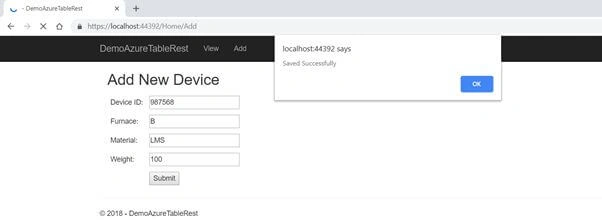
That's it. Now, run the web application, go to Debug menu, and click on "Start without Debugging" or press F5. To add a new form, change the URL to https://localhost:44392/Home/Add.
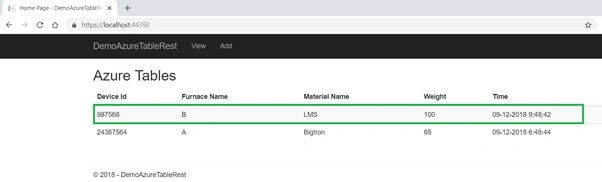
Now, fill the form and click the "Submit" button.
I hope you have learned how to store data in Azure Table Storage using Rest API in an ASP.NET Core web application. Feel free to fill up the comment box below if you need any assistance.



Muthu KumarPosted Jan 2, 2019, 8:34 AM
Nice Article Ravishankar. Thanks for sharing....