

Introduction
This article explains how to create a Power Automate flow to retrieve, filter, and count SharePoint Recycle Bin items for the Invoice Approval application. The flow uses the SharePoint Send an HTTP request to SharePoint action to retrieve Recycle Bin items, filters the results based on the LeafName value, and uses the length() expression to calculate the number of matching deleted items.
For example, the flow can filter records where LeafName contains 29465 and return the total number of matching Recycle Bin items. This provides a simple way to validate and track deleted invoice-related records without manually checking the SharePoint Recycle Bin.
Requirement
Retrieve SharePoint Recycle Bin items from the Invoice site, filter the deleted records where the
LeafNamecontains the required Sharepoint list items identifier, and count the matching records.
Action 1 : Manually trigger a flow
No input requiredAction 2 : Send an HTTP request to SharePoint
Site Address:
Invoice Sharepoint Site

Method:
GET

URI:
_api/site/RecycleBin

Headers:
Accept = application/json;odata=nometadata
Action 3 : Filter array
From
body('Send_an_HTTP_request_to_SharePoint')?['value']Condition
LeafName
contains
29465
Or Advanced mode:
@contains(item()?['LeafName'], '29465')Action 4 : Compose - length for filter array
Expression:
length(body('Filter_Array_-Recycle_Bin_Items'))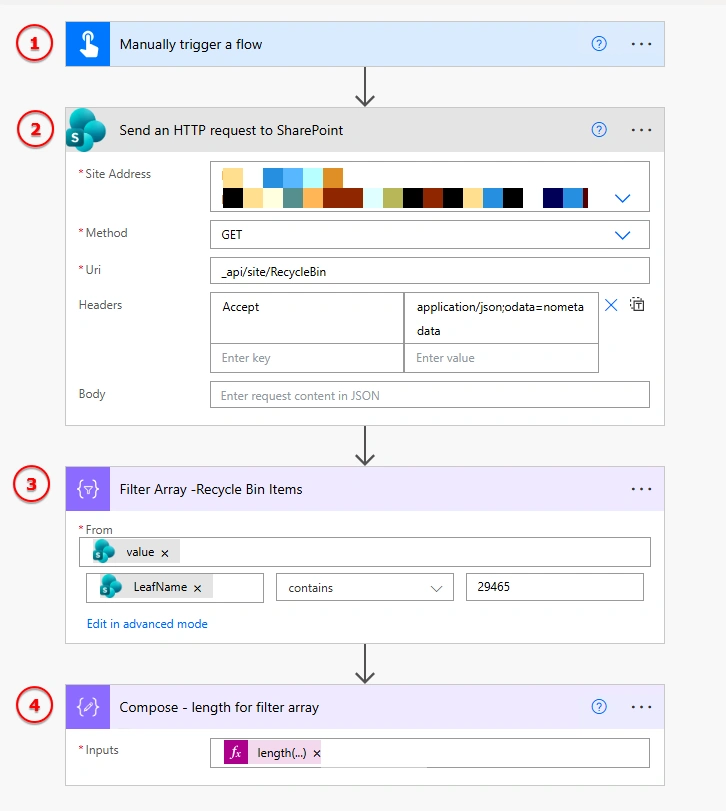
Expected Result
If the Recycle Bin contains 5 records matching 29465, the final Compose action returns:
1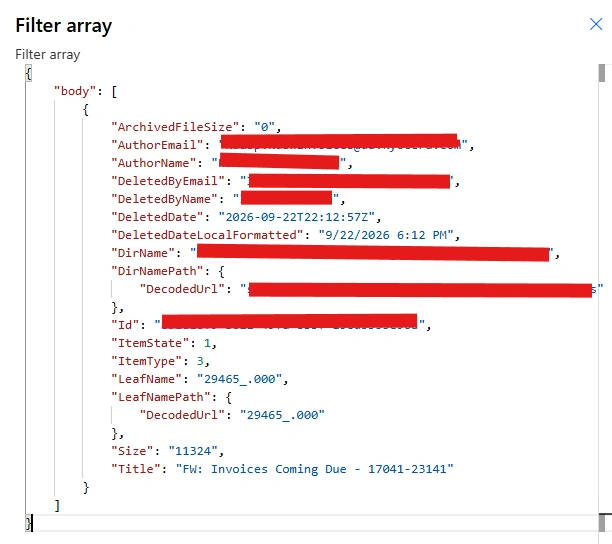
Example run
Get Recycle Bin Items
        ↓
Total Recycle Bin items = 100
        ↓
Filter LeafName contains 29465
        ↓
Matching items = 1
        ↓
Compose length
        ↓
1
Important Note
this flow is technically filtering on the LeafName property, not directly on the SharePoint List ID.
If 29465 represents an InvoiceDetails identifier, invoice number, folder identifier, or another value embedded in the deleted item's LeafName, this approach is appropriate.
However, if 29465 is intended to be the SharePoint List ID, you should not use:
LeafName contains 29465Instead, the filter should be based on the Recycle Bin item's actual list-related property returned by your SharePoint environment.
This distinction is important because:
LeafNameand:
List IDConclusion
The Power Automate flow provides an automated approach to retrieve, filter, and count deleted SharePoint Recycle Bin items. By using the Send an HTTP request to SharePoint action, Filter array, and length() expression, the required records can be identified and counted efficiently.
The same approach can be reused for the InvoiceDetails list and other Invoice Approval lists by changing the filter criteria as required. This helps simplify Recycle Bin validation, deletion tracking, and reporting within the Invoice Approval solution.
Join the conversation! Your thoughts help the community grow.