
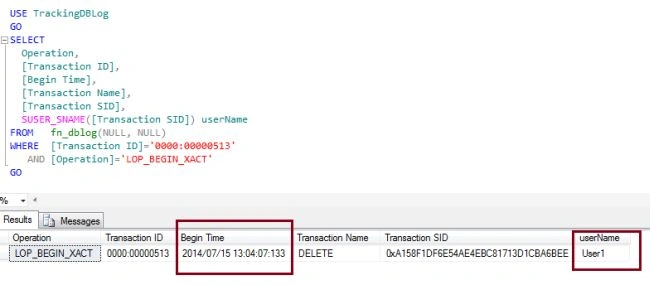
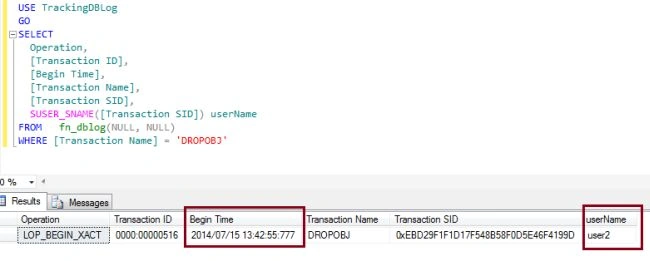
This is the most important part for DBAs or developers. Yesterday somebody dropped or deleted objects from my database, but no one will say who. And I want to track who did it. By using the transaction log we can track which user dropped or deleted my database objects.
I have already discussed how to track the transaction log in my previous article How to track database transaction Log in SQL Server 2012. Before reading this article, I recommend you read the previous article to understand the transaction log for all database activity.
Let's create a small Test Environment using the Transaction Log and the undocumented function "fn_dblog”.
The following is the test environment.
-Tracking a user who a Deleted TSQL
Step 1: Now I will create a database and a table:
- --Create Test DB.
- USE [master];
- GO
- CREATE DATABASE TrackingDBLog;
- GO
- -- Create tables.
- USE TrackingDBLog;
- GO
- CREATE TABLE [Test] (
- [ID] INT IDENTITY (1, 1),
- [Date] DATETIME DEFAULT GETDATE (),
- [Name] CHAR (25) DEFAULT 'A');
Step 2: Now insert some data into the Test table:
- USE [TrackingDBLog];
- GO
- SET NOCOUNT ON;
- GO
- INSERT INTO [Test] DEFAULT VALUES ;
- GO 50
- GO
- SELECT COUNT(*) TotalCount FROM [Test]
- GO

- USE TrackingDBLog
- GO
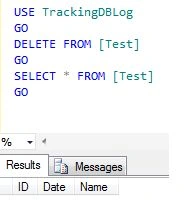
- DELETE FROM [Test]
- GO
- SELECT * FROM [Test]
- GO
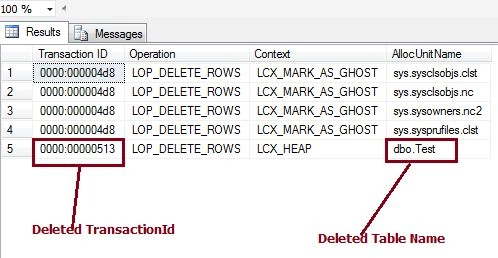
Step 4: Now I will find the deleted rows information using the Transaction Log and the function "fn_dblog”. Run the following command to get the info about all the deleted transactions.
- USE TrackingDBLog
- GO
- SELECT DISTINCT
- [Transaction ID],
- Operation,
- Context,
- AllocUnitName
- FROM
- fn_dblog(NULL, NULL)
- WHERE
- Operation = 'LOP_DELETE_ROWS'
Hemant SrivastavaPosted Jul 16, 2014, 1:35 PM
good information!
Shivom AgarwalPosted Jul 16, 2014, 6:37 AM
thanks anupam
Anupam SinghPosted Jul 16, 2014, 4:53 AM
nice....
Shivom AgarwalPosted Jul 16, 2014, 2:14 AM
thanks to all
Shivom AgarwalPosted Jul 16, 2014, 2:14 AM
this is db user name
Khan Abrar AhmedPosted Jul 16, 2014, 1:44 AM
Nice once sir, just wanted to confirm the name is user name of db user name.
Manju lata YadavPosted Jul 16, 2014, 1:28 AM
nice article.