SharePoint is a content collaboration platform where we can create and share content. The user profile service applications are used in managing the user profiles inside SharePoint tenant. User Profile services use the data from Active Directory Services and keep the user data and AD user data in sync. SharePoint Online has 80+ default User Profile properties. To update the values of User Profile properties, SharePoint has no explicit place other than the SharePoint Admin center and Delve. Delve is limited to some of the User Profile properties and it idoes not allow properties created by the user to be edited.
SPFx is the new Microsoft Office development framework which is used in building customized applications. SPFx applications are installed on the SharePoint site and it will run in the SharePoint user context. So, it is very easy to integrate it with the SharePoint environment. SharePoint has exposed its APIs which is helpful in working closely with its environment. In this article, you will learn to update your user profile data.
Prerequisite
Our first thing is to configure the development environment. You can follow this link to create and work with SPFx apps. After configuring follow the below steps to update the User Profile properties using SPFx.
User Profile Properties
There are a lot of user properties and user profile properties in SharePoint Online site. Before starting with that, you have to know what are all the user profile properties available in SharePoint. Below is the list of user profile properties,
- AboutMe
- SPS-LastKeywordAdded
- AccountName
- SPS-Locale
- ADGuid
- SPS-Location
- Assistant
- SPS-MasterAccountName
- CellPhone
- SPS-MemberOf
- Department
- SPS-MUILanguages
- EduExternalSyncState
- SPS-MySiteUpgrade
- EduOAuthTokenProviders
- SPS-O15FirstRunExperience
- EduPersonalSiteState
- SPS-ObjectExists
- EduUserRole
- SPS-OWAUrl
- Fax
- SPS-PastProjects
- FirstName
- SPS-Peers
- HomePhone
- SPS-PersonalSiteCapabilities
- LastName
- SPS-PersonalSiteInstantiationState
- Manager
- SPS-PhoneticDisplayName
- Office
- SPS-PhoneticFirstName
- PersonalSpace
- SPS-PhoneticLastName
- PictureURL
- SPS-PrivacyActivity
- PreferredName
- SPS-PrivacyPeople
- PublicSiteRedirect
- SPS-ProxyAddresses
- QuickLinks
- SPS-RegionalSettings-FollowWeb
- SID
- SPS-RegionalSettings-Initialized
- SISUserId
- SPS-ResourceAccountName
- SPS-AdjustHijriDays
- SPS-ResourceSID
- SPS-AltCalendarType
- SPS-Responsibility
- SPS-Birthday
- SPS-SavedAccountName
- SPS-CalendarType
- SPS-SavedSID
- SPS-ClaimID
- SPS-School
- SPS-ClaimProviderID
- SPS-ShowWeeks
- SPS-ClaimProviderType
- SPS-SipAddress
- SPS-ContentLanguages
- SPS-Skills
- SPS-DataSource
- SPS-SourceObjectDN
- SPS-Department
- SPS-StatusNotes
- SPS-DisplayOrder
- SPS-Time24
- SPS-DistinguishedName
- SPS-TimeZone
- SPS-DontSuggestList
- SPS-UserPrincipalName
- SPS-Dotted-line
- SPS-WorkDayEndHour
- SPS-EmailOptin
- SPS-WorkDayStartHour
- SPS-FeedIdentifier
- SPS-WorkDays
- SPS-FirstDayOfWeek
- Title
- SPS-FirstWeekOfYear
- UserName
- SPS-HashTags
- UserProfile_GUID
- SPS-HireDate
- WebSite
- SPS-Interests
- WorkEmail
- SPS-JobTitle
- WorkPhone
- SPS-LastColleagueAdded
Some of these properties are read-only by default. Also, admins can mark these properties read-only. To read the properties from SharePoint, you can use the below API Endpoint.
To get all user properties for current user,
https://<your_site_collection_url>/_api/SP.UserProfiles.PeopleManager/GetMyProperties
To get the user profile properties for specific user,
https://<your_site_collection_url>/_api/SP.UserProfiles.PeopleManager/GetPropertiesFor(accountName=@v)?@v='i:0%23.f|membership|[email protected]'
To get all the user profiles property for a single specific user,
https://<your_site_collection_url>/_api/SP.UserProfiles.PeopleManager/GetUserProfilePropertyFor(accountName=@v, propertyName='<property_name>')?@v='i:0%23.f|membership|[email protected]'
User profile properties are classified as single and multi-valued. For example, WorkEmail is a single valued property and the SPS-School is a multi-valued property. To update these kinds of values we are going to use the below API end points
https://<your_site_collection_url>/_api/SP.UserProfiles.PeopleManager/SetSingleValueProfileProperty

https://<your_site_collection_url>/_api/SP.UserProfiles.PeopleManager/SetMultiValuedProfileProperty
SPFX application to interact with User Profile properties
In our SPFx application, we are going to have a text box to get the property name input from the user. Then, a GET button to perform the Get operation which gets the current value from the User Profile. Then, an Update button which updates the value of the user profile property that we have chosen.
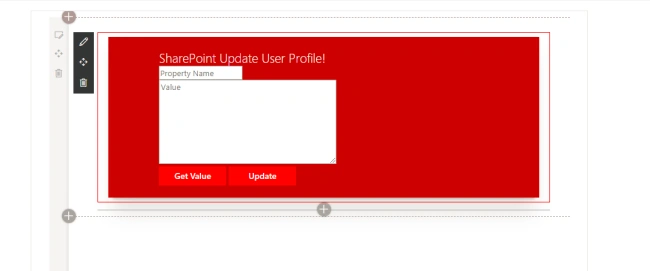
Below is the code snippet to get the user profile property which is chosen through the textbox.
private getValue() {
    let pptName: any = this.domElement.querySelector('#txtPropertyName');
    this.propertyName = pptName.value;
    let apiUrl = this.context.pageContext.web.absoluteUrl + "/_api/SP.UserProfiles.PeopleManager/GetUserProfilePropertyFor(accountName=@v, propertyName='" + this.propertyName + "')?@v='" + encodeURIComponent("i:0#.f|membership|") + this.userdetails.loginName + "'";
    let httpClient: SPHttpClient = this.context.spHttpClient;
    httpClient.get(apiUrl, SPHttpClient.configurations.v1).then(response => {
        response.json().then(responseJson => {
            let newValue: any = this.domElement.querySelector('#txtPropertyValue');
            newValue.value = responseJson.value;
        });
    });
}
Below is the code snippet to update the User Profile property value. I am differentiating the multi-value and single-valued properties using a separator “|”. So if you want to update a multivalued property using this below code, make sure that you have given “|” at the suffix like this “Engineering|”.
private updateValue() {
    let newValue: any = this.domElement.querySelector('#txtPropertyValue');
    this.value = newValue.value;
    if (this.value.indexOf("|") !== -1) {
        this.updateMultiUPValue();
    } else {
        this.updateSingleUPValue();
    }
}
updateMultiUPValue() {
    let apiUrl = this.context.pageContext.web.absoluteUrl + "/_api/SP.UserProfiles.PeopleManager/SetMultiValuedProfileProperty";
    let userData = {
        'accountName': "i:0#.f|membership|" + this.userdetails.loginName,
        'propertyName': this.propertyName, //can also be used to set custom single value profile properties
        'propertyValues': this.value.split("|")
    }
    let httpClient: SPHttpClient = this.context.spHttpClient;
    let spOpts = {
        headers: {
            'Accept': 'application/json;odata=nometadata',
            'Content-type': 'application/json;odata=verbose',
            'odata-version': '',
        },
        body: JSON.stringify(userData)
    };
    httpClient.post(apiUrl, SPHttpClient.configurations.v1, spOpts).then(response => {
        alert("Updated");
    });
}
updateSingleUPValue() {
    let apiUrl = this.context.pageContext.web.absoluteUrl + "/_api/SP.UserProfiles.PeopleManager/SetSingleValueProfileProperty";
    let userData = {
        'accountName': "i:0#.f|membership|" + this.userdetails.loginName,
        'propertyName': this.propertyName, //can also be used to set custom single value profile properties
        'propertyValue': this.value
    }
    let httpClient: SPHttpClient = this.context.spHttpClient;
    let spOpts = {
        headers: {
            'Accept': 'application/json;odata=nometadata',
            'Content-type': 'application/json;odata=verbose',
            'odata-version': '',
        },
        body: JSON.stringify(userData)
    };
    httpClient.post(apiUrl, SPHttpClient.configurations.v1, spOpts).then(response => {
        alert("Updated");
    });
}
I hope you have understood how to update User Profile properties using SPFx and Rest API. Don’t hesitate to post your thoughts and doubts in the comment box below.
Happy SharePointing!!!


Sonal AgrawalPosted Apr 11, 2021, 8:27 AM
In power apps on button click i want to show Pdf using one of custom user profile mapping...i want to use Open API while creating custom connector...Please [email protected]
rupali nirmalePosted Feb 11, 2021, 12:25 PM
How do i set user language in sharepoint online using SPFX?
S LPosted Apr 15, 2020, 9:57 PM
Hi, I had a question not related to this particular article. If I want to fetch other User Profile Properties by using value of one User Profile Properties, is that possible? For example, if I have SID of someone, can I fetch all details of that user?
Aman UpadhyayPosted Sep 19, 2019, 4:04 AM
What would be the request body to update multiple property of a user Profile
vishal jadhaoPosted Aug 21, 2019, 2:12 PM
This is working fine for me now. The property didn't have edit permissions setup.
vishal jadhaoPosted Aug 21, 2019, 1:15 PM
Hi, I tried this blog and I get a success message after updating the custom property but my property doesn't get updated.
Poornima SinghPosted Jul 29, 2019, 7:01 AM
I am trying to update managed metadata type user profile property. I guess I am not sending the data with proper syntax. Can any one help me with that?
Samik RoyPosted Dec 27, 2018, 1:19 AM
Thank you for the article. Does this also support updating boolean custom properties !
Piyush AgarwalPosted Oct 5, 2018, 12:12 PM
Thanks for sharing this article
Shyam SamudralaPosted Sep 5, 2018, 11:49 AM
Thanks for the solution Muthukannu. I am wondering if a similar solution can be used for updating user profile properties of other users?
Praveen KumarPosted Aug 6, 2018, 3:25 AM
HtmlString += '<li class="image">'; htmlString += '<a nowrap class="link_tag" href="'+ results1[i].DownloadURL.Url +'">'; htmlString += results1[i].Title; if(banner=jQuery(results1[i].Banner_Image.Url) === null ? '' : jQuery(results1[i].Banner_Image.Url)) { htmlString +='<img class="baner_image" src="'+banner+'" alt="">'; } Hi Selvan, i am fetching the banner url from the list but i dont knew how to give null point exception to this function. can you please help me with this?
Hadshana KamalanathanPosted Jul 19, 2018, 5:13 AM
Thanks for sharing
Viknaraj ManogararajahPosted Jul 14, 2018, 10:57 PM
Nice Article, Thank you for sharing.........
Reshma BhalekarPosted Jul 9, 2018, 7:30 AM
Nice Article Arutselvan
Sagar PardeshiPosted Jul 9, 2018, 5:49 AM
GOOD oNE Article on SPFx
Ravishankar NPosted Jul 9, 2018, 1:06 AM
Good one.Thanks for Sharing.