I am going to create a new ASP.NET application called “ImageDemo.” Open Visual Studio 2015 and click New Project and from the New Project window, you need to choose “ASP.NET Application” and give a name to the application.
It will open new windows for “New ASP.NET Project,” here you can choose from different type of templates. For example, you can choose Web Forms or MVC or Web API, etc. But we just need to choose the Web Forms as in the following:

In this web application, I will create a front end UI from where I can upload the image with some other details. For example, for this demo, I have taken the “WebSite” example where I will add the details like name, where it is, and profile image.
So, first I have just created the GUI from where I can upload the image as well as displaying the uploaded image in GridView. Yes, you are right, for displaying the image I am using the gridview with image control as in the following:
- <%@ Page Language="C#" AutoEventWireup="true" CodeBehind="Employee.aspx.cs" Inherits="ImageDemo.Employee" %>
-
- <!DOCTYPE html>
-
- <html xmlns="http://www.w3.org/1999/xhtml">
-
- <head runat="server">
- <title></title>
- </head>
-
- <body>
- <form id="form1" runat="server">
- <div style="border:2px solid black;">
- <table>
- <tr>
- <td colspan="2">
- <b>Enter WebSite Details</b>
- <br /><br /><br />
-
- </td>
- </tr>
- <tr>
- <td>Name
- </td>
- <td>
- <asp:TextBox runat="server" ID="txtName"></asp:TextBox>
- </td>
- </tr>
- <tr>
- <td>Address
- </td>
- <td>
- <asp:TextBox runat="server" ID="txtAddress"></asp:TextBox>
- </td>
- </tr>
- <tr>
- <td>Profile Image
- </td>
- <td>
- <asp:FileUpload runat="server" ID="fupProfileimage" />
- </td>
- </tr>
- <tr>
- <td>
- </td>
- <td>
- <asp:Button runat="server" ID="btnSubmit" Text="Submit" OnClick="btnSubmit_Click" />
- </td>
- </tr>
- <tr>
- <td colspan="2">
- <asp:Label runat="server" ID="lblMessage" ForeColor="Red"></asp:Label>
- </td>
- </tr>
- </table>
- <br />
- <br />
- <asp:GridView runat="server" ID="grvEmployee" AutoGenerateColumns="false">
- <Columns>
- <asp:BoundField DataField="Name" HeaderText="Name" />
- <asp:BoundField DataField="Address" HeaderText="Address" />
- <asp:TemplateField HeaderText="Profile Image">
- <ItemTemplate>
- <asp:Image runat="server" ID="imgProfile" ImageUrl='<%# Eval("Image") %>' Width="400px" Height="150px" />
- </ItemTemplate>
- </asp:TemplateField>
- </Columns>
-
- </asp:GridView>
- </div>
- </form>
- </body>
-
- </html>
As you can see with above ASP.NET code, I have made two parts with this application: Where I can upload the WebSite details with images as well as you can see the latest uploaded images in grid view with their corresponding data.
I have just made database connectivity to upload the image path inthe database rather than directly uploading the image in the database as binary format.
What I will do is, I will upload the image in the “Upload” folder and save the relevant path into the database. So at the time of displaying the data I will use the same path from database. This technique makes your site faster as compared to uploading the image as binary format in database.
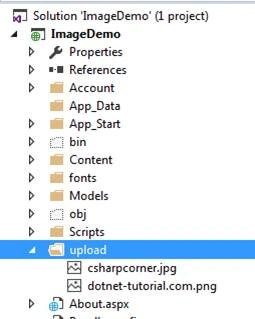
So, I am going to first create the connection string for database connectivity.
- <connectionStrings>
- <add name="MyConnection" connectionString="Data Source=my-computer;Initial Catalog=TestEmployee; user id=mukesh; password=adminadmin;" providerName="System.Data.SqlClient" />
- </connectionStrings>
Here's the code behind part for uploading and displaying the website details:.
- using System;
- using System.Collections.Generic;
- using System.Linq;
- using System.Web;
- using System.Web.UI;
- using System.Web.UI.WebControls;
- using System.Data;
- using System.Data.SqlClient;
- using System.Configuration;
- using System.IO;
-
- namespace ImageDemo
- {
- public partial class Employee: System.Web.UI.Page
- {
- string connectionstring = ConfigurationManager.ConnectionStrings["MyConnection"].ConnectionString;
- protected void Page_Load(object sender, EventArgs e)
- {
-
- if (!IsPostBack)
- {
- BindEmployeeData();
- }
- }
-
-
-
- public void BindEmployeeData()
- {
- using(var con = new SqlConnection(connectionstring))
- {
- string commandText = "select * from employees";
- var com = new SqlCommand(commandText, con);
- con.Open();
- var adapter = new SqlDataAdapter(com);
- DataSet ds = new DataSet();
- adapter.Fill(ds);
- grvEmployee.DataSource = ds;
- grvEmployee.DataBind();
-
- }
- }
-
- protected void btnSubmit_Click(object sender, EventArgs e)
- {
- string empName = Convert.ToString(txtName.Text);
- string address = Convert.ToString(txtAddress.Text);
-
-
- if (fupProfileimage.HasFile)
- {
- string profileImageName = fupProfileimage.PostedFile.FileName;
-
- string filePath = Server.MapPath(@ "~/upload/" + profileImageName);
- fupProfileimage.SaveAs(filePath);
- using(var con = new SqlConnection(connectionstring))
- {
- try
- {
- string commandText = "insert into employees (Name, address, image) values ('" + empName + "','" + address + "','~/upload/" + profileImageName + "')";
- var com = new SqlCommand(commandText, con);
- con.Open();
- int result = com.ExecuteNonQuery();
- if (result > 0)
- {
- BindEmployeeData();
- } else
- {
- lblMessage.Text = "Failed to Add Employee Data !";
- }
- } catch (Exception ex)
- {
-
- }
- }
- } else
- {
- lblMessage.Text = "choose any image first !";
- }
- }
- }
- }
You can see with the above code at the time of submitting the data, I am only saving the Name, Address, and Image Path into the database and saving the whole image into the database as binary format. I am just uploading the image in some other folder as well.
When you run the project and upload some images with other details then your application will look the same as below.

Thanks for reading this article, hope you enjoyed it.
Read more articles on ASP.NET:


Reza RezaPosted Jan 4, 2020, 4:25 AM
But download code is not written here, the problem is how to download the concerned image?
Thiru RPosted Feb 29, 2016, 5:23 AM
good
Ehsan SajjadPosted Feb 28, 2016, 11:32 AM
cool.
Humayun Kabir MamunPosted Feb 28, 2016, 8:06 AM
Nice...
Shubham KumarPosted Feb 26, 2016, 5:45 AM
nice
Vignesh ManiPosted Feb 26, 2016, 3:55 AM
Nice
Raja TPosted Feb 25, 2016, 11:05 PM
Nice, Thanks for sharing
Gowtham KPosted Feb 25, 2016, 12:41 PM
Good One
Sonu ChaudharyPosted Feb 25, 2016, 6:09 AM
good artical
Amit Kumar SinghPosted Feb 25, 2016, 4:26 AM
Good Article
Asfend YarPosted Feb 25, 2016, 1:55 AM
Can you provide me the link for asp.net where I can easily access to your articles ..
Sibeesh VenuPosted Feb 25, 2016, 12:38 AM
Nice Share