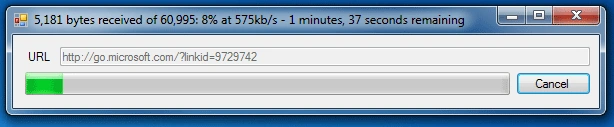
One of .NET's neat features is the WebClient which can allow synchronous or asynchronous transfer of data from a resource. Below is a simple illustration of how to use a WebClient asynchronously with the use of a simple dialog to display its status.
We can track several aspects such as percentage completed, bytes downloaded and total number of bytes. With the use of some simple mathematical equations we can then display information such as transfer rate, and remaining time.
1. Let's start by creating our WebClient
_webClient = new WebClient();
_webClient.DownloadProgressChanged
+= new DownloadProgressChangedEventHandler(_webClient_DownloadProgressChanged);
_webClient.DownloadFileCompleted
+= new AsyncCompletedEventHandler(_webClient_DownloadFileCompleted);
2. Now we can start our asynchronous download
_startDate = DateTime.Now;
_webClient.DownloadFileAsync(uri, _savedFile);
3. Let's do some calculations for display
progMain.Value =
e.ProgressPercentage;
if ((DateTime.Now
- _startDate).Seconds > 0)
{
double kbPerSecond =
(e.BytesReceived / 1000) (DateTime.Now -
_startDate).Seconds;
double remainingTimeSeconds
= (((e.TotalBytesToReceive - e.BytesReceived) / 1000) / kbPerSecond);
string remainingTimeDisplay
= string.Empty;
if (remainingTimeSeconds
> 3600)
{
remainingTimeDisplay
+= ((int)(remainingTimeSeconds) /
3600).ToString("n0") + " hours, ";
remainingTimeSeconds %= 3600;
}
if (remainingTimeSeconds
> 60)
{
remainingTimeDisplay += ((int)(remainingTimeSeconds)
/ 60).ToString("n0") + " minutes, ";
remainingTimeSeconds %= 60;
}
remainingTimeDisplay += ((int)remainingTimeSeconds).ToString("n0") + "
seconds remaining";
this.Text =
(e.BytesReceived / 1000).ToString("n0")
+ " bytes received of " +
(e.TotalBytesToReceive / 1000).ToString("n0") + ":
" + e.ProgressPercentage.ToString() + "%
at " +
kbPerSecond.ToString("n0")
+ "kb/s - " +
remainingTimeDisplay;
}
4. Finally we'll do some display clean up.
progMain.Value = 0;
There you have it, your very own download dialog. The same concept can easily be extended to work with the BackgroundWorker as well for any process running in its own thread.

claudio centenoPosted Aug 5, 2012, 5:12 AM
Muy buen articulo xD