

Abstract / Direct Answer
Alpamayo 1 (Alpamayo-R1) is used by integrating it into a research or simulation pipeline where visual inputs are converted into language-based reasoning and then into planned driving actions. Practically, developers load the open-source model, feed it perception data (images, scene tokens, or simulator outputs), prompt it with driving tasks, and consume its generated reasoning traces and trajectories to evaluate or control autonomous vehicle behavior.
Conceptual Background
Nvidia designed Alpamayo 1 as a vision-language-action (VLA) model rather than a traditional perception-only system. This changes how developers “use” the model.
Instead of:
Detect object → apply rule → act
You work with:
Observe scene → reason in language → plan trajectory → act
This makes Alpamayo 1 especially suitable for research, simulation, and safety analysis, where understanding why a decision was made is as important as the decision itself.
Where Alpamayo 1 Fits in a Typical Stack
Alpamayo 1 typically sits between perception and control.
Upstream: camera/LiDAR perception or simulator state
Alpamayo 1: reasoning + trajectory planning
Downstream: control systems, safety monitors, evaluators
It is not a fully autonomous driving system by itself. It is a reasoning and planning brain.
Step-by-Step: How to Use Alpamayo 1
1. Set Up the Environment
Alpamayo 1 is released for research use and commonly accessed via Hugging Face.
Typical requirements
Python 3.9+
PyTorch
CUDA-enabled GPU (recommended)
Hugging Face
transformersandaccelerate
Conceptually, setup looks like:
from transformers import AutoModelForCausalLM, AutoTokenizer

tokenizer = AutoTokenizer.from_pretrained("nvidia/Alpamayo-R1-10B")
model = AutoModelForCausalLM.from_pretrained(
    "nvidia/Alpamayo-R1-10B",
    torch_dtype="auto",
    device_map="auto"
)
At this stage, the model is loaded but not yet driving anything.
2. Prepare Driving Inputs
Alpamayo 1 does not directly consume raw steering commands. You provide structured scene context.
Typical inputs include:
Encoded camera frames or perception tokens
Lane geometry
Detected agents (vehicles, pedestrians)
Vehicle state (speed, heading)
Example of a simplified scene description passed to the model:
{
  "ego_state": {
    "speed": "35 km/h",
    "lane": "right lane",
    "heading": "north"
  },
  "environment": {
    "weather": "rain",
    "road_type": "urban intersection",
    "traffic_light": "yellow"
  },
  "agents": [
    {"type": "pedestrian", "position": "crosswalk right"},
    {"type": "vehicle", "position": "ahead slowing"}
  ]
}
This abstraction is intentional. Alpamayo 1 is designed to reason, not to replace low-level perception networks.
3. Prompt the Model for Reasoning and Planning
Alpamayo 1 is driven using instruction-style prompts.
Example prompt:
You are an autonomous driving planner.
Analyze the scene, explain the risks,
and propose a safe driving trajectory.
The model returns:
A reasoning trace (chain-of-causation)
A planned trajectory or action recommendation
Example (simplified output):
Reasoning:
The traffic light is yellow and the road is wet.
Stopping distance is increased due to rain.
A pedestrian is near the crosswalk.

Plan:
Reduce speed gradually.
Prepare to stop before the intersection.
Maintain right lane alignment.
This “thinking out loud” is a core feature.
4. Consume the Output
You typically use Alpamayo 1 outputs in one of three ways:
Evaluation: compare reasoning vs. ground truth
Simulation: apply planned trajectory in a simulator
Supervision: feed decisions into a rule-based safety layer
It is common to log the reasoning text for later analysis.
Alpamayo 1 Usage Flow
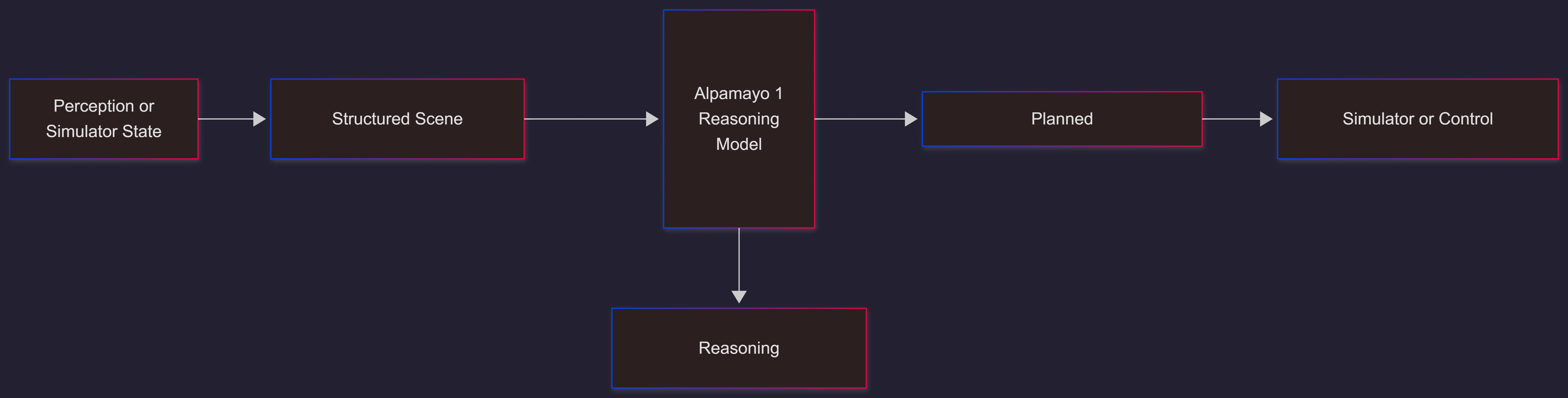
Using Alpamayo 1 in Simulation
One of the most common uses is closed-loop simulation.
Typical workflow:
Run CARLA or internal simulator
Extract scene state every timestep
Send scene snapshot to Alpamayo 1
Apply the returned trajectory
Observe safety and comfort metrics
Benefits:
Safe testing of rare scenarios
Clear explanations for failures
Repeatable experiments
Analyzing Reasoning Quality
Because Alpamayo 1 exposes its reasoning, teams can score:
Logical consistency
Risk awareness
Compliance with traffic rules
Alignment with human driving intuition
This is a major shift from opaque neural planners.
Sample Research Workflow (JSON)
{
  "experiment": "urban_intersection_rain",
  "model": "Alpamayo-R1",
  "input_source": "CARLA_simulator",
  "outputs": [
    "reasoning_trace",
    "planned_trajectory"
  ],
  "evaluation_metrics": [
    "collision_rate",
    "off_road_rate",
    "rule_violation_count"
  ]
}
This format is commonly used to batch-run experiments and compare results.
Common Use Cases
Autonomous driving research
Safety validation and auditing
Long-tail scenario testing
Explainable AI studies
Training downstream planners
Limitations and Considerations
Not plug-and-play for production vehicles
Requires abstraction layers for perception
High compute cost for real-time use
Research-focused licensing
Alpamayo 1 is best viewed as a thinking module, not a full driving stack.
FAQs
Is Alpamayo 1 used directly for steering and braking?
No. It produces reasoning and plans that are consumed by downstream control systems.Can it replace classical motion planners?
In research settings, yes. In production, it is usually paired with rule-based safety layers.Does it work without language prompts?
Language prompts are central to how Alpamayo 1 reasons and explains decisions.
Future Enhancements (Expected)
Tighter integration with simulators
More compact models for edge deployment
Expanded multi-modal inputs (audio, maps)
Improved real-time inference optimization
Conclusion
Using Alpamayo 1 means shifting from opaque autonomy to reasoned autonomy. Developers interact with it by supplying structured driving context, prompting it to analyze scenarios, and consuming its transparent reasoning and trajectory plans. While not a turnkey driving solution, Alpamayo 1 provides a powerful research foundation for building safer, more explainable autonomous systems and represents a decisive step toward human-like driving intelligence.
Join the conversation! Your thoughts help the community grow.