

Overview
In this article we will understand the complete process of using PnP search webpart in SharePoint Modern Pages.
Introduction
In SharePoint, with the introduction of Modern Sites and Modern Pages, we aren't able to change templates in Modern Pages, so if we want to use a customized search in SharePoint Modern sites it would be best to use some existing webparts. To that end, PnP has released Modern Search webparts which will be very helpful and easy to configure. So let's start configuring it.
Step 1
Download the latest release of PnP Search webpart using the below link to download the webpart:
Link : https://github.com/microsoft-search/pnp-modern-search/releases
Step 2
Upload the .sppkg file in the App Catalog. We can use any of the app catalog site collections or tenant level app catalogs.
In the popup click on deploy to deploy the solution
Step 3
Add the app in the site collection using "+ New" button present in the home page.
Select PnP Modern Search - Search Web parts
Step 4 - Create a Modern page & set up the required search webpart
- Add Search box webpart – This will be used as search text box where we can add a search term for the search results
- Add Search results webpart – This will be used for displaying the search results associated with search box.
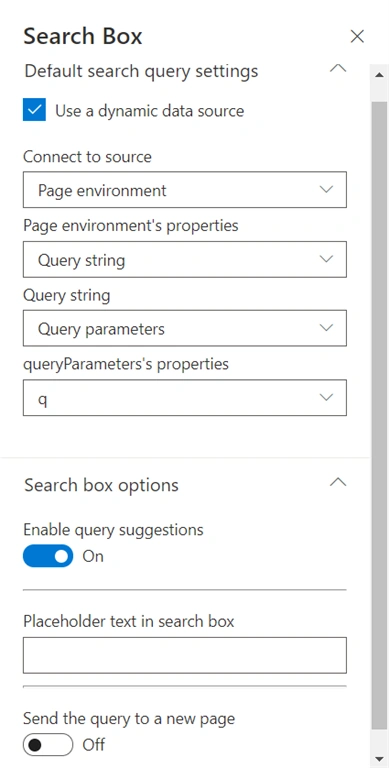
Below are all the configurations that can help you setup the PnP Search box
- Use a dynamic data source - This will help if we want to send search text using query string from another page. By checking this there will be multiple extra configurations which are:
- Connect to Source - For the query string configuration we can select Page environment.
- Page environment's properties - We want to fetch the data from Query string so we can select that value.
- Query string - In this as we are not using URL fragment to fetch the data we should select Query parameters
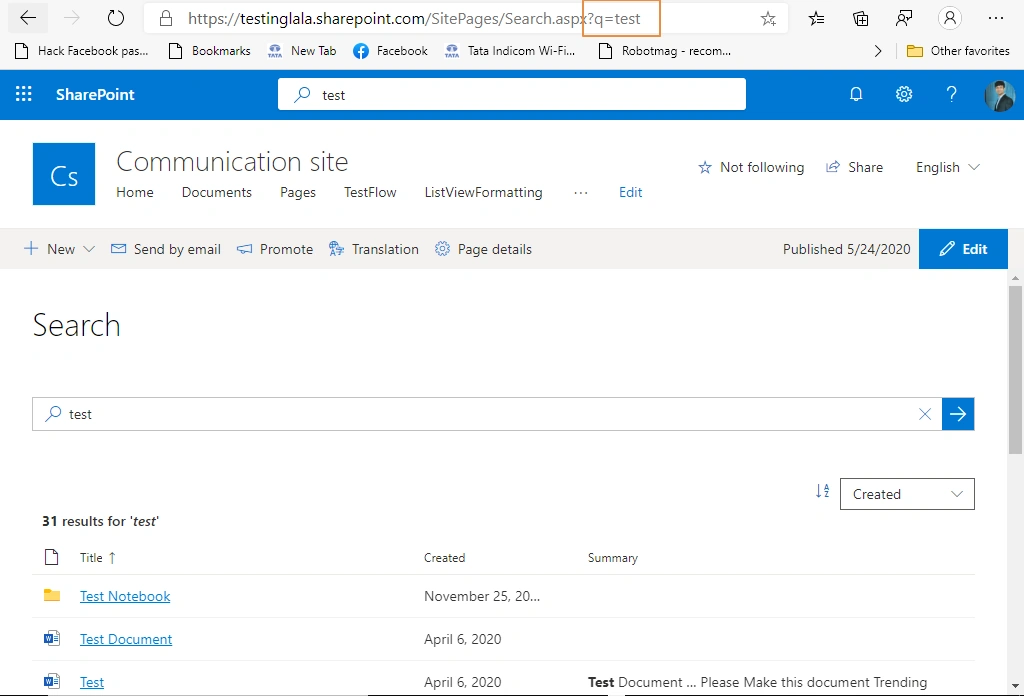
- queryParameters's properties - This indicates which parameter will help us fetch the data so we will use q (the URL would have ?q=<searchTerm>)
Note:-If the dropdown does not display q add it in the URL and refresh the page (?q=test&Mode=Edit)
- Enable query suggestions - We can enable it to get the suggestion for the entered query text
- Placeholder text in search box - This will help if we want to display some text in the search text box in the background as Placeholder.
- Send the query to a new page - If we want to redirect the user to some other page then we can enable it. On enabling it will have an additional three properties - Page URL, Opening behavior, Method. For demo configuration we will not enable sending the query to a new page
Configuration for Search results
The configuration for search results is divided into three section or pages
Section 1(connection to Search Text box)
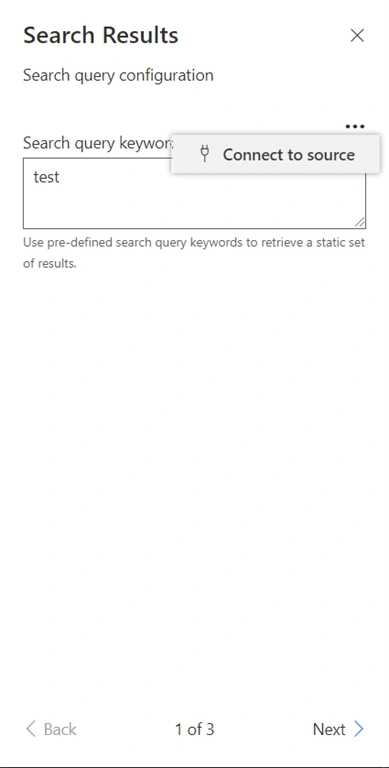
- Search query keywords :- If we want to display some data for static keyword we can enter it directly in the text box. But we want to connect to the search box so that we will obtain dynamic results based on the search text in the search box. Click on the three dots (…) and select connect to source.
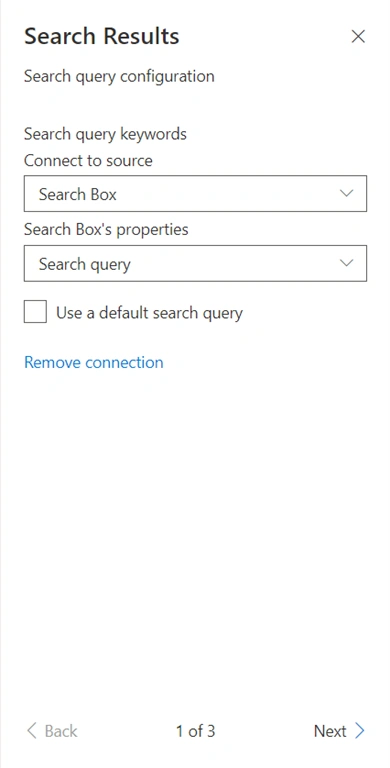
- Connect to source :- In this dropdown we can select search box as we want to display search results based on search box query text
- Search Box's properties :- We can select search query for fetching the search text
Section 2 (search, pagination setting)
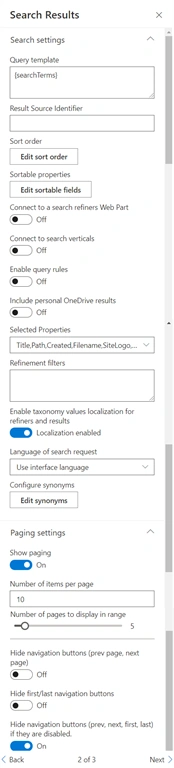
Search Setting,
- Query template - This will accept any KQL based query . This will help if we want to remove results from a specific path or if we want to boost some results based on XRANK
- Result Source Identifier - We can specific the result source from where we want to display the data (optional in case we are using Query template where we can specify the same)
- Sort order - This indicates on which properties the sorting of the data is based
- Sortable properties - This will help us adding sorting based on the managed property we can add any fields which are displayed in the search results
- Connect to a search refiners Web Part - This will be used if we want to add additional filters to the results. This will also use managed property to filter based on the fields which are displayed in the search results
- Connect to search verticals - This will be used if we are using PnP search verticals webpart
- Enable Query Rules - This will display SharePoint promoted results and make the result block available for custom render if enabled.
- Include personal OneDrive results - This will add personal OneDrive results also in the search.
- Selected Properties - To retrieve the properties displayed in the search results we can specify the managed properties in this field
- Enable taxonomy values localization for refiners and results :- This will help if there are any other language variations for the taxonomy value then based on the users preferred language it will display the result
- Language of search request - This field indicates in which language we want to display the result; by default it will use the current UI language
- Synonyms - We can define synonyms for some query text and we can use two-way mode.
Pagination Setting
- Show paging - This indicates whether the pagination be displayed in the webpart or not
- Number of items per page - Number of items to be displayed in the search result in one page
- Number of pages to display in range - Numbers to display in the page navigation
- Hide navigation buttons - Hide the previous and next button
- Hide first/last navigation buttons - Hide the last and first navigation button
- Hide navigation buttons if they are disabled - If no page is available hide the navigation
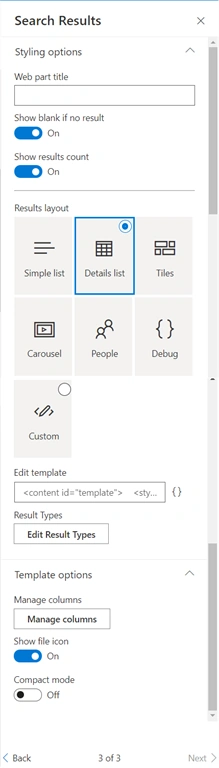
Section 3 (style, template setting)
Style Setting
- Web part title - Displays the webpart title. We can keep it blank if we do not want to display the title
- Show blank if no result - It would not display any result or text if there are no results for the search term
- Show results count - Displays the total number of results obtained for the search term
- Results layout - We can select from the predefined option or we can customize where we can specify our own layout. For that select the edit layout option. We can use a handlebar to create the template
- Result Types - Allows us to set custom template at item level (ex:- Filetype equals 'docx')
Template Setting
- Manage columns - This will help in selecting the managed property that we would like to display in the search results by adding managed property it would display in the search result
- Show file icon - If we want to display the file type icon we can enable it
- Compact mode - if we want to display the result in compact mode we can enable it
Outcome
Summary
We checked how easy it is to configure and use PnP Modern Search Webparts. We can even use other webparts which are available as a part of the package like Search Filters and Search Navigation.
Lokesh UmapathyPosted Dec 4, 2020, 3:49 AM
Can we add single line text column in search refiner
Vinay AyinapurapuPosted Nov 12, 2020, 8:41 PM
Nice article Kunj