

Introduction
What is Async Pipe ?
Async Pipe is an impure pipe which automatically subscribes to an observable to emit the latest values. It not only subscribes to an observable but also it subscribes to promise and calls the then method .When the components get destroyed it automatically unsubscribes it to reduce memory leaks.
Advantages of Async Pipe
- Async Pipe makes rendering of data from observable and promise easier.
- For promises it automatically calls then method and
- For observables it automatically calls subscribe and unsubscribe.
Prerequisites
- Basic knowledge of Angular
- Visual Studio Code must be installed
- Angular CLI must be installed
- Node JS must be installed
Step 1
ng new asyncPipe
Step 2
Now, let's create a new component by using the following command,
ng g c async-pipe-example
Step 3
Now, open the async-pipe-example.component.html file and add the following code in the file,
- <div class="card">
- <div class="card-body pb-0">
- <h4 style="text-align: center;">{{SampleMessage}}</h4>
- <div class="row">
- <div class="col-12 col-md-12">
- <div class="card">
- <div class="card-body position-relative">
- <div class="table-responsive cnstr-record product-tbl">
- <table class="table table-bordered heading-hvr">
- <thead>
- <tr>
- <th width="50">Art.No
- </th>
- <th>Brand</th>
- <th>
- Price/Unit</th>
- <th>Provider</th>
- <th>P. Art. N</th>
- <th>S. A/C</th>
- </tr>
- </thead>
- <tbody *ngFor="let product of products$ | async">
- <tr>
- <td align="center">{{product.ArtNo}}</td>
- <td>{{product.Brand}}</td>
- <td>{{product.Price }}</td>
- <td>{{product.Provider}}</td>
- <td>{{product.ProviderArtNo}}</td>
- <td>{{product.SalesAccount}}</td>
- </tr>
- </tbody>
- </table>
- </div>
- </div>
- </div>
- </div>
- </div>
- </div>
- </div>
Here in the below code we can see how to apply async pipe with our structural direcrtive *ngFor
- <tbody *ngFor="let product of products$ | async">
Step 4
Now, open the async-pipe-example.component.ts file and add the following code in this file,
- import { Component, OnInit } from '@angular/core';
- import { ProductsService } from '../product.service';
- import { Observable } from 'rxjs';
- @Component({
- selector: 'app-async-pipe-example',
- templateUrl: './async-pipe-example.component.html',
- styleUrls: ['./async-pipe-example.component.css']
- })
- export class AsyncPipeExampleComponent implements OnInit {
- products = [];
- products$:Observable<any>;
- SampleMessage="Example of Angular Async Pipe";
- constructor(private _productService:ProductsService) { }
- ngOnInit() {
- //this.getProductsUsingSubscribeMethod();
- this.getProductsUsingAsyncPipe();
- }
- public getProductsUsingSubscribeMethod() {
- this.SampleMessage="Example of Angular Subscribe Method";
- this._productService.getAllProducts().subscribe((data: any) => {
- this.products =data;
- console.log(data);
- })
- }
- public getProductsUsingAsyncPipe() {
- this.SampleMessage="Example of Angular Async Pipe";
- this.products$ =this._productService.getAllProducts();
- }
- }
Here in the below code we are using observables of any type and to get the asynchronous flow data either we can use subscribe method to subscribe the observables or we can simply use 'async pipe' which automatically subscribes to an Observable and returns the latest value and it also unsubscribes automatically to avoid memory leaks.
- public getProductsUsingAsyncPipe() {
- this.SampleMessage="Example of Angular Async Pipe";
- this.products$ =this._productService.getAllProducts();
- }
Step 5
Now, open the product.service.ts file and add the following code,
- import { Injectable } from '@angular/core';
- import { HttpClient } from '@angular/common/http';
- @Injectable()
- export class ProductsService {
- private url = '';
- private baseUrl = "http://localhost:49661/";//Replace it with your http address and port
- constructor(public http: HttpClient) {
- }
- getAllProducts() {
- this.url = this.baseUrl+'api/Product/getAllProducts';
- return this.http.get<any[]>(this.url);
- }
- }
WEB API - Create an ASP.NET application
Follow these steps to create an ASP.NET application.
Step 1
In Visual Studio 2019, click on File -> New -> Project.
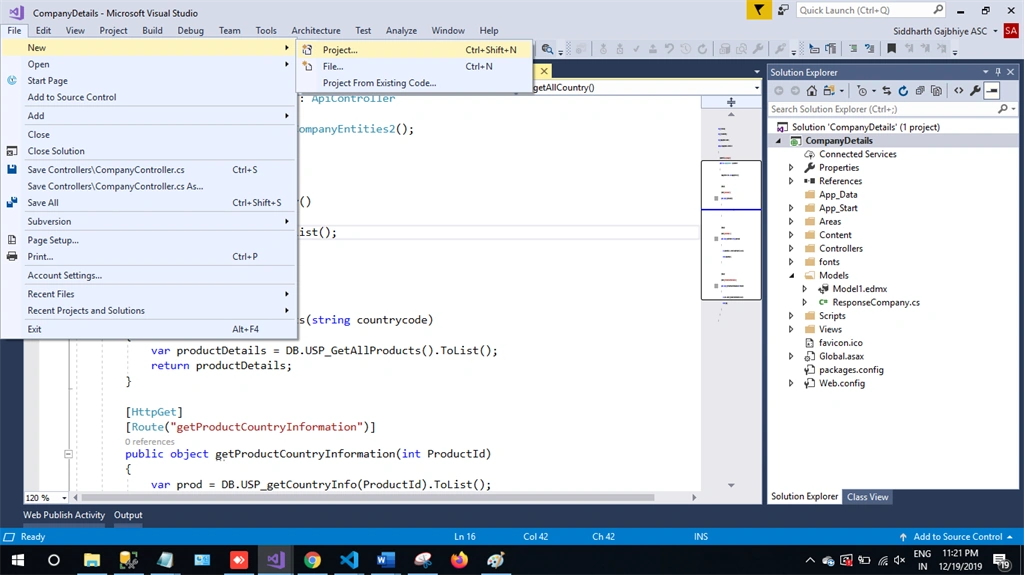
Step 2
Choose the Create option and select Asp.net web application.
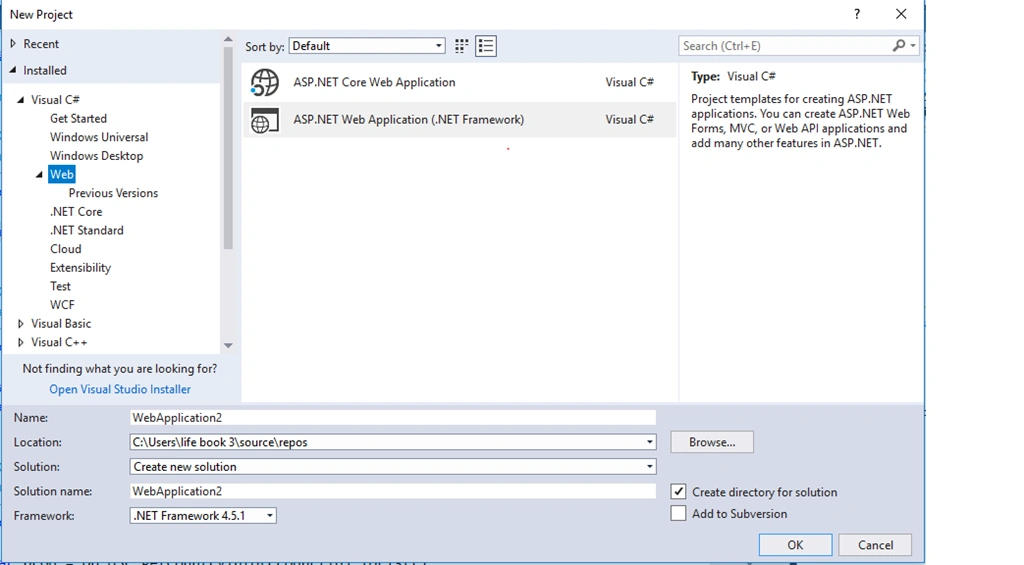
Step 3
Select Web API and click Ok.
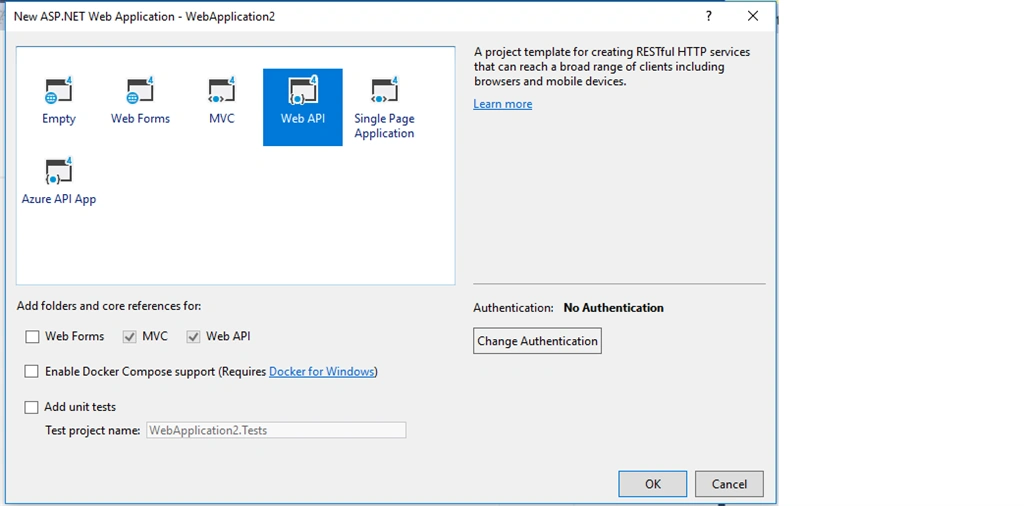
Step 4
Now right click on controller and then add a new item.
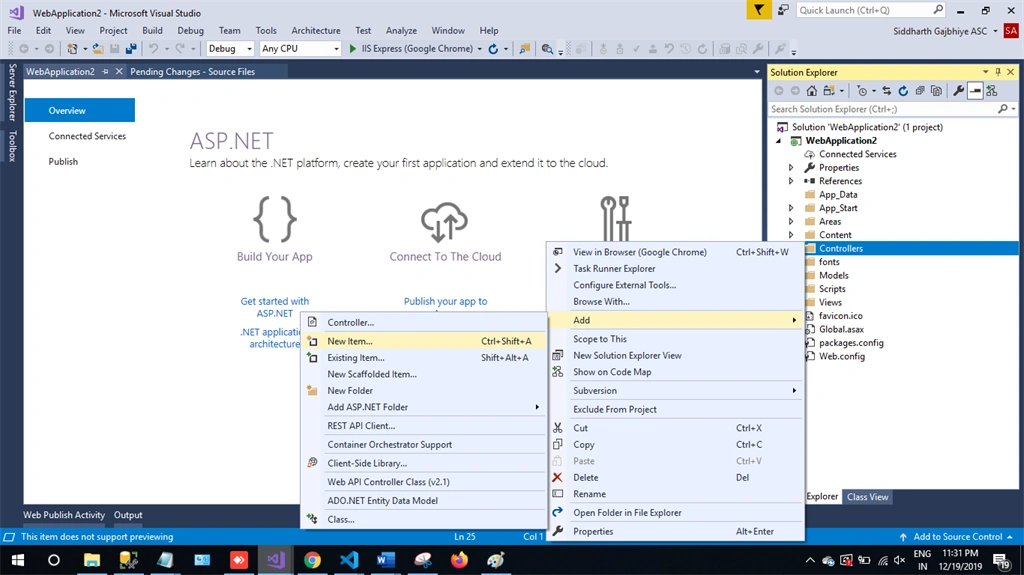
Step 5
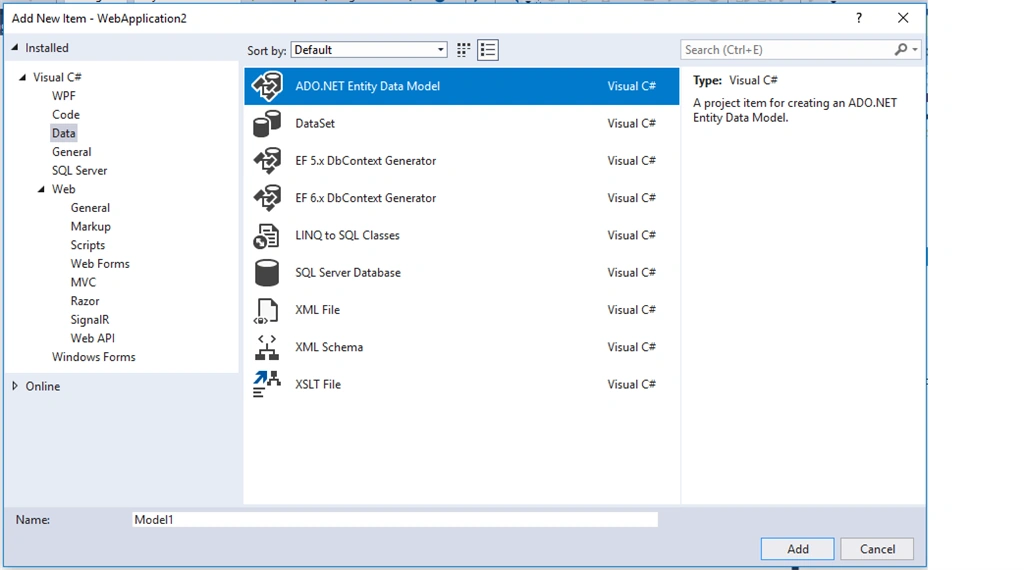
Choose Ado.net Entity Data Model and then click on Add.
Step 6
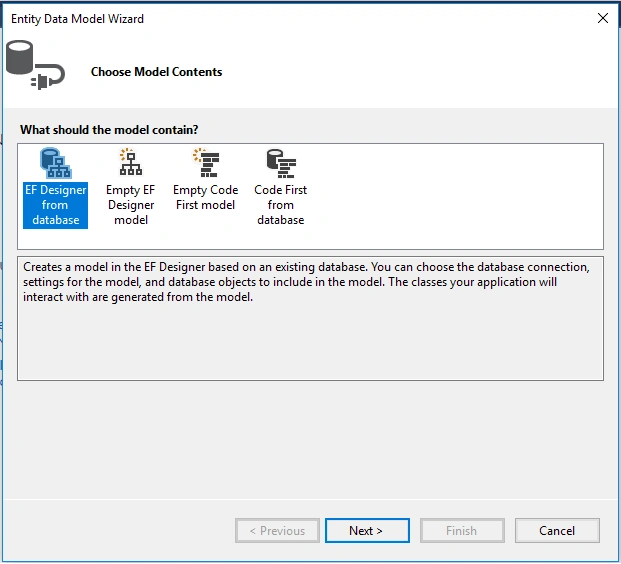
Next Step is EF Designer, just click on next.
Step 7
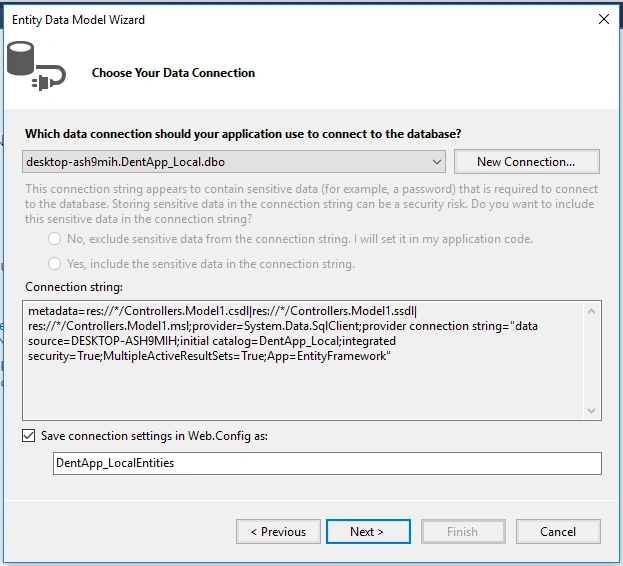
A new pop-up will show. Click on next. If yours isn't established, then click on new connection
Step 8
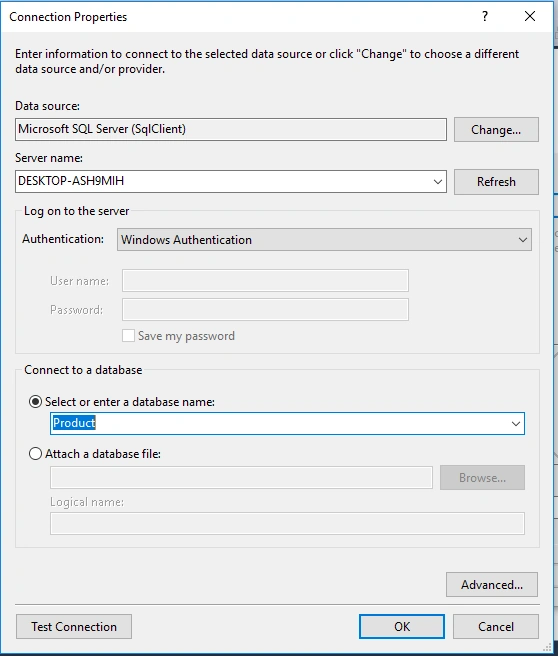
Copy your database connection server name and paste it in the server name textbox. You will see all the database, select your database and click on ok.
Step 9
The next popup will show, paste your database server name, and choose for the database and test for the connection then click on next. Here, in the new screen, select your tables and store the procedure. Then click on finish.
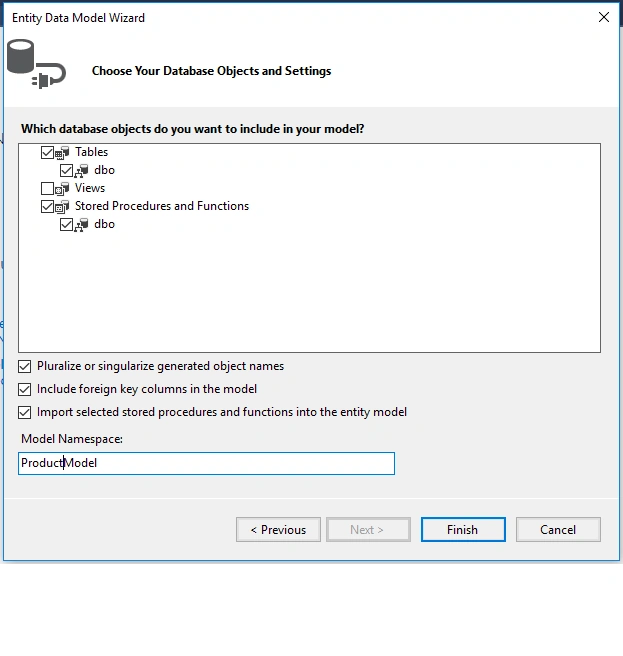
Our next step is to right-click on the controllers folder and add a new controller. Name it as "Product controller" and add the following namespace in the student controller.
Here is the complete code for getting all the product data and their nested product information data.
Complete Product controller code
- using System.Linq;
- using System.Web.Http;
- using CompanyDetails.Models;
- namespace CompanyDetails.Controllers {
- [RoutePrefix("api/Company")]
- public class CompanyController: ApiController {
- CompanyEntities2 DB = new CompanyEntities2();
- [HttpGet]
- [Route("getAllProducts")]
- public object getAllProducts(string countrycode) {
- var productDetails = DB.USP_GetAllProducts().ToList();
- return productDetails;
- }
- }
- }
Now, it's time to enable CORS. Go to Tools, open NuGet Package Manager, search for CORS, and install the "Microsoft.Asp.Net.WebApi.Cors" package.
If you are running your frontend application in a different port and your server is running in another port, then to avoid a Cross-Origin-Resource-Sharing issue you have to add small code in webapiconfig.cs file.
Open Webapiconfig.cs and add the following lines.
- EnableCorsAttribute cors = new EnableCorsAttribute("*", "*", "*");
- config.EnableCors(cors);
BACKEND
Here we will do back end related code using SQL server
The very first step is to create a database.
Create database
Let’s create a database on your local SQL Server. I hope you have installed SQL Server 2017 in your machine (you can use SQL Server 2008, 2012, or 2016, as well).
Step 1
Create a database product
- create database product
Step 2
Create a product table using the following code,
- USE [Product]
- GO
- /****** Object: Table [dbo].[Product] Script Date: 12/18/2019 10:23:19 PM ******/
- SET ANSI_NULLS ON
- GO
- SET QUOTED_IDENTIFIER ON
- GO
- CREATE TABLE [dbo].[Product](
- [ProductId] [int] IDENTITY(1,1) NOT NULL,
- [ArtNo] [nvarchar](50) NULL,
- [Provider] [nvarchar](50) NULL,
- [ProviderArtNo] [nvarchar](50) NULL,
- [Brand] [nvarchar](50) NULL,
- CONSTRAINT [PK_Product] PRIMARY KEY CLUSTERED
- (
- [ProductId] ASC
- )WITH (PAD_INDEX = OFF, STATISTICS_NORECOMPUTE = OFF, IGNORE_DUP_KEY = OFF, ALLOW_ROW_LOCKS = ON, ALLOW_PAGE_LOCKS = ON) ON [PRIMARY]
- ) ON [PRIMARY]
- GO
Make product ID the primary key
Now it's time to add some store procedures.
Step 4
All you have to do is paste the following code in a new query,
- USE [Product]
- GO
- /****** Object: StoredProcedure [dbo].[USP_GetAllProducts] Script Date: 12/18/2019 10:24:35 PM ******/
- SET ANSI_NULLS ON
- GO
- SET QUOTED_IDENTIFIER ON
- GO
- ALTER Proc [dbo].[USP_GetAllProducts]
- As
- Begin
- Select p.*,pci.Price,pci.BuyAccount,pci.SalesAccount from [Product] p
- End
With this step we have successfully completed our front end, web API, and back end coding.
Now it's time to run the project by using 'npm start' or 'ng serve' command and check the output.
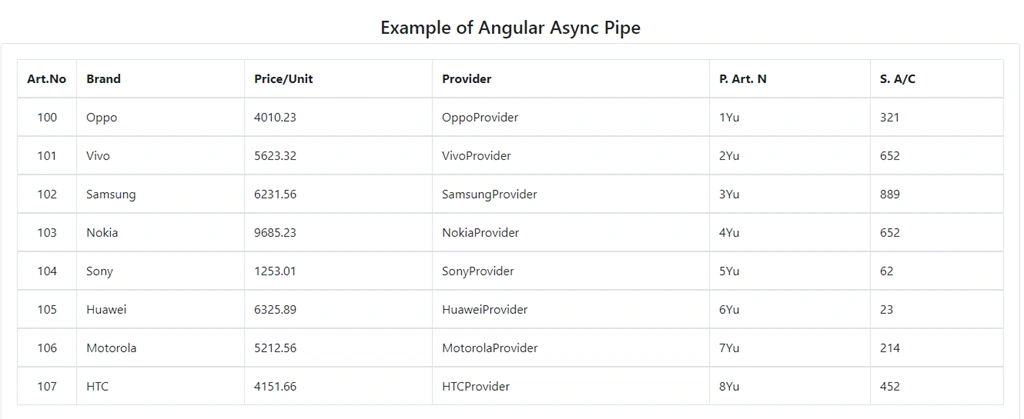
Conclusion
In this article, we have learned how to use async pipe in Angular 8 Application.
Please give your valuable feedback/comments/questions about this article. Please let me know if you liked and understood this article and how I could improve it.
Join the conversation! Your thoughts help the community grow.