Introduction
In my
previous article, we learned how to handle “android.os.FileUriExposedException” if we have an app that shares files with other apps using a URI on API 24+. In this article, we will learn how to use Camera Intent in Android N and above devices.
Creating a New Project with Android Studio
- Open Android Studio and select "Create new project".
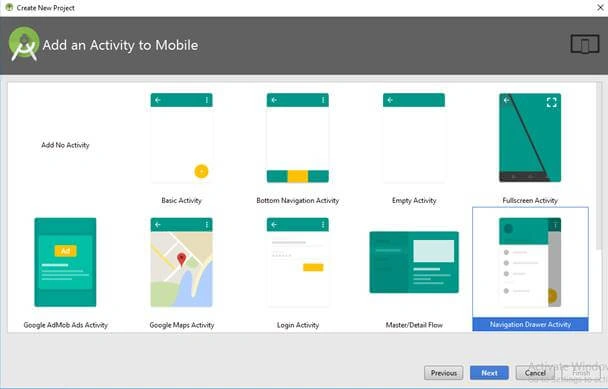
- Name the project as per your wish and select your activity template.
- Click the “finish” button to create a new project in Android Studio.
Steps to use Camera API
- We already know how to open the camera from our app using intents. But for Android N & the above devices, Google has changed the approach for accessing the Camera API. In this step, we will see how to use Camera Intent for Pre Android N and Android N above devices.
- Open your MainActivity.java file and add a button with a click event to open the Camera. The following code snippet shows the camera intent.
- btnPickCamera.setOnClickListener(new View.OnClickListener() {
- @Override
- public void onClick(View view) {
-
- if (ActivityCompat.checkSelfPermission(MainActivity.this,
- Manifest.permission.CAMERA) != PackageManager.PERMISSION_GRANTED
- || ActivityCompat.checkSelfPermission(MainActivity.this,
- Manifest.permission.READ_EXTERNAL_STORAGE) != PackageManager.PERMISSION_GRANTED) {
- ActivityCompat.requestPermissions(MainActivity.this,
- new String[]{Manifest.permission.CAMERA, Manifest.permission.READ_EXTERNAL_STORAGE}, PICK_FROM_CAMERA);
- return;
- }
-
- if (Build.VERSION.SDK_INT >= Build.VERSION_CODES.N) {
- ContentValues values = new ContentValues(1);
- values.put(MediaStore.Images.Media.MIME_TYPE, "image/jpg");
- outputFileUri = getContentResolver().insert(MediaStore.Images.Media.EXTERNAL_CONTENT_URI, values);
- Intent captureIntent = new Intent(MediaStore.ACTION_IMAGE_CAPTURE);
- captureIntent.addFlags(Intent.FLAG_GRANT_READ_URI_PERMISSION | Intent.FLAG_GRANT_WRITE_URI_PERMISSION);
- captureIntent.putExtra(MediaStore.EXTRA_OUTPUT, outputFileUri);
- startActivityForResult(captureIntent, PICK_FROM_CAMERA);
- } else {
- Intent captureIntent = new Intent(MediaStore.ACTION_IMAGE_CAPTURE);
- File file = new File(Environment.getExternalStorageDirectory(), "MyPhoto.jpg");
- outputFileUri = Uri.fromFile(file);
- captureIntent.putExtra(MediaStore.EXTRA_OUTPUT, outputFileUri);
- startActivityForResult(captureIntent, PICK_FROM_CAMERA);
- }
- }
- });
- Here, I have added runtime permission checking for Android N and the above devices.
- ContentValues values = new ContentValues(1);
- values.put(MediaStore.Images.Media.MIME_TYPE, "image/jpg");
- outputFileUri = getContentResolver().insert(MediaStore.Images.Media.EXTERNAL_CONTENT_URI, values);
- Intent captureIntent = new Intent(MediaStore.ACTION_IMAGE_CAPTURE);
- captureIntent.addFlags(Intent.FLAG_GRANT_READ_URI_PERMISSION | Intent.FLAG_GRANT_WRITE_URI_PERMISSION);
- captureIntent.putExtra(MediaStore.EXTRA_OUTPUT, outputFileUri);
- startActivityForResult(captureIntent, PICK_FROM_CAMERA);
- Here, we have created ContentValues and added MIME type as image. Then, created an output URI for the Camera API output image.
- Then, we have added flags “FLAG_GRANT_READ_URI_PERMISSION” and “FLAG_GRANT_WRITE_URI_PERMISSION” to allow the Camera API to take an image in Android N & above devices.
- We can retrieve the picked camera image by “onActivityResult” and the same as the old approach.
Full Code
The following code shows how to access an image from Gallery, how to take pictures from the camera, and how to open a file using intent in Android N & above devices.
- public class MainActivity extends AppCompatActivity {
-
- ImageView imgPreview;
- TextView imgPath;
- Button btnPickCamera;
- Button btnPickGallery;
- Button btnOpenFile;
-
- Uri outputFileUri;
- private static final int PICK_FROM_CAMERA = 1;
- private static final int PICK_FROM_GALLERY = 2;
-
- @Override
- protected void onCreate(Bundle savedInstanceState) {
- super.onCreate(savedInstanceState);
- setContentView(R.layout.activity_main);
- initViews();
- initOperations();
- }
-
- private void initViews() {
- imgPreview = findViewById(R.id.imgPreview);
- imgPath = findViewById(R.id.imgPath);
- btnPickCamera = findViewById(R.id.btnCapture);
- btnPickGallery = findViewById(R.id.btnGallery);
- btnOpenFile = findViewById(R.id.btnOpenImg);
- }
-
- private void initOperations() {
- btnPickGallery.setOnClickListener(new View.OnClickListener() {
- @TargetApi(Build.VERSION_CODES.JELLY_BEAN)
- @Override
- public void onClick(View view) {
-
- if (ActivityCompat.checkSelfPermission(MainActivity.this,
- Manifest.permission.READ_EXTERNAL_STORAGE) != PackageManager.PERMISSION_GRANTED) {
- ActivityCompat.requestPermissions(MainActivity.this,
- new String[]{Manifest.permission.READ_EXTERNAL_STORAGE}, PICK_FROM_GALLERY);
- return;
- }
- Intent galleryIntent = new Intent(Intent.ACTION_PICK, MediaStore.Images.Media.EXTERNAL_CONTENT_URI);
-
- startActivityForResult(galleryIntent, PICK_FROM_GALLERY);
- }
- });
-
- btnPickCamera.setOnClickListener(new View.OnClickListener() {
- @Override
- public void onClick(View view) {
-
- if (ActivityCompat.checkSelfPermission(MainActivity.this,
- Manifest.permission.CAMERA) != PackageManager.PERMISSION_GRANTED
- || ActivityCompat.checkSelfPermission(MainActivity.this,
- Manifest.permission.READ_EXTERNAL_STORAGE) != PackageManager.PERMISSION_GRANTED) {
- ActivityCompat.requestPermissions(MainActivity.this,
- new String[]{Manifest.permission.CAMERA, Manifest.permission.READ_EXTERNAL_STORAGE}, PICK_FROM_CAMERA);
- return;
- }
-
- if (Build.VERSION.SDK_INT >= Build.VERSION_CODES.N) {
- ContentValues values = new ContentValues(1);
- values.put(MediaStore.Images.Media.MIME_TYPE, "image/jpg");
- outputFileUri = getContentResolver().insert(MediaStore.Images.Media.EXTERNAL_CONTENT_URI, values);
- Intent captureIntent = new Intent(MediaStore.ACTION_IMAGE_CAPTURE);
- captureIntent.addFlags(Intent.FLAG_GRANT_READ_URI_PERMISSION | Intent.FLAG_GRANT_WRITE_URI_PERMISSION);
- captureIntent.putExtra(MediaStore.EXTRA_OUTPUT, outputFileUri);
- startActivityForResult(captureIntent, PICK_FROM_CAMERA);
- } else {
- Intent captureIntent = new Intent(MediaStore.ACTION_IMAGE_CAPTURE);
- File file = new File(Environment.getExternalStorageDirectory(), "MyPhoto.jpg");
- outputFileUri = Uri.fromFile(file);
- captureIntent.putExtra(MediaStore.EXTRA_OUTPUT, outputFileUri);
- startActivityForResult(captureIntent, PICK_FROM_CAMERA);
- }
- }
- });
-
- btnOpenFile.setOnClickListener(new View.OnClickListener() {
- @RequiresApi(api = Build.VERSION_CODES.JELLY_BEAN)
- @Override
- public void onClick(View v) {
-
- if (ActivityCompat.checkSelfPermission(MainActivity.this,
- Manifest.permission.READ_EXTERNAL_STORAGE) != PackageManager.PERMISSION_GRANTED) {
- ActivityCompat.requestPermissions(MainActivity.this,
- new String[]{Manifest.permission.READ_EXTERNAL_STORAGE}, PICK_FROM_GALLERY);
- return;
- }
- File file = new File(imgPath.getText().toString());
- Intent intent = new Intent(Intent.ACTION_VIEW);
- intent.setFlags(Intent.FLAG_ACTIVITY_CLEAR_TOP | Intent.FLAG_ACTIVITY_NEW_TASK);
- if (Build.VERSION.SDK_INT >= Build.VERSION_CODES.N) {
- Uri apkURI = FileProvider.getUriForFile(getApplicationContext(), getPackageName() + ".provider", file);
- intent.setDataAndType(apkURI, "image/jpg");
- intent.addFlags(Intent.FLAG_GRANT_READ_URI_PERMISSION);
- } else {
- intent.setDataAndType(Uri.fromFile(file), "image/jpg");
- }
- startActivity(intent);
- }
- });
- }
-
- @Override
- protected void onActivityResult(int requestCode, int resultCode, Intent data) {
- super.onActivityResult(requestCode, resultCode, data);
- Bitmap bitmap;
- switch (requestCode) {
- case PICK_FROM_CAMERA:
- if (resultCode == Activity.RESULT_OK) {
-
- Uri selectedImage = outputFileUri;
- ContentResolver cr = getContentResolver();
- getContentResolver().notifyChange(selectedImage, null);
- try {
- bitmap = android.provider.MediaStore.Images.Media.getBitmap(cr, selectedImage);
- int nh = (int) ( bitmap.getHeight() * (512.0 / bitmap.getWidth()) );
- bitmap = Bitmap.createScaledBitmap(bitmap, 512, nh, true);
- imgPreview.setImageBitmap(bitmap);
- imgPath.setText(outputFileUri.getPath());
- } catch (Exception e) {
- Toast.makeText(this, "Failed to load", Toast.LENGTH_SHORT)
- .show();
- }
- }
- break;
- case PICK_FROM_GALLERY:
- if (resultCode == Activity.RESULT_OK) {
-
- Uri selectedImage = data.getData();
- String[] filePathColumn = {MediaStore.Images.Media.DATA};
-
- assert selectedImage != null;
- Cursor cursor = getContentResolver().query(selectedImage, filePathColumn,
- null, null, null);
-
- assert cursor != null;
- cursor.moveToFirst();
-
- int columnIndex = cursor.getColumnIndex(filePathColumn[0]);
- String imgDecodableString = cursor.getString(columnIndex);
- cursor.close();
- bitmap = BitmapFactory.decodeFile(imgDecodableString);
- imgPreview.setImageBitmap(bitmap);
- imgPath.setText(imgDecodableString);
- }
- break;
- }
- }
- }
Reference
How to handle “android.os.FileUriExposedException”.
Download
You can download the code from
GitHub. If you like this article do like & share the article and star the repo in
GitHub.


Join the conversation! Your thoughts help the community grow.