

Introduction
In this article, we will learn about the use of the Catch Reject Output settings in tMap components with a real-time example. As we assume you have already had experience with connections and basic talend design.
To learn more about on tMap component, other tMap settings, and its benefits, read my previous articles Working With The tMap Component In Real-Time Examples - Part 1 and Mapping Componet(tMap) In Talend Open Studio
tMap Examples
In this job, we are going to join multiple data from different sources (here files) into a single data (table) using tMap component. Input files are read by tFileInputDelimited component and output data is printed by tLogRow component. Here student data are taken as an example.
In this example, we are going to check how catch output reject setting in output panel works.
Input data
In this example, we take the input data from the 3 text files using tFileInputDelimited component.
- Input Files
- Primary.txt
- Mark.txt
- Parent.txt


Example 1
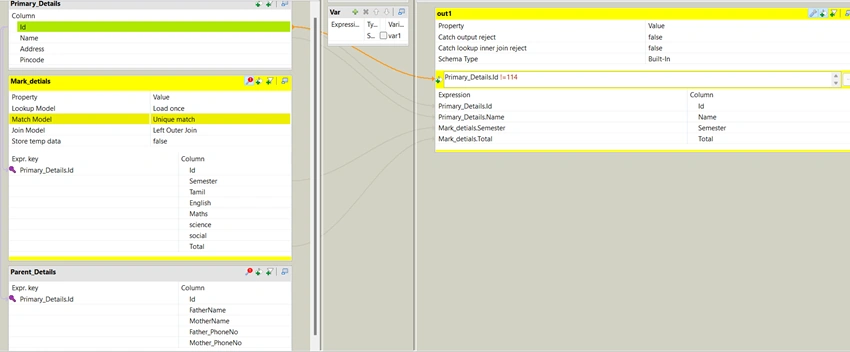
Join model is left outer join, the expression filter condition on output panel can only apply on main table data because lookup table might have null values. Catch output reject is false, so reject from output table is not caught in the output.
For this example, we have created the below job.

| Property | Value | Description |
| Input Panel - tMap settings | ||
| Join Model | Left Outer Join | The output data have all the main table data, primary key matched lookup table data and if primary key value is not in the lookup table then the lookup table columns have null value. |
| Output Panel - tMap settings | ||
| Catch output reject | False | Output reject won't catch |
Output
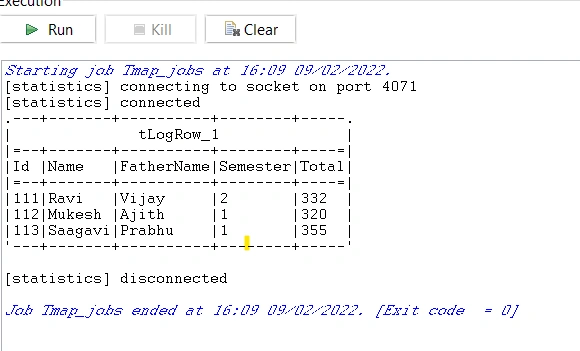
Id column in primary_details table is taken as a primary key. Id 114 is not in the mark_details but in primary_detials table. So in output table 114 is not given.
Example 2
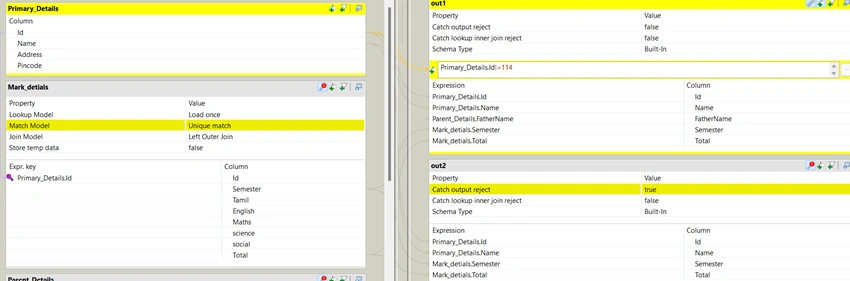
Join model is left outer join, the expression filter condition on output panel can only apply to main table data because lookup table might have null values. Catch output reject is true, due to filter condition reject from the output table is caught in the next output table.
For this example, we have created the below job.

| Property | Value | Description |
| Input Panel - tMap settings | ||
| Join Model | Left Outer Join | The output data have all the main table data, primary key matched lookup table data and if primary key value is not in the lookup table then the lookup table columns have null value. |
| Output Panel - tMap settings | ||
| Catch output reject | True | reject from the first output table will catch in second output table |
Output
tLogRow1 prints the 1st output from the tmap.On the first output table, we have applied the filter, where Id 114 should filter from the primary_detail table.
tLogRow2 prints the 2nd output from the tmap. In the second output table, we have applied the catch output reject is true, so it will catch the reject from the primary_detail table from the filter. Rejected 114 IDs will print in the 2nd output table.

Example 3
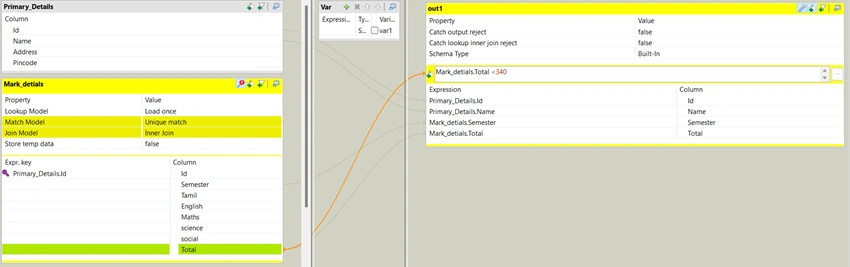
Join model is inner join, the expression filter condition can apply on both main and lookup table. Catch output reject is false, so reject won't catch in output.
For this example, we have created the below job.
| Property | Value | Description |
| Input Panel - tMap settings | ||
| Join Model | Inner Join | The output data have the primary key matched data between both Main and Lookup table |
| Output Panel - tMap settings | ||
| Catch output reject | False | Output reject won't catch |
Output
In expression filter, we have conditioned to print only the student who has total less than 340. This condition rejects the 355 total students.

Example 4
Join model is an inner join, the expression filter condition can apply on both main and lookup tables. Catch output reject is true, due to filter condition reject from the output table is caught in the next output table.
| Property | Value | Description |
| Input Panel - tMap settings | ||
| Join Model | Inner Join | The output data have the primary key matched data between both Main and Lookup table |
| Output Panel - tMap settings | ||
| Catch output reject | True | reject from the first output table will catch in second output table |
Scenario 1
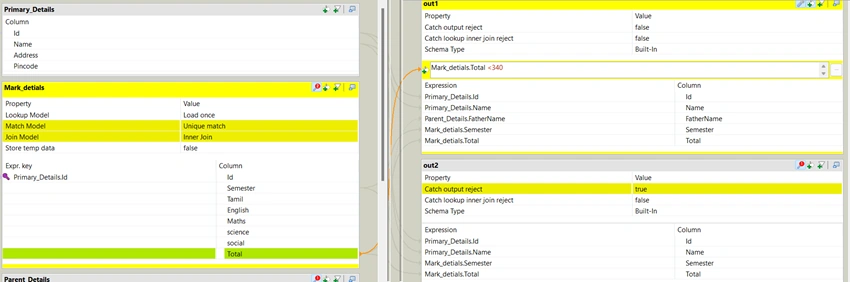
In this scenario, we are trying to print the reject the first output table.
For this, we have created the below job.
Output
- Expression filter in first table, we have conditioned to print only the student who has total less than 340. This condition rejects the 355 total students.
- In second table, we have selected the catch reject output as true, It caught the reject from the first table and print.

Scenario 2
- If catch output rejects is true, then it is considered as the reject table.
- The first output table has catch output reject is a false and Second table also have catch output reject is false, so both the table is the main output table. The third output table has catch output reject is true, then it is considered as reject table.
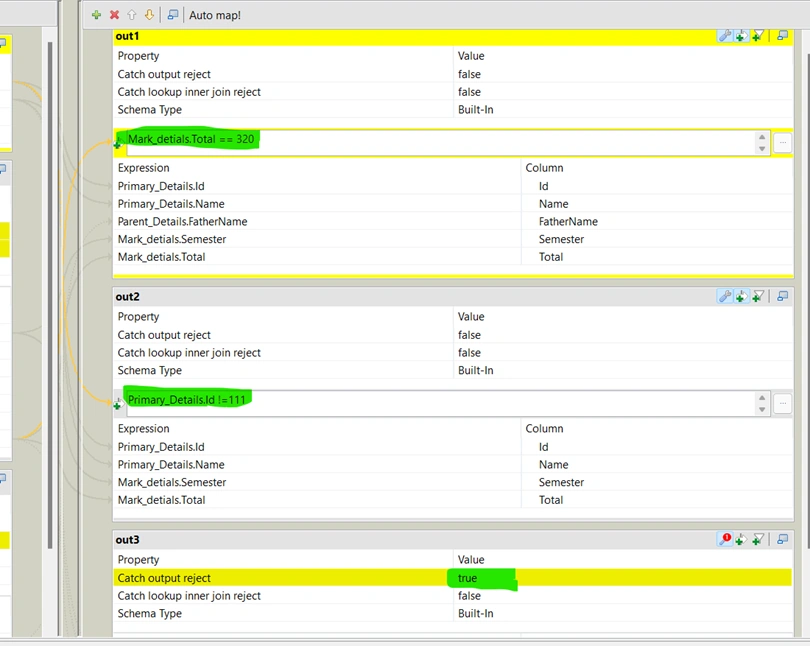
- In this scenario, we are trying to print the reject of first and second output table in third output table.
For this, We have created the below job.

Output
- On the first output table, we have applied the expression filter as total should be equal to 320. First table rejects is Id 113 total 355 and Id 111 total 332.
- In the second output table, we have conditioned the expression filter should be Id not equal to 111.
- In the third output table, catch output rejects is true. It will compare the first table reject and also the second table reject with inner join output (without any filter), If any record is missing from the main output (without any filter) it will print in 3rd table.

Scenario 3
- If catch output reject is true then it is considered as the reject table.
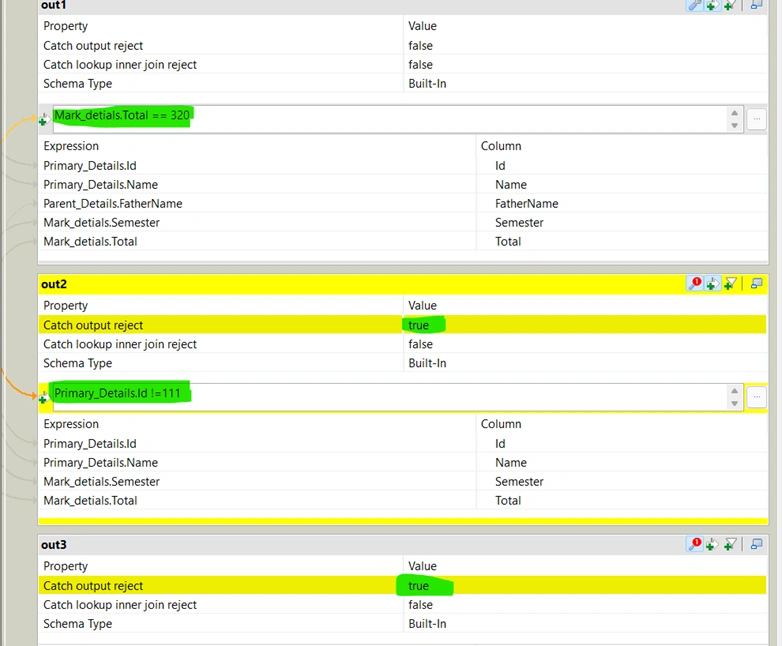
- The first output table has catch output reject is false, the first output table is considered as the main output table. Second table has catch output reject is true and the third output table also have catch output reject is true, so both the second and third table is considered as a reject table.
- In this Scenario we are trying to print the reject of first table in second table. And as second output table also reject table it's reject won't come in third output table. Third output table must have only main output table rejects.
Job is same only changes in tMap editor.
Output
- In first output table, we have applied the expression filter as total should be equal to 320. First table reject is Id 113 total 355 and Id 111 total 332.
- In second output table, we have conditioned the expression filter should be Id not equal to 111 and catch output reject is true. So the reject of 1st table is 113 and 111 in which we have added the filter condition in second table as Id not equal to 111. It prints only Id 113.
- In third output table, catch output reject is true. It will compare the first table reject with inner join output(without any filter), If any record is missed from main output (without any filter) it will print in 3rd table. It prints 111 and 113 is rejected from first table.

Summary
In this article, you have learned about the how tMap component works on the various scenarios with examples.
Join the conversation! Your thoughts help the community grow.