

Introduction
The Cimbalino Windows Phone Toolkit delivers a set of useful and powerful MVVM-compatible tools and services to help developers build Silverlight applications for Windows Phone. The Toolkit is divided in projects that deliver various features, ranging from base MVVM services and helpers, through to code for background agents and for accessing the media library, location services and so on.
The Cimbalino Toolkit's "Device Extended Properties" service is used to provide MVVM-compatible access to the properties in the system DeviceExtendedProperties class. The kit provides both the IDeviceExtendedPropertiesService interface and its implementation DeviceExtendedPropertiesService required to register the service in MVVM Light (note that MVVM and the MVVM Light Toolkit are not "preconditions" to use this service).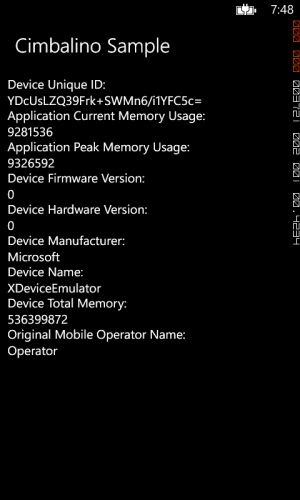
A screenshot of the example app (from Simulator).
Building the example code
The source code for the code example is available here: DeviceExtendedPropertiesService Sample (Github).
To build the source code you will also need the MVVM Light Toolkit and the Cimbalino Windows Phone Toolkit. Their packages are available in the Nuget Package Manager.
Note: You must specify the following capabilities in the app manifest: ID_CAP_IDENTITY_DEVICE.
Registering the service
Register the service in the ViewModelLocator constructor as shown below:
- /// This class contains static references to all the view models in the
- /// application and provides an entry point for the bindings.
- public class ViewModelLocator
- {
- /// Initializes a new instance of the ViewModelLocator class.
- public ViewModelLocator()
- {
- ServiceLocator.SetLocatorProvider(() => SimpleIoc.Default);
- Cimbalino.Phone.Toolkit.Services.DeviceExtendedPropertiesService
- if (!SimpleIoc.Default.IsRegistered<IDeviceExtendedPropertiesService>())
- {
- SimpleIoc.Default.Register<IDeviceExtendedPropertiesService, DeviceExtendedPropertiesService>();
- }
- SimpleIoc.Default.Register<MainViewModel>();
- }
- public MainViewModel MainViewModel
- {
- get
- {
- return ServiceLocator.Current.GetInstance<MainViewModel>();
- }
- }
- public static void Cleanup()
- {
- // TODO Clear the ViewModels
- }
- }
Implement the MainViewModel as shown below. The highlighted sections show the MainViewModel constructor taking the IDeviceExtendedPropertiesService parameter and assigning it to the private variable and later on the variable being used to access the device information.
- /// This class contains properties that the main View can data bind to.
- public class MainViewModel : ViewModelBase
- {
- /// The device extended properties service
- private readonly IDeviceExtendedPropertiesService _deviceExtendedPropertiesService;
- /// Initializes a new instance of the MainViewModel class.
- public MainViewModel(IDeviceExtendedPropertiesService deviceExtendedPropertiesService)
- {
- _deviceExtendedPropertiesService = deviceExtendedPropertiesService;
- }
- /// Gets the device unique identifier.
- public string DeviceUniqueID
- {
- get
- {
- return Convert.ToBase64String(_deviceExtendedPropertiesService.DeviceUniqueId);
- }
- }
- /// Gets the application current memory usage.
- public long ApplicationCurrentMemoryUsage
- {
- get
- {
- return _deviceExtendedPropertiesService.GetDeviceProperty<long>("ApplicationCurrentMemoryUsage");
- }
- }
- /// Gets the application peak memory usage.
- public long ApplicationPeakMemoryUsage
- {
- get
- {
- return _deviceExtendedPropertiesService.GetDeviceProperty<long>("ApplicationPeakMemoryUsage");
- }
- }
- /// Gets the device firmware version.
- public string DeviceFirmwareVersion
- {
- get
- {
- return _deviceExtendedPropertiesService.GetDeviceProperty<string>("DeviceFirmwareVersion");
- }
- }
- /// Gets the device hardware version.
- public string DeviceHardwareVersion
- {
- get
- {
- return _deviceExtendedPropertiesService.GetDeviceProperty<string>("DeviceHardwareVersion");
- }
- }
- /// Gets the device manufacturer.
- public string DeviceManufacturer
- {
- get
- {
- return _deviceExtendedPropertiesService.GetDeviceProperty<string>("DeviceManufacturer");
- }
- }
- /// Gets the name of the device.
- public string DeviceName
- {
- get
- {
- return _deviceExtendedPropertiesService.GetDeviceProperty<string>("DeviceName");
- }
- }
- /// Gets the device total memory.
- public long DeviceTotalMemory
- {
- get
- {
- return _deviceExtendedPropertiesService.GetDeviceProperty<long>("DeviceTotalMemory");
- }
- }
- /// Gets the name of the original mobile operator.
- public string OriginalMobileOperatorName
- {
- get
- {
- return _deviceExtendedPropertiesService.GetDeviceProperty<string>("OriginalMobileOperatorName");
- }
- }
- }
The MainPage.xaml can be the following:
- <phone:PhoneApplicationPage x:Class="CimbalinoSample.MainPage"
- xmlns="http://schemas.microsoft.com/winfx/2006/xaml/presentation"
- xmlns:x="http://schemas.microsoft.com/winfx/2006/xaml"
- xmlns:d="http://schemas.microsoft.com/expression/blend/2008"
- xmlns:mc="http://schemas.openxmlformats.org/markup-compatibility/2006"
- xmlns:phone="clr-namespace:Microsoft.Phone.Controls;assembly=Microsoft.Phone"
- xmlns:shell="clr-namespace:Microsoft.Phone.Shell;assembly=Microsoft.Phone"
- FontFamily="{StaticResource PhoneFontFamilyNormal}"
- FontSize="{StaticResource PhoneFontSizeNormal}"
- Foreground="{StaticResource PhoneForegroundBrush}"
- Orientation="Portrait"
- DataContext="{Binding MainViewModel,
- Source={StaticResource Locator}}"
- SupportedOrientations="Portrait"
- shell:SystemTray.IsVisible="True"
- mc:Ignorable="d">
- <!-- LayoutRoot is the root grid where all page content is placed -->
- <Grid x:Name="LayoutRoot" Background="Transparent">
- <Grid.RowDefinitions>
- <RowDefinition Height="Auto" />
- <RowDefinition Height="*" />
- </Grid.RowDefinitions>
- <!-- TitlePanel contains the name of the application and page title -->
- <StackPanel x:Name="TitlePanel"
- Grid.Row="0"
- Margin="12,17,0,28">
- <TextBlock Margin="12,0"
- Style="{StaticResource PhoneTextTitle2Style}"
- Text="Cimbalino Sample" />
- </StackPanel>
- <!-- ContentPanel - place additional content here -->
- <Grid x:Name="ContentPanel"
- Grid.Row="1"
- Margin="12,0,12,0">
- <TextBlock TextWrapping="Wrap">
- Device Unique ID: <LineBreak/><Run Text="{Binding DeviceUniqueID}" />
- </TextBlock>
- <TextBlock TextWrapping="Wrap" Margin="0,50,0,0">
- Application Current Memory Usage: <LineBreak/><Run Text="{Binding ApplicationCurrentMemoryUsage}" />
- </TextBlock>
- <TextBlock TextWrapping="Wrap" Margin="0,100,0,0">
- Application Peak Memory Usage: <LineBreak/><Run Text="{Binding ApplicationPeakMemoryUsage}" />
- </TextBlock>
- <TextBlock TextWrapping="Wrap" Margin="0,150,0,0">
- Device Firmware Version: <LineBreak/><Run Text="{Binding DeviceFirmwareVersion}" />
- </TextBlock>
- <TextBlock TextWrapping="Wrap" Margin="0,200,0,0">
- Device Hardware Version: <LineBreak/><Run Text="{Binding DeviceHardwareVersion}" />
- </TextBlock>
- <TextBlock TextWrapping="Wrap" Margin="0,250,0,0">
- Device Manufacturer: <LineBreak/><Run Text="{Binding DeviceManufacturer}" />
- </TextBlock>
- <TextBlock TextWrapping="Wrap" Margin="0,300,0,0">
- Device Name: <LineBreak/><Run Text="{Binding DeviceName}" />
- </TextBlock>
- <TextBlock TextWrapping="Wrap" Margin="0,350,0,0">
- Device Total Memory: <LineBreak/><Run Text="{Binding DeviceTotalMemory}" />
- </TextBlock>
- <TextBlock TextWrapping="Wrap" Margin="0,400,0,0">
- Original Mobile Operator Name: <LineBreak/><Run Text="{Binding OriginalMobileOperatorName}" />
- </TextBlock>
- </Grid>
- </Grid>
- </phone:PhoneApplicationPage>
Vithal WadjePosted Jan 1, 2015, 1:14 AM
nice to learn about windows phone,thanks for sharing