
The first time I saw data annotations in action, it was love at first sight. The second time, it was strong passion. It didn't take much, though, for reason to regain control over emotion. At that point, data annotations became again just another technology with its own set of pros and cons -- like many technologies, it shines in a particular context but not necessarily in others.
Data annotations appeared for the first time in a beta of Silverlight 3 a few years ago. A lot has changed since then, and much work has been done to integrate data annotations in ASP.NET MVC. Today, the technology is flexible and extensible enough that you can use it in nearly any input-validation scenario. That doesn't mean, however, that data annotations are the ideal solution for every ASP.NET MVC input form. In this article, I'll present three input scenarios that show both the flexibility of data annotations and also their underlying nature, so that you can intelligently decide when they are appropriate for your use. Another tutorial about ASP.NET MVC 3 you can find here.
Property-Based Validation
When you present users an input form, you want them to enter single values into input fields. Some fields in the form may be required, and others may be optional. Some input fields expect to receive a date, whereas others can only accept numbers in a given range. You may also have input fields whose content must match a regular expression and other fields that employ a custom logic to determine whether or not the provided value is acceptable. The first scenario I consider is when input form validation occurs on individual values.
For the sake of our demonstration, let's assume we have a class like that shown in Figure below, which describes a tennis match.
public class NewMatchModel
{
[Required]
public String Player1 { get; set; }
[Required]
public String Player2 { get; set; }
[Range(0, 7)]
public Int32 FirstSet1 { get; set; }
[Range(0, 7)]
public Int32 FirstSet2 { get; set; }
[Range(0, 7)]
public Int32 SecondSet1 { get; set; }
[Range(0, 7)]
public Int32 SecondSet2 { get; set; }
[Range(0, 7)]
public Int32 ThirdSet1 { get; set; }
[Range(0, 7)]
public Int32 ThirdSet2 { get; set; }
}
The class has two string fields to contain the players' names and six numeric fields to contain the score that each player may achieve in up to three sets. Taken individually, each score field can have only an integer value ranging from 0 to 7. (Admittedly, I'm minimizing the complexity of tennis scoring in this example, but as you can see it is adequate for showing the limitation of property-based validation in some scenarios.)
At first glance, this class does a good job because it ensures that player names are always specified and each player's score can be from 0 to 7 (games per set). Validation applied to individual properties, however, is largely insufficient in this specific case. Figure 2 shows a form that passes validation but represents an invalid and unacceptable input for the application back end.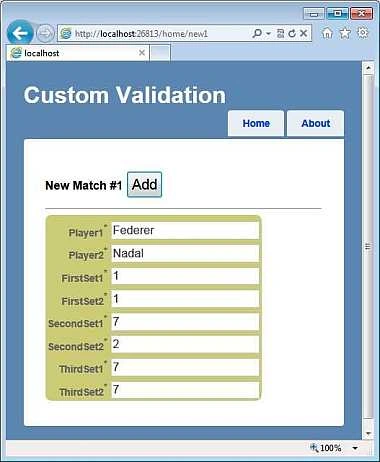
Whether you're simply creating a new record in a database table or processing that input to update statistics, the input you get is invalid for the domain logic. In particular, sets are played incrementally, meaning that to have nonzero values in, say, the third set, you must have completed the previous two. A set is completed when one of the players reaches 6 or 7 with at least a two-game lead. (Again, real logic is much more sophisticated, but this logic is sufficient for our validation purposes.)
The bottom line is that data annotations make it easy to arrange per-property validation, which is insufficient in many real-world scenarios.
I'll discuss cross-property validation using data annotations shortly, but before I do so, I will briefly address some common objections that I often receive at this point when I teach my ASP.NET MVC classes.
Extensibility of Data Annotations
One could say that per-property validation is still effective to avoid patently invalid data on the client. In ASP.NET MVC, data annotations can be easily arranged to emit JavaScript code that validates on the client. There's not really much you need to do -- just check that client-side validation is enabled in the web.config file and that the correct script files are on the site. If you start from the default ASP.NET MVC template, everything is simply in place. Client-side validation, though, is only one aspect of validation. From a business perspective, in fact, the data you get as shown in Figure 2 is invalid, and you must be able to detect this. I see two possible strategies for doing so.
One strategy is to use data annotations only for user interface validation and arrange another layer of validation in the domain model. In the second strategy, you take full advantage of data annotation's capabilities and use a single validation model that works on the client and server. For the latter strategy to work, though, you should recognize when per-property validation is not appropriate businesswise.
Data annotations comprise a core set of attributes but encourage you to create custom attributes that
implement custom validation logic. Before .NET Framework 4 and ASP.NET MVC 3, the implementation of data annotations didn't allow you to arrange cross-property validation easily. Thankfully, with .NET Framework 4, cross-property validation is easier.
Cross-Property Validation
Cross-property validation refers to a situation in which the content of a property cannot be properly validated without looking into the value stored in other properties. Cross-property validation likely requires a bit of context- and domain-specific code. For this reason, cross-property validation requires a custom attribute that turns out to be not really reusable outside of a given domain. As an example, consider the custom attribute in the figure below. The attribute is called SetScoreAttribute and is designed to validate the two input values forming the score of a given set.
public class SetScoreAttribute : ValidationAttribute
{
public SetScoreAttribute(String otherPropertyName)
: base("Invalid set score")
{
OtherPropertyName = otherPropertyName;
}
public String OtherPropertyName { get; set; }
protected override ValidationResult IsValid(Object value,
ValidationContext validationContext)
{
var otherPropertyInfo = validationContext.ObjectType.GetProperty(OtherPropertyName);
var otherSetScore = (Int32)otherPropertyInfo.GetValue(validationContext.ObjectInstance, null);
var thisSetScore = (Int32)value;
// Perform a very minimal validation: much more would be required realistically
var success = true;
var maxScore = Math.Max(thisSetScore, otherSetScore);
var minScore = Math.Min(thisSetScore, otherSetScore);
if (maxScore > 7 && minScore < 0)
success = false;
if (maxScore == otherSetScore && maxScore == 7)
success = false;
if (maxScore == 7 && minScore < 5)
success = false;

Dileep Kumar PatelPosted Apr 19, 2012, 3:54 AM
This is good article for bugginers.MVC(Multi view controler) is the one of the best technique of the annotaion of Website.
Vineet Kumar SainiPosted Mar 25, 2012, 6:53 AM
Very good post about custom validations......
Arun ChoudharyPosted Mar 24, 2012, 7:49 AM
Thanks for sharing. This is a good article.
Deepak DwijPosted Mar 24, 2012, 7:48 AM
Nice way to represent the concept. Thanks for Sharing!!!
Akshay TeotiaPosted Mar 24, 2012, 7:47 AM
Thanks for sharing this.