

Introduction
In this article, we will explore the different Data flow partition types in Azure Data Factory. Each partitioning type provides specific instructions to Spark on how to organize the data after each processing in the cluster. This is a crucial step in developing any data transformation as it allows us to optimize the performance of our Data flow pipeline.
Challenges
In our previous article, we learned how to view the processing time by stages and access the partition chart by enabling the verbose logging in the Data flow activity. Now, we need to review our data transformation to reduce the transformation time. In each Data flow components, we can change the partition type. Before we dive into the tutorial, we need to understand the 5 partition types:
- Round Robin: Evenly distribute the data across the specified number of partitions. Spark will re-partition the data if the number of partition changes. This is often used when we do not have a good column to distribute the data.
- Hash: We define the columns to be used by the hashing function. A hash value is generated based on the unique column values. Each hash value is mapped to exactly 1 partition but one or more hash value can be placed in a partition. The benefit of this method is to group all the columns with the same values together for downstream processing (like aggregation).
- Dynamic Range: We define the columns to be used to arrange the data. Spark will determine the range of values that can fit within each partition.
- Fixed Range: We define the specific conditions for partitioning the data. Spark will use this as part of the partition function.
- Key: The number of partitions is generated based on the columns defined. Each unique combination of values will result in one partition. This should only be used if the combinations are limited and are small.
Tutorial
1. Let's review the data flow we are using for this tutorial:
- We have 2 source Azure SQL Tables.
- We are joining them using 'InvoiceID' to calculate the daily profit using 'InvoiceDate'.
- Finally, we are adding some audit columns and writing the output to a reporting Azure SQL table.
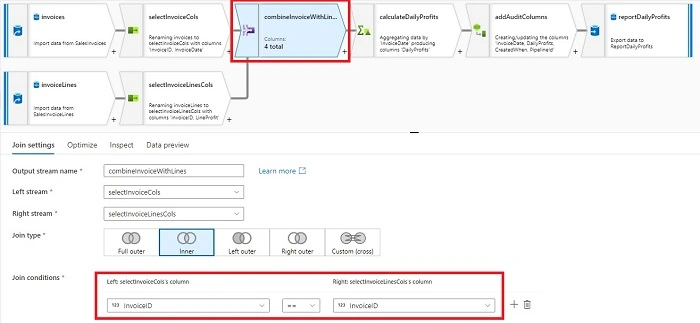
2. Both 'invoices' and 'invoiceLines' sources are partitioned using 'Use current partitioning'. When using with option with sources, the data is partitioned evenly across all the partitions. A new partition is created when the data is about 128 MB. Generally, this is the recommended setting for most sources.
As you can see, in our example, mapping data flow created only 1 partition because we don't have a lot of data,

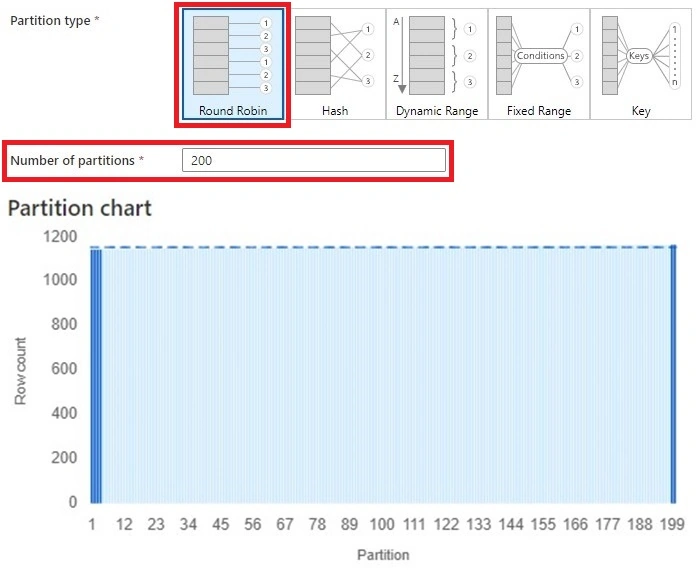
3. Next, we will examine different partition optimization in the 'combineInvoiceWithLines' join element. First up is 'Round Robin':
- This is the default selection. We created 200 partitions.
- As expected, the data is distributed evenly across all partitions.
- To join the data and repartition the result, it took 2.853s.
- We will treat this as the base case for our optimization. We have just under 1200 records in each partition.
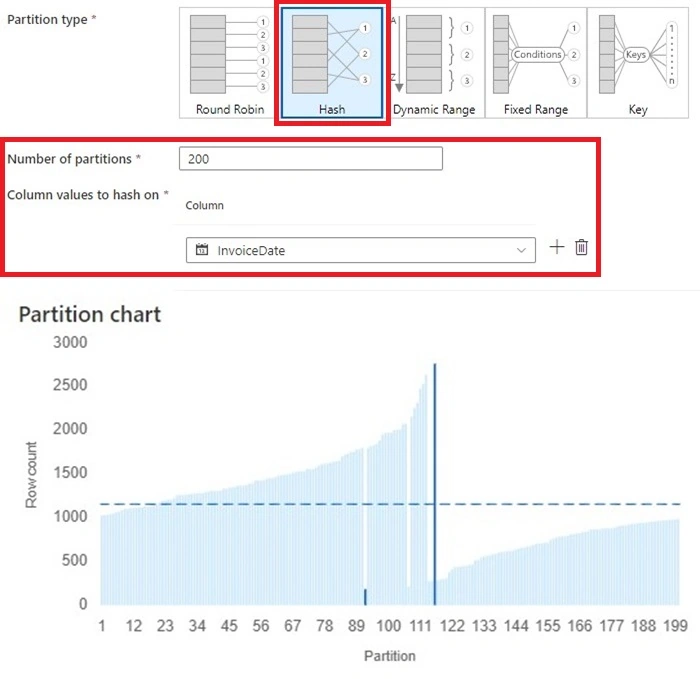
4. The next option we have is 'Hash'. This is a popular option, especially if we have multiple columns:
- Again, we created 200 partitions.
- Since we want to aggregate the data based on invoiceDate. We will use it for our hash column.
- The result shows about half of the partitions have higher than average number of row counts.
- The join and repartition took 1.35s.
- The benefit of this method is we know each invoiceDate is stored in 1 partition. The downside is we can place too many data in a partition. The amount of data going into a partition is strictly based on the hashing function. If our dataset is evenly distributed then this partition method will work great.
5. Dynamic Range is very similar to Hash partition option but Spark will try to distribute the data evenly using the column values:
- We are using 200 partitions and the sorted range is 'InvoiceDate' column.
- The chart looks very similar to Hash except the spikes are much smaller and each partition is closer to the average row count.
- This process took 1.129s
- The benefit of this method is similar to Hash, grouping invoice dates together while allowing Spark to optimize which partition the data should be placed. This will smooth out any major spikes. The downside reminds if we have some invoice dates with a significate amount of data greater than other days.

6. Fix Range requires us to define the rule for each partition:
- Since fix range requires me to enter a condition 1 by 1, I created a similar example using 12 partitions. I defined a rule using month() function and created total of 12 rules.
- This process took 0.269s.
- The benefit is this allows full control for the developer to assign a partition to the dataset. The downside is this requires greater understanding of the dataset. As the dataset's distribution changes, it might require changes in the partition conditions.

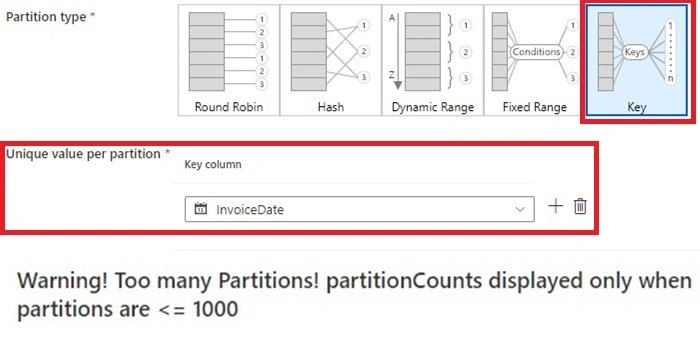
7. The last option is Key. In this option, we do not pre-define the number of partitions. Instead, this is created based on the unique key values.
- One limitation of this partition method is we cannot apply any calculation to the partition column. Instead, this must be created in advanced, either using derived column or read in from source.
- I tried using InvoiceDate, but it resulted over 1000 partitions. Instead, I would recommend generating a column based on month() and dayofmonth() function so the maximum partition will be 366.
- The benefit of this option is to control the number of partitions based on key columns' unique value. This is a good use case for data that have a wide range of categories. The drawback is the overhead of calculating and generating columns to be used for this mapping.
Summary
In conclusion, Mapping data flow provides five partition options for tuning. Some of the options are easier to use and more suitable for everyday use cases. The goal of repartitioning should be to reduce data movement in downstream processes. As a result, our overall stages' process time must be reduced.
Finally, here is a table summarizing the partition options and my opinion on when we should use it.
| Partition type | Data distribution | Number of partitions | When to use |
| Round Robin | Evenly distributed | User defined | Default, when no good column for distribution. |
| Hash | Based on values in hash columns | User defined | Multi-value aggregation with a well distributed datasets |
| Dynamic Range | Based on values in the range columns, Spark will try to balance the underutilized partitions | User defined | Single or Multi-value aggregation. The dataset might not well distributed. |
| Fixed Range | Based on the defined conditions | User defined | Full control over how the data is distributed. Requires good knowledge of the dataset. |
| Key | Based on unique values in the key columns | Spark generated | When each unique value needs to be in their own partition. Only should be used when the unique values are known and small. |
Happy Learning!
References
Join the conversation! Your thoughts help the community grow.