

Introduction
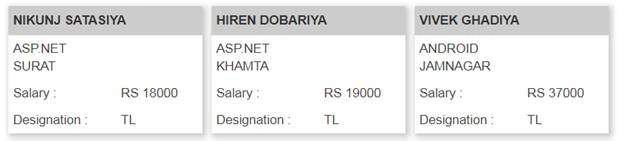
In this article, I’ll present a tutorial with an example: a way to use the DataList control in ASP.NET for displaying information/records from the database using SQL DataSource.
So, first, we will discuss ASP.NET data list control.
What is a data list control in ASP.NET?
The DataList control, just like the Repeater control, maybe a model-driven, lightweight control that acts as an instrumentality of continual information. The templates during this control area unit define the information that it'll contain. It is versatile in the sense that you simply will easily customize the display of 1 or many records that area unit displayed within the management. You've got a property within the DataList management known as RepeatDirection that may be used to customize the layout of the control.
For creating a database, you can follow this SQL query as per your requirements. In this article, I am creating one temp table with some duplicate records to demonstrate the data list control.
Create Table
CREATE TABLE #Employee (
    EmpID INT,
    EmpName NVARCHAR(50),
    EmpDept NVARCHAR(50),
    EmpCity NVARCHAR(50),
    Salary NVARCHAR(50),
    Designation NVARCHAR(50)
);
Insert Data into Table
INSERT INTO #Employee (EmpID, EmpName, EmpDept, EmpCity, Salary, Designation)
VALUES ('1', 'NIKUNJ SATASIYA', 'ASP.NET', 'SURAT', 'RS 18000', 'TL')
INSERT INTO #Employee (EmpID, EmpName, EmpDept, EmpCity, Salary, Designation)
VALUES ('1', 'HIREN DOBARIYA', 'ASP.NET', 'KHAMTA', 'RS 19000', 'TL')
INSERT INTO #Employee (EmpID, EmpName, EmpDept, EmpCity, Salary, Designation)
VALUES ('1', 'VIVEK GHADIYA', 'ANDROID', 'JAMNAGAR', 'RS 37000', 'TL')
INSERT INTO #Employee (EmpID, EmpName, EmpDept, EmpCity, Salary, Designation)
VALUES ('1', 'SNEHAL PATEL', 'IOS', 'SURAT', 'RS 45000', 'TL')
INSERT INTO #Employee (EmpID, EmpName, EmpDept, EmpCity, Salary, Designation)
VALUES ('1', 'PRATIK PANSURIYA', 'JAVA', 'RAJKOT', 'RS 33000', 'TL')
INSERT INTO #Employee (EmpID, EmpName, EmpDept, EmpCity, Salary, Designation)
VALUES ('1', 'SARAH DEMOLA', 'PHP', 'SURAT', 'RS 19000', 'TL')
Get Data From Table
SELECT * FROM #Employee
Drop Table
DROP TABLE #Employee
- Table: this is often the default layout. The Table layout renders the DataList as an associate hypertext markup language (HTML) Table and it renders within the Table Cell. The number of Cells in every row will be set using the Repeat Columns property.
- Flow: The Flow layout doesn't render the DataList as any markup language component. All the DataList things are rendered directly even as for how the Repeater control repeats its things.
- OrderedList and UnorderedList: The OrderedList and UnorderedList layouts render the DataList as markup language Ordered List and Unordered List. But in .Net 4.0 and higher than these aren't supported any longer.
- DataList management and Templates: The DataList control makes use of the subsequent templates.
- HeaderTemplate: The content of this example won't be recurrent and can be placed in the topmost position, i.e., the head section of the DataList control.
- ItemTemplate: The contents of this example are recurrent for every record present in its DataSource.
- AlternatingItemTemplate: AlternatingItemTemplate is used for adding alternate things. It's used together with ItemTemplate, usually for displaying a unique style for alternating things.
- SeparatorTemplate: This example is used to feature an extractor between 2 things of the DataList control.
- FooterTemplate: The content of this example won't be continual and can be placed at the bottom-most position i.e. footer section of the DataList control.
Radhika parmarPosted May 22, 2020, 2:56 AM
Hi,how to display image in datalist control?
Jyoti JodhaPosted Oct 10, 2017, 7:35 AM
Now i am use like this <asp:Image ID="Image1" runat="server" ImageUrl='<%# Bind("Images")%>'/> now don't show Images
Jyoti JodhaPosted Oct 10, 2017, 7:11 AM
I am Using Like this <asp:Image ID="Image1" runat="server" ImageUrl='<%# "GetImageDatafromDB.aspx?id=" + System.Convert.ToString(Eval("P_ID")) %>'/> Image Don't show in web Pages
Jyoti JodhaPosted Oct 10, 2017, 5:58 AM
How to show image in datalist from database in asp.net c#
Nikunj SatasiyaPosted Oct 10, 2017, 1:26 AM
Rahul Actually, It's depend on your requirement what actually you want, For Example if you want to display record in grid (tabular) Format then you should use GridView, if you want to show your data/information shown as in article then you should use Datalist, or if you want to display record like as comment box then you can use Repeater control, in-sort it is fully depend on your requirement what client actually want. other wise the binding method of all the DataBound Controls is almost same.
Rahul RathodPosted Oct 9, 2017, 7:43 AM
Hi, Actually i have doubt about the DataBound Controls ,their are 6 control like (Repeater,ListView ,GridView,DataView,Detailsview,FormView) so at which senario should we used the Which control...