

Introduction
While working with Entity Framework LINQ people ususally get struck on how to use joins, group by cluase, count etc..
Joins take two source sequences as input. The join clause compares the specified keys for equality by using equals keyword. Their are different types of joins; depending upon our senario, we can use any one.
Example
Suppose, there is a shop which contains multiple products. The shop owner can add a discount for each product or category.
I am going to create two tables, first for DISCOUNT includes Product Category Name, Discount in percentage; and second one is PRODUCT that includes Product Names, Amount, Discount id (which is Foreign key from discount table).
We will use different types of joins, and group by clause, to show the actual number of count of that particular category type. Below is the table script which has some dummy data.
While working with Entity Framework LINQ people ususally get struck on how to use joins, group by cluase, count etc..
Joins take two source sequences as input. The join clause compares the specified keys for equality by using equals keyword. Their are different types of joins; depending upon our senario, we can use any one.
Example
Suppose, there is a shop which contains multiple products. The shop owner can add a discount for each product or category.
I am going to create two tables, first for DISCOUNT includes Product Category Name, Discount in percentage; and second one is PRODUCT that includes Product Names, Amount, Discount id (which is Foreign key from discount table).
We will use different types of joins, and group by clause, to show the actual number of count of that particular category type. Below is the table script which has some dummy data.
- GO
- SET ANSI_NULLS ON
- GO
- SET QUOTED_IDENTIFIER ON
- GO
- SET ANSI_PADDING ON
- GO
- CREATE TABLE [dbo].[DISCOUNT](
- [DI_ID] [int] IDENTITY(1,1) NOT NULL,
- [DI_NAME] [varchar](50) NULL,
- [DI_PER] [decimal](18, 2) NULL,
- CONSTRAINT [PK_SALARY_HIKE] PRIMARY KEY CLUSTERED
- (
- [DI_ID] ASC
- )WITH (PAD_INDEX = OFF, STATISTICS_NORECOMPUTE = OFF, IGNORE_DUP_KEY = OFF, ALLOW_ROW_LOCKS = ON, ALLOW_PAGE_LOCKS = ON) ON [PRIMARY]
- ) ON [PRIMARY]
- GO
- SET ANSI_PADDING OFF
- GO
- SET ANSI_NULLS ON
- GO
- SET QUOTED_IDENTIFIER ON
- GO
- SET ANSI_PADDING ON
- GO
- CREATE TABLE [dbo].[PRODUCT](
- [PR_ID] [int] IDENTITY(1,1) NOT NULL,
- [PR_NAME] [varchar](50) NULL,
- [PR_AMOUNT] [decimal](18, 2) NULL,
- [PR_DI_ID] [int] NULL,
- CONSTRAINT [PK_PRODUCT_1] PRIMARY KEY CLUSTERED
- (
- [PR_ID] ASC
- )WITH (PAD_INDEX = OFF, STATISTICS_NORECOMPUTE = OFF, IGNORE_DUP_KEY = OFF, ALLOW_ROW_LOCKS = ON, ALLOW_PAGE_LOCKS = ON) ON [PRIMARY]
- ) ON [PRIMARY]
- GO
- SET ANSI_PADDING OFF
- GO
- SET IDENTITY_INSERT [dbo].[DISCOUNT] ON
- GO
- INSERT [dbo].[DISCOUNT] ([DI_ID], [DI_NAME], [DI_PER]) VALUES (1, N'ELECTRONICS', CAST(10.00 AS Decimal(18, 2)))
- GO
- INSERT [dbo].[DISCOUNT] ([DI_ID], [DI_NAME], [DI_PER]) VALUES (2, N'HOME APPLIANCES', CAST(5.50 AS Decimal(18, 2)))
- GO
- INSERT [dbo].[DISCOUNT] ([DI_ID], [DI_NAME], [DI_PER]) VALUES (3, N'CAR & ACCESSORIES', CAST(12.00 AS Decimal(18, 2)))
- GO
- INSERT [dbo].[DISCOUNT] ([DI_ID], [DI_NAME], [DI_PER]) VALUES (4, N'CLOTHS', CAST(25.25 AS Decimal(18, 2)))
- GO
- SET IDENTITY_INSERT [dbo].[DISCOUNT] OFF
- GO
- SET IDENTITY_INSERT [dbo].[PRODUCT] ON
- GO
- INSERT [dbo].[PRODUCT] ([PR_ID], [PR_NAME], [PR_AMOUNT], [PR_DI_ID]) VALUES (1, N'Mobile 1', CAST(35000.00 AS Decimal(18, 2)), 1)
- GO
- INSERT [dbo].[PRODUCT] ([PR_ID], [PR_NAME], [PR_AMOUNT], [PR_DI_ID]) VALUES (2, N'Shirt', CAST(1200.00 AS Decimal(18, 2)), 4)
- GO
- INSERT [dbo].[PRODUCT] ([PR_ID], [PR_NAME], [PR_AMOUNT], [PR_DI_ID]) VALUES (3, N'Wood Table', CAST(3500.00 AS Decimal(18, 2)), 2)
- GO
- INSERT [dbo].[PRODUCT] ([PR_ID], [PR_NAME], [PR_AMOUNT], [PR_DI_ID]) VALUES (4, N'BMW X3', CAST(4340000.00 AS Decimal(18, 2)), 3)
- GO
- INSERT [dbo].[PRODUCT] ([PR_ID], [PR_NAME], [PR_AMOUNT], [PR_DI_ID]) VALUES (5, N'Laptop', CAST(75000.00 AS Decimal(18, 2)), NULL)
- GO
- INSERT [dbo].[PRODUCT] ([PR_ID], [PR_NAME], [PR_AMOUNT], [PR_DI_ID]) VALUES (6, N'Shampoo ', CAST(150.00 AS Decimal(18, 2)), NULL)
- GO
- INSERT [dbo].[PRODUCT] ([PR_ID], [PR_NAME], [PR_AMOUNT], [PR_DI_ID]) VALUES (7, N'Ice Cream', CAST(100.00 AS Decimal(18, 2)), NULL)
- GO
- INSERT [dbo].[PRODUCT] ([PR_ID], [PR_NAME], [PR_AMOUNT], [PR_DI_ID]) VALUES (8, N'Mobile 2', CAST(27000.00 AS Decimal(18, 2)), 1)
- GO
- INSERT [dbo].[PRODUCT] ([PR_ID], [PR_NAME], [PR_AMOUNT], [PR_DI_ID]) VALUES (9, N'Mobile 3', CAST(22000.00 AS Decimal(18, 2)), 1)
- GO
- SET IDENTITY_INSERT [dbo].[PRODUCT] OFF
- GO
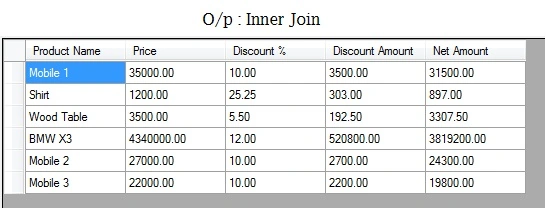
The exmaple shows a simple Innner join query. This query shows the list of product names, amount, discount, net amount - those who having matching elements with discount pairs. If product does not have any discount id, then this will not display.
First, create .edmx file from the database. Right click on Project solution => Add => New Item, then from Data, select ADO.NET Entity Data Model & give any name ( example- sample).
Now, give connection string, select Database Name, your two tables & after successfully adding, just build your solution. Now, in our class, create object of DB Enitity so it will be able to access our tables from DBContext as
- Temp_DBEntities objDBEntity = new Temp_DBEntities();
In this example, I am going to create a datatable so we can see the actual result. Add columns to the datatables. In our join, I am going to do some calculations to apply appropriate discount on products, as shown below.
- DataTable dt = new DataTable();
- dt.Columns.Add("Product Name", typeof(string));
- dt.Columns.Add("Price", typeof(decimal));
- dt.Columns.Add("Discount %", typeof(decimal));
- dt.Columns.Add("Discount Amount", typeof(decimal));
- dt.Columns.Add("Net Amount", typeof(decimal));
- var joinResult = (from p in objDBEntity.PRODUCTs
- from d in objDBEntity.DISCOUNTs
- where p.PR_DI_ID == d.DI_ID
- select new
- {
- PNAME = p.PR_NAME,
- PAMT = p.PR_AMOUNT,
- PDISPER = d.DI_PER == null ? 0 : d.DI_PER,
- PDISAMT = d.DI_PER == null ? 0 : (p.PR_AMOUNT * d.DI_PER / 100),
- PNETAMT = (p.PR_AMOUNT - (d.DI_PER == null ? p.PR_AMOUNT : (p.PR_AMOUNT * d.DI_PER / 100))),
- }).ToList();
- foreach (var item in joinResult)
- {
- DataRow row = dt.NewRow();
- string name = Convert.ToString((item.PNAME).ToString());
- decimal price = Convert.ToDecimal((item.PAMT).ToString());
- decimal per = Math.Round(Convert.ToDecimal(item.PDISPER), 2, MidpointRounding.AwayFromZero);
- decimal dAmt = Math.Round(Convert.ToDecimal(item.PDISAMT), 2, MidpointRounding.AwayFromZero);
- decimal netAmt = Math.Round(Convert.ToDecimal(item.PNETAMT), 2, MidpointRounding.AwayFromZero);
- row["Product Name"] = name;
- row["Price"] = price;
- row["Discount %"] = per;
- row["Discount Amount"] = dAmt;
- row["Net Amount"] = netAmt;
- dt.Rows.Add(row);
- }
If we put debugger & check datatable dt into watch, then our output will be the following.
Outer Join
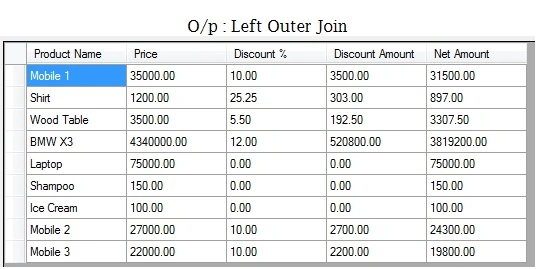
Following exmaple shows a simple Outer Left join query. All the elements in the left source sequence will be displayed, even if there is no matching element with right source.
Outer Join
Following exmaple shows a simple Outer Left join query. All the elements in the left source sequence will be displayed, even if there is no matching element with right source.
- DataTable dt1 = new DataTable();
- dt1.Columns.Add("Product Name", typeof(string));
- dt1.Columns.Add("Price", typeof(decimal));
- dt1.Columns.Add("Discount %", typeof(decimal));
- dt1.Columns.Add("Discount Amount", typeof(decimal));
- dt1.Columns.Add("Net Amount", typeof(decimal));
- var leftJointResult = (from p in objDBEntity.PRODUCTs
- join d in objDBEntity.DISCOUNTs on new { DID = (int?)p.PR_DI_ID } equals new { DID = (int?)d.DI_ID } into dis
- from d in dis.DefaultIfEmpty()
- select new
- {
- PNAME = p.PR_NAME,
- PAMT = p.PR_AMOUNT,
- PDISPER = d.DI_PER == null ? 0 : d.DI_PER,
- PDISAMT = d.DI_PER == null ? 0 : (p.PR_AMOUNT * d.DI_PER / 100),
- PNETAMT = p.PR_DI_ID == null ? p.PR_AMOUNT : (p.PR_AMOUNT - (p.PR_AMOUNT * d.DI_PER / 100)),
- }).ToList();
- foreach (var item in leftJointResult)
- {
- DataRow row = dt1.NewRow();
- string name = Convert.ToString((item.PNAME).ToString());
- decimal price = Convert.ToDecimal((item.PAMT).ToString());
- decimal per = Math.Round(Convert.ToDecimal(item.PDISPER), 2, MidpointRounding.AwayFromZero);
- decimal dAmt = Math.Round(Convert.ToDecimal(item.PDISAMT), 2, MidpointRounding.AwayFromZero);
- decimal netAmt = Math.Round(Convert.ToDecimal(item.PNETAMT), 2, MidpointRounding.AwayFromZero);
- row["Product Name"] = name;
- row["Price"] = price;
- row["Discount %"] = per;
- row["Discount Amount"] = dAmt;
- row["Net Amount"] = netAmt;
- dt1.Rows.Add(row);
- }
If we put debugger & check datatable dt1 into watch, then our output will be the following.
Group By, Count
I am going to create one model here as so this will be used to get records when we execute group by query clause to get count of product on categoery.
I am going to create one model here as so this will be used to get records when we execute group by query clause to get count of product on categoery.
- public class ProductInfo
- {
- public string PNAME { get; set; }
- public decimal? PAMT { get; set; }
- public decimal? PDISPER { get; set; }
- public decimal? PDISAMT { get; set; }
- public decimal? PNETAMT { get; set; }
- public int? PCOUNT { get; set; }
- public int? PRDID { get; set; }
- }
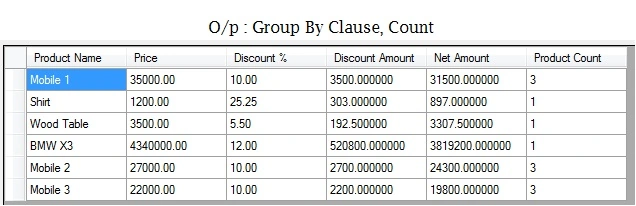
In Below code, first we are selecting record from table into a variable by using our model & then we apply group by clause & count so we will get count.
- DataTable dt2 = new DataTable();
- var groupByResult = (from p in objDBEntity.PRODUCTs
- from d in objDBEntity.DISCOUNTs
- where p.PR_DI_ID == d.DI_ID
- select new ProductInfo
- {
- PNAME = p.PR_NAME,
- PAMT = p.PR_AMOUNT,
- PDISPER = d.DI_PER == null ? 0 : d.DI_PER,
- PDISAMT = d.DI_PER == null ? 0 : (p.PR_AMOUNT * d.DI_PER / 100),
- PNETAMT = (p.PR_AMOUNT - (d.DI_PER == null ? p.PR_AMOUNT : (p.PR_AMOUNT * d.DI_PER / 100))),
- PCOUNT = (int?)0,
- PRDID = p.PR_DI_ID
- }).ToList();
- foreach (var item in groupByResult)
- {
- var rCount = (from p in objDBEntity.PRODUCTs
- where p.PR_DI_ID == item.PRDID
- group p by
- new
- {
- d_Id = p.PR_DI_ID
- } into s
- select new
- {
- dIDs = s.Key.d_Id,
- cnt = s.Count()
- }).FirstOrDefault();
- item.PCOUNT = rCount == null ? 0 : (int?)rCount.cnt;
- DataRow row = dt2.NewRow();
- row["Product Name"] = item.PNAME;
- row["Price"] = item.PAMT;
- row["Discount %"] = item.PDISPER;
- row["Discount Amount"] = item.PDISAMT;
- row["Net Amount"] = item.PNETAMT;
- row["Net Amount"] = item.PNETAMT;
- row["Product Count"] = item.PCOUNT;
- dt2.Rows.Add(row);
- }
If we put debugger & check datatable dt2 into watch then our output will be,
Summary
In this article, you learned How to use Joins, Group By Clause in Entity Framework with Linq C#.
Summary
In this article, you learned How to use Joins, Group By Clause in Entity Framework with Linq C#.
Sanjay ShekhawatPosted Oct 12, 2019, 2:18 AM
Nice article. Thanks
Rajesh KumarPosted Jun 13, 2018, 5:09 AM
Good information, will be useful ....
Kashif AsifPosted Jul 18, 2017, 12:46 AM
Nice article keep it up (y)