

LOG4NET
Before showing what Log4Net is I would like to explaing what logging actually is.
Logging
In computing, a logfile is a file that records either events that occur in an operating system or in a programme or when a software runs.
Logging is the act of keeping a log.
Or we can say, logging is a method of tracking/monitoring what is going on when an application is running. Log records will be the most needed items when something goes wrong in your application.
Now I am explaing Log4Net.
LOG4NET
Log4net is an open-source library that allows or helps the .NET applications to trace the details of the errors that have occurred in a project.
Now I will explain how we should use Log4Net in our MVC project to track errors.
Step 1
Create a new MVC project.
Step 2
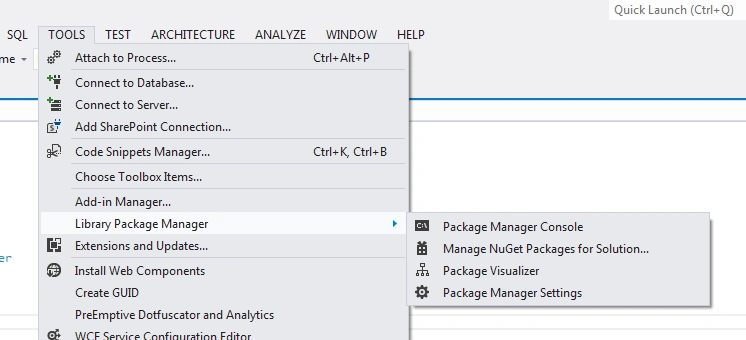
Go to the tools and do the following changes as in the picture shown.
Step 3
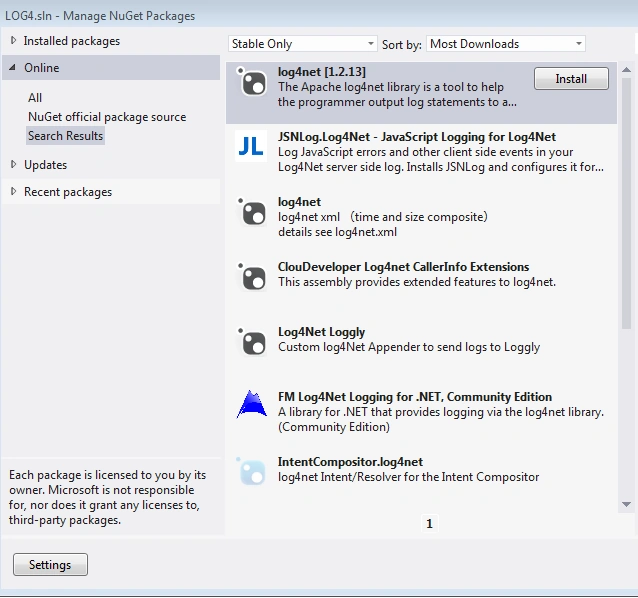
Click on the Manage NuGet Package Manager and then search for Log4Net.
Step 4
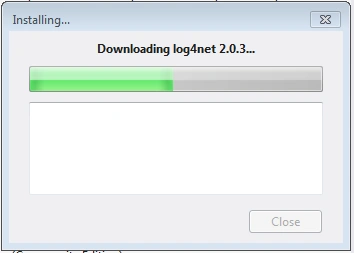
Install Log4Net.
Step 5
Step 6
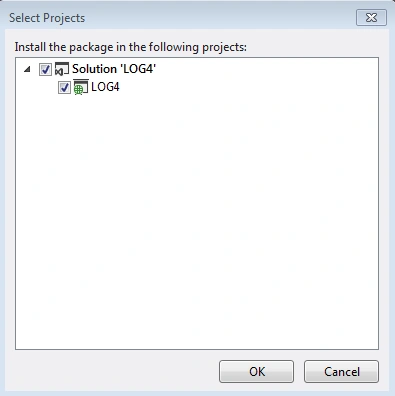
Now expand the assembly and you will see the Log4Net.
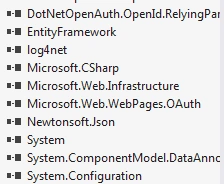
As we have successfully imported Log4Net, we will now use it.
So create a Home controller with the following Action Method.
- public class HomeController : Controller
- {
- log4net.ILog logger = log4net.LogManager.GetLogger(typeof(HomeController)); //Declaring Log4Net
- public ActionResult Index()
- {
- try
- {
- int x, y, z;
- x = 5; y = 0;
- z = x / y;
- }
- catch(Exception ex)
- {
- logger.Error(ex.ToString());
- }
- return View();
- }
- }
For this we need to do some setting in web.config. Go to Web.config and paste in the following things.
Under <configurations> in web.config write the following code.
- <configSections>
- <section name="log4net" type="log4net.Config.Log4NetConfigurationSectionHandler, log4net" />
- </configSections>
- <log4net debug="false">
- <appender name="LogFileAppender" type="log4net.Appender.FileAppender">
- <param name="File" value="C:\test\test.log" />
- <!--<param name="AppendToFile" value="true"/>-->
- <layout type="log4net.Layout.PatternLayout">
- <param name="ConversionPattern" value="%d [%t] %-5p %c %m%n" />
- </layout>
- </appender>
- <root>
- <level value="All" />
- <appender-ref ref="LogFileAppender" />
- </root>
- </log4net>
I am here using the image for a better understanding.
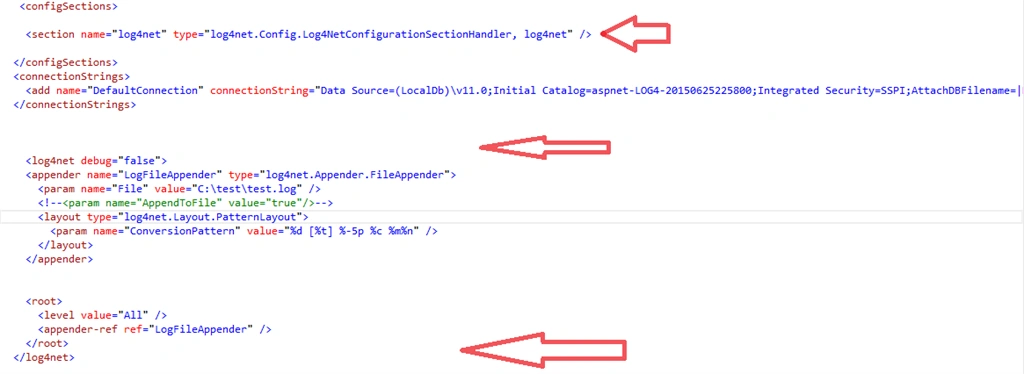
Now I am explaining on the key concepts.
APPENDER: The <appender /> element specifies the name and logger type. It specifies where the information will be logged, how it will be logged and under what circumstances the information will be logged. You can check the various types of appender in the link http://logging.apache.org/log4net/release/config-examples.html.
param name: specifies the file name and path where the log will be saved. In this case it is "test.log".
layout: The Layout element tells Log4Net how each log line should look like.
Root: You need to have one root section to house your top-level logger references. These are the loggers that inherit information from your base logger (root).
Now run the project with the Index action method and Home controller and check the log file in C\Test\Test.log. You will get the details of the exception.
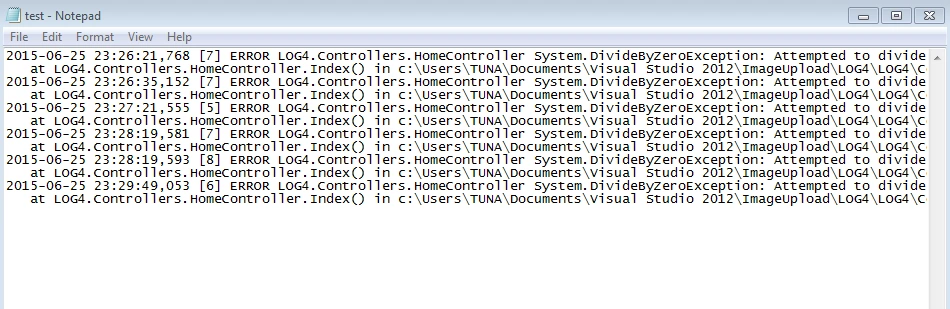
Since I run it multiple times it is showing the same error multiple times with the date and time. So in this way we can use this Log4Net to track errors in a realistic scenario.
Anil SinghPosted Oct 13, 2017, 12:44 AM
It might helps you guys - https://www.code-sample.com/2017/10/log4net-in-mvc-5-log-error.html
arun prasadPosted Sep 23, 2017, 12:00 AM
Dinesh DinaAdd The log4net configuration inside global.aspx in Application_Start. Add this code ( log4net.Config.XmlConfigurator.Configure(); )
DotNet coaderPosted Sep 5, 2017, 10:39 PM
Thanks Debendra..your expalanation is so nice...Thanks a Ton.
Dinesh DinaPosted Sep 15, 2016, 6:33 AM
Add The log4net configuration inside global.aspx in Application_Start. Add this code ( log4net.Config.XmlConfigurator.Configure(); )
Bhuvanesh MohankumarPosted Jul 26, 2016, 9:25 AM
Good one and screen shot is highlight, I have forwarded to a friend
Sujeet TiwariPosted Apr 3, 2016, 7:20 AM
nic
Santhakumar MunuswamyPosted Jul 4, 2015, 3:10 AM
Thanks for nice one
Debendra DashPosted Jun 30, 2015, 7:21 AM
Thanks Tarun......
Tarun GiriPosted Jun 30, 2015, 1:17 AM
nice
Sibeesh VenuPosted Jun 29, 2015, 3:12 AM
Good one...
Abhijit KakadePosted Jun 29, 2015, 2:03 AM
Good artical Debendra.
Debasis SahaPosted Jun 29, 2015, 1:08 AM
Nice one..
Mahesh ChandPosted Jun 29, 2015, 12:41 AM
Nice. I used Log4Net in my projects.
Gopi ChandPosted Jun 29, 2015, 12:34 AM
Good
Rajeesh MenothPosted Jun 29, 2015, 12:21 AM
Nice One