

The out parameters in SQL Server, when used in Stored Procedures, allow developers to pass a value in the database to the front-end controls like label. They are most commonly used in web application development.
Let us discuss how to create and use them in ASP.Net with a practical example. First we will design our database.
- Create a database in SQL Server.
- Let us create a table with three columns, say username, password and confirmation password.
- Create table logintable(username varchar(max),password varchar(max),confirmpassword varchar(max))
- Let us create our Stored Procedure.
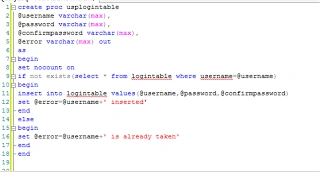
Here we have created a Stored Procedure named usplogintable with username, password and confirmpassword as input parameters. The next variable that I have created is the @error variable of varchar type. You can see the keyword "out" near the varchar. Yes, your guess is correct, the keyword "out" stands for the output parameter in SQL Server.
We will execute this Stored Procedure as a batch so we have begins and ends. Then, "set nocount on" avoids returning the number of rows affected.
The if condition checks whether the username exists in a database and if the answer for it is yes, the @error variable is set with the username already taken or it inserts the values into the table and sets the @error variable as the username inserted.
Executing the Stored Procedure also requres a different style. First you need to declare a variable, you need to specify the output parameter on execution and you need to write a select query at the end to make it execute. Here is my sample for the preceding sp.
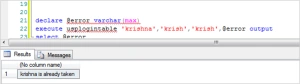
I have inserted the table with the values krishna, krish and confirm password as krish.
- I can guess what you are thinking. “How can I use it in my server-side code?”. Yeah, I am an ASP.Net developer and I have the solution for this. Here are the ways.
Additionally, you must also open your Visual Studio or press Ctrl+r and type devenv.
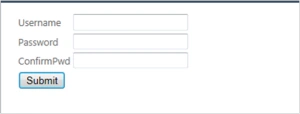
Create an ASP.Net web application with the framework being above 2.0. First create a form in ASP.Net with three labels and three textboxes with names as username.password and confirmpassword as shown in the screen below.
Okay. Let me take you through a tour of the server-side code on it. I will use ADO.Net here for the database connectivity. I will add my logic on my button click. Add using statements for the namespaces System.data and System.Data.SqlClient since these are not the default namespaces in .Net.
Add the following code by double-clicking the submit button.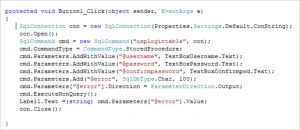
Here I have created the connection string in my fashion and you can use your own style in your application as usual.
Thats it. We are done. Press Ctrl+F5.
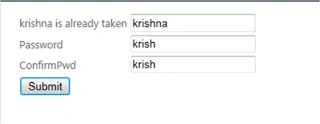
If you provide the inserted usename, this error is produces:
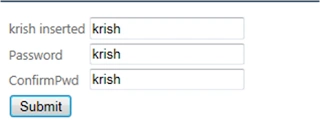
And if you provide a new username, yuppy, it is inserted.
Karthik Muthu KaruppanPosted Apr 23, 2015, 11:23 AM
good
Krishnanand SivarajPosted Apr 21, 2015, 3:21 PM
Thank you Santhakumar. All of your words keep me going
Santhakumar MunuswamyPosted Apr 21, 2015, 2:48 PM
Thanks for nice article
Krishnanand SivarajPosted Apr 21, 2015, 12:53 PM
Always would love to share my learning. Thanks Dinesh and all :)
Dinesh BeniwalPosted Apr 21, 2015, 11:41 AM
Thanks for sharing.
Rahul Kumar SaxenaPosted Apr 21, 2015, 8:20 AM
Good Show...
Surendu MondalPosted Apr 21, 2015, 5:47 AM
Good one
Krishnanand SivarajPosted Apr 21, 2015, 4:48 AM
Thank you all. Thanks Rahul. Code sample attachments from next time.
NitinPosted Apr 21, 2015, 1:58 AM
Good one
Rahul BansalPosted Apr 21, 2015, 1:50 AM
Good start but try to put the images that can be easily visible :)
Shubham KumarPosted Apr 21, 2015, 1:19 AM
nice helpful
Gowtham RajamanickamPosted Apr 21, 2015, 1:06 AM
good one...