

Introduction
In this article, we will learn how we can use the Owl Carousel in React application. Carousel is a slideshow for cycling a series of images or videos.
Prerequisites
- Basic knowledge of React.js
- Visual Studio Code IDE
Create ReactJS project
Let's first create a React application using the following command.
- npx create-react-app matform
Open the newly created project in Visual Studio code and Install bootstrap in this project by using the following command.
- npm install --save bootstrap
Now, open the index.js file and import Bootstrap.
- import 'bootstrap/dist/css/bootstrap.min.css';
Install Owl Carousel
Now install owl carousel by using following command
- npm install react-owl-carousel --save
Now open index.html and add jquery reference ,add following line in head
- <script src="https://code.jquery.com/jquery-3.4.1.min.js"></script>
Now, right-click on the public folder. Add a new folder 'assets' and under it add a new folder and rename that to 'img' and add some demo images to this folder,
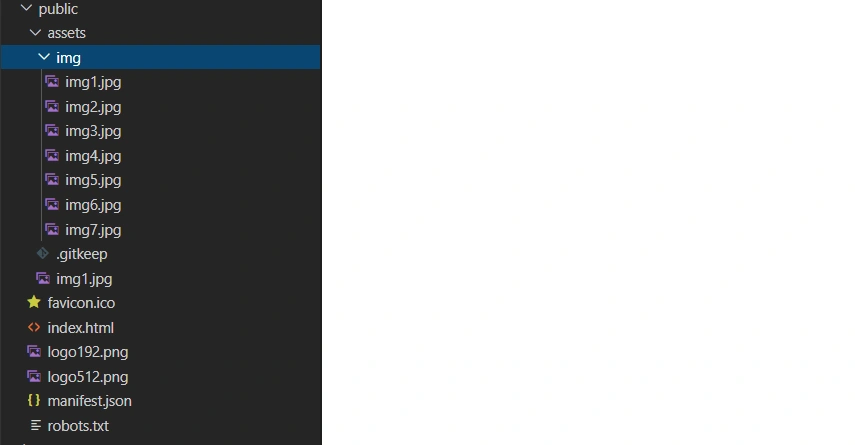
Now go to src folder and create a new component 'Owldemo1.js' and add the following reference in this component
- import OwlCarousel from 'react-owl-carousel';
- import 'owl.carousel/dist/assets/owl.carousel.css';
- import 'owl.carousel/dist/assets/owl.theme.default.css';
Add the following code in this component.
- import React,{Component} from 'react';
- import OwlCarousel from 'react-owl-carousel';
- import 'owl.carousel/dist/assets/owl.carousel.css';
- import 'owl.carousel/dist/assets/owl.theme.default.css';
- import './owl.css';
- export class Owldemo1 extends Component {
- render()
- {
- return (
- <div>
- <div class='container-fluid' >
- <div className="row title" style={{marginBottom: "20px"}} >
- <div class="col-sm-12 btn btn-info">
- Owl Carousel In React Application
- </div>
- </div>
- </div>
- <div class='container-fluid' >
- <OwlCarousel items={3}
- className="owl-theme"
- loop
- nav
- margin={8} >
- <div ><img className="img" src= {'assets/img/img1.jpg'}/></div>
- <div><img className="img" src= {'assets/img/img2.jpg'}/></div>
- <div><img className="img" src= {'assets/img/img4.jpg'}/></div>
- <div><img className="img" src= {'assets/img/img3.jpg'}/></div>
- <div><img className="img" src= {'assets/img/img5.jpg'}/></div>
- <div><img className="img" src= {'assets/img/img6.jpg'}/></div>
- <div><img className="img" src= {'assets/img/img7.jpg'}/></div>
- </OwlCarousel>
- </div>
- </div>
- )
- }
- }
- export default Owldemo1


Parth DavePosted Oct 19, 2020, 9:10 AM
Is it compatible with IE 11 Browser? It's not working for me..