

This chapter is taken from book "Programming Windows Phone 7" by Charles Petzold published by Microsoft press. http://www.charlespetzold.com/phone/index.html
XAML is not a real programming language. It doesn't include anything like if statements. XAML isn't capable of making decisions. But that doesn't mean we can't try.
Here's a new class named
TwelveHourClock that derives from Clock and the
Clock class used the straight Hour property from DateTime, which is a 24-hour
clock value. You might instead want a 12-hour clock and display the text "AM" or
"PM" to indicate the morning or afternoon. Normally you can do that by
formatting the time but suppose you want to be very flexible about how you
display the AM and PM information-perhaps you'd prefer to display the text "in
the morning" or "in the afternoon"-and you want to do it in XAML.
namespace
Petzold.Phone.Silverlight
{
public class
TwelveHourClock :
Clock
{
int hour12;
bool isam, ispm;
public int
Hour12
{
protected
set
{
if (value
!= hour12)
{
hour12 = value;
OnPropertyChanged(new
PropertyChangedEventArgs("Hour12"));
}
}
get
{
return hour12;
}
}
public bool
IsAm
{
protected
set
{
if (value
!= isam)
{
isam = value;
OnPropertyChanged(new
PropertyChangedEventArgs("IsAm"));
}
}
get
{
return isam;
}
}
public bool
IsPm
{
protected
set
{
if (value
!= ispm)
{
ispm = value;
OnPropertyChanged(new
PropertyChangedEventArgs("IsPm"));
}
}
get
{
return ispm;
}
}
protected
override void OnPropertyChanged(PropertyChangedEventArgs
args)
{
if (args.PropertyName ==
"Hour")
{
Hour12 = (Hour - 1) % 12 + 1;
IsAm = Hour < 12;
IsPm = !IsAm;
}
base.OnPropertyChanged(args);
}
}
}
The TwelveHourClock class defines three new properties, all triggering PropertyChanged events. These are Hour12 and two Boolean properties, IsAm and IsPm. The override of OnPropertyChanged checks if the property being changed is Hour and, if so, calculates new values for these three properties, which themselves cause calls to OnPropertyChanged.
This XAML has separate text strings for morning and afternoon, but at any time only one of them should be displayed depending on whether IsAm or IsPm is true. How is such a thing even possible?
Another converter is required, and this is also a converter that you'll use quite often. It's called a BooleanToVisibilityConverter and it assumes that the source value is a Boolean and the target is a property of type Visibility:
namespace
Petzold.Phone.Silverlight
{
public class
BooleanToVisibilityConverter :
IValueConverter
{
public object
Convert(object value,
Type targetType,
object parameter,
CultureInfo culture)
{
return (bool)value
? Visibility.Visible :
Visibility.Collapsed;
}
public object
ConvertBack(object value,
Type targetType,
object
parameter, CultureInfo culture)
{
return (Visibility)value
== Visibility.Visible;
}
}
}
Now bind the Visibility properties of the final two TextBlock elements to the
IsAm and IsPm properties using the BooleanToVisibilityConverter. Here's the
markup from the project AmOrPm:
<Grid
x:Name="ContentPanel"
Grid.Row="1"
Margin="12,0,12,0">
<StackPanel
DataContext="{StaticResource
clock12}"
Orientation="Horizontal"
HorizontalAlignment="Center"
VerticalAlignment="Center">
<TextBlock
Text="It's after " />
<TextBlock
Text="{Binding
Hour}" />
<TextBlock
Text=" in the morning."
Visibility="{Binding
IsAm,
Converter={StaticResource
booleanToVisibility}}" />
<TextBlock
Text=" in the afternoon."
Visibility="{Binding
IsPm,
Converter={StaticResource
booleanToVisibility}}"/>
</StackPanel>
</Grid>
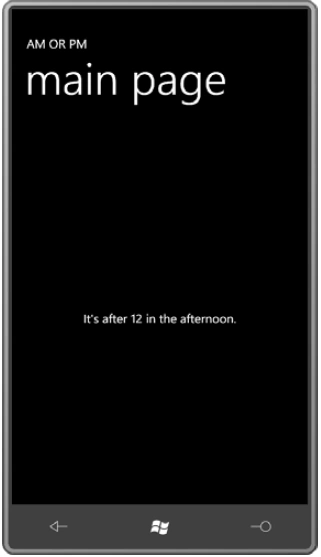
And it works:
Converters with Properties
It's not unreasonable to create a data-binding converter that is so specialized or so weird that it's only good for one particular application. For example, here's a class called DecimalBitToBrushConverter. This converter includes two public properties named ZeroBitBrush and OneBitBrush.
namespace
BinaryClock
{
public class
DecimalBitToBrushConverter :
IValueConverter
{
public Brush
ZeroBitBrush { set; get;
}
public Brush
OneBitBrush { set; get;
public object
Convert(object value,
Type targetType,
object parameter,
CultureInfo culture)
{
int number = (int)value;
int bit =
Int32.Parse(parameter
as string);
int digit = number / PowerOfTen(bit
/ 4) % 10;
return ((digit & (1 << (bit % 4)))
== 0) ? ZeroBitBrush : OneBitBrush;
}
public object
ConvertBack(object value,
Type targetType,
object
parameter, CultureInfo culture)
{
return null;
}
int PowerOfTen(int
exp)
{
int value = 1;
for (int
i = 0; i < exp; i++)
value *= 10;
return value;
}
}
}
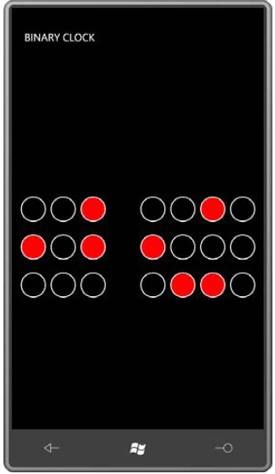
I use this converter in a project called BinaryClock. The converter is
referenced in a UserControl derivative called BinaryNumberRow. Notice how the
two public properties of DecimalBitToBrushConverter are set right in the
Resources collection, which also includes a Style for the Ellipse.
<UserControl
x:Class="BinaryClock.BinaryNumberRow"
xmlns="http://schemas.microsoft.com/winfx/2006/xaml/presentation"
xmlns:x="http://schemas.microsoft.com/winfx/2006/xaml"
xmlns:petzold="clr-namespace:Petzold.Phone.Silverlight;assembly=Petzold.Phone.Silverlight"
xmlns:local="clr-namespace:BinaryClock">
<UserControl.Resources>
<Style
x:Key="ellipseStyle"
TargetType="Ellipse">
<Setter
Property="Width"
Value="48"
/>
<Setter
Property="Height"
Value="48"
/>
<Setter
Property="Stroke"
Value="{StaticResource
PhoneForegroundBrush}"
/>
<Setter
Property="StrokeThickness"
Value="2"
/>
</Style>
<local:DecimalBitToBrushConverter
x:Key="converter"
ZeroBitBrush="{x:Null}"
OneBitBrush="Red"
/>
</UserControl.Resources>
<petzold:UniformStack
Orientation="Horizontal">
<Ellipse
Style="{StaticResource
ellipseStyle}"
Fill="{Binding
Converter={StaticResource
converter},
ConverterParameter=6}"
/>
<Ellipse
Style="{StaticResource
ellipseStyle}"
Fill="{Binding
Converter={StaticResource
converter},
ConverterParameter=5}"
/>
<Ellipse
Style="{StaticResource
ellipseStyle}"
Fill="{Binding
Converter={StaticResource
converter},
ConverterParameter=4}"
/>
<Ellipse
Style="{StaticResource
ellipseStyle}"
Stroke="{x:Null}"
/>
<Ellipse
Style="{StaticResource
ellipseStyle}"
Fill="{Binding
Converter={StaticResource
converter},
ConverterParameter=3}"
/>
<Ellipse
Style="{StaticResource
ellipseStyle}"
Fill="{Binding
Converter={StaticResource
converter},
ConverterParameter=2}"
/>
<Ellipse
Style="{StaticResource
ellipseStyle}"
Fill="{Binding
Converter={StaticResource
converter},
ConverterParameter=1}"
/>
<Ellipse
Style="{StaticResource
ellipseStyle}"
Fill="{Binding
Converter={StaticResource
converter},
ConverterParameter=0}"
/>
</petzold:UniformStack>
</UserControl>
Join the conversation! Your thoughts help the community grow.